Smartphones capture everything now, but the photos stay trapped behind glass. A good cell phone photo printer turns your camera roll into something you can stick on a fridge, slip into a letter, or hand to a grandparent. The trick is picking one that matches how you actually print, not just what looks slick in a product photo.
A Snapshot Of The Selections
Fujifilm Instax Mini Link Smartphone Printer (Dark Denim)

FUJIFILM Instax Mini Link 3 Cell Phone Printer (Sage Green)

Nelko PP01 2×3 Portable Photo Printer (White)

Nelko PP01 2×3 Portable Photo Printer (Purple)
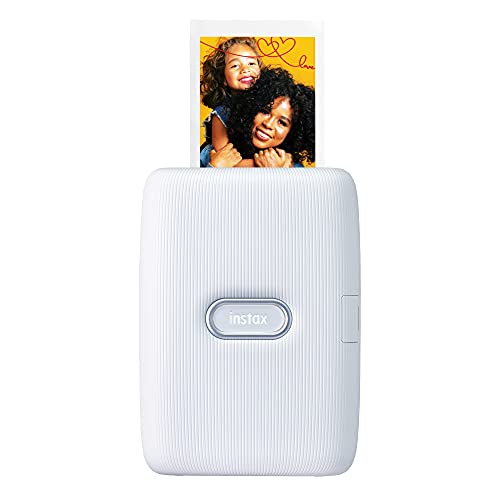
Fujifilm Instax Mini Link Smartphone Printer (Ash White)

Fujifilm INSTAX Mini Link 3 Clay White Film Bundle

Fujifilm Instax Mini Link 3 Sage Green Accessory Bundle
HP Sprocket Select 2.3×3.4 Instant Photo Printer (Eclipse)

HP Sprocket Select Eclipse Zink Paper Bundle

HP Sprocket Select Eclipse Starter Bundle
More On The Choices That Made The List
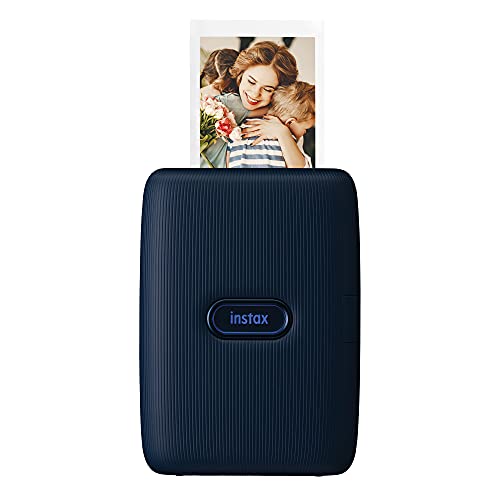
The original Instax Mini Link in Dark Denim leans into the brand’s instant-film identity. It connects to your phone over Bluetooth and prints onto the same mini-format film stock that defines the Instax look, so your digital photos come out with that soft, slightly faded border.
Compared to later picks like the FUJIFILM Instax Mini Link 3 Cell Phone Printer (Sage Green), this one uses an older app experience and fewer creative extras. For anyone who values that classic instant-film feel above fancy editing tools, it remains a friendly starting point. It suits casual shooters who print a few photos a week and want them to feel like souvenirs rather than lab prints.
What Makes Sense
- Compact body slips into a jacket pocket for dinners, hikes, or weekend trips.
- Bluetooth pairing keeps the setup quick, so the printer is rarely the bottleneck.
- Mini-format prints double as instant keepsakes for gifts, scrapbooks, or fridge displays.
- Dark Denim finish reads as understated rather than toy-like on a desk or shelf.
Honest Caveats
- Film costs add up faster than ink or Zink paper alternatives once you print weekly.
- The older app interface offers fewer creative tools than the Mini Link 3 generation.
Who It Suits Best
Casual instant-film fans who want a slim, attractive printer without chasing every new app feature.
Look Elsewhere When
Shoppers who care more about modern creative tools should consider the FUJIFILM Instax Mini Link 3 Cell Phone Printer (Sage Green) instead.
This third-generation Mini Link keeps the pocketable proportions of earlier models and adds a textured body, three pastel color options, and an LED strip along the front. The companion app drives the show, letting you arrange layouts, add text, and trigger prints with motion gestures on the printer itself.
For anyone who prints at parties or family gatherings, the social-friendly app tools add genuine value. The Mini Link 3 also introduces AR effects through the app, which lean novelty but feel like a clear step beyond the older Fujifilm Instax Mini Link Smartphone Printer (Dark Denim). The trade-off is the same instant-film cost structure, so heavy printers should expect to budget for film packs.
Why It Works Well
- Slim, textured shell fits alongside a phone without bulging a small bag or pocket.
- App-based AR effects and filters make printed photos feel more like creative projects.
- LED indicator and motion controls add playful feedback during group printing sessions.
- Pastel color options suit gift-giving better than the darker original Link finishes.
- Mini Link app organizes editing, multi-print layouts, and social features in one place.
Things To Consider
- Instant-film running costs remain the main ownership consideration for frequent printers.
- AR features depend on a recent phone and the companion app being updated.
- Print size stays the same mini format, which feels small on a large scrapbook spread.
Key Specs
Made For
Social printers and creative phone photographers who want modern app tools alongside classic instant-film output.
A Better Fit Elsewhere
Printers who want larger sticky-backed prints should look at the HP Sprocket Select 2.3×3.4 Instant Photo Printer (Eclipse).
The Nelko PP01 takes a different route from Instax and HP Sprocket models. It uses compact inkjet technology (tiny cartridge-based printing rather than film or thermal paper) to produce full-color 2×3-inch prints on sticky-backed photo paper. The body weighs roughly 0.6 pounds and fits comfortably in a hand or small backpack pocket.
Where the FUJIFILM Instax Mini Link 3 Cell Phone Printer (Sage Green) leans on instant-film nostalgia, this Nelko focuses on everyday practicality. Prints peel and stick, which suits journals and laptops better than traditional photo frames. For students, travelers, and casual gift-givers, that format often matters more than film aesthetics.
Practical Advantages
- Sticky-backed prints work for scrapbooks, laptop lids, and journal entries without extra adhesive.
- Compact 0.6-pound body travels well for school, day trips, and field work.
- Inkjet-style output handles color gradients more naturally than thermal Zink prints.
- Cartridge system keeps replacement consumables straightforward to swap and store.
Things To Weigh
- Print speeds tend to lag behind thermal and instant-film printers, which matters during long sessions.
- Brand-specific cartridges and paper limit third-party consumable options.
- Print heads benefit from occasional use to prevent clogs if it sits idle for weeks.
Right Fit For
Students, journal-keepers, and casual travelers who print often enough to value sticky-backed color output over instant-film charm.
Swap It Out When
Shoppers chasing that instant-film look should consider the Fujifilm Instax Mini Link Smartphone Printer (Ash White) instead.
The Purple variant of the Nelko PP01 shares its internals with the white model reviewed just above. The differences are purely cosmetic, aimed at shoppers who want a printer that doubles as a desk accessory or gift. The 2×3 sticky-backed prints and inkjet-style output carry over exactly.
In a category full of neutral black and white finishes, this color option stands out on a shelf or in a teenager’s backpack. It works best for shoppers who care about appearance alongside print format, and the purple tone reads more “personal accessory” than “office tool.”
Features That Help
- Distinctive purple finish makes the printer easy to spot in a bag or shared workspace.
- Same 2×3 sticky-back paper format as the white PP01 for familiar everyday use.
- Compact build keeps the printer comfortable for school, dorm rooms, and travel.
- Color personality suits younger users and gift-giving occasions better than neutral finishes.
Points To Note
- Performance matches the white PP01, so there is no technical reason to pick this over the other color.
- Glossy color finishes can show fingerprints and small scratches more visibly than matte shells.
Best Suited To
Style-driven casual printers who want personality and a colorful desk presence alongside sticky-backed prints.
Another Choice May Suit
Minimalists who prefer a neutral finish should consider the Fujifilm Instax Mini Link Smartphone Printer (Ash White) instead.
The Ash White version of the original Mini Link is the same printer as the Dark Denim option reviewed earlier, just dressed in a softer neutral. It suits home offices, weddings, and anyone who wants instant-film prints without a louder color statement. Functionally, nothing changes between the two finishes.
For shoppers torn between this and the FUJIFILM Instax Mini Link 3 Cell Phone Printer (Sage Green), the decision usually comes down to software age and budget rather than output. The Ash White body uses the older Mini Link app generation, which still handles Bluetooth printing and basic editing, just without the newer AR and motion gestures.
Real-World Strengths
- Neutral Ash White shell blends with most desks and gift-wrap aesthetics.
- Compact body pairs naturally with a smartphone for travel and event printing.
- Classic instant-film look suits wedding guest books and scrapbook layouts.
Some Limits To Know
- App interface lags behind the newer Mini Link 3 generation reviewed above.
- Film refills stay the largest ongoing cost for any Mini Link user.
- Light finish can pick up dye transfer from denim bags if stored without a case.
Who Should Grab It
Shoppers who want a neutral-finish Instax printer and don’t need the latest app creative tools.
Consider Something Else When
Anyone wanting modern creative features should reach for the FUJIFILM Instax Mini Link 3 Cell Phone Printer (Sage Green) instead.
This bundle pairs the Mini Link 3 in Clay White with a 20-exposure pack of Instax Mini film and a microfiber cleaning cloth. For shoppers buying their first Instax printer, the bundle removes the awkward “buy the printer, then figure out film” two-step. Everything needed for a first printing session arrives in one shipment.
The printer itself matches the standard FUJIFILM Instax Mini Link 3 Cell Phone Printer (Sage Green) in capability, just in a different finish. Where this bundle wins is convenience for new users. Twenty exposures is enough to learn the workflow before committing to larger film packs.
Practical Pluses
- One-box purchase removes the need to source film separately for first-time users.
- Clay White finish appeals to shoppers who want something softer than black tech gear.
- Cleaning cloth helps keep the printer body and film exit slot looking new over time.
- Bundle pricing often beats buying the printer and film separately for newcomers.
A Few Limitations
- 20 exposures may run out quickly for party hosts and event photographers.
- Bundle price can outpace the standalone printer once film stock is added separately.
Feature Snapshot
Perfect Match For
First-time Instax shoppers who want everything needed to start printing in one package.
Reach For A Different Pick When
Shoppers who already own Instax film should buy the FUJIFILM Instax Mini Link 3 Cell Phone Printer (Sage Green) alone.
This expanded bundle layers a protective case, sticker frames, and a USB-C cable onto the standard Mini Link 3 package. It’s built for shoppers who plan to print heavily on the go, since the case protects the printer and the sticker frames dress up the finished prints for scrapbooking or gifting.
Compared to the Fujifilm INSTAX Mini Link 3 Clay White Film Bundle reviewed above, this version goes further on accessories but still ships with a starting film pack. For travelers and gift-givers, the case alone justifies the upgrade, and the sticker frames add creative options beyond standard prints.
Notable Upsides
- Protective case helps the printer survive backpack travel and party transport.
- Sticker frames add creative variation to prints without extra editing work.
- USB-C cable aligns with modern phone and laptop charging setups.
- Sage Green finish matches the standalone Mini Link 3 reviewed earlier in this list.
- All-in-one bundle suits gift-giving better than buying accessories separately later.
Worth Bearing In Mind
- Bundle cost runs higher than a bare printer plus separately sourced film and case.
- Sticker frame designs may not suit every printing style or scrapbook theme.
- Bundled film count still tops out around 20 exposures for casual testing only.
Whose Shelf It Belongs On
Travelers and gift-givers who want printer, case, and creative extras together.
Where A Sibling Pick Shines
Shoppers who only need film and a printer should consider the Fujifilm INSTAX Mini Link 3 Clay White Film Bundle instead.
The HP Sprocket Select steps away from Instax film in favor of Zink (zero-ink) paper, a thermal-based stock that hides color dyes inside the paper itself. That means no ink cartridges, no ribbons, and no film packs. The trade-off is slightly cooler color rendering compared to instant film.
Prints measure roughly 2.3×3.4 inches, which lands larger than the typical Instax mini output. For travelers and scrapbookers, that extra real estate matters more than the missing film aesthetic. Compared to the Nelko PP01 picks earlier in this list, the Sprocket Select uses different consumables and a slimmer app experience focused on social printing.
Key Advantages
- Zink paper eliminates ink cartridges and simplifies consumable stocking.
- Larger 2.3×3.4-inch format feels more substantial for albums and wall displays.
- Sticky-backed paper peels clean for laptops, journals, and lockers.
- HP Sprocket app adds AR features and social media integration for casual sharing.
Practical Considerations
- Zink colors skew cooler and less saturated than instant-film prints.
- Zink paper costs vary, so heavy printers should plan a rough monthly budget.
- Paper handling can be sensitive to humidity if stored in damp bags or cars.
Quick Facts
Built With In Mind
Travelers and casual phone photographers who want cartridge-free printing with a slightly larger format than Instax mini.
Not Your Match When
Shoppers chasing warm, nostalgic film color should consider the FUJIFILM Instax Mini Link 3 Cell Phone Printer (Sage Green) instead.
This bundle pairs the Sprocket Select printer with a Zink paper pack so printing can start the moment the box opens. For first-time Sprocket shoppers, skipping the separate paper order removes a step that often catches new owners off guard.
The printer itself is identical to the standalone HP Sprocket Select 2.3×3.4 Instant Photo Printer (Eclipse) reviewed just above. The bundle differs only by including paper out of the box, which suits gift-giving and travel packing especially well.
The Case For It
- Printer and paper arrive together, so there’s no waiting on a second shipment.
- Zink paper format eliminates ink cartridge decisions for new users.
- Sticky-backed output doubles as gift tags and journal inserts without extras.
- HP Sprocket app supports social media imports for casual party printing.
Where It Is Less Suited
- Bundled paper count is limited, so heavy printers will reorder soon anyway.
- Bundle pricing may run higher than separate purchases during sales events.
Feature Card
The Right Fit
New Sprocket shoppers who want paper ready to load the same day the box arrives.
Skip It When
Anyone who already owns Zink paper should buy the HP Sprocket Select 2.3×3.4 Instant Photo Printer (Eclipse) on its own.
The Starter Bundle is the most beginner-friendly configuration of the Sprocket Select line. It includes the printer along with the basics a first-time user needs to start printing, all in one purchase. For shoppers gifting a printer to a teen or new homeowner, this is the lowest-friction option in the Sprocket family.
Functionally, the printer matches the HP Sprocket Select Eclipse Zink Paper Bundle reviewed above. The Starter Bundle may include slightly different accessory counts depending on the listing, so check the included items before checkout. Either way, the Zink format and 2.3×3.4-inch print size carry over.
Well-Handled Touches
- All-in-one packaging removes guesswork for gift-givers and first-time owners.
- Zink paper means no ink cartridges to learn about or replace.
- Larger 2.3×3.4-inch prints suit scrapbook layouts better than mini formats.
Points To Keep In Mind
- Starter accessories may run thin for heavy or frequent printers.
- Zink color output stays cooler than instant-film prints, which matters for portrait-heavy projects.
- Some Starter Bundles ship with older accessory counts than the Zink Paper Bundle above.
Quick Technical Notes
Who Will Love This
First-time Sprocket owners and gift-givers who want everything needed to start printing in one box.
Where Another Pick Suits Better
Shoppers wanting richer color should consider the FUJIFILM Instax Mini Link 3 Cell Phone Printer (Sage Green) instead.
What To Think Through Before Picking A Pocket Printer
Print format shapes the experience more than any other choice. Instax mini prints feel like keepsakes and fit wallets, while Zink and PP01 prints trade that aesthetic for stickier, more versatile output suited to laptops and journals. Matching the format to how you’ll actually use the photos keeps you from buying twice.
Consumable cost matters more than printer cost for heavy users. Instant film, Zink paper, and inkjet cartridges all carry ongoing expenses that vary by brand and pack size. Light printers can ignore the math; party hosts and scrapbookers should compare per-print cost before choosing.
App quality affects the day-to-day feel. Fujifilm’s Mini Link app leans creative with filters and AR effects, HP’s Sprocket app focuses on social sharing and AR overlays, and Nelko’s app centers on straightforward print queues. If you already live inside one ecosystem, the app experience may matter as much as the hardware itself.
Portability depends on body weight and battery life. Most picks here fit a jacket pocket, but printers used at long events benefit from longer battery life and rugged shells. Travelers and outdoor users should weight the carry case as a real accessory rather than an optional add-on.
Picking Smart Around Cell Phone Photo Printers
Traps First Timers Fall Into
A common slip is buying a printer purely for the look, then discovering the consumables cost more than expected. Always check per-print expense before committing, since a low printer price can mask pricey film or paper refills over a year of regular use.
Another trap is assuming all “mini” prints are the same size. Instax mini, Zink 2×3, and PP01 2×3 prints all look similar but use different consumables and render color differently. Side-by-side output samples, or at least a clear spec sheet, help avoid disappointment after the first print.
Where The Extra Money Goes
Higher-tier picks in this category earn their price through app polish, modern creative tools, and bundled consumables. The FUJIFILM Instax Mini Link 3 Cell Phone Printer (Sage Green), for instance, adds AR effects and motion controls that budget options skip. For casual users, the lower tier works fine; for party hosts and creative phone photographers, the upgrade pays off in saved time and better-looking prints.
Frequently Asked Questions
What is the difference between Zink and Instax film? Zink is a paper-based thermal stock (the color dyes sit inside the paper itself) that produces sticky-backed prints without cartridges. Instax uses traditional instant film with a chemical development process, giving a softer, more nostalgic look and slightly smaller prints.
Do cell phone photo printers need ink? Zink models like the HP Sprocket Select line do not. Inkjet-based models like the Nelko PP01 use small cartridges, and Instax printers rely on film packs. Check the consumable type before choosing, since it affects ongoing cost.
How long does printing take? Most picks in this list produce a print in under a minute once the image is queued. Instant-film printers often show the image within seconds but finish developing over a couple of minutes, while Zink and inkjet models typically deliver a fully finished print on exit.
Can I print social media photos directly? Yes. The HP Sprocket app and Fujifilm Mini Link app both support importing photos from social platforms, and the companion apps handle filters and layouts before sending the image to the printer.
What phone compatibility should I expect? All picks here support both iOS and Android through their companion apps. Older phone OS versions may lose access to newer features, so check the app’s current requirements before buying if you run an outdated device.
Closing Remarks
The right cell phone photo printer comes down to format, consumable cost, and app feel rather than raw specs. Casual gift-givers often love the Instax aesthetic, scrapbookers tend to prefer sticky-backed Zink or PP01 output, and party hosts usually value the newer Mini Link 3 app features. Pick the one that matches your real printing habit, and the printer becomes a tool you reach for often rather than one that gathers dust.