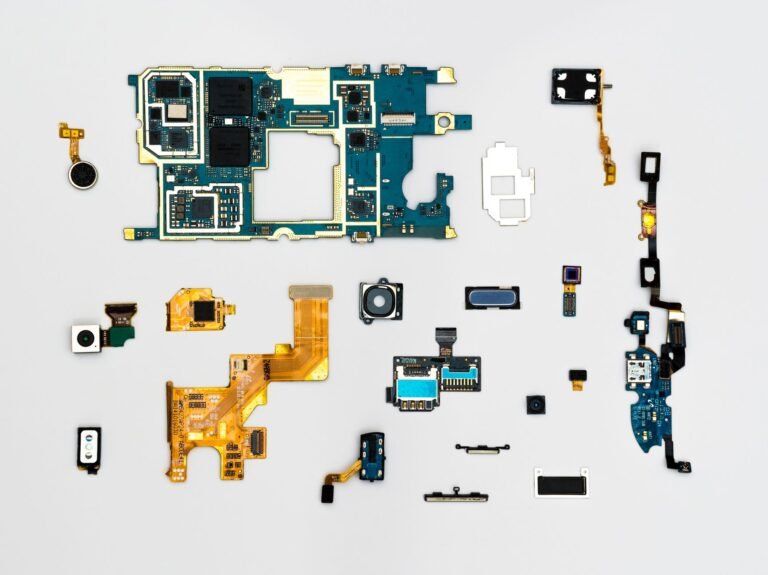
Inside every modern handset, the SoC directs apps, iOS or Android, graphics, cameras, memory, and wireless tasks. It affects how quickly your phone opens work, records 4K video, draws game frames, and stays responsive as several jobs compete for power and cooling.
Here, you’ll trace the CPU, GPU, NPU, RAM, heat, and chip families, then match processor power to your daily phone habits and exact model.
The Processor Directs Your Phone’s Core Tasks
Tap an app icon, and several hardware blocks wake within milliseconds. The chip marketed as the processor routes instructions between software, memory, graphics, storage, cameras, and wireless hardware so your phone can respond as one device.
Your phone uses that silicon package to run Android or iOS, open apps, switch tasks, retain background activity, and control the camera and display. A weak chip turns routine actions, such as opening a map or scrolling through photos, into repeated pauses that interrupt your use.
Processor, Chipset, and CPU Describe Different Parts
The CPU, or central processing unit, runs general instructions from apps and the operating system. The wider SoC contains the CPU alongside graphics hardware, camera processing, memory links, and wireless functions.
An octa-core label covers only one portion of the chip. Your phone can have eight CPU cores yet still slow in games, heat during video capture, or take longer to finish a photo because another SoC component has reached its limit.
Recording 4K video shows how phone processors work under pressure. Your device captures light, processes frames, stabilizes motion, saves large files, and controls heat at the same time.
That coordination depends on integrating specialized components close enough to exchange data with minimal delay.
A System-on-a-Chip Keeps Major Hardware Close Together
That crowded workload fits inside a small package because a modern chip is a system-on-a-chip, or SoC. Phone designers place several specialized engines near each other instead of relying on separate chips for every major function.
Shorter data paths cut delay and reduce energy waste between components. Your battery benefits because data travels less distance, and the phone retains room for cameras, antennas, cooling material, and battery cells.
| SoC component | Main job | What you feel |
|---|---|---|
| CPU cores | Run apps and system tasks | Faster loading and smoother multitasking |
| GPU | Draw graphics and video | Fluid motion, games, and display effects |
| Image signal processor | Process camera sensor data | Quicker photos and stronger low-light output |
| NPU or AI accelerator | Run machine-learning tasks locally | Faster transcription, translation, and photo effects |
| Memory controller | Move data to and from RAM | Fewer pauses during demanding work |
Wireless hardware sits close to the SoC, though a modem may be integrated or separate depending on the phone. Cellular data moves through that modem, while Wi-Fi and Bluetooth hardware may sit in the same package or beside it.
The arrangement matters during busy moments, such as uploading photos while navigation runs and a call arrives. Your phone needs quick handoffs among CPU cores, RAM, storage, radio hardware, and the operating system to keep those tasks from blocking each other.
Several Engines Shape What You Feel on Screen
A phone feels quick because separate engines finish parts of a task without waiting for a single CPU block. CPU speed affects app launches and multitasking, but the GPU, memory controller, camera hardware, and heat control shape your final experience.
CPU and GPU Work Affect Visible Speed
The CPU schedules operating-system work, processes app logic, and shifts jobs between performance cores and efficiency cores. Performance cores handle short bursts, while efficiency cores take lighter background work with lower battery drain.
Your GPU, or graphics processing unit, draws interface animations, decodes video, and renders games. A 120 Hz display refreshes 120 times per second, but smooth motion depends on the CPU and GPU supplying frames at a similar pace.
Game frame rates make the trade-off easy to spot. A demanding title may run sharply for several minutes, then slow after heat fills the thin phone body; that slowdown is thermal throttling, where the chip cuts clock speed to control temperature.
Heat also explains why peak benchmark output tells only part of your story. A phone with stronger cooling can hold speed longer during a 20-minute gaming session than a thinner model using related silicon.
Camera and AI Engines Handle Specialized Work
Pressing the shutter starts far more than a single exposure. The image signal processor converts raw sensor data into a photo, handling color, noise reduction, focus data, and exposure choices before the image reaches your gallery.
Many chips include a neural processing unit, also called an NPU or AI accelerator. Your phone can run live captions, voice transcription, language translation, portrait blur, subject selection, and image cleanup locally instead of sending every task to a remote server.
Google Tensor chips place strong emphasis on AI-assisted Pixel features, while Apple A-series chips tie image processing closely to iPhone software. Your result still depends on software choices, camera sensors, and heat control rather than silicon alone.
Heat and Efficiency Set Sustained Limits
Peak speed lasts only while heat can escape. A large game, a 20-minute video recording session, or turn-by-turn navigation in summer sunlight can push a small chassis past its cooling capacity.
Power efficiency describes how much work your phone finishes from each unit of battery charge. A chip that completes a task quickly at lower power leaves more charge for calls, photos, maps, and streaming later in your day.
That efficiency gap becomes clearer as the battery ages. Your phone may feel slower under load because the device has less available power and more heat, even though the chip itself has not changed.
Those limits explain why headline core counts and clock speeds rarely predict sustained everyday performance on their own.
Core Counts and GHz Need Context
An octa-core label sounds decisive, yet eight cores can follow very different designs. Some handle heavy bursts, while others use less power during background work, so core count alone cannot tell you what makes a phone processor fast.
Clock Speed Does Not Stand Alone
Clock speed, shown in GHz, states how quickly a core cycles. A 3 GHz core does not automatically beat a 2.5 GHz core because each chip design completes a different amount of work during each cycle.
Your real speed also rests on memory bandwidth, RAM capacity, storage speed, software tuning, and cooling. Fast UFS storage shortens app loading, while slow storage can make your phone feel delayed during large file transfers.
RAM affects how many active apps stay ready in memory. With too little RAM, your phone closes background apps sooner, forcing them to reload when you return.
Process Nodes and Benchmarks Need Careful Reading
A label such as 3 nm names a manufacturing generation, not a direct speed rating. Smaller node labels can allow denser transistor layouts and better efficiency, but chip design, heat control, and software decide how the finished phone behaves.
Geekbench scores offer one controlled data point for similar phones. Set scores beside sustained speed, battery drain, and heat because a short run cannot mirror an hour of gaming, camera use, or video work.
Benchmark results are most useful when the chip generation, phone model, software version, and test conditions are close. A single score cannot describe your camera speed or battery life.
Chip Families Mark Different Hardware Tiers
Chip family names identify a line of products rather than a fixed level of speed. Qualcomm Snapdragon, Apple A-series chips, MediaTek Dimensity, Samsung Exynos, and Google Tensor span several generations and hardware classes.
| Chip family | Where you see it | Practical focus |
|---|---|---|
| Qualcomm Snapdragon | Many Android brands | Broad range from budget phones to high-end gaming hardware |
| Apple A-series | iPhone models | Close links with iOS, graphics, and camera features |
| MediaTek Dimensity | Android phones across price bands | Efficiency and features across broad hardware designs |
| Samsung Exynos | Selected Samsung models and regions | Regional alternative with model-specific behavior |
| Google Tensor | Google Pixel phones | AI-focused Pixel features and camera processing |
Your comparison needs the exact chip model, not only the family name. Snapdragon 8-series chips vary sharply across generations, and a Dimensity 800-series part serves a different role from a Dimensity 9000-series part.
Flagship Apple and Snapdragon-class chips tend to lead peak CPU and graphics output. But a phone at the top of a benchmark chart is not automatically right for you, since display brightness, camera hardware, battery size, and software update period can matter more.
Midrange silicon handles calls, streaming, navigation, social apps, and routine photos without strain. Flagship hardware adds stronger graphics, faster camera image processing, advanced connectivity, and more headroom across several years.
Your Exact Model Number Reveals the Chip Inside
Settings menus reveal the phone model, though they do not always list the full chip name. Regional versions complicate the search because one phone line can ship with different silicon in different markets.
Android Menus Vary Across Brands
- Open Settings and find About Phone, Device Information, or Hardware Information near the bottom of the menu.
- Find model details because the model number identifies the exact regional version of your Android phone.
- Search maker specifications with that model number when Settings shows only a marketing device name.
- Use a hardware database to verify the SoC, RAM, storage type, and regional hardware details together.
- Review software version because updates can alter battery behavior, gaming speed, and benchmark results.
These steps answer how to check your phone processor without relying on the device name alone. Your model number is more useful than a label such as “Pro,” “Plus,” or “Ultra,” which can cover several regional versions.
iPhone Models Use Apple Chip Names
On an iPhone, open Settings, tap General, then tap About to find your model name and model number. Apple assigns an A-series chip to each iPhone generation, so the model information identifies the processor.
Country-specific details still matter for some Android phones. Samsung Galaxy lines have used Qualcomm Snapdragon hardware in some markets and Samsung Exynos hardware in others, so your regional model number belongs in any fair hardware comparison.
Once you know the precise hardware, the useful question is whether its capabilities match how you use a phone.
A marketing label such as “AI phone” does not identify a chip. Match your exact model number with maker specifications before judging processor power.
Your Daily Workload Sets the Right Power Level
Calls, messaging, browsing, streaming, navigation, and social apps place lighter loads on hardware than gaming or long video capture. A recent entry-level or midrange SoC handles those daily tasks well when your phone also has enough RAM and healthy storage space.
Different Habits Need Different Headroom
- Routine daily use suits a recent entry-level or midrange chip, 6 GB RAM or more, and adequate storage.
- Heavy multitasking benefits from newer midrange silicon that keeps work apps, maps, and camera tasks responsive together.
- Frequent photography rewards stronger image processing for night shots, rapid captures, HDR, and higher-resolution video.
- Sustained gaming calls for flagship graphics, effective cooling, and a display that matches the frame rates your games reach.
- Longer ownership favors newer silicon, a clear software update policy, and enough storage for future app growth.
Your phone does not need peak benchmark output for casual work. A current midrange model can stay quick for years, while an older flagship can lose ground through worn battery health, limited updates, and heat from demanding apps.
How to choose a phone processor comes down to the whole device. Check the exact chip, RAM, storage capacity, battery size, display quality, camera hardware, update policy, and price together before you settle on a model.
Final Takeaways
From launching apps to connecting wirelessly, the SoC directs nearly every task you perform, though its CPU is only one part. Your real experience comes from the CPU, GPU, NPU, RAM, storage, camera hardware, software, and cooling working together.
Look past core counts and GHz labels toward sustained speed and efficiency. A 120 Hz screen, 4K video mode, or high benchmark score means little to you when the phone overheats, reloads apps from limited RAM, or drains its battery too quickly.
For casual use, a recent midrange chip and 6 GB RAM or more are sensible starting points. Your next step is to identify the exact model, then judge its chip alongside battery condition, camera needs, storage, and planned ownership length.
FAQ
What is a smartphone processor?
At the heart of the handset, a system-on-a-chip directs apps, the operating system, graphics, camera work, memory access, and wireless tasks. Your phone uses its CPU for general instructions, while the GPU, NPU, image signal processor, and memory controller handle specialized jobs.
What does a phone processor do?
A phone processor directs the work behind app launches, multitasking, graphics, camera capture, storage access, and wireless activity. Your experience depends on how quickly its CPU, GPU, RAM connection, camera engine, and cooling system finish those jobs together.
What is a good processor for a phone?
For a phone you plan to keep four years, the right chip matches your workload and its software update period. A recent midrange chip handles browsing, streaming, navigation, messaging, and routine photos well, while flagship silicon suits sustained gaming, demanding work apps, high-resolution video, and advanced camera features that you use frequently.
How do I check my smartphone processor?
On Android, look in Settings under About Phone, Device Information, or Hardware Information, then use the model number to confirm the chip on a maker specification page. On iPhone, find the model name in Settings, General, About, then match it to Apple’s A-series chip.
How much processor power does a phone need?
Your needs depend on daily tasks rather than a single GHz number. Recent entry-level and midrange chips fit calls, web use, maps, and streaming, while frequent gaming, long video capture, heavy multitasking, and longer ownership benefit from newer flagship-class hardware and stronger cooling.
What phone has the fastest processor?
Peak results shift with each chip generation and phone release, so no single model stays ahead for long. Flagship iPhones and high-end Android phones with Apple A-series or Snapdragon-class chips tend to lead peak scores, but sustained speed depends on cooling and software.