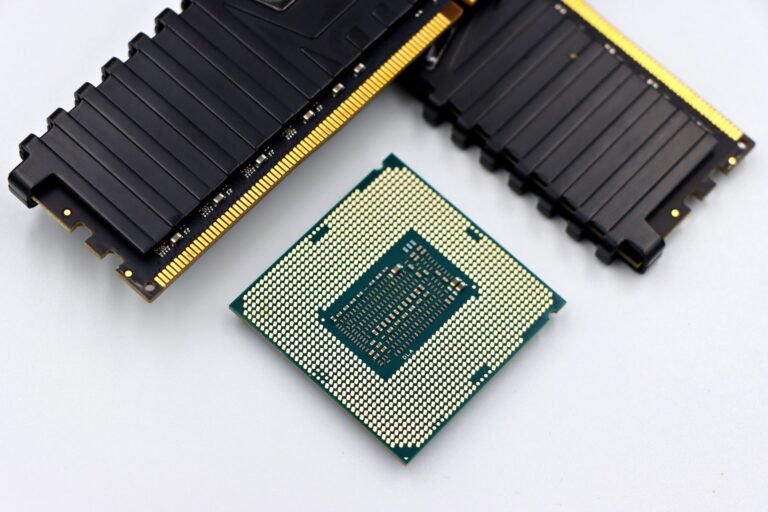
Etched onto a single piece of silicon, the SoC combines your phone’s CPU, GPU, camera processing, AI engine, memory control, and wireless connections. It shapes app response, photo processing, gaming speed, battery draw, and the 4G LTE or 5G networks your model can reach.
This explanation helps you read phone specifications, separate chip labels from real-world behavior, and judge the hardware around the SoC before choosing your next device.
An SoC Brings Major Phone Hardware Together
A chip about the size of a fingernail handles work that once required several separate parts. The smartphone chipset is a system-on-a-chip (SoC), with computing, graphics, imaging, memory, and radio functions placed in one silicon package.
Your phone needs this tight layout because internal space, heat, and battery capacity are limited. Short paths between chip blocks cut data travel distance and power draw, helping your device move from a video call to maps or a camera viewfinder without a bulky circuit-board design.
Phone SoCs differ from older PC layouts
Desktop PCs once split hardware duties among a CPU and motherboard controller chips. A northbridge linked memory and graphics, while a southbridge handled storage ports and input devices. Separate controllers would take more board space and power inside a phone.
The word “chipset” remains common on phone specification sheets, though SoC is more exact. Qualcomm Snapdragon 8 Gen 3, MediaTek Dimensity 9300, and Apple A17 Pro are integrated mobile platforms rather than single-purpose CPUs.
| Device design | Where major functions sit | What it means for you |
|---|---|---|
| Older desktop PC | CPU plus several motherboard controller chips | Your parts are easier to change separately. |
| Modern smartphone | CPU, GPU, modem, imaging, and controllers inside an SoC | Your phone stays compact, but chip changes are not practical. |
| Tablet or laptop with mobile silicon | Major functions share one chip package | Your battery efficiency and thin device design take priority. |
That all-in-one design explains why the label means more than raw speed. Each block has its own assignment, and your experience depends on how smoothly those blocks exchange data.
Several Engines Share Work Inside the SoC
A phone does not send every task through one processing engine. The CPU starts an app, the GPU draws visuals, the image signal processor handles sensor data, and the modem carries cellular traffic. Your device feels smoother because each job reaches hardware built for that workload.
Computing blocks split phone workloads
| SoC component | Main job | Result you can notice |
|---|---|---|
| Central processing unit (CPU) | Runs Android or iOS tasks, apps, and background services | Your apps launch faster and multitasking stays steadier. |
| Graphics processing unit (GPU) | Renders games, animations, interfaces, and video graphics | Your screen motion and game frame rates look smoother. |
| Neural processing unit (NPU) | Handles focused AI workloads on the device | Your speech tools and image edits can respond faster. |
| Image signal processor (ISP) | Turns camera sensor data into photos and video | Your images gain better exposure, focus, color, and noise control. |
| Memory controller | Moves data between the SoC and RAM | Your open apps face fewer pauses. |
| Modem and radio hardware | Handles cellular, Wi-Fi, Bluetooth, and location signals | Your device connects with 4G LTE, 5G, and wireless accessories. |
Your CPU handles broad instructions such as loading a banking app, sorting notifications, and scheduling background tasks. Core count and clock speed matter, but the CPU architecture sets how much work each core completes during a clock cycle.
The GPU takes over during visual work. In Genshin Impact, it draws 3D objects, lighting, shadows, and effects many times each second. Your gaming frame rate depends more on sustained GPU behavior than a peak CPU figure.
Camera and AI blocks form a processing chain
A camera sensor captures raw light data rather than a finished JPEG. The ISP corrects lens distortion, blends exposure frames, reduces image noise, and maps color. Your night photos can depend as much on that processing chain as the megapixel figure printed beside the camera.
Modern NPU and AI engine hardware handles narrow tasks with less energy than CPU cores. Google Tensor chips focus on speech and photo features, while Apple A-series silicon uses a Neural Engine for on-device functions across iPhone software.
These separate blocks explain why “processor” is a loose consumer label. Your next step is separating the CPU from the broader silicon platform named on a specification sheet.
CPU, Processor, Chipset, and Motherboard Mean Different Things
Phone brands use “processor” as shorthand for the entire SoC because the label is familiar. In hardware terms, the CPU is one part of that package, while the chipset label covers the wider group of engines and controllers.
Your motherboard is different again. It is the thin circuit board that holds the SoC, RAM and storage chips, cameras, charging hardware, antennas, and connectors. Copper traces carry signals between those parts, but the board does not perform CPU or GPU calculations.
| Term | Precise meaning | Useful shorthand |
|---|---|---|
| CPU | A processing block for general software tasks | Your phone’s general-purpose worker |
| Processor | A broad consumer label for the SoC | The chip name shown in phone marketing |
| Chipset or SoC | An integrated platform with computing and radio blocks | Your phone’s main silicon system |
| Motherboard | The circuit board carrying major phone parts | The physical base linking your hardware |
This vocabulary matters during repairs and phone selection. A motherboard fault can affect the SoC because both parts are soldered together, yet replacing a board is a major repair rather than a CPU upgrade.
Because those parts are inseparable in practice, daily performance reflects the whole phone rather than an upgradeable CPU.
Phone Hardware Shapes Daily Performance
A half-second pause between a camera app and a map can come from more than CPU speed. RAM capacity, storage speed, software scheduling, and heat limits affect silicon behavior in a finished device. You experience the whole phone, not a chip running alone on a lab board.
Speed, graphics, and cameras share resources
Open ten apps, record 4K video, then return to a game, and several SoC blocks compete for memory bandwidth and battery power. Stronger silicon can keep those tasks responsive, though low RAM can still force one of your apps to reload.
Camera processing gives you a clear example. A phone with a capable ISP can capture HDR frames quickly, while a weaker model pauses between shots. Your results still rely on lens quality, sensor size, stabilization, and camera software chosen by the manufacturer.
Gaming exposes sustained heat limits faster than casual use. A device can post a high benchmark score during a brief run, then lower clock speeds after 15 minutes of heat. That slowdown is thermal throttling, which protects the silicon from excess temperature.
Battery runtime depends on the complete device
Power efficiency comes from chip architecture, manufacturing process, modem activity, display settings, and power-management rules. A 4 nm chip can use less energy than an older design at similar work levels, but battery capacity and software behavior still shape your daily runtime.
Two phones with the same Qualcomm Snapdragon model can feel very different after a long gaming session. One device can have a larger vapor chamber, faster storage, 12 GB of RAM, and stronger heat control. Your other option can use a smaller cooling system and reduce performance sooner.
Check sustained game footage and battery-drain results for the exact phone model. A brief benchmark score cannot show how your device will behave after 30 minutes of heat.
Hardware families set the starting point, but phone brands choose the cooling, memory, and software around them. That is why your chip name alone cannot settle which device fits your use.
Major Chip Families Have Different Priorities
Qualcomm Snapdragon appears across a wide range of Android phones, giving manufacturers broad modem and graphics options. MediaTek Dimensity chips span budget and premium devices, while Samsung Exynos appears in selected Samsung Galaxy models and regions.
Your regional model matters because one phone line can ship with different silicon in the United States, Europe, or Asia. Samsung has used Snapdragon and Exynos variants in parts of its Galaxy range, so a review from another country may not describe your model.
| Chip family | Where you see it | Design emphasis |
|---|---|---|
| Qualcomm Snapdragon | Many Android phones | Broad modem coverage, strong graphics, and wide manufacturer use |
| MediaTek Dimensity | Android phones across several price tiers | Efficiency and performance across varied phone designs |
| Samsung Exynos | Selected Galaxy models | Samsung hardware and regional product plans |
| Apple A-series | iPhone models | Tight hardware and iOS integration |
| Google Tensor | Google Pixel phones | On-device AI, speech, and photography features |
Apple A-series chips appear only in iPhone models, so the hardware and iOS work as a matched pair. Google Tensor takes a different route in Pixel phones, placing attention on computational photography, voice processing, and Pixel-specific AI tools.
- Gaming focus: Check GPU behavior, cooling hardware, and frame-rate footage from the exact games you play.
- Camera focus: Review real photo samples because ISP ability and camera tuning work together.
- Travel focus: Match 5G bands and modem coverage with the carrier networks you use.
- Long-use focus: Look at software update periods, heat control, and battery-drain results.
The strongest Android silicon changes from generation to generation. Your choice rests on whether graphics speed, power efficiency, camera tools, or modem features matter most in the phone you carry.
Device Model Numbers Reveal the Chip Inside
Model names are more reliable than menu labels because Settings screens do not always show the chip name. Start with your precise device model, including storage version and region, then match it with a manufacturer specification listing.
Android model details narrow the search
- Open About Phone: Go to Settings, then About Phone, and write down your full model name or model number.
- Find model specifications: Search the manufacturer’s specifications for that exact model number rather than the product family name.
- Use hardware apps: Install a reputable device-information app that shows the SoC, CPU cores, GPU, and modem details.
- Match your region: Confirm your country or carrier version because some lines ship with Snapdragon in one market and Exynos elsewhere.
Your Android Settings menu can show “processor” rather than “chipset,” and that label can be incomplete. A hardware-information app fills the gap, though the manufacturer specification listing remains the stronger reference for your model configuration.
iPhone model numbers lead to A-series details
iPhone Settings shows the model name and model number rather than the A-series chip in a direct hardware field. Open Settings, choose General, then About, and match your model information with Apple technical specifications for that iPhone.
Do not rely on a phone family name alone. “Galaxy S” and “iPhone Pro” labels cover multiple generations, each with a different SoC and feature set.
Once you have the exact name, chip data becomes useful alongside the rest of the phone. That wider view stops a flashy benchmark number from carrying more weight than it deserves.
Real-World Checks Matter More Than One Benchmark
A benchmark run measures a narrow burst of work under controlled conditions. It does not show camera color tuning, cellular reception in your neighborhood, or heat after a long game. You should treat benchmark performance as one clue rather than a final verdict.
Practical details show long-session behavior
- Check chip generation: Newer designs can bring stronger CPU cores, graphics features, modem changes, and lower power draw.
- Read sustained results: Look for 20 to 30 minute gaming or stress footage that reveals heat-related slowdowns.
- Inspect modem bands: Match 4G LTE and 5G coverage with your carrier and travel needs.
- Study camera samples: Review daylight, indoor, motion, and night images from the exact handset.
- Check memory hardware: Your RAM amount and storage speed affect app switching and large game loading times.
- Review update periods: A longer software update period can matter more than a small benchmark lead.
Heat is the detail specification sheets tend to hide. A thin phone can reach its thermal limit sooner than a thicker model using the same SoC. Your longer sessions then run at reduced clocks, lowering game frame rates and raising battery drain.
A chip replacement is not a consumer upgrade path. The SoC is soldered to the motherboard with hundreds of tiny contacts, and a swap needs board-level repair equipment, compatible firmware, and a matching hardware design. Your original phone choice locks in the silicon platform for practical purposes.
That permanence makes the surrounding hardware and software just as important at the moment of purchase.
Your Phone Choice Should Look Beyond the Chip Name
The chip name shows what your phone can start from, not exactly how it will feel after six months. Check the SoC alongside cooling, RAM and storage, cameras, modem bands, and software update periods. That fuller view helps you judge whether the hardware suits your daily use rather than chase one score.
FAQ
What is a chipset in a smartphone?
One integrated silicon platform handles CPU tasks, graphics, camera processing, AI functions, memory control, and wireless connections. Your phone uses this SoC to move data between major hardware blocks without separate controller chips for each job.
Is a phone chipset the same thing as a processor or SoC?
A phone chipset and SoC refer to the wider integrated silicon platform, while the CPU is one part inside it. “Processor” is a broad consumer label that brands use for the entire SoC, even though your CPU handles only general-purpose processing tasks.
What components are included in a smartphone chipset?
Inside the silicon package sit the CPU, GPU, NPU or AI engine, image signal processor, memory controller, modem, and radio hardware. Your phone also relies on separate RAM and storage chips, cameras, antennas, battery hardware, and a motherboard outside the SoC.
How does a chipset affect camera quality, battery life, and gaming?
The chip affects camera processing through the ISP, gaming through the GPU, battery draw through efficiency and heat control, and wireless behavior through the modem. Your final results still depend on camera sensors, cooling, RAM, storage speed, display settings, and software tuning.
Which companies make smartphone chipsets?
Qualcomm makes Snapdragon chips, MediaTek makes Dimensity chips, Samsung makes Exynos chips, Apple designs A-series chips for iPhone models, and Google uses Tensor chips in Pixel phones. Your available chip family depends on the phone brand, model, and region.
Which phone chipset is better?
No single chip is better for every phone. Your stronger choice depends on the exact handset, its cooling, software update period, regional modem bands, and the tasks you value, such as games, photos, battery runtime, or on-device AI features.