Modern phones and laptops juggle a lot of connections, and most of us have hit the wall of “not enough ports” at least once this week. A good hub quietly solves that headache by adding HDMI, Ethernet, extra USB slots, and power passthrough through a single cable. I put together this list to cover the two flavors most people actually buy: laptop USB-C docks for working on the go, and multi-port charging stations for keeping a household of devices topped up.
The Choices Worth Comparing

Hiearcool USB C Hub 4K@60Hz HDMI, 1Gbps Ethernet

Pastall USB Splitter 1 in 3 Out 30cm

Yottamaster 5-in-1 USB C to HDMI Adapter

Hiearcool 7-in-1 USB C Hub for MacBook (Gray)

Hiearcool 7-in-1 USB C Hub for MacBook (Black)
Pezin & Hulin 5-Port USB Wall Charger 40W

FRISATPOW USB Multiport Charger Station
CREATIVE DESIGN 400W Charging Station Dock

Yottamaster 8-in-1 Laptop Docking Station
Meet The Standout Selections
The Hiearcool 8-in-1 is the dock I keep coming back to when someone asks for a “just works” hub for a MacBook or a Dell XPS. It packs an HDMI output that runs 4K at 60Hz, so the picture stays smooth on an external monitor, and a Gigabit Ethernet port (the kind that delivers up to 1 Gbps over a wired network) for stable video calls when Wi-Fi gets flaky.
The aluminum shell in Space Gray blends with most laptops, and the cable is long enough to live behind a monitor stand without strain. For a hybrid worker running a home office plus the occasional hotel room, this strikes a thoughtful balance between ports and portability.
A Favorable Mix
- 4K@60Hz HDMI keeps presentations and movies sharp without dropped frames
- Gigabit Ethernet gives a wired backup when Wi-Fi misbehaves during calls
- USB-C Power Delivery passthrough charges the laptop while accessories stay connected
- Compatible with MacBook Pro/Air, Dell XPS, HP, and Lenovo USB-C laptops
- Compact enough to slip into a laptop sleeve for travel days
Things To Consider
- Video output only works on laptops whose USB-C port supports DisplayPort Alt Mode
- Owners commonly report the housing warms up when several ports run at once
- Eight-in-one sounds generous, but heavy users may still want a second USB-A slot
Made For
Remote workers and students who dock a MacBook or USB-C laptop into a full desktop setup most days.
Swap It Out When
Travelers packing lighter should reach for the Yottamaster 5-in-1 instead, since it skips Ethernet for a smaller footprint.
The Pastall splitter is the smallest item on this list, and that’s the point. It’s a 30-centimeter Y cable that turns one USB-A port into three, which solves the kind of low-stakes problem where a desktop tower or an older laptop just doesn’t have enough rear-facing slots.
Plug-and-play means no driver hunting, and the cable is short enough to stay tidy behind a monitor. Think of it as a tool, not a centerpiece, and you won’t be disappointed by what it delivers.
What Stands Out
- Adds three USB-A ports from a single back-panel connection
- 480 Mbps data transfer handles keyboards, mice, and flash drives comfortably
- No drivers or software needed on Windows, macOS, or Linux
- Compact 30 cm length keeps cable mess off the desk
Points To Note
- Charges slowly at 5V/1.5A, so this is a data splitter first and a charger second
- Not recommended for high-power devices like external SSDs running at full tilt
- USB-A only, so newer USB-C laptops need an adapter upstream
Best Suited To
Anyone stretching the ports on an older desktop, docking station, or printer that needs more USB-A inputs.
Look Elsewhere When
Modern laptop owners should pick the Hiearcool 7-in-1 instead, since USB-C passthrough and HDMI matter more than splitting one legacy port.
Yottamaster keeps this hub lean on purpose. Five ports cover the essentials: 4K HDMI at 60Hz, a 100W USB-C Power Delivery input for passthrough charging, one USB 2.0, and two USB 3.2 Gen 2 slots for fast peripherals.
It fits the way I travel, which is in a backpack pocket next to a charger. Compared with the larger Hiearcool 8-in-1 above, it skips Ethernet and SD card readers, but the trade pays off in a noticeably smaller brick that disappears into a sling bag.
Practical Advantages
- 100W passthrough keeps a laptop charging while the hub stays active
- USB 3.2 Gen 2 ports move files at 10 Gbps for external SSDs
- HDMI at 4K 60Hz handles presentations and second-monitor work without compromise
- Small footprint suits hotel desks and coworking spaces
Worth Noting
- Only one USB-A runs at the slower USB 2.0 standard, so older mice or keyboards share that bandwidth
- No Ethernet, so Wi-Fi is the only network path
- Host USB-C port must support DisplayPort Alt Mode for video output
Right Fit For
Frequent flyers and remote employees who want a small dock for hotel TVs and projector setups.
Reach For A Different Pick When
Anyone needing wired networking at a permanent desk should pick the Yottamaster 8-in-1, which adds Gigabit Ethernet and a 3.5mm audio jack.
Photographers and content folks tend to ask the same question: where do the SD cards go? This Hiearcool answers with a 7-in-1 layout that includes both SD and microSD slots alongside HDMI and USB-A 3.0, which is honestly the everyday mix I want on a desk.
HDMI runs at 4K@30Hz, which is fine for document work and slide decks but a step behind the 60Hz refresh on the first Hiearcool above. The Space Gray finish also matches Apple’s older MacBook colorway closely, so it visually disappears when plugged in.
Key Advantages
- Dual card slots pull photos off cameras without a separate reader
- USB-A 3.0 ports transfer files at up to 5 Gbps
- USB-C Power Delivery keeps a laptop charged through the hub
- HDMI at 4K@30Hz supports dual-monitor setups for spreadsheets and editing apps
Honest Caveats
- 30Hz refresh on 4K means video editors may want a higher-rate hub for timeline scrubbing
- No Ethernet port, so conferencing depends on Wi-Fi stability
- Card slots sit close together, which can complicate simultaneous SD and microSD use
Who It Suits Best
Casual photographers and office multitaskers who shuttle files between cameras, drives, and laptops every week.
Where Another Pick Suits Better
Cinephiles streaming 4K content should grab the Hiearcool 8-in-1 above, since 60Hz HDMI looks noticeably cleaner on a big screen.
This black variant of the Hiearcool 7-in-1 exists for people whose laptops aren’t silver. The internal layout mirrors the gray version above, including the same HDMI at 4K@30Hz, two USB-A 3.0 ports rated at 5 Gbps, and SD plus microSD slots.
The honest read is that this is more about finish than function, and the manufacturer lists UL/SGS safety approval for the adapter. For a setup with a black keyboard tray or a darker laptop sleeve, the color match alone can justify the pick.
Notable Upsides
- Color-matched shell blends with darker laptops and cases
- USB-C PD passthrough up to 100W handles most laptop chargers
- Card slots and USB-A cover the everyday desktop workflow
- UL/SGS safety listing speaks to the build quality
A Few Limitations
- HDMI caps at 4K@30Hz, so 1080p@60Hz is the smoother refresh target
- No Ethernet, which can matter in conference rooms with weak Wi-Fi
- Not every phone or tablet supports video out through its USB-C port
Who Should Grab It
Students and home office workers who want a tidy black hub that disappears into a darker desk setup.
Consider Something Else When
Anyone running a Thunderbolt display or two monitors should pick the Yottamaster 8-in-1 instead, which adds Ethernet and audio.
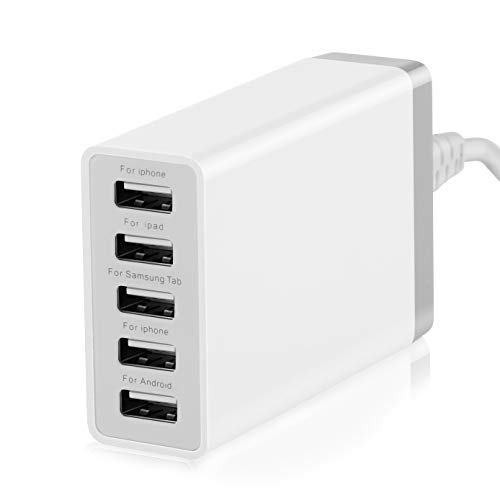
Phone chargers multiply fast. The Pezin & Hulin 5-port station pumps out 40 watts total, spread across five USB-A ports, which is enough to top up a family of phones overnight without a tangle of wall bricks.
Surge protection and temperature control are the kind of safety details that don’t show up until something goes wrong, so I appreciate that they’re built in. At roughly eight ounces, it slips into a travel bag for hotel rooms too.
A Strong Showing
- Five USB-A ports handle phones, tablets, and e-readers at once
- Built-in surge protection adds peace of mind for overnight charging
- Compact and lightweight at around 8 oz, so travel is realistic
- Sleek shell fits a kitchen counter or bedside table without looking like tech clutter
Smaller Trade-offs
- 40 watts shared across five ports means slower fills when everything is plugged in
- USB-A only, so newer USB-C phones charge at standard speed rather than fast-charge
- No dedicated high-wattage port for laptops
Key Product Details
Whose Shelf It Belongs On
Families charging a handful of phones, e-readers, and Bluetooth headphones every night from one outlet.
Not Your Match When
Laptop owners should consider the CREATIVE DESIGN 400W Charging Station, which delivers far more wattage per port.
The FRISATPOW station leans into per-port speed rather than raw wattage. Each port delivers up to 2.4A, which is a sensible ceiling for phones, tablets, e-readers, and Bluetooth gear, and the unit supports fast-charging protocols for compatible devices.
It’s a practical pick for a shared apartment or a small office where mixed devices rotate through the same dock daily. Compared with the Pezin & Hulin above, the per-port spec reads better on paper for quick top-ups.
Strong Points
- Up to 2.4A per port accelerates charging for phones and tablets
- Wide device compatibility covers Kindles, headphones, and portable speakers
- Multi-port design replaces several wall adapters in one footprint
- Useful for entryways, kitchens, and meeting rooms alike
Things To Weigh
- Total wattage is shared, so all-fast-charge at once isn’t realistic
- USB-A only, with no USB-C PD port for newer laptops or phones
- Wall-plug form factor means it occupies an outlet rather than sitting on a desk
Built With In Mind
Mixed-device households and small offices that want fast top-ups across several phones, tablets, and accessories.
A Better Fit Elsewhere
Users with modern laptops should look at the CREATIVE DESIGN 400W Charging Station, which adds USB-C PD for power-hungry devices.
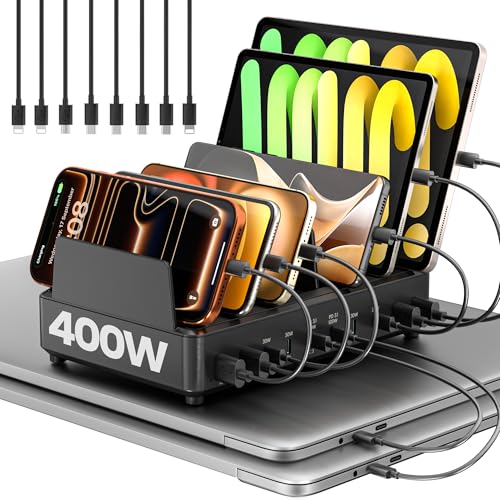
This is the charger for people who treat power like a finite resource. Two dedicated 100W USB-C outputs sit up front, so two laptops or power-hungry tablets can fast-charge simultaneously without splitting the budget.
At 400 watts of total capacity, the dock dwarfs the family chargers above. The trade-off is a brick-like footprint, so it lives on a desk or a workshop shelf rather than inside a suitcase.
Notable Gains
- Dual 100W USB-C ports charge two 16-inch laptops at full speed at the same time
- 400W total budget leaves headroom for additional USB-A devices
- Eliminates battery anxiety during long work sessions
- Organizer-style dock reduces cable clutter on a permanent desk
Practical Considerations
- Larger and heavier than a typical travel charger
- Full benefit requires USB-C cables rated for 100W passthrough
- Higher output means a pricier replacement if the unit is ever damaged
Feature Snapshot
Perfect Match For
Power users with multiple laptops, tablets, and phones who want one dock to handle every device on a standing desk.
Skip It When
Casual phone owners should pick the Pezin & Hulin 5-port instead, which is cheaper and lighter for overnight phone charging.
The bigger sibling to the Yottamaster 5-in-1 above adds the ports that matter at a stable desk: Gigabit Ethernet for wired calls, a 3.5mm audio jack for headsets or speakers, and an SD card reader for media workflows. The HDMI port still runs at 4K 60Hz, same as its smaller kin.
It’s labeled for MacBook, iPad, Dell, Lenovo, and HP, which lines up with the USB-C laptops most offices actually use. For someone whose laptop spends most of its life plugged into the same desk, this is the dock that earns its space.
Well-Handled Touches
- 100W USB-C PD passthrough charges the host laptop through the dock
- Gigabit Ethernet keeps video calls smooth when Wi-Fi crowds up
- 3.5mm audio jack supports headsets without an extra dongle
- SD card reader streamlines photo and video imports
- 4K HDMI at 60Hz stays smooth for external displays and TVs
Less-Strong Areas
- Eight ports in a slim brick mean heat can build up during long sessions
- Video output requires a host USB-C port with DisplayPort Alt Mode
- Heavier and bulkier than the 5-in-1 Yottamaster, so travel is less practical
Who Will Love This
Office workers and remote employees running a permanent desk setup that needs wired networking and a headset jack.
Another Choice May Suit
Roaming travelers should pick the Yottamaster 5-in-1 instead, which trims Ethernet and audio for a slimmer travel profile.
What Matters Most Before Choosing Cell Phone Hubs
The first decision is whether you actually need a laptop dock or a charging station. Docks expand one USB-C port into HDMI, Ethernet, card readers, and passthrough power, while charging stations multiply wall outlets into several USB ports at once. Many households end up with both, one for the home office and one for the kitchen counter.
Port count tells only half the story. Look for the protocol behind each port: USB 3.0 or 3.2 Gen 2 for fast file transfers, USB-C Power Delivery (PD) for laptop passthrough, and DisplayPort Alt Mode support on the host laptop if HDMI matters to you. Without DP Alt Mode, the HDMI port stays dark regardless of the dock.
Refresh rate matters more than resolution for video work. A 4K monitor at 30Hz looks choppy when scrolling long documents, while 4K at 60Hz feels like a native panel. For spreadsheets, browser tabs, and slide decks, 30Hz is honestly fine, but for video editing or gaming, push for 60Hz.
Charging stations come down to wattage math. A 40W brick across five ports averages just 8W per port, which is fine for phones overnight but slow for tablets. High-wattage docks with 100W USB-C PD ports handle laptops, while multi-port USB-A hubs cover everything else in a drawer.
Key Considerations Across These Picks
Pitfalls Shoppers Hit
The most common slip-up is assuming HDMI works on every USB-C port. Video output requires a laptop whose USB-C supports DisplayPort Alt Mode, and many budget phones skip it entirely. A second trap is buying a hub without enough passthrough wattage: a 60W laptop paired with a 45W hub charges slowly under load.
Where The Extra Money Goes
Higher-tier hubs pay for faster USB standards, sturdier shells, and safety listings like UL or SGS approval. They also tend to bundle Ethernet, audio jacks, and card readers in one brick, which removes three dongles from a travel bag. For a permanent desk, that consolidation is usually worth the upgrade.
Frequently Asked Questions
Do I need a hub if my laptop already has multiple ports?
It helps when HDMI, Ethernet, or extra USB-A slots are missing. Most modern laptops ship with two or three USB-C ports and nothing else, which is where a hub earns its place.
Will any USB-C hub work with my phone or tablet?
Only if the phone’s USB-C port supports DisplayPort Alt Mode for video and USB-C PD for passthrough charging. iPads generally support hub connections, but many Android phones limit output to charging only.
What’s the difference between USB 3.0 and USB 3.2 Gen 2?
USB 3.0 tops out around 5 Gbps, while USB 3.2 Gen 2 reaches 10 Gbps. For external SSDs and large file transfers, Gen 2 saves noticeable time.
Can a charging station damage my phone’s battery?
Quality stations with surge protection and temperature control manage output safely. Cheap bricks without those safeguards are where problems tend to show up over time.
How many watts do I need to charge a laptop?
Most thin-and-light laptops want 45W to 65W, while 15-inch and 16-inch machines often need 100W. Match the hub’s passthrough rating to your laptop’s charger for full-speed charging.
Final Verdict
For most setups, I’d start with one laptop dock that matches the daily port mix, then add a multi-port charging station for the kitchen counter or bedside table. Match the dock to the laptop’s USB-C capabilities, especially DisplayPort Alt Mode for HDMI, and aim for at least 60W of passthrough if charging matters. The right combo turns cable chaos into a clean, predictable workspace.