Phones hold thousands of photos that rarely leave the screen. A dedicated cell phone printer pulls those memories into your hands, ready to stick on a fridge or tuck into a scrapbook. I’ve sorted through portable inkjet models, instant film printers, and travel-ready thermal options to match different habits, whether you’re a scrapbooker, a parent chasing school projects, or someone who prints receipts on the road.
The Choices Worth Comparing

FUJIFILM Instax Mini Link 3 Cell Phone Printer (Sage Green)

Nelko PP01 Portable Photo Printer (Purple)

Phomemo M08F Inkless Portable Thermal Printer
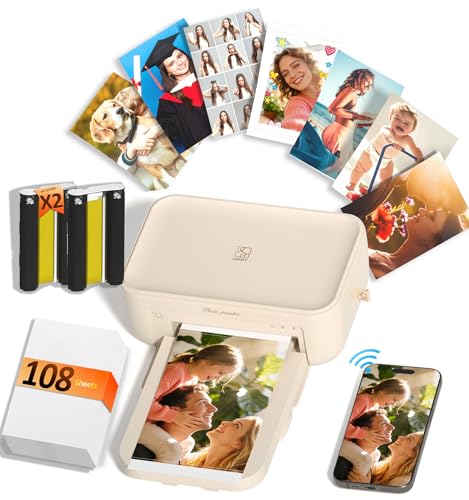
HPRT CP4100 4×6 Photo Printer with 108 Sheets

Nelko PP03 Color Mini Instant Photo Printer

Nelko PP01 Sticker Printer with Stripe Fun Paper

Nelko PP01 Sticker Printer with Little Leaf Paper

HP Envy 6555e All-in-One Wireless Printer
More On The Choices That Made The List
The Mini Link 3 leans into instant film rather than digital photo paper, giving every print that soft, slightly imperfect look people associate with the Instax brand. It pairs over Bluetooth with the Instax app, where you arrange frames, add filters, or collage several shots into a single print. Compared with the Nelko models further down the list, this one trades ink cartridges for dedicated film cartridges, so there’s no risk of dried-out print heads from sitting idle.
It’s compact enough to slip into a tote or a large coat pocket, and the textured Sage Green shell feels friendlier in the hand than glossy plastic. For someone who wants photos they can hand across a table moments after taking them, this is the natural starting point.
The Good Stuff
- True instant film output with that warm, slightly faded film look, ready in under a minute
- Bluetooth pairing through the Instax app keeps workflow simple for casual users
- No ink cartridges means less long-term maintenance than inkjet alternatives
- Frame, collage, and filter tools inside the app add personality without extra software
Things To Consider
- Print size stays at the classic Instax mini format, so it isn’t a fit for 4×6 albums
- Cost-per-print runs higher than inkjet paper, since film cartridges are the recurring expense
Feature Snapshot
Made For
Gift-givers, party hosts, and anyone who values the nostalgic instant film look over pixel-perfect color.
Consider Something Else When
If you need larger keepsake-size prints, the HPRT CP4100 4×6 Photo Printer delivers a more traditional photo format.
The PP01 in Purple keeps things approachable: a pocket-sized shell, inkjet imaging, and sticky-backed paper that handles scrapbook projects without extra adhesive. Owners commonly report that setup takes a few minutes, mainly to install the app and the ink cartridge, but day-to-day printing feels close to point-and-shoot.
It weighs roughly half a pound, so it travels easily in a backpack or laptop bag. For students, craft hobbyists, or anyone who wants prints that double as stickers, this entry-level Nelko model hits a comfortable middle ground between price and usability.
Useful Touches
- Self-adhesive 2×3 photo paper removes the need for glue on scrapbook layouts
- Compact 0.6-pound body slips into a small bag without weighing it down
- Smudge-proof and tear-resistant paper holds up to handling in everyday settings
Worth Noting
- Print resolution is fine for casual use but won’t match a dedicated photo lab
- Ink cartridge replacements are an ongoing cost worth budgeting for
Right Fit For
Students, scrapbookers, and parents building memory boards on a budget.
Skip It When
The FUJIFILM Instax Mini Link 3 is a better pick if you prefer the warm, analog look of instant film over inkjet color.
The M08F steps outside the photo-only lane by using thermal printing technology, which means there is no ink or toner to carry. Instead, special thermal paper feeds through and the print head creates images with heat. The result is a single-color output suited more to documents, receipts, and study notes than full-color photos.
At roughly 1.5 pounds and about 1.5 inches thick, it fits in a backpack alongside a laptop. The included carry case adds a layer of protection for frequent commuters. For anyone who needs to print contracts, study guides, or itineraries from a phone, this is a versatile pick.
A Strong Showing
- Inkless thermal design eliminates cartridge swaps and dried-print-head worries
- Supports standard letter-size 8.5×11 thermal paper for everyday documents
- Bluetooth connection through the Phomemo app works with both iOS and Android
- Carry case included for travel between home, office, and client sites
Trade Offs
- Single-color output means it cannot reproduce full-color photographs
- Specialized thermal paper costs more per sheet than standard copy paper
- App-only connection can feel limiting for quick laptop printing without software setup
Best Suited To
Traveling professionals, students, and anyone printing contracts or notes on the go.
Look Elsewhere When
The Nelko PP01 Portable Photo Printer makes more sense for scrapbookers who need full-color prints.
The CP4100 takes a different route from the rest of this list: it’s a desktop photo printer rather than a pocket device, designed to stay on a shelf and produce 4×6 prints that rival what you’d pick up from a pharmacy counter. Dye-sublimation printing (a heat-based process that fuses color layers onto paper) produces up to 1.7 million colors at 300dpi resolution, and each print comes out with a built-in protective layer.
The bundle ships with 108 sheets and two ribbon cartridges, which is enough for a long stretch of family events without reordering. Wi-Fi connectivity keeps the printer in a living room or office corner while phones send photos over the network.
Useful Strengths
- 300dpi dye-sublimation output delivers vivid, lifelike color suitable for framing
- Built-in protective coating keeps prints waterproof, scratch-resistant, and fade-resistant
- 108 sheets plus 2 ribbons in the box covers a generous first run of family prints
- Wi-Fi setup reduces cable clutter and supports phones on the same network
Points To Note
- Bulkier than pocket printers, so it stays put rather than traveling in a bag
- Replacement ribbons and paper are the main ongoing cost
Quick Facts
Perfect Match For
Photo enthusiasts and families who want lab-quality keepsakes without leaving the house.
A Better Fit Elsewhere
The Nelko PP03 Color Mini Instant Photo Printer is the more natural choice for someone who prints on the move and doesn’t need full 4×6 output.
The PP03 leans into variety. Out of the box, you get 50 sheets of paper split across three styles: classic white, macaron pastels, and heart shapes. For someone who prints for different moods and occasions, that bundle saves the separate-purchase step.
Like the other Nelko pocket models, it weighs about 0.6 pounds and connects over Bluetooth through a phone app. The white shell keeps it understated on a desk, and the ink imaging technology produces full-color prints on the smaller 2×3 format. It’s a friendly middle pick between budget and premium for casual use.
Everyday Wins
- Bundled paper assortment covers three styles without separate orders
- Pocket-friendly size slips into a school bag or purse for printing on the go
- Smudge-proof and water-resistant paper handles everyday handling
Honest Caveats
- Print resolution stays modest compared to dye-sublimation models
- Replacement ink cartridges are the main ongoing cost
Whose Shelf It Belongs On
Casual users who want a little variety in paper styles and a low-fuss setup.
Swap It Out When
For larger 4×6 keepsakes, the HPRT CP4100 4×6 Photo Printer handles traditional photo sizes much better.
This version of the PP01 ships with Stripe Fun photo paper, a patterned option that gives prints a playful border straight out of the printer. For journal hobbyists and scrapbookers, that built-in framing removes a step from the creative workflow.
Print quality runs at 600dpi through inkjet imaging, which is sharper than many pocket competitors in the same category. Setup stays consistent with other Nelko models: load the paper with the smooth side down, install the ink cartridge, and pair over Bluetooth through the Nelko app. The USB-C cable charges the unit, though a wall adapter is sold separately.
The Helpful Details
- Stripe Fun paper gives prints a finished, decorative edge without extra design work
- 600dpi inkjet output delivers crisp detail for small-format photos
- Adhesive backing turns each print into a sticker for planners and journals
A Few Limitations
- Wall adapter not included, so charging requires an existing USB-C plug
- Sticker paper is the only bundled option in the box
Who Should Grab It
Bullet journal hobbyists and crafters who want a decorative border without extra design work.
Reach For A Different Pick When
The Nelko PP01 with Little Leaf Paper suits someone who prefers a botanical pattern over stripes.
Sharing the same PP01 hardware as the previous entry, this version comes with Little Leaf paper for a softer, botanical border. For someone planning a nature-themed album or a wedding scrapbook, that detail saves effort in layout design.
The print engine, Bluetooth workflow, and adhesive-backed output match the Stripe Fun version exactly, so the only real decision is which pattern fits your project. Both are equally easy to slip into a gift bag alongside a card.
Advantages To Know
- Little Leaf paper gives prints a calm, botanical accent
- Same 600dpi engine produces clear, vibrant images in small format
- Sticky-back photos work straight into journals without extra adhesive
Soft Spots
- Power adapter sold separately from the included USB charging cable
- Single paper pattern in the box limits variety for the unboxing moment
Built With In Mind
Gift-givers and memory keepers assembling nature-themed albums or wedding guest books.
Another Choice May Suit
The FUJIFILM Instax Mini Link 3 is a stronger choice for someone who values the nostalgic instant film aesthetic over adhesive sticker prints.
The Envy 6555e is the outlier on this list: it’s a full-size all-in-one rather than a pocket photo printer. It prints, scans, and copies, with a 35-sheet auto document feeder and a 100-sheet main paper tray that handles both documents and photos.
Wireless and mobile printing through the HP app keeps phones connected, so the photo side of its personality still matters. Where it stands apart from the Nelko and Instax entries is the duplex (two-sided) printing capability and a deeper paper capacity for households that print a mix of schoolwork, forms, and occasional photos.
Where It Excels
- Print, scan, and copy functions in one machine for full household coverage
- 35-sheet auto document feeder handles multi-page scans without manual feeding
- Duplex printing saves paper on everyday two-sided jobs
- Mobile printing through the HP app keeps phones at the center of the workflow
Practical Considerations
- Much larger footprint than any pocket photo printer on this list
- Ink replacement costs are higher than dedicated photo printers used casually
Key Specs
The Right Fit
Remote workers and households that need printing, scanning, and copying in one machine.
Where Another Pick Suits Better
The HPRT CP4100 4×6 Photo Printer is a tighter match for photo enthusiasts who don’t need scan or copy functions.
What Matters Most Before Choosing Cell Phone Printers
Print Technology And Image Quality
Cell phone printers split into three technology camps: inkjet (liquid ink sprayed onto paper), dye-sublimation (heat-fused color layers), and thermal (heat-only imaging on special paper). Inkjet covers most pocket picks and balances cost against color quality. Dye-sublimation shows up in dedicated photo printers and produces more lifelike gradients, which matters for portrait keepers. Thermal printing skips ink entirely but locks you into single-color output, so it’s best for documents rather than photo albums.
Size, Portability, And Power
A pocket printer weighing under a pound can ride in a backpack without complaint, but a desktop model like the HP Envy 6555e trades portability for paper capacity and scan/copy features. Battery-powered units charge over USB, while desktop printers need a wall outlet. Picking the right balance comes down to whether you print mostly at home or mostly on the move.
Paper Format And Cost
Print size affects everything downstream: 2×3 sticker paper suits journals and planners, 4×6 prints fit standard frames, and letter-size thermal output works for documents. Cost-per-print varies by technology. Ink cartridges and film packs both add up over a year of regular use, so it helps to estimate how often you’ll print before committing.
Connectivity And App Experience
Most cell phone printers pair over Bluetooth through a dedicated app, but desktop models often add Wi-Fi for multi-device households. Some apps include frames, filters, and collage tools, while others stay minimal. The smoother the app, the less time you spend troubleshooting between shots.
Common Slip Ups When Shopping For Cell Phone Printers
Mistaking “Portable” For “Everywhere”
A pocket printer still needs charged batteries, working app software, and the right paper cartridge to function. Assuming it will print anywhere with no prep leads to frustration on the road. Packing a small case, a charging cable, and an extra paper pack keeps the experience smooth.
Picking The Wrong Output Format
A 2×3 sticker printer cannot substitute for a 4×6 keepsake printer, and a thermal document printer cannot replace a photo lab. Matching the format to the project matters more than chasing a single do-it-all device, since each technology does its own job well.
When Paying More Pays Off
Build Quality And Color Depth
Higher-tier dye-sublimation models like the HPRT CP4100 reproduce smoother skin tones and richer skies through continuous-tone output (a method that blends color shades seamlessly rather than using visible dots). That extra detail matters for prints intended to live in frames or albums.
Bundled Supplies And Long-Term Cost
Premium models ship with generous paper bundles and multiple ribbon cartridges, which lowers the first-year cost of ownership. Budget models look attractive on the shelf, but the gap closes quickly once replacement supplies arrive in the mail.
Frequently Asked Questions
How Do Cell Phone Printers Connect To My Phone?
Most use Bluetooth through a dedicated app on iOS or Android. Some desktop models also support Wi-Fi for sharing across multiple devices on the same network.
What Paper Size Should I Pick?
For journals and scrapbooks, 2×3 sticky-backed paper works well. For framed photos and traditional albums, 4×6 prints fit standard frames. For documents and notes, letter-size thermal paper handles everyday tasks.
Do Cell Phone Printers Need Ink?
Inkjet and dye-sublimation models use cartridges or ribbons. Thermal printers skip ink entirely and rely on heat-reactive paper, but they only print in a single color.
How Long Do Prints Last?
Dye-sublimation prints with a protective coating resist water, scratches, and fading for years. Inkjet prints on quality paper hold up well in albums but can fade faster in direct sunlight. Instant film prints develop a soft patina over time.
Can I Print From A Laptop Too?
Some models support laptop connections through Wi-Fi or USB. The Phomemo M08F, for example, prints letter-size documents from both phones and laptops, while pocket inkjet models tend to stay phone-first.
Wrap Up
Cell phone printers fall into a few clear camps: instant film for nostalgia, pocket inkjet for crafts, desktop photo printers for keepsakes, and thermal models for on-the-go documents. The right pick depends on what you actually print, how often, and where. Match the technology to the project, and the rest of the experience tends to take care of itself.