

Office work doesn’t always need a full laptop. Spreadsheets, email triage, shared documents, video calls, and note-taking all run fine on a well-chosen tablet, especially when the budget is tight and the work happens in coffee shops, coworking spaces, or a spare corner at home. I pulled together eight solid options that balance cost, screen quality, keyboard support, and the kind of everyday reliability that matters when deadlines loom.
The Essentials At A Glance
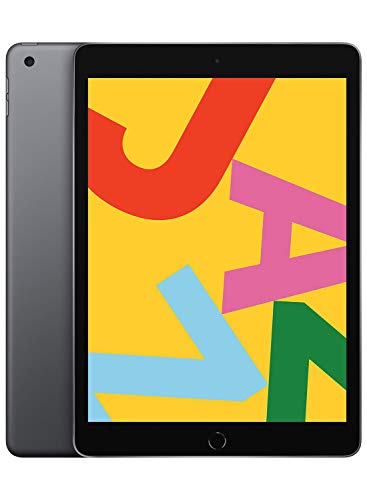
Apple iPad 10.2-inch Wi-Fi 32GB Space Gray

Samsung Galaxy Tab A 10.1 128GB Renewed

XIAOMI Pad 7 11.2-inch 256GB WiFi

TABWEE 11-inch FHD Android 16 256GB

Lenovo Tab M11 11-inch 128GB Luna Grey

Blackview 13-inch Android 15 256GB

TABWEE T50 11-inch Android 16 128GB

Samsung Galaxy Tab A 8.4-inch 32GB LTE
Inside Each Recommended Option
The seventh-generation iPad has earned its spot in countless small offices for a reason. The 10.2-inch Retina screen (a high-resolution panel that makes text crisp) pairs with the A10 Fusion chip, which handles spreadsheets, email, and web apps without breaking a sweat. Touch ID keeps the lock screen fast, and the Smart Keyboard connector means a real keyboard clicks in for proper document editing.
Compared to the Android options below, this iPad leans on a tighter app ecosystem, and that works in an office’s favor. Productivity apps tend to be polished, and Files integration across cloud services is smooth. For anyone managing spreadsheets, contracts, or video calls on a daily basis, the experience holds together with minimal friction.
Practical Advantages
- Crisp Retina display makes long reading and document review easier on the eyes.
- Smart Keyboard support turns the tablet into a workable writing surface.
- Touch ID speeds up login compared to typing passcodes throughout the day.
- Access to a deep, office-friendly app catalog through the App Store.
- Up to 10 hours of battery, which covers most workdays on a single charge.
Things To Consider
- 32GB fills up quickly with large files and offline media.
- The A10 Fusion chip shows its age on heavier multitasking, so older iOS versions may feel limiting.
- The Smart Keyboard and Apple Pencil cost extra on top of the tablet.
Feature Snapshot
Who It Suits Best
Professionals who live inside document editors, browsers, and email, and who want a refined, predictable experience with a mature accessory ecosystem.
Consider Something Else When
Anyone needing more than 32GB of storage for local files should consider the TABWEE T50, which offers a larger capacity for tighter budgets.
This Renewed Galaxy Tab A 10.1 arrives with a comfortable 128GB of built-in storage, which is generous for the price bracket. The 2019 model runs an octa-core processor (a chip with eight working cores that handles multiple tasks simultaneously), making it adequate for browsing, email, and document editing. The 10.1-inch Full HD screen delivers sharp text and clean video for meetings.
For someone setting up a home office or a secondary workstation, the storage headroom matters. Unlike the 32GB iPad above, this tablet leaves room for downloaded files, presentations, and offline attachments without an immediate card purchase. The Renewed program adds a layer of inspection and warranty that makes the cost savings less risky than buying secondhand privately.
What Pays Off
- 128GB of internal storage covers document libraries and media without extras.
- Full HD display keeps spreadsheets and PDFs readable at typical viewing distances.
- Renewed condition includes quality checks and a limited warranty.
- Samsung’s One UI offers a familiar Android experience for most users.
Worth Noting
- Being a 2019 model, it may not receive the latest Android updates for many more years.
- Renewed units may show light cosmetic wear from previous use.
- Performance lags behind newer tablets on heavier multitasking sessions.
Made For
Home offices and remote setups where storage capacity matters more than bleeding-edge performance, and where the Renewed cost savings are welcome.
A Better Fit Elsewhere
Anyone wanting a longer software support window should look at the Lenovo Tab M11, which ships with newer Android and ongoing updates.
The XIAOMI Pad 7 stretches the budget category into premium territory with an 11.2-inch 3.2K display running at 144Hz (refresh cycles per second, meaning smoother scrolling and animations). For office work, that translates to razor-sharp text and buttery navigation through dense documents. The 256GB storage and 8GB RAM handle multitasking across several apps with ease.
Compared to the iPad above, this tablet offers more screen real estate and a higher refresh rate for a similar tier of polish. The 8850mAh battery comfortably lasts through long work sessions, and four speakers add a bit of life to video calls. It’s a strong fit for anyone who values display quality and storage in a single package.
Practical Pluses
- 3.2K resolution at 144Hz keeps text sharp and scrolling fluid.
- 256GB storage swallows large project files without constant cleanup.
- Large 8850mAh battery supports extended work sessions away from outlets.
- Quad speakers improve clarity during hands-free calls.
Points To Note
- WiFi-only model means no built-in cellular for remote work outside hotspots.
- The tablet is on the larger side, so smaller laptop bags may feel tight.
- Some Western app availability depends on regional software support.
Quick Facts
Best Suited To
Visual professionals and multitaskers who appreciate a premium-feeling display and generous storage without jumping to flagship pricing.
Skip It When
Frequent travelers needing cellular connectivity should consider the Samsung Galaxy Tab A 8.4-inch LTE, which keeps them online without tethering.
TABWEE packs a serious spec sheet into this 11-inch tablet: Android 16, 32GB RAM, and 256GB of internal storage. For office work involving browser tabs, document editing, and chat apps running in parallel, that RAM headroom is meaningful. The Gemini AI integration offers on-device help for drafting and summarizing tasks.
The 180Hz touch sampling rate (how many times per second the screen reads your finger input) makes stylus interactions feel responsive, which matters for handwritten notes in meetings. Set against the Galaxy Tab A 10.1 above, this TABWEE model delivers significantly more memory and storage, which is the kind of upgrade that pays off during heavy multitasking.
A Few Strong Suits
- 32GB RAM keeps multiple apps open without slowdowns.
- 256GB storage leaves room for files, downloads, and offline media.
- 180Hz touch sampling supports smooth stylus note-taking.
- Android 16 brings the latest OS features to the budget tier.
Trade Offs
- Newer Android 16 ecosystem may have occasional app compatibility gaps.
- Brand recognition is lower than Samsung or Apple, so long-term support is harder to predict.
- Battery life may shorten under sustained heavy multitasking.
Feature Rundown
Who Will Love This
Power users juggling many apps, and note-takers who prefer stylus workflows over typing-heavy sessions.
Look Elsewhere When
Those prioritizing brand-name reliability and a polished office suite experience should turn to the Apple iPad, which offers deeper ecosystem maturity.
The Lenovo Tab M11 arrives as a thoughtful bundle: the tablet ships with a folio case, so it goes straight from box to a protected commute. The 11-inch 1920×1200 display and MediaTek Helio G88 octa-core chip handle document editing, browser-heavy research, and video calls without drama. Ambient light sensing adjusts brightness automatically through changing office lighting.
For someone who moves between desks, coffee shops, and meetings, the included case removes an extra purchase decision. Compared to the XIAOMI Pad 7 above, this Lenovo is lighter on raw power but covers the fundamentals well. The 10-hour battery rating holds up to a typical workday of mixed tasks, which is the realistic benchmark that matters.
Points In Its Favor
- Included folio case adds protection without a separate accessory purchase.
- Ambient light sensor adapts to changing office environments.
- 10-hour battery covers standard workdays on one charge.
- 128GB storage balances file space with app installation needs.
Minor Gripes
- 4GB RAM limits how many browser tabs and apps stay open smoothly.
- Display resolution is good but not as sharp as higher-tier picks.
- The folio case offers basic protection, not rugged drop resistance.
The Right Fit
Commuters and mobile professionals who want a tablet that arrives ready to use, case included, without hunting down accessories separately.
Reach For A Different Pick When
Users needing maximum multitasking headroom will find the TABWEE 11-inch Android 16 a stronger match with its 32GB RAM configuration.
The Blackview 13-inch tablet makes a strong case as a desk-bound workstation. The 2176×1600 IPS display at 90Hz (smoother than standard 60Hz screens) gives documents and spreadsheets room to breathe, while the MediaTek Helio G100 octa-core processor keeps things moving. It arrives with a keyboard, mouse, and stylus, so it essentially functions as a portable desktop from the moment it’s unboxed.
For a home office where a laptop would feel cramped, this screen size fills a different role. The 36GB combined memory configuration (a blend of physical RAM and virtual expansion) helps with running multiple windows side by side. Compared to the Lenovo Tab M11 above, this Blackview trades portability for screen real estate, which is the right call when the tablet rarely leaves the desk.
Strengths Worth Knowing
- 13-inch display offers laptop-class screen space for multitasking.
- Bundled keyboard, mouse, and stylus remove extra accessory purchases.
- 90Hz refresh rate keeps scrolling and animations fluid.
- 256GB storage handles large project archives locally.
Where It May Fall Short
- Size makes it less comfortable for handheld reading on a couch or commute.
- Heavier than 10-11 inch options, so tablet-only bags strain under the weight.
- Battery drains faster on the larger display during long sessions.
Whose Shelf It Belongs On
Home offices needing a desktop replacement that handles documents, spreadsheets, and casual creative work without a full laptop investment.
Swap It Out When
Mobile workers carrying the tablet daily should prefer the Samsung Galaxy Tab A 8.4-inch LTE, which slips into smaller bags and stays connected.
The TABWEE T50 sits at the affordable end without sacrificing the basics. The octa-core processor and 24GB combined RAM configuration handle standard office workflows, while 128GB of storage covers document libraries and offline attachments. Android 16 keeps the software current, which is unusual in this price tier.
For students balancing coursework and side gigs, or anyone starting a small business on a tight budget, this tablet answers the call. The 11-inch form factor sits comfortably between the smaller Galaxy Tab A 8.4 above and the bulkier Blackview 13-inch, making it a versatile middle ground for varied work setups.
Advantages To Know
- Affordable price point keeps startup costs manageable.
- Android 16 offers modern features at a budget tier.
- 128GB storage is generous for the cost bracket.
- 11-inch size balances screen space with portability.
Honest Caveats
- Bundled RAM includes virtual expansion, which behaves differently from true physical RAM.
- Display brightness may struggle in direct sunlight or near bright windows.
- Long-term software update commitment is uncertain outside major brands.
Built With In Mind
Students, freelancers, and budget-conscious professionals who need a capable daily driver without overspending on premium branding.
Where A Sibling Pick Shines
Anyone wanting stronger multitasking should consider the TABWEE 11-inch Android 16 with 32GB physical RAM, which delivers smoother heavy workflows.
The Galaxy Tab A 8.4-inch earns its place through one defining feature: built-in LTE connectivity. For field workers, traveling professionals, or anyone working outside Wi-Fi range, that cellular radio turns the tablet into a true mobile office. The 16:10 display ratio gives documents and video calls a wider canvas than standard 4:3 screens.
The 8.4-inch form factor makes this the most portable pick in the lineup, fitting comfortably in a jacket pocket or small bag. Against the XIAOMI Pad 7 above, this Samsung trades screen size and resolution for cellular freedom. The 32GB storage is modest, though a microSD card slot supports expansion, which owners commonly use to add space for media and documents.
The Practical Payoff
- Built-in LTE keeps work flowing without hunting for Wi-Fi or tethering.
- Compact 8.4-inch size fits smaller bags and one-handed use cases.
- Wide 16:10 display suits video calls and document sidebars.
- microSD expansion adds storage for media-heavy workflows.
A Few Limitations
- 32GB internal storage fills up quickly without expansion planning.
- Older 2020 model limits future Android update runway.
- LTE requires a separate carrier plan, adding ongoing costs beyond the tablet price.
Spec Overview
Perfect Match For
Travelers, field technicians, and remote professionals who need a connected tablet that goes wherever the work takes them.
Not Your Match When
Stationary home offices will find more screen and storage in the Blackview 13-inch tablet, which serves desk-bound setups better.
What To Weigh Before Choosing Budget Tablets For Office Work
Screen Size And Workspace Fit
Screen size shapes how office tasks feel in practice. An 8.4-inch tablet like the Galaxy Tab A 8.4 handles email and quick edits comfortably, but spreadsheets feel cramped at that scale. An 11-inch screen, found in most picks here, strikes a useful balance between portability and readable document layouts. For desk-bound setups where the tablet rarely moves, 13-inch options open up genuine multitasking room. The trade-off is weight and bag fit: larger screens demand more carrying comfort.
Performance And Multitasking Headroom
The processor and RAM configuration decide how smoothly apps run side by side. For basic email, browsing, and document editing, octa-core chips with 4GB RAM (the minimum usable baseline) handle routine tasks fine. Heavy multitaskers juggling browser tabs, chat apps, and cloud documents benefit from 8GB or more. Storage matters too, since 32GB fills quickly with downloaded attachments and offline files. Cards and cloud storage offset some limits, but built-in storage simplifies daily life.
Keyboard And Accessory Support
Real office work demands real typing input. Tablets with dedicated keyboard support, whether through first-party accessories or universal Bluetooth options, transform from consumption devices into writing tools. Bundled accessories, like the folio case on the Lenovo Tab M11 or the keyboard set on the Blackview 13-inch, remove guesswork and extra purchases. Stylus support adds value for handwritten notes and markup workflows during meetings.
Connectivity And Mobility
Wi-Fi-only tablets suit stationary or home setups where networks are reliable. Built-in LTE, like the Galaxy Tab A 8.4-inch above, becomes essential for travel-heavy work, field visits, or any setting where Wi-Fi isn’t guaranteed. The trade-off is the ongoing cost of a cellular plan, which adds to the total ownership price over time.
Key Considerations Across These Picks
Common Shopping Slip Ups
Many shoppers focus on screen size or processor speed while overlooking storage limits. A 32GB tablet sounds ample until offline documents, app caches, and system updates start crowding the space. Another frequent miss is ignoring keyboard compatibility. A tablet without a comfortable typing solution often ends up paired with a separate laptop anyway, doubling the cost. Battery life claims also deserve scrutiny, since real-world usage with brightness cranked up drains cells faster than lab ratings suggest.
Where The Extra Money Goes
Stepping up to a higher tier typically buys three things: more RAM for smoother multitasking, sharper or larger displays for easier reading, and better accessory ecosystems for genuine laptop replacement. The XIAOMI Pad 7 above illustrates this well, with its high-refresh 3.2K screen and generous storage. For professionals whose work depends on screen real estate and app responsiveness, the upgrade often pays back through faster task completion and less eye fatigue during long sessions.
Frequently Asked Questions
Are Budget Tablets Good Enough For Office Work?
Yes, for most standard office tasks like email, document editing, spreadsheets, and video calls, budget tablets handle the workload reliably. The key is matching specs to your typical app load and screen habits.
How Much Storage Do Office Tablets Need?
A minimum of 64GB is comfortable for light use, while 128GB or more suits users who keep large files locally. Cloud storage supplements internal space but doesn’t help when working offline.
Can These Tablets Replace A Laptop?
For tasks centered on cloud apps, email, and document editing, a tablet with a keyboard can replace a laptop. Resource-heavy work like video editing or complex databases still benefits from a traditional computer.
Do Budget Tablets Support External Keyboards?
Most modern tablets support Bluetooth keyboards, and several picks here offer dedicated keyboard accessories or first-party options. Confirm compatibility before purchasing accessories separately.
How Long Do Budget Tablets Last?
With careful use, budget tablets commonly last three to five years. Software update support varies by brand, and older models eventually lose access to the latest apps and security patches.
Closing Remarks
The right tablet depends on how and where the work happens. A frequent traveler benefits more from LTE connectivity than a 4K display, while a desk-bound user gains more from screen size than portability. Match the spec sheet to the actual workflow, and any of these picks can serve as a capable, affordable office companion for years.
