

I write notes constantly, from lecture halls to coffee shops, and a good tablet makes the difference between organized and chaotic. Budget tablets for note taking need a responsive screen, solid battery life, and stylus support without draining your wallet. After comparing dozens of options, I narrowed it down to ten tablets that handle handwriting, PDFs, and daily classwork without compromising on what matters.
The Picks in Brief
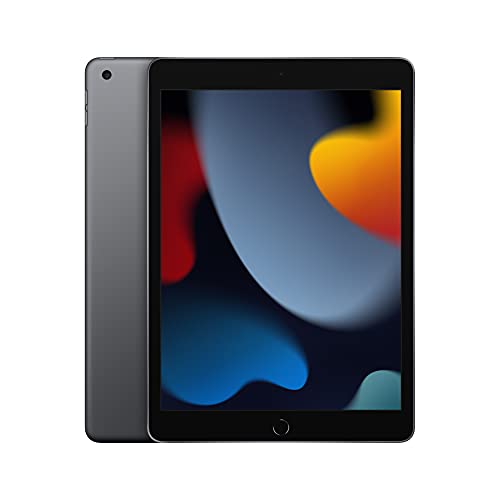
Apple iPad (9th Generation) with A13 Bionic Chip 64GB Wi-Fi (Space Gray)

Apple iPad Wi-Fi 32GB Gold (Previous Model)

Apple iPad Air 11-inch M2 128GB Wi-Fi 6E (Blue)
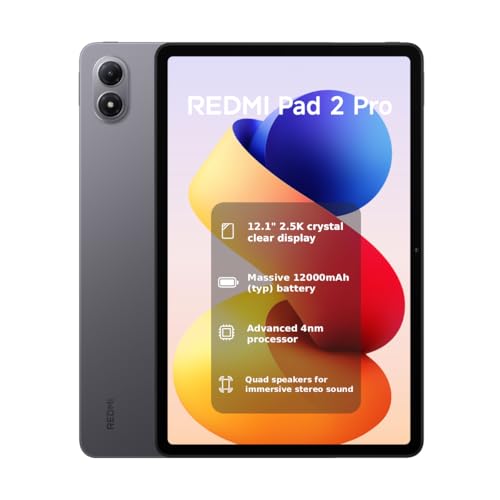
Xiaomi Redmi Pad 2 Pro WiFi 12.1-inch 256GB (Gray)

Samsung Galaxy Tab S6 Lite 10.4-inch 64GB WiFi with S Pen (Angora Blue)

Lenovo Idea Tab Plus 12.1-inch 128GB with Tab Pen and Folio Case

Samsung Galaxy Tab S9 FE 10.9-inch 128GB WiFi with S Pen (Gray)

Blackview 13-Inch Tablet Android 15 256GB with Keyboard, Mouse, and Stylus

Samsung Galaxy Tab S6 Lite 2024 10.4-inch 64GB WiFi with S Pen (Oxford Gray)

HONOR Pad 10 12.1-inch Wi-Fi 256GB Tablet 2025 (Gray)
More on the Choices That Made the List
The 9th generation iPad remains my top suggestion for anyone who wants a proven tablet that just works. The 10.2-inch Retina screen gives you enough room to scribble margins on lecture slides without feeling cramped, and the A13 Bionic chip handles split-view multitasking smoothly.
Compared to the older 6th generation iPad (the next pick), this model supports Center Stage, the auto-framing webcam trick that keeps you centered during video study sessions. iPadOS also lets you handwrite into any text field with Apple Pencil Scribble, which feels closer to writing on real paper than tapping out characters.
Strong Points
- Apple Pencil support turns the tablet into a genuine notebook replacement
- 10.2-inch Retina display is sharp and easy on the eyes during long reading sessions
- A13 Bionic chip handles multitasking and PDF annotation without noticeable lag
- Touch ID fingerprint sensor keeps private notes locked behind biometrics
- Access to a mature note-taking app ecosystem through the App Store
Trade Offs
- Apple Pencil is sold separately, adding to the total cost
- 64GB fills up quickly with lecture recordings and large PDFs
- Lacks the USB-C port that newer iPads use, sticking with Lightning instead
Feature Snapshot
Made For
Students who want a dependable, app-rich tablet and plan to invest in an Apple Pencil down the line.
Consider Something Else When
Anyone on a strict entry-level budget should look at the Apple iPad Wi-Fi 32GB Gold (Previous Model) for a lower starting point.
This older iPad is the most affordable gateway into Apple’s tablet ecosystem. The 9.7-inch Retina screen still delivers crisp text, though it’s noticeably smaller than the 10.2-inch panel on the 9th generation.
The A10 Fusion chip is older and slower, so heavy multitasking may feel sluggish, but for opening a note app and a PDF side by side, it holds up. Touch ID keeps things secure when you’re passing the tablet between classmates.
What Helps Most
- Lowest cost of entry for an Apple tablet that runs current iPadOS apps
- 9.7-inch Retina screen is compact enough for one-handed note-taking
- Touch ID unlocks quickly between study sessions
- Lightweight enough to slip into a backpack without bulk
Worth Noting
- 32GB is tight, so owners commonly report needing cloud storage for notes and recordings
- A10 Fusion chip feels dated compared to the A13 in the 9th generation iPad
- No Center Stage support for the front camera
Right Fit For
Shoppers who want the cheapest path into Apple Pencil note-taking and don’t mind older internals.
Look Elsewhere When
Anyone planning to keep the tablet for three or more years should step up to the Apple iPad (9th Generation) with A13 Bionic Chip for longer software support.
The iPad Air with M2 sits at the top of this list in raw capability. The 11-inch Liquid Retina display uses advanced tech like P3 wide color and True Tone, which adjusts the white balance to your room’s lighting. For someone who reads and marks up documents for hours, that difference shows up as less eye fatigue.
The M2 chip makes Apple Pencil latency nearly invisible, so writing feels immediate. Wi-Fi 6E delivers faster wireless speeds in compatible environments, and the USB-C port simplifies connecting to external drives.
Why It Works Well
- M2 chip delivers desktop-class speed for heavy note apps and multitasking
- 11-inch Liquid Retina display with True Tone reduces eye strain during long sessions
- Wi-Fi 6E future-proofs your wireless connection for campus networks
- USB-C port simplifies charging and file transfers
Points to Consider
- Costs significantly more than the standard iPad options
- Apple Pencil Pro is a separate purchase
Feature Snapshot
Best Suited To
Power users and visual creatives who want the smoothest writing experience and are willing to pay for it.
Skip It When
Budget-focused shoppers get more value from the Samsung Galaxy Tab S6 Lite 10.4-inch 64GB WiFi with S Pen (Angora Blue), which bundles the pen.
The Redmi Pad 2 Pro goes big on both screen size and battery. The 12.1-inch panel gives you laptop-like real estate for split-screen notes, and the 12000mAh battery is one of the largest in this price bracket.
The 2.5K resolution (2560 x 1600) keeps text sharp at this size, and the 120Hz refresh rate makes scrolling through long PDFs feel smooth. Note that this is a WiFi-only model with no SIM card slot, so cellular users will need a hotspot.
Everyday Wins
- Massive 12000mAh battery lasts through multiple full days of classes
- 12.1-inch 2.5K display gives generous room for handwriting and split-view apps
- 256GB of internal storage handles large lecture video files
- Four speakers deliver clear audio for recorded lectures
- Wi-Fi 6 support for fast wireless connectivity
Honest Caveats
- Larger size makes it less pocket-friendly than 10-inch tablets
- No cellular option, so you depend on WiFi or phone tethering
- Global ROM may behave differently from region-specific software
Who Should Grab It
Students with long commutes or frequent travel who need a tablet that survives off-grid.
Not Your Match When
Anyone wanting a more compact daily carry should consider the Apple iPad (9th Generation) with A13 Bionic Chip instead.
The original Tab S6 Lite earns its spot because Samsung includes the S Pen in the box. That’s a meaningful saving since stylus-equipped tablets often require a separate accessory purchase.
The 10.4-inch display and slim metal design make it comfortable to hold during long reading sessions. Dual speakers add decent audio for recorded lectures, though they won’t replace headphones in a noisy library.
Where It Excels
- S Pen included in box saves the cost of a separate stylus purchase
- Slim metal design feels more premium than the plastic body suggests
- 10.4-inch screen balances handwriting space with portability
- Dolby Atmos-tuned dual speakers for media playback
Minor Gripes
- 64GB is limiting for heavy media libraries
- Older processor struggles with demanding multitasking
Feature Snapshot
Perfect Match For
Students who want to start taking notes immediately without budgeting for a separate stylus.
Another Choice May Suit
Power users seeking a newer processor should consider the Samsung Galaxy Tab S9 FE 10.9-inch 128GB WiFi with S Pen (Gray).
Lenovo includes both the Tab Pen and a folio case, which is uncommon at this price. The folio doubles as a stand for hands-free video calls or watching lectures.
The 12.1-inch 2.5K IPS display runs at 90Hz, making scrolling noticeably smoother than 60Hz screens. The MediaTek Dimensity 6400 processor handles everyday note apps well, and 8GB of RAM keeps multiple windows responsive.
The Good Stuff
- Pen and folio case included for a true out-of-box experience
- 90Hz display refresh rate for smoother scrolling
- 96% DCI-P3 color gamut for vivid display quality
- 8GB RAM supports multitasking across apps
Factors to Consider
- Bulkier than 10-inch tablets when cased
- Lenovo’s note app ecosystem is less mature than Apple’s
Whose Shelf It Belongs On
Anyone who wants everything in one box, including a protective case, without buying extras.
Reach for a Different Pick When
Users deeply tied to Apple Notes or iCloud workflows should look at the Apple iPad (9th Generation) with A13 Bionic Chip.
The Tab S9 FE steps up from the S6 Lite with a more powerful processor and IP-rated water resistance, which adds peace of mind for accidental spills in the dorm or cafe.
The 10.9-inch display sits comfortably between the smaller S6 Lite and the larger 12-inch options. The S Pen attaches magnetically and charges wirelessly, so it’s always ready when inspiration (or a deadline) hits.
Reasons It Performs
- Faster processor handles heavier multitasking than the S6 Lite
- 128GB of internal storage with microSD expansion
- S Pen attaches magnetically for convenient storage
- Durable build designed for everyday carry
A Few Limitations
- Costs more than the older S6 Lite models
- Heavier than compact 9-inch options
Quick Facts
Right Fit For
Style-conscious students who want a premium-feeling mid-range tablet that won’t break the bank.
Swap It Out When
Anyone who needs a much larger screen for desktop-style multitasking should consider the Lenovo Idea Tab Plus 12.1-inch 128GB with Tab Pen and Folio Case.
Blackview ships the most complete accessory bundle on this list, including a keyboard, mouse, and stylus. For someone who types more than they write by hand, that keyboard changes the tablet into a quasi-laptop.
The 13-inch IPS display with 2176×1600 resolution gives you the most screen real estate in this roundup. The MediaTek Helio G100 handles Android 15 well, though it’s not the fastest chip for heavy creative apps.
A Few Highlights
- Keyboard and stylus included for hybrid typing and writing workflows
- 13-inch display offers near-laptop workspace
- 256GB storage handles large document libraries
- Android 15 brings current software features
Things to Watch
- 13-inch size is bulky for one-handed note-taking
- Less refined build than established brands like Apple or Samsung
Perfect Match For
Typing-heavy students who alternate between writing notes and drafting essays, and want a 2-in-1 feel.
Skip It When
Anyone prioritizing portability and pen-first note-taking should consider the Samsung Galaxy Tab S6 Lite 2024 10.4-inch 64GB WiFi with S Pen (Oxford Gray).
The 2024 refresh of the Tab S6 Lite updates the internals while keeping the same student-friendly 10.4-inch form factor. The S Pen still ships in the box, and Samsung DeX (a desktop-like interface) adds productivity options for heavier workloads.
Dolby Atmos surround sound is a small touch, but it makes recorded lectures and study videos clearer without headphones. The slim, lightweight build slips easily into a backpack.
Notable Gains
- Updated processor offers smoother performance than the original S6 Lite
- S Pen included with no extra cost
- Samsung DeX adds desktop-style productivity when needed
- Lightweight metal build feels more premium than the price suggests
Honest Caveats
- 64GB storage fills up with video files unless you add a microSD card
- Not as fast as the Tab S9 FE for demanding apps
Best Suited To
High school and college students who want a refreshed take on a proven student tablet formula.
A Better Fit Elsewhere
Anyone needing more power for multitasking should look at the Samsung Galaxy Tab S9 FE 10.9-inch 128GB WiFi with S Pen (Gray).
The HONOR Pad 10 delivers generous specs for its bracket. The 12.1-inch display runs at 2560 x 1600 resolution with support for 1.07 billion colors, so photos and lecture slides look accurate.
At 595g and just 5.79mm thick, it’s surprisingly portable for a 12-inch tablet. The 256GB storage and 8GB RAM handle large document libraries and multitasking well, and Android 15 brings current software support.
Well-Handled Touches
- 12.1-inch high-resolution display with 1.07 billion colors
- 256GB storage and 8GB RAM at a competitive price
- 5.79mm thin profile keeps it portable despite the large size
- Android 15 with current feature support
Points to Note
- Stylus sold separately, unlike Samsung’s bundled approach
- Less established app ecosystem than Apple or Samsung
Spec Overview
Who It Suits Best
Budget-focused power users who want large-screen multitasking without paying flagship prices.
Where Another Pick Suits Better
Those who prefer a stylus in the box should consider the Samsung Galaxy Tab S6 Lite 2024 10.4-inch 64GB WiFi with S Pen (Oxford Gray).
Picking the Right Tablet for Your Note-Taking Style
Matching the Tablet to Your Study Habits
Before choosing, think about where and how you’ll actually use the tablet. A 10-inch screen strikes the best balance between handwriting comfort and portability for most students. The Samsung Galaxy Tab S6 Lite and the Apple iPad 9th generation both fit that mold. Larger 12-inch screens, like the Xiaomi Redmi Pad 2 Pro or the HONOR Pad 10, work better if you plan to keep the tablet on a desk for split-screen note apps. Smaller screens, like the 9.7-inch older iPad, feel more cramped for handwriting but slip into smaller bags easily.
Stylus support matters more than raw specs for note-taking. Apple’s Scribble feature and Samsung’s S Pen are both mature, with low latency (the small delay between moving the pen and seeing the ink appear). The Lenovo Idea Tab Plus and Blackview Tab include their own pens, which is great if you want everything in one box. Note-taking apps like GoodNotes, Notability, and Samsung Notes are the real workhorses, and they run well on any tablet in this guide.
Storage and Battery Considerations
Storage fills up faster than you’d expect when you start saving lecture recordings and annotated PDFs. 64GB is fine for text-only notes, but video files eat space quickly. Tablets with microSD expansion slots, like the Samsung Galaxy Tab S9 FE, give you room to grow. Otherwise, lean toward 128GB or 256GB if your budget allows.
Battery life claims on spec sheets are usually optimistic. In real use, expect around 8 to 10 hours of active note-taking on most of these tablets. The Xiaomi Redmi Pad 2 Pro stands out with its 12000mAh battery, which delivers meaningfully longer sessions. Fast charging is rare in this category, so plan to charge overnight or during short breaks between classes.
Software Ecosystem and App Quality
iPadOS offers the most polished note-taking apps, including GoodNotes and Notability, though they require paid subscriptions after limited free trials. Android tablets rely on apps like Samsung Notes (free on Galaxy devices), OneNote, and Squid. The HONOR Pad 10 and Blackview Tab run Android but don’t have Samsung’s tailored software, so you’ll want to test your preferred note app before committing.
iPadOS also supports system-wide handwriting input through Apple Pencil Scribble, which lets you write directly into any text field. That’s a small but meaningful productivity boost for students who prefer handwriting over typing.
Key Considerations Across These Picks
Common Shopping Slip Ups
The biggest mistake I see is choosing a tablet without checking stylus compatibility. Not every touchscreen works with active styluses, and passive styluses feel imprecise for handwriting. Always confirm the tablet supports an active stylus with pressure sensitivity before buying.
Another trap is underestimating storage. 32GB fills up fast once you add lecture recordings and PDFs. If you can’t expand via microSD, go for 128GB or more.
What the Higher Tier Buys
Stepping up to premium models gets you faster processors, sharper displays, and longer software support. The Apple iPad Air M2 delivers near-zero stylus latency, which makes handwriting feel like writing on paper. Premium builds also tend to have better water resistance and sturdier materials, which matters for daily backpack carry.
Frequently Asked Questions
Do I really need a stylus for note taking?
A finger works for tapping and scrolling, but handwriting feels imprecise without a proper stylus. Active styluses with pressure sensitivity let you vary line weight naturally, which makes handwritten notes easier to read later.
Is 64GB enough for a student’s tablet?
For text notes and a few PDFs, yes. Once you start saving audio recordings or video lectures, 64GB gets tight quickly. Consider 128GB or a model with microSD expansion.
Can budget tablets handle handwriting apps smoothly?
Most modern budget tablets run popular note apps without lag. The Samsung Galaxy Tab S6 Lite and the Apple iPad 9th generation are both responsive for daily handwriting. Older or cheaper chips may stutter when multitasking.
What’s the difference between active and passive styluses?
Passive styluses are simple rubber tips that work on any touchscreen but lack pressure sensitivity. Active styluses use electronics to communicate with the screen, supporting pressure, tilt, and palm rejection for a more natural feel.
Should I get a cellular model or stick with WiFi?
Cellular adds flexibility for note-taking on the move, but it costs more upfront and requires a data plan. Most students can use a phone hotspot for occasional offline use and save money with WiFi-only models.
Closing Verdict
The right tablet depends on how you study. The Apple iPad 9th generation is the safest all-around pick for Apple users, while the Samsung Galaxy Tab S6 Lite offers the best value with its bundled S Pen. For larger screens and longer battery life, the Xiaomi Redmi Pad 2 Pro and HONOR Pad 10 both deliver. Match the tablet to your note-taking style, and you’ll wonder how you ever managed with paper alone.
