

A good budget tablet should just disappear into your routine: into your backpack, your couch cushion, your kid’s hands on a long car ride. The trick is finding one that won’t frustrate you six months in. I’ve spent time comparing screen specs, processor families, and storage configurations across this year’s slate, and these ten stand out for everyday people who don’t want to overspend.
The Choices Worth Comparing

Lenovo Idea Tab Plus Lightweight Tablet 12.1″ 2.5K IPS 90Hz

Lenovo Idea Tab College Tablet 11″ 2.5K IPS 90Hz 256GB

AD16WUVI Android Tablet 11 inch Android 16 32GB RAM 128GB
AD16WUVI Android 16 Tablet 11 inch with Keyboard 32GB 128GB
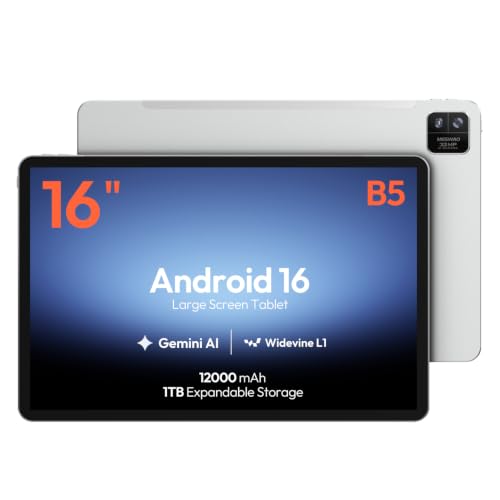
MESWAO 16-Inch Android 16 Tablet Helio G99 12GB 128GB

AD16WUVI Android 16 Tablet 10 inch 26GB RAM 128GB 7000 mAh
AD16WUVI Android Tablet 10 inch Android 16 26GB 128GB 7000 mAh

Lenovo Tab One Lightweight Tablet 8.7″ HD 4GB 64GB Helio G85

Samsung Galaxy Tab S7 11-inch Android Tablet 128GB Wi-Fi S Pen
AOC 10 Inch Tablet Android 16 120Hz IPS 8-Core 4GB 128GB
Inside Each Recommended Option
The Idea Tab Plus is what I’d hand to a college freshman who wants one device for lecture notes, textbook PDFs, and evening streaming. The 12.1-inch 2.5K panel is sharp enough that dense slides stay readable, and the 90Hz refresh rate keeps scrolling through long documents smooth. A MediaTek Dimensity 6400 chipset handles the multitasking that comes with a study session: notes app open, YouTube playing, and a reference PDF side by side.
Compared to the smaller Idea Tab below, this one trades a slightly larger body for a bigger canvas and that included Tab Pen. If your work or hobby leans on sketching, annotating, or handwriting equations, that pen becomes the reason to choose this model. The folio case in the bundle keeps the pen handy and the screen protected on the move.
Key Advantages
- 12.1-inch 2.5K IPS display with 90Hz makes long reading sessions easier on the eyes
- Included Tab Pen turns the tablet into a digital notebook without an extra purchase
- 8GB memory handles split-screen notes plus a reference browser tab
- Folio case is bundled, so day-one protection is solved
- Dimensity 6400 has enough headroom for casual gaming between study blocks
Worth Noting
- 12.1-inch footprint is less comfortable for one-handed reading on a crowded train seat
- 128GB storage fills up fast if you keep large video files locally; you may lean on cloud storage
- Pen tips, like most tablet pens, are wear items you may need to replace after heavy use
Feature Snapshot
Who It Suits Best
Students and hobbyist sketchers who want a large, pen-ready canvas for note-taking and reading.
Where Another Pick Suits Better
Travelers who prioritize a smaller bag footprint will get more daily use out of the Lenovo Tab One, which fits in a coat pocket.
The standard Idea Tab steps down to an 11-inch panel but doubles the storage to 256GB, which matters more than screen inches for many students. Lecture recordings, scanned textbook chapters, and offline videos all eat space fast, and 256GB gives you breathing room across a semester. The Dimensity 6300 is a modest step behind the Plus model in raw performance, but for notes, streaming, and reading it’s perfectly capable.
Compared to the Idea Tab Plus above, this one trades some screen real estate for storage headroom and a slightly lower price tag. The Tab Pen still ships in the box, so the handwriting experience is essentially the same. For anyone whose main worry is “will I run out of space,” this is the calmer choice.
Noteworthy Benefits
- 256GB storage holds a full semester of recordings and scans without constant cleanup
- 11-inch form factor slips into most backpacks alongside a laptop
- 2.5K resolution at 90Hz keeps lecture captures crisp during playback
- Tab Pen and folio case included, so no extra spend to get started
Points To Keep In Mind
- Dimensity 6300 lags the Plus model under heavy multitasking, which you may notice when stacking five apps
- No cellular option listed, so campus Wi-Fi coverage becomes essential for offload work
Right Fit For
College students juggling lecture recordings, scanned notes, and a heavy download workflow who want storage to spare.
Swap It Out When
Sketch-heavy art students should reach for the Lenovo Idea Tab Plus above, where the larger 12.1-inch canvas is more forgiving for full-page drawings.
This AD16WUVI model is the most memory-rich option on the list, with 32GB of RAM (combining physical and expanded virtual memory) and an 11-inch screen tuned for daily use. The 8000 mAh battery is the headline number for heavy users: long commutes, kids’ cartoons in the back seat, or a full workday of video calls. Android 16 brings the latest app support, which is helpful for anyone who doesn’t want to feel locked into older software a year from now.
Where the Lenovo options above lean on pen input and Lenovo’s software polish, this one leans into raw multitasking and battery stamina. It’s not a flagship, but it doesn’t pretend to be. It’s the tablet you leave on the kitchen counter and grab without thinking.
The Helpful Details
- 32GB combined memory keeps many apps and browser tabs alive in the background
- 8000 mAh battery comfortably covers a day of mixed streaming and browsing
- Android 16 means longer software support runway than older tablets in this tier
- 11-inch screen hits a comfortable middle ground between reading and watching
Honest Caveats
- Unknown long-term software update cadence beyond the launch window
- Build quality and speaker tuning vary widely in this lower-priced tier, so expectations should stay realistic
- 128GB storage fills quickly with downloaded video; consider a memory card if you travel with media
Made For
Households that treat a tablet as a shared device: video calls, streaming, recipes, and casual gaming throughout the day.
Look Elsewhere When
Anyone who needs pen input or a premium-feeling chassis should look at the Lenovo Idea Tab Plus, which ships with a Lenovo Tab Pen and a folio case.
This is the same AD16WUVI hardware as the previous pick, bundled with a keyboard for light typing work. Email replies, spreadsheet updates, and document edits become less painful when you can rest the tablet on a desk and type at speed. The 11-inch panel is large enough for split-screen productivity without feeling cramped.
The trade-off shows up when you want to read in bed or hand the tablet to a kid: the keyboard adds bulk and weight. Still, for anyone who treats the tablet like a stand-in laptop on short trips or in a kitchen-office hybrid space, the typing speed boost is the whole point of choosing this bundle.
Notable Upsides
- Bundled keyboard removes the main friction for email and document work
- 32GB combined memory keeps office apps, browser, and chat clients running together
- Android 16 supports the latest productivity apps and split-screen refinements
- Same 8000 mAh battery class as the keyboard-less sibling, which helps long work sessions
Things To Consider
- Keyboard adds noticeable weight if you mostly read or watch
- No trackpad is listed, so cursor work still relies on the touchscreen
Quick Facts
Best Suited To
Remote workers, side hustlers, and students who type more than they sketch and want one device that handles both modes.
Consider Something Else When
Casual couch users who mainly stream or read should pick the keyboard-free AD16WUVI 11-inch tablet above and save the bulk.
The MESWAO 16-inch is the outlier here, and that’s the appeal. A 16:10 IPS panel at this size is a sheet-music display, a digital manuscript stand, or a portable second monitor, depending on your craft. The Helio G99 (a MediaTek chip focused on efficiency rather than flagship speed) handles reading-heavy apps with steady performance, and 12GB of RAM is plenty for notation software plus a backing track.
Compared to the Lenovo Idea Tab Plus, this tablet is more stationary. You won’t toss it in a tote for a commute, but on a piano bench, a desk, or a craft table it earns its footprint. For musicians, illustrators, and presenters who think in full pages, the bigger canvas matters more than portability.
Strengths Worth Knowing
- 16-inch 1920 x 1200 IPS canvas fits two PDF pages or a full lead sheet without scrolling
- 12GB RAM keeps notation or design apps responsive while a reference window stays open
- Android 16 supports modern music and design apps from the Play Store
- Wi-Fi connectivity fits typical home and studio environments
Trade Offs
- 16-inch size and weight rule out one-handed reading and casual couch use
- 128GB storage without expandable details listed, so plan around cloud libraries for large sample packs
- No pen is listed in the bundle, unlike the Lenovo options, so factor that in if you draw
Technical Sheet
Who Should Grab It
Musicians, illustrators, and presenters who need a stationary large-screen tablet for sheet music, manuscripts, or visual reference work.
Another Choice May Suit
For portable everyday use, the Lenovo Idea Tab Plus is a much friendlier carry, with a smaller footprint and pen support.
Step the screen down to 10 inches and the tablet shrinks into something a commuter can hold one-handed on a subway. The Unisoc T606 octa-core chip (a budget-friendly processor designed for everyday tasks rather than heavy gaming) is paired with 26GB of combined memory, which is enough to keep your email, maps, and a podcast app all alive in the background. The 7000 mAh battery is reasonable for a tablet this size, and Android 16 brings current app support.
This is the smaller sibling to the 11-inch AD16WUVI tablet above. You give up some screen real estate but gain portability, which matters more than people expect on a small device. For quick trips and couch reading, the 10-inch form factor is hard to beat.
Where It Delivers
- 10-inch size is genuinely one-hand-friendly for reading and casual browsing
- 26GB combined memory keeps multitasking fluid for everyday apps
- Android 16 future-proofs app compatibility over older tablets in this price range
- Lighter carry than 11-inch and up options, ideal for travel
Possible Compromises
- Smaller screen means more scrolling through long documents and dense PDFs
- Unisoc T606 is a budget chip, so demanding games will need lower settings
Perfect Match For
Commuters and casual readers who want a small, light tablet that handles email, reading, and streaming without weighing down a bag.
Not Your Match When
Anyone who splits time between work and play on the same screen should look at the AD16WUVI 11-inch keyboard tablet above for better multitasking room.
This second 10-inch AD16WUVI tablet shares most of its DNA with the model above, but it lands in the “shared household device” lane. The 10-inch size is comfortable for kids’ hands, light enough for an older parent, and big enough that cartoons and recipe videos look fine at the kitchen counter. Android 16 with Gemini AI support means Google assistant features keep working for years.
The trade-off is the same chipset constraints as the previous 10-inch tablet, so this isn’t a gaming powerhouse. It’s a “leave it on the dock and grab it as needed” tablet, which is exactly what most families actually use.
Useful Highlights
- 10-inch screen suits a wide range of ages and hand sizes
- 26GB combined memory handles multiple profiles and apps without constant clearing
- 7000 mAh battery covers a day of mixed family use
- Android 16 brings parental controls and current app compatibility
Worth Bearing In Mind
- Shared family use means you’ll want a sturdy case; none is listed in the bundle
- Storage is non-trivial to expand without a memory card slot detail confirmed
Who Will Love This
Families who want one tablet that gets passed around for homework, streaming, and kitchen-counter recipe viewing.
A Better Fit Elsewhere
Solo users with a strong reading habit will prefer the Lenovo Tab One below for its palm-friendly 8.7-inch form factor.
The Tab One is the smallest, lightest pick on the list, and it leans into that role without apology. An 8.7-inch HD screen fits in a coat pocket, the chassis stays under a pound, and Lenovo rates the battery for long streaming sessions. The MediaTek Helio G85 (a budget chip aimed at everyday apps and light gaming) won’t win benchmark contests, but for reading, video, and email it’s steady.
Where the Lenovo Idea Tab Plus above is a study-and-sketch device, the Tab One is a take-everywhere device. It also ships with a folio case, which is rare in this size class and saves you a separate purchase.
What Pays Off
- 8.7-inch form factor slips into bags and large coat pockets
- Bundled folio case protects the screen on the road
- Long-rated battery life handles travel days and long flights
- Lightweight chassis is comfortable for one-handed reading
Smaller Limitations
- 4GB of memory limits serious multitasking compared to larger picks
- 64GB storage fills quickly with offline video; you may need to lean on streaming
Built With In Mind
Travelers, commuters, and casual readers who want a pocketable tablet for reading and streaming without bulk.
Reach For A Different Pick When
Anyone who wants to draw or annotate should step up to the Lenovo Idea Tab Plus, which adds a Tab Pen in the box.
The Galaxy Tab S7 is an older flagship that still punches above its weight in the bargain bin. An 11-inch panel, 128GB of storage, and Samsung’s S Pen (a precise stylus with pressure sensitivity that slots into the tablet’s body) support make this a serious note-taking and sketching device. The Snapdragon-class chipset from its era handles modern apps gracefully, even several years past launch.
Compared to the newer Lenovo Idea Tab Plus above, the Tab S7 trades some raw specs for Samsung’s software polish and the mature S Pen experience. If you find it at a bargain price and aren’t worried about the latest Android version, it’s a refined alternative to the fresh budget picks on this list.
What Stands Out
- S Pen integration is among the most refined in the Android tablet world
- 11-inch 128GB configuration covers most productivity and creative needs
- Samsung’s DeX mode (a desktop-like interface that launches when you connect a keyboard or mouse) adds a near-laptop experience for typing sessions
- USB-C port supports fast charging and modern accessories
Practical Considerations
- As an older flagship, long-term software support is shorter than current-generation tablets
- Wi-Fi only configuration limits on-the-go connectivity without a hotspot
Whose Shelf It Belongs On
Shed shoppers and stylus fans who want Samsung-grade build and S Pen accuracy without paying flagship prices.
Where A Sibling Pick Shines
Newer-budget shoppers who want longer software support should pick the Lenovo Idea Tab Plus instead, which ships with current Android and a Lenovo Tab Pen.
The AOC 10-inch closes the list with a streaming-first feature set. The 120Hz IPS panel is unusually smooth for a budget tablet, and Widevine L1 (a digital-rights certification that allows HD playback from services like Netflix and Disney+) means you’ll actually get HD streams rather than the downgraded SD quality that cheaper tablets often fall back to. A metal body is a nice surprise at this tier, giving it a more premium feel in the hand.
Compared to the larger AD16WUVI tablet earlier, this one prioritizes display smoothness and build feel over raw storage or memory. The 4GB of RAM is the real limitation, so this is best as a dedicated streaming and reading device rather than a multitasking workhorse.
The Practical Payoff
- 120Hz refresh rate makes scrolling and video noticeably smoother
- Widevine L1 unlocks HD streaming from major services
- Metal body gives a more premium in-hand feel than typical plastic budget tablets
- Storage expandable up to 1TB with a memory card, easing offline media worries
Things To Weigh
- 4GB RAM is the lowest on this list, so multitasking will feel tight
- 6000 mAh battery is smaller than other picks, so streaming sessions may run shorter
Right Fit For
Streaming-first users who want HD playback, smooth scrolling, and a premium-feeling chassis for movie nights and travel.
Skip It When
Power users who need lots of memory for multitasking should pick the AD16WUVI 11-inch tablet earlier in the list, which doubles the RAM ceiling.
What Matters Most Before Choosing a Bargain Android Tablet
Start with how you’ll actually hold it. A 16-inch tablet is great on a piano bench but punishing on a commute. Most people settle into the 10 to 11-inch sweet spot for everyday mixed use, while readers and travelers often prefer the 8.7-inch class.
Look past the headline RAM number. Many budget tablets list combined memory that includes virtual expansion, which helps with multitasking but isn’t a substitute for physical RAM when many apps stay open at once.
Battery size matters most for travelers and kids. Anything above 7000 mAh (milliamp-hours, a measure of battery capacity) tends to cover a full day of mixed use, while smaller packs may need a top-up before bedtime.
For creative work, pen support and screen resolution matter more than raw speed. A 2.5K panel with a responsive stylus turns a tablet into a notebook, while a basic HD panel feels limiting for handwriting or sketching.
Finally, check the software generation. Android 16 extends app support for years, while older Android versions may hit compatibility walls sooner than you’d expect.
Key Considerations Across These Picks
Pitfalls Shoppers Hit
The most common trap is buying on RAM number alone. A tablet advertising 26GB or 32GB of memory often means a smaller physical amount plus virtual expansion, which is helpful but not equal to true RAM. Watch for storage too: 64GB fills fast with offline video, and a memory card slot becomes essential.
Another misstep is assuming all pens are equal. A Lenovo Tab Pen, Samsung S Pen, and a generic third-party stylus feel different in the hand, with different pressure sensitivity and palm rejection (the ability to ignore a resting hand while writing). For daily note-taking, that difference shows up quickly.
What The Higher Tier Buys
Stepping up in price typically buys three things: a sharper or smoother display, a more capable chipset, and longer software support. Flagship-grade chipsets handle gaming and heavy multitasking that budget chips struggle with, while premium displays make a real difference for creative work and long reading sessions.
The honest read is that for streaming, email, and casual browsing, the bargain tier on this list is genuinely capable. The upgrade pays off most for stylus-heavy work, demanding games, or anyone who keeps a tablet for five years rather than two.
