

I write notes on basically everything, from grocery lists to client sketches, so a tablet that keeps up with my stylus habits matters. The right Android tablet turns scattered ideas into organized work without dragging me back to a desk. I’ve narrowed down ten solid options that pair a responsive pen with a screen that actually feels good to write on, whether you’re a student, a creative, or just tired of smudging your phone.
The Essentials At A Glance

Lenovo Idea Tab Plus 12.1″ 2.5K Tablet with Tab Pen & Folio Case

Lenovo Idea Tab 11″ 2.5K College Tablet with Tab Pen & Folio Case

Samsung Galaxy Tab S6 Lite 10.4″ 128GB WiFi Android Tablet with S Pen

JUNINKE 11 inch Android 16 Tablet with Stylus Pen, Mouse, Keyboard, Case
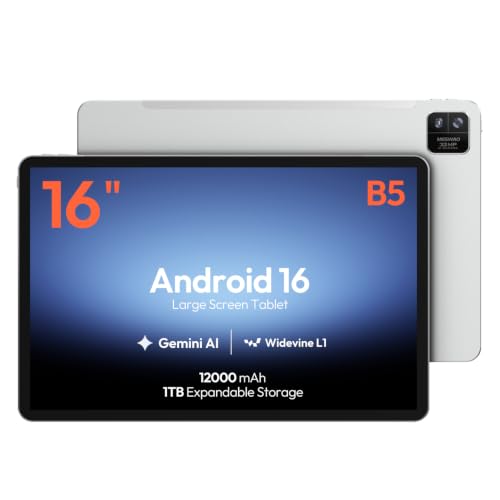
MESWAO 16-Inch Android 16 Tablet with Helio G99, 12GB RAM, 128GB

Lenovo Tab One 8.7″ HD Tablet with Folio Case

JUNINKE Gemini AI 11 inch Android 16 Tablet with Expandable Storage

Samsung Galaxy Tab S7 11-inch 128GB Wi-Fi Android Tablet with S Pen

JUNINKE Kids Android 16 Tablet 10 inch Pink with Pen & EVA Case
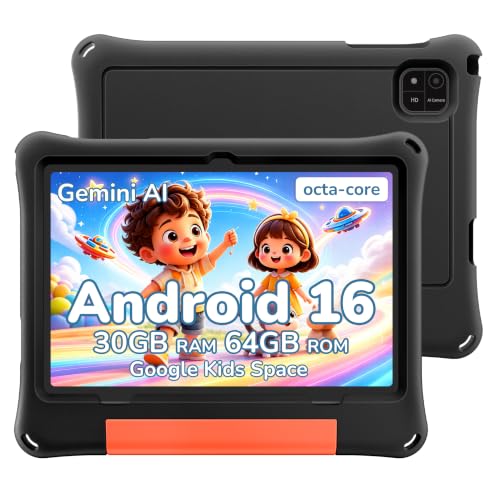
JUNINKE 2026 Android 16 Kids Tablet 10 inch with Black EVA Case
The Details Behind The Selections
The Lenovo Idea Tab Plus opens up a 12.1-inch canvas that genuinely feels closer to a small laptop screen than a typical tablet. Paired with the included Tab Pen and a 90Hz refresh rate (meaning the screen redraws 90 times per second for smoother motion), it handles long sketching sessions without the lag that drives me crazy on cheaper panels. IPS (In-Plane Switching) LCD technology keeps colors accurate even when I’m leaning over to show a client a layout from an awkward angle.
With the MediaTek Dimensity 6400 chip and 8GB of memory under the hood, jumping between a drawing app, a reference PDF, and a Slack chat stays smooth. The 128GB of internal storage holds plenty of working files, though anyone dealing with raw video may want to look at higher-capacity picks. Compared to the smaller Lenovo Idea Tab later in this list, this Plus model trades a bit of pocket-friendliness for breathing room on the screen.
Strengths Worth Knowing
- The 12.1-inch 2.5K IPS panel gives sketches and notes room to breathe, reducing thumb-scroll fatigue during long sessions.
- The 90Hz refresh rate makes pen strokes feel closer to real ink, with minimal visible lag between hand and line.
- The included Tab Pen and Folio case mean I can start writing the moment the box opens, no extra shopping required.
- Arm Mali-G57 MC2 graphics handle mid-tier creative work without choking, useful for layered illustrations or light video edits.
Things To Consider
- At 128GB of storage, heavy video editors may fill the internal space quickly and need a cloud or microSD workaround.
- The 12.1-inch footprint is generous for couch use but heavier to hold one-handed for long reading sessions.
Who It Suits Best
Creators and design students who want a generous canvas without jumping to a full laptop-class device will find this Lenovo Idea Tab Plus a comfortable middle ground.
Where Another Pick Suits Better
For anyone prioritizing a smaller, more pocket-friendly build, the Lenovo Idea Tab 11-inch offers a tighter footprint in a similar Lenovo ecosystem.
The Lenovo Idea Tab leans into its identity as a study companion, packing a sharp 11-inch 2.5K display into a body that slides into most backpacks without a fight. Quad speakers tuned with Dolby Atmos (a spatial-audio format that adds depth to movie and lecture playback) give recorded lectures a fuller sound than the tiny drivers I usually find at this size. The Tab Pen rounds out a bundle that’s ready for the first day of class.
Powered by the MediaTek Dimensity 6300 with 8GB of memory, this Lenovo handles note apps, browser tabs, and music streaming without making me wait. Where the Idea Tab Plus leans toward creative work, this 11-inch sibling focuses more on reading, research, and AI-assisted studying. The 256GB storage bump over the Plus model also helps students hoarding years of PDFs and lecture recordings.
What Pays Off
- The 11-inch 2.5K IPS display hits a sweet spot between portability and screen real estate for textbook reading and split-screen notes.
- Quad Dolby Atmos-tuned speakers make lecture playback and study-podcast listening clearer without headphones.
- 256GB of internal storage outpaces many similarly priced tablets, leaving headroom for years of class materials.
- The MediaTek Dimensity 6300 keeps AI-powered study tools responsive, from on-screen search to translation overlays.
Honest Caveats
- Owners commonly report that the included Tab Pen lacks pressure sensitivity on par with Samsung’s S Pen, so serious illustrators may want a third-party option.
- The smaller 11-inch screen is comfortable for one-handed reading but feels cramped for split-screen multitasking.
Made For
College students who split their day between lectures, note-taking, and late-night study sessions will appreciate the focused balance of screen quality and portability.
Skip It When
Anyone wanting more sketching real estate should look at the Lenovo Idea Tab Plus, whose 12.1-inch panel handles larger compositions more comfortably.
The Samsung Galaxy Tab S6 Lite has earned its reputation as a sensible middle-of-the-road pick, pairing a slim metal body with the included S Pen that magnetically snaps to the edge. The 10.4-inch screen sits comfortably between phone and laptop dimensions, and dual speakers give movies more presence than the chassis size suggests. In real use, this is the tablet I toss in my tote for a coffee shop work session without thinking twice.
Samsung’s long battery life claim and 128GB of internal storage make the Tab S6 Lite forgiving for someone who forgets to charge between meetings. Where the Lenovo Idea Tab Plus chases a bigger creative canvas, this Samsung leans toward portability and polished everyday Android. The S Pen’s pressure-sensitive tip (responding to how hard you press, much like a real pen) earns it a place on lists for hobbyist sketchers, not just scribblers.
The Value In It
- The slim metal chassis feels premium in hand and slides into smaller bags where 12-inch tablets won’t fit.
- Long battery life stretches through a full day of note-taking and streaming for commuters and travelers.
- The included S Pen magnetically attaches for quick grab-and-go sessions, with no charging routine to remember.
- 128GB of storage handles typical app, photo, and document loads for most households and students.
Worth Noting
- Owners commonly note that the 10.4-inch screen can feel tight for split-screen note-taking alongside a textbook.
- The processor is comfortable but not punchy, so heavy multitasking or demanding games may show occasional stutter.
Best Suited To
Everyday note-takers and casual sketchers who value portability, a polished build, and a pressure-sensitive stylus will find the Galaxy Tab S6 Lite a steady daily companion.
Look Elsewhere When
If a bigger creative canvas matters more than pocket-friendliness, the Lenovo Idea Tab Plus gives a roomier 2.5K surface for the same stylus-driven workflow.
The JUNINKE 11-inch Android 16 tablet arrives as a complete kit, with a stylus pen, Bluetooth keyboard, mouse, and a protective black case tucked into the same box. For someone setting up a lightweight workstation without buying extras one by one, that bundle takes the guesswork out of the equation. The octa-core processor (a chip with eight processing cores that handle multiple tasks at once) and modern Android 16 software keep daily office and study tasks responsive.
The shockproof case and bundled stylus make this pick especially forgiving for new users or shared family devices. The trade-off, compared with the Samsung Galaxy Tab S6 Lite, is a less premium build and a stylus that focuses on basic input rather than pressure-sensitive drawing. For productivity-first shoppers, however, the all-in-one nature often outweighs those caveats.
What Helps Most
- The keyboard, mouse, stylus, and case arrive together, skipping the usual accessory hunt for first-time tablet owners.
- The shockproof case adds peace of mind for shared family use, students tossing it into backpacks, or travel-heavy routines.
- Android 16 brings the latest software conveniences to a budget-friendly hardware bundle.
- The octa-core processor keeps web browsing, document editing, and stylus note-taking snappy.
Trade Offs
- The included stylus is generally fine for tapping and basic writing, but it lacks the pressure sensitivity of higher-tier pens like the S Pen.
- The plastic-heavy build won’t feel as refined as the metal Samsung or Lenovo options in this list.
Right Fit For
Budget-conscious shoppers who want a stylus tablet that doubles as a portable workstation, without paying extra for a keyboard or case, will get strong mileage from this bundle.
Consider Something Else When
Artists focused on pressure-sensitive sketching should consider the Samsung Galaxy Tab S6 Lite, whose S Pen offers a more refined drawing experience.
The MESWAO 16-inch tablet is the giant of this roundup, a slab that feels closer to a portable monitor than a typical tablet. The IPS display running at a 1920 x 1200 resolution with a 16:10 aspect ratio gives sheet music, lead sheets, chord charts, and PDF scores plenty of room to breathe. For a working musician or choir director, that extra screen space translates into less scrolling mid-rehearsal.
Powered by Android 16 with a Helio G99 octa-core processor and 12GB of RAM, this tablet handles multiple music apps, lyrics overlays, and a backing track without breaking a sweat. Compared to the Lenovo Idea Tab Plus earlier, the screen trade-off goes the other way: more real estate, more weight to carry. The stylus experience leans toward note-taking and marking up scores rather than fine illustration work.
What Makes Sense
- The 16-inch IPS panel keeps full pages of sheet music, chord charts, and PDFs readable without constant zooming.
- 12GB of RAM and a Helio G99 processor juggle music apps, lyrics, and backing tracks smoothly.
- 128GB of internal storage holds a sizable offline music library for rehearsal spaces with poor Wi-Fi.
- The 16:10 aspect ratio gives a wider workspace for stylus annotation on horizontal scores.
Points To Note
- The 16-inch footprint is heavier and bulkier than any other pick here, making it a poor companion for one-handed couch reading.
- Its 1920 x 1200 resolution is roomy but not as pixel-dense as the 2.5K panels on the Lenovo Idea Tab Plus or Idea Tab 11-inch.
Who Should Grab It
Musicians, choir directors, and music teachers who work from digital scores all day will find this large MESWAO tablet purpose-built for their workflow.
Not Your Match When
Anyone wanting a more portable stylus tablet should consider the Lenovo Idea Tab 11-inch, which trades screen size for backpack-friendly convenience.
The Lenovo Tab One shrinks the stylus tablet idea down to a palm-sized 8.7-inch HD screen that weighs under a pound. Built around a MediaTek Helio G85 processor with 4GB of RAM and 64GB of storage, this tablet handles reading, casual note-taking, and streaming without making a fuss. The included Folio Case adds basic protection and a built-in stand for hands-free video.
For commuters and travelers, the Tab One’s compact frame is genuinely liberating compared to the larger Lenovo Idea Tab Plus or MESWAO 16-inch picks. The trade-off shows up in stylus input, where the smaller screen feels cramped for serious sketching or handwriting. It earns its keep as a reading and light annotation companion that disappears into a coat pocket.
Everyday Advantages
- The 8.7-inch HD display and sub-pound weight make this the easiest tablet here to hold one-handed for long reading sessions.
- Up to 12.5 hours of streaming battery life keeps it alive through flights and long commutes without a charger hunt.
- The Folio Case adds scratch protection and a viewing stand right out of the box.
- 480 nits of brightness (a measure of how much light the screen puts out) keeps text readable in most indoor and outdoor lighting.
Soft Spots
- The 8.7-inch canvas feels tight for stylus note-taking compared to the 10.4-inch Samsung Galaxy Tab S6 Lite.
- 4GB of RAM and 64GB of storage will feel limiting for anyone juggling large files or many open apps.
Perfect Match For
Travelers and commuters who want a featherlight tablet for reading, light annotation, and streaming will find the Lenovo Tab One fits a coat pocket better than any other pick on this list.
A Better Fit Elsewhere
Anyone needing a larger stylus canvas for sketching or note-taking should consider the Samsung Galaxy Tab S6 Lite with its 10.4-inch screen.
The JUNINKE Gemini AI 11-inch tablet leans into raw storage and battery capacity, advertising an 8000mAh cell (a battery capacity rating where higher numbers mean longer runtime) and expandable storage that climbs all the way to 2TB. For someone who hoards offline reference files, music libraries, or scanned documents, that ceiling changes how the tablet gets used day to day. The octa-core T7200 processor and Android 16 software keep everyday tasks responsive.
Where the Lenovo Idea Tab Plus targets creative professionals, this JUNINKE prioritizes office-style flexibility with 4GB of base RAM expandable to 28GB through memory extension. The shockproof case in the box adds drop protection for shared workspaces. Owners commonly report that the bundled stylus handles tapping and short notes well, though it isn’t built for pressure-sensitive illustration work.
Where It Delivers
- Expandable storage up to 2TB removes the usual ceiling on offline document, music, and video libraries.
- The 8000mAh battery keeps the tablet running through long workdays, depending on screen brightness settings.
- Android 16 software brings modern security and interface refinements to a budget-friendly hardware platform.
- Built-in GPS and FM radio add functionality beyond a typical home or office tablet.
Points To Keep In Mind
- The 4GB base RAM feels modest against the Lenovo Idea Tab Plus’s 8GB, so heavy multitasking may lean on memory expansion.
- The bundled stylus focuses on input rather than artistic pressure response, so sketchers may want a third-party pen.
Whose Shelf It Belongs On
Office workers and reference-heavy professionals who need to carry massive offline libraries will find this JUNINKE tablet’s expandable storage a genuine daily advantage.
Reach For A Different Pick When
Creative users focused on illustration should consider the Lenovo Idea Tab Plus, which pairs a larger 2.5K canvas with a more refined Tab Pen.
The Samsung Galaxy Tab S7 steps up to a performance-oriented build, with 128GB of internal storage and fast-charging USB-C that tops up the battery quickly between meetings. The included S Pen uses Bluetooth connectivity to unlock air gestures and remote controls, features the Galaxy Tab S6 Lite lacks. For anyone juggling multiple apps at once, the extra horsepower shows up in smoother multitasking.
The 11-inch display and Mystic Black finish give this tablet a more grown-up, boardroom-friendly look than the lighter Tab S6 Lite. Compared to the Lenovo Idea Tab Plus, the Tab S7 leans more toward productivity than creative canvas size, though both handle stylus input well. USB-C fast charging cuts downtime when the battery runs low mid-project.
Features That Help
- Bluetooth-enabled S Pen adds remote-control and air-gesture features that simpler stylus tablets can’t match.
- Fast-charging USB-C reduces downtime during tight schedules and travel days.
- 128GB of internal storage holds extensive app libraries for productivity-focused users.
- The 11-inch form factor balances portability with enough screen real estate for split-screen multitasking.
Factors To Consider
- The performance hardware commands a higher cost than the Galaxy Tab S6 Lite, which may stretch some budgets.
- Its battery life, while solid, drains faster under heavy multitasking and gaming than smaller entry-level tablets.
Who Will Love This
Productivity-focused professionals and creative pros who value S Pen Bluetooth features and fast charging will find the Galaxy Tab S7 a capable daily workstation.
Swap It Out When
Casual note-takers on tighter budgets will be happier with the Samsung Galaxy Tab S6 Lite, which delivers core stylus functionality at a friendlier cost.

The JUNINKE Kids Tablet wraps Android 16 in a 10-inch chassis wrapped in a pink EVA (ethylene-vinyl acetate, a soft, rubbery foam) protective case, designed for small hands and inevitable drops. Inside, 30GB of combined memory (6GB physical plus memory expansion up to 24GB) handles learning apps, video calls, and stylus doodling without stalling. The included pen lets kids scribble, trace, and complete homework without scratching the screen.
Google Kids Space and Family Link parental controls let caregivers approve apps, set screen-time limits, and filter content, a feature set that’s tough to replicate on adult-targeted tablets. The dual cameras support video calls with relatives, which grandparents always appreciate. Compared to the JUNINKE 2026 Kids Tablet later in this list, the pink version leans into a friendlier, more colorful gift-friendly design.
Standout Benefits
- Google Kids Space and Family Link give parents meaningful control over screen time and content access.
- The pink EVA case cushions drops and makes the tablet easier for small hands to grip.
- The bundled stylus, keyboard, and mouse round out a learning-station setup out of the box.
- Dual cameras support video calls with family members, adding social connection beyond solo play.
A Few Limitations
- The Kids Space interface, while protective, feels limited once children outgrow the curated experience.
- The 10-inch tablet is heavier than the Lenovo Tab One, which younger kids may find tiring during long holds.
Right Fit For
Parents shopping for younger children who need parental controls, a colorful build, and a stylus for learning apps will appreciate the all-in-one design of this JUNINKE Kids Tablet.
Where A Sibling Pick Shines
For families preferring a more neutral look and the same protective build, the JUNINKE 2026 Kids Tablet with Black EVA Case offers the same core experience in a different color.
The JUNINKE 2026 Kids Tablet offers the same 10-inch learning-focused platform as its pink sibling, but wraps it in a black EVA protective case that feels a bit more grown-up. The shock-absorbing bumper takes the sting out of drops, and the included stylus keeps screen scratches at bay. For households that prefer a less colorful device, this black version slips into a backpack without drawing attention.
Underneath the case, Android 16 with 30GB of combined memory handles learning apps, video streaming, and stylus-driven homework. Google Kids Space and Family Link keep parents in control of screen time and content, matching the safety story of the pink JUNINKE Kids Tablet. The trade-off, as with most kids tablets, is a stylus experience that’s better suited to tracing and basic writing than fine art.
Strong Points
- The black EVA case provides rugged drop protection for travel, classrooms, and everyday kid chaos.
- Google Kids Space and Family Link parental controls help manage screen time and content access.
- 30GB of combined memory supports a healthy rotation of learning apps, books, and videos.
- The bundled stylus supports handwriting practice and screen-friendly doodling.
Possible Compromises
- The 10-inch size and EVA case add bulk compared to the pocket-friendly Lenovo Tab One.
- The stylus focuses on basic input and lacks the pressure sensitivity of premium options like the S Pen.
Built With In Mind
Parents looking for a neutral, durable tablet for kids who prefer a less flashy design will appreciate the tough build and parental controls of this JUNINKE model.
Another Choice May Suit
For a more colorful, gift-friendly look with the same protective build, the JUNINKE Kids Android 16 Tablet Pink offers a friendlier aesthetic for younger children.
What Matters Most Before Choosing Android Tablets With Stylus
Screen Size and Resolution
The screen is where you’ll spend every minute with your tablet, so size and pixel count drive daily comfort. A 10.4-inch display like the Samsung Galaxy Tab S6 Lite fits most bags and most reading sessions, while a 12.1-inch panel like the Lenovo Idea Tab Plus gives sketches and split-screen work breathing room. Pixel density (measured in pixels per inch, or PPI) matters more than raw resolution: a 2.5K panel on an 11-inch screen looks sharper than the same resolution stretched across 16 inches.
Stylus Type and Feel
A good stylus feels invisible in your hand, with just enough resistance to mimic real ink. Pressure sensitivity lets lines vary with how hard you press, a feature Samsung’s S Pen and Lenovo’s Tab Pen both offer on higher-tier models. Cheaper bundles like the JUNINKE 11-inch option focus on tapping and basic writing, which suits office work but not detailed illustration.
Performance and Storage
Processors and RAM decide how many apps you can juggle before things slow down. The MediaTek Dimensity 6400 in the Lenovo Idea Tab Plus and the Helio G99 in the MESWAO 16-inch tablet handle mid-tier creative work comfortably. Storage matters for offline files, so anyone hoarding PDFs, sheet music, or video should prioritize expandable storage or 256GB configurations.
Use Case Fit
The honest read is that no single tablet wins every category. A musician wants the MESWAO 16-inch canvas, a student wants the Lenovo Idea Tab 11-inch with AI study helpers, and a parent wants a JUNINKE Kids Tablet with parental controls. Matching the device to the use case beats chasing specs.
Key Considerations Across These Picks
Pitfalls Shoppers Hit
Many shoppers chase the largest screen or the cheapest bundle without checking stylus quality, then end up with a tablet that’s awkward to write on. Pressure sensitivity varies wildly between models, and a stylus without it makes sketching feel like dragging a plastic stick across glass. Another common slip is ignoring weight, since a 16-inch tablet like the MESWAO is exhausting to hold one-handed for a long reading session.
What The Higher Tier Buys
Stepping up to premium models like the Lenovo Idea Tab Plus or Samsung Galaxy Tab S7 buys sharper displays, pressure-sensitive pens, and faster processors that handle multitasking without stutter. You also get better build materials, like the metal chassis on the Galaxy Tab S6 Lite, which feels more durable than plastic-heavy budget bundles. The upgrade payoff shows up most clearly for creative professionals and students who depend on their tablet daily, where lag and low responsiveness compound into lost time.
Frequently Asked Questions
Do all Android tablets support a stylus?
Most Android tablets support capacitive styluses (pens that mimic a fingertip on the touchscreen), but only specific models include pressure-sensitive pens like Lenovo’s Tab Pen or Samsung’s S Pen. Check the manufacturer’s specifications before assuming stylus support.
Can I use any Bluetooth stylus with these tablets?
Bluetooth styluses offer extra features like air gestures and remote controls, but they typically work best with the brand they were designed for. A third-party stylus may connect but won’t unlock proprietary features like Samsung’s air actions or Lenovo’s pen shortcuts.
How important is screen refresh rate for stylus use?
A higher refresh rate, like the 90Hz panels on the Lenovo Idea Tab models, makes pen strokes appear smoother and closer to real ink. For detailed drawing, that difference is noticeable; for basic note-taking, a standard 60Hz screen still works fine.
Are kids tablets good for adults?
Kids tablets like the JUNINKE Kids Tablet run full Android with parental controls that adults can disable. The hardware handles everyday tasks well, but the rugged cases and curated app stores feel clunky once you outgrow them.
What’s the difference between LCD and OLED screens?
LCD screens, including the IPS panels on most picks here, use a backlight that stays on regardless of the image, which keeps them affordable and bright. OLED screens turn off individual pixels for true blacks and richer contrast, though they appear less often in this price range.
Closing Remarks
A stylus tablet only earns its spot on your desk if it matches how you actually work, not just what’s on the spec sheet. The Lenovo Idea Tab Plus covers creators, the Samsung Galaxy Tab S6 Lite handles everyday note-takers, and the JUNINKE Kids Tablet wraps learning in a tough shell. Pick the one that lines up with your real routine, and the stylus becomes a tool rather than a novelty.
