

Some people scribble notes in the margins of a PDF. Others draw for a living. A few just want to tap a screen without leaving fingerprints everywhere. Whatever the reason for reaching for a stylus, the tablet underneath has to keep up: comfortable to hold, smooth under the pen tip, and quick enough that handwriting feels like handwriting rather than a stutter. The shortlist below pulls together ten Android tablets with bundled or compatible styluses, ranging from compact creator companions to kid-proof learners and even a giant 16-inch canvas.
The Picks In Brief

SAMSUNG Galaxy Tab S6 Lite 10.4″ Android Tablet with S Pen

11 inch Android 16 Tablet with Stylus, Mouse, Keyboard

TCL NXTPAPER 11 Plus 11.5″ 2.2K 120Hz Tablet

TCL NXTPAPER 14 14.3″ 2.4K Tablet with T-PEN

TCL Note A1 NXTPAPER 11.5″ Paper Tablet
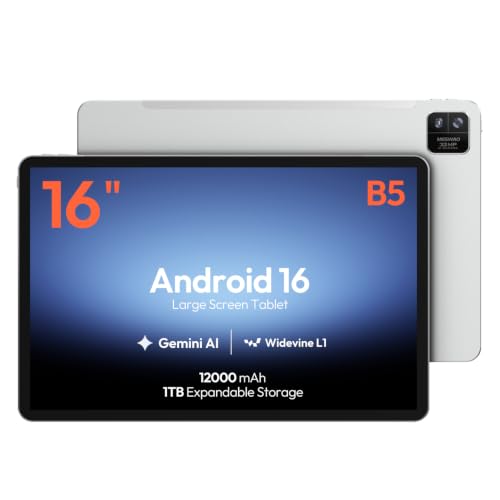
MESWAO 16-Inch Android 16 Tablet, Helio G99

Gemini AI Android 16 11″ Tablet, 32GB+256GB

Samsung Galaxy Tab S7 11-inch Android Tablet with S Pen

Kids Android 16 Tablet 10″ with Stylus Pen (Pink)
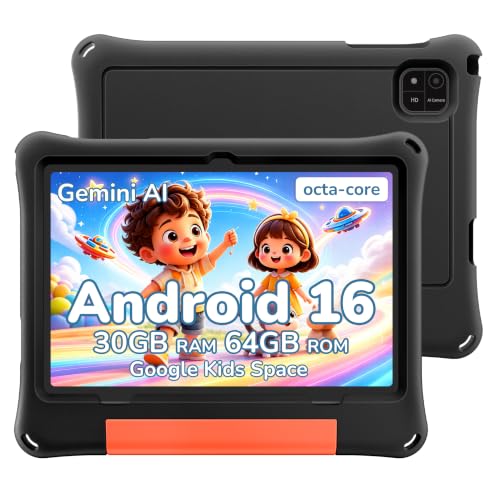
2026 Android 16 Kids Tablet 10″ with Black EVA Case
Inside Each Recommended Option
The Galaxy Tab S6 Lite is the kind of tablet that quietly does its job without fuss. Its slim metal chassis slips into a backpack, and the bundled S Pen magnetically tucks into the side so it never rolls off a cafe table. Students marking up lecture slides and travelers sketching in airport lounges get the same experience: a responsive tip, no charging needed, and a screen big enough to read comfortably for an hour or two.
128GB of internal storage gives breathing room for a semester of notes, e-books, and reference PDFs. The long-lasting battery is the kind of feature that only matters when you forget your charger and still make it through a workday. For most people buying a stylus tablet for everyday writing and reading, this is where I’d start the conversation.
Advantages To Know
- S Pen included in the box, so there is no extra accessory to track down.
- Slim metal build feels solid in hand and travels well in a small bag.
- Dual speakers handle casual video without needing headphones.
- Battery life commonly covers a full day of mixed reading and notes.
Things To Consider
- The 10.4-inch screen can feel tight for split-screen multitasking with PDFs and notes side by side.
- S Pen does not need charging, but replacement tips are worth keeping on hand for heavy daily writers.
Who It Suits Best
University students, journal writers, and commuters who want a proven stylus experience without paying flagship prices will get along well with this pick.
Where Another Pick Suits Better
Artists who need 4096-level pressure sensitivity and a paper-textured display should look at the TCL NXTPAPER 11 Plus instead.
Where the Galaxy Tab S6 Lite keeps things minimal, this 11-inch Android 16 tablet goes the other direction and ships with everything in one box. The octa-core processor, Bluetooth keyboard, wireless mouse, and stylus pen arrive together with a shockproof protective case. Anyone furnishing a study nook on a tight budget gets a full desk setup without separate shopping trips.
The 11-inch screen is a comfortable middle ground: bigger than the S6 Lite for split-view research, smaller than the TCL NXTPAPER 14 for easy couch carrying. Running Android 16 keeps app compatibility current. The bundled case is genuinely useful since dropping a stylus-equipped tablet is the fastest way to ruin the whole experience.
Benefits That Matter
- Keyboard, mouse, stylus, and case all included, which keeps total setup costs predictable.
- Octa-core performance handles document editing, video calls, and casual games smoothly.
- 11-inch display sits in the sweet spot between portability and usable workspace.
Trade Offs
- Bundled accessories are functional rather than premium, so the stylus may not match the feel of a dedicated drawing tool.
- The shockproof case adds bulk, which commuters packing a slim tote may notice.
- Long-term app support and update cadence are less established than Samsung’s track record.
Made For
Remote learners, first-year college students, and home offices building a complete workstation from a single order will appreciate the all-in-one packaging.
Consider Something Else When
Creative professionals who pressure-test their stylus on detailed illustration work will be better served by the TCL NXTPAPER 14.
Sketching on a glossy glass screen is its own small frustration: the pen slips, the glare fights back, and the surface never feels like the thing it is imitating. TCL’s NXTPAPER 11 Plus tackles that head-on with a textured display that mimics paper grain. Pair it with the bundled T-PEN stylus, which reads 4096 pressure levels, and the act of drawing starts to feel familiar rather than simulated.
The 11.5-inch 2.2K panel runs at 120Hz, which keeps brush strokes from ghosting during fast shading. 8GB of RAM and 256GB of storage handle layered artwork and a packed PDF library at the same time. Where the Galaxy Tab S6 Lite is a generalist, this TCL leans firmly toward artists and serious note-takers.
Positive Takeaways
- NXTPAPER display reduces glare and gives the pen tip a more natural grip.
- 4096-level pressure detection captures subtle shading in drawing apps.
- 120Hz refresh rate keeps the line under the pen tight during quick strokes.
Worth Noting
- The textured screen, while easier on the eyes, can make colors look slightly muted compared to a standard glossy panel.
- The T-PEN relies on battery power, so keeping a charging routine matters for daily drivers.
Best Suited To
Digital illustrators, design students, and journal enthusiasts who treat pen input as the main reason to buy a tablet.
Look Elsewhere When
Shoppers wanting a more general-purpose tablet with stylus support should consider the SAMSUNG Galaxy Tab S6 Lite for everyday writing.
When the canvas needs to disappear so the work can take over, a 14.3-inch display does heavy lifting. The TCL NXTPAPER 14 stretches the paper-textured idea from the 11 Plus into a workspace big enough for side-by-side sheet music, two-page PDF annotations, or a full digital painting without constant zooming. The 4096-level T-PEN reads every stroke with enough fidelity for musicians marking scores and illustrators blocking out compositions.
The 2.4K resolution keeps text crisp at reading distance, and 8GB of RAM with 256GB of storage gives room for large project files. Compared to the MESWAO 16-inch option reviewed later, this TCL trades raw screen size for the more comfortable paper-feel coating. For long sessions where eye comfort matters as much as canvas size, that trade usually wins.
Key Advantages
- 14.3-inch 2.4K paper-like display fits full sheet music or two-page documents without scrolling.
- T-PEN with 4096 pressure levels supports nuanced drawing, marking, and handwriting.
- NXTPAPER technology reduces glare, which helps during long studio sessions.
- 256GB of storage holds large project files and media libraries.
Soft Spots
- The 14.3-inch frame is less lap-friendly than the NXTPAPER 11 Plus for couch sketching.
- Premium positioning means a higher entry cost than most general Android tablets.
Whose Shelf It Belongs On
Composers, art students, and professional illustrators who want a single device to replace notebooks, sheet music binders, and a sketchbook.
Not Your Match When
Casual note-takers shopping for a smaller everyday carry should turn to the SAMSUNG Galaxy Tab S6 Lite for a more pocketable form factor.
The TCL Note A1 is the most focused option in this list: a tablet built to behave like a stack of paper. Powered by NXTPAPER PURE, the screen cuts glare harder than the standard NXTPAPER coating and adds a TÜV-certified eye comfort layer for long reading and writing stints. Writers working through a novel draft or students paging through textbook chapters will feel the difference after a couple of hours.
The 11.5-inch 2.2K panel runs at 120Hz, so scrolling through notes or flipping pages stays smooth. 8GB of RAM and 256GB of internal storage leave plenty of space for e-books, handwritten archives, and reference documents. A quick firmware update after setup is worth doing, since it improves stylus responsiveness across the supported apps.
Where It Delivers
- NXTPAPER PURE coating provides a tactile, low-glare surface for handwritten work.
- TÜV-certified eye protection helps during multi-hour reading sessions.
- 3A Crystal Shield Glass resists fingerprints and minor scratches during daily carry.
Points To Keep In Mind
- Setup requires a firmware update for the best stylus response, which adds a step before first use.
- Color reproduction leans toward natural rather than vivid, so media consumption looks slightly subdued.
The Right Fit
Writers drafting longhand, researchers annotating papers, and anyone with eye-strain concerns who reads and writes for hours each day.
A Better Fit Elsewhere
Artists wanting maximum screen real estate for full-page illustrations should step up to the TCL NXTPAPER 14 instead.
A 16-inch tablet is closer to a portable monitor than a phone-tablet hybrid, and the MESWAO leans into that scale. The IPS panel runs 1920 x 1200 with a 16:10 aspect ratio, which fits full pages of digital sheet music, chord charts, lead sheets, and rehearsal notes without pinching to zoom. Musicians following along during practice or lessons get the kind of breathing room smaller tablets cannot match.
Android 16 paired with a Helio G99 octa-core processor handles standard music, document, and browsing apps without strain. 12GB of RAM keeps multiple tabs and reference materials open at once. The trade-off is obvious: this is a desk-bound tablet more than a couch companion, and the stylus experience centers on marking up existing material rather than pressure-sensitive drawing.
Everyday Perks
- 16-inch screen displays full sheet music pages without scrolling or zooming.
- 12GB of RAM supports running a notation app alongside lesson videos.
- Android 16 keeps app compatibility current for modern music tools.
Some Limits To Know
- At 16 inches, the tablet is heavier and harder to hold one-handed than every other pick on this list.
- Resolution is modest for the screen size, so fine text in dense PDFs can look slightly soft.
Perfect Match For
Practicing musicians, choir directors, and music teachers who want a portable digital music stand with stylus annotation built in.
Skip It When
Shoppers wanting a portable everyday tablet will find the TCL NXTPAPER 11 Plus a more manageable size for daily carry.
Storage anxiety is real for anyone who treats a tablet like a second brain. The Gemini AI Android 16 tablet answers that with a 256GB internal ceiling that can be pushed out to 2TB through expandable storage, plus 32GB of total RAM for juggling large files. Long-haul travelers, field researchers, and anyone working offline for stretches will appreciate not having to curate what stays on the device.
The 11-inch form factor is a familiar middle ground, and the 8000mAh battery keeps the screen lit through a full day of stylus note-taking. An octa-core processor paired with that much memory handles split-screen multitasking without dropping frames. The shockproof case in the bundle adds peace of mind for travel and outdoor use.
Where It Excels
- Expandable storage up to 2TB accommodates massive media libraries and offline project files.
- 8000mAh battery supports extended sessions away from a power outlet.
- Bundled shockproof case protects the stylus workflow from everyday drops.
Honest Caveats
- The 32GB RAM figure includes expansion rather than physical RAM, so peak performance depends on workload.
- The included stylus is functional for notes and signatures but not aimed at pressure-sensitive illustration.
Who Should Grab It
Travelers, field workers, and anyone who treats their tablet as a primary offline workstation with stylus input.
Reach For A Different Pick When
Creative artists focused on pressure-sensitive drawing will be happier with the TCL NXTPAPER 11 Plus.
The Galaxy Tab S7 has been on shelves long enough that owners have stress-tested every part of the experience. The S Pen here supports pressure-sensitive input and magnetically docks along the edge for charging, which keeps the workflow tidy. For shoppers who care about long-term app support and a mature stylus ecosystem, that track record carries real weight.
The 11-inch screen, 128GB of storage, and USB-C fast charging cover the daily checklist without surprises. Bluetooth connectivity handles wireless headphones and keyboards for desk setups. Compared to the newer TCL NXTPAPER options, this Samsung leans on refined software polish and brand familiarity rather than cutting-edge display tech.
Why It Works Well
- S Pen with magnetic charging dock keeps the stylus ready without separate cables.
- USB-C port supports fast charging and easy data transfers.
- 128GB internal storage fits a working library of apps, notes, and media.
- Mature Samsung software means wide accessory compatibility.
Room For Improvement
- Display is glossy glass, so glare in sunlit spaces is more of a factor than on the TCL NXTPAPER models.
- As an older release, the processor is showing its age against the newest TCL hardware.
Built With In Mind
Prosumers who value a refined stylus software experience and brand reliability over the latest display coatings will feel at home here.
Swap It Out When
Shoppers prioritizing eye comfort during long reading sessions should consider the TCL Note A1 NXTPAPER.
A kid’s tablet has to survive juice spills, sudden drops, and the kind of creative hammering only a seven-year-old can deliver. This 10-inch Android 16 tablet ships with an EVA protective case, a stylus pen, a keyboard, and a mouse, so the bundle covers schoolwork, drawing practice, and basic typing without extra shopping. The pink shell signals it’s the kids’ device at a glance, which avoids the daily kitchen-table argument.
Google Kids Space provides age-appropriate apps, books, and videos, while Google Family Link gives parents app approvals, screen-time limits, and content filters. Dual cameras handle video calls with grandparents and the occasional selfie. 30GB of combined memory and 1TB of expandable storage leave plenty of room for downloaded lessons and family photos.
Useful Highlights
- Stylus and keyboard bundle supports handwriting practice and early typing skills.
- Google Kids Space curates age-appropriate content automatically.
- EVA case cushions drops and resists spills during daily use.
- Family Link parental controls let caregivers manage screen time and app access.
Practical Considerations
- Stylus is general-purpose rather than pressure-sensitive, so detailed art apps will not feel professional.
- EVA case adds noticeable bulk, which younger hands may need time adjusting to.
Who Will Love This
Parents building a safe first tablet for elementary-aged children who want stylus handwriting practice built in from day one.
Where A Sibling Pick Shines
Families wanting a more rugged, less colorful build for shared use should consider the 2026 Android 16 Kids Tablet 10″ with Black EVA Case.
Color-coded shells are great until the device gets handed between siblings, cousins, and weekend sleepovers. The 2026 Android 16 Kids Tablet skips the color cue and leans into a reinforced black EVA case built to absorb drops, scuffs, and the general entropy of childhood. The neutral finish also ages well past the early elementary years.
Google Kids Space and Family Link handle the same content curation and parental controls as the pink sibling model above. Stylus support is bundled in for handwriting practice, though the included pen targets general use rather than detailed art. For families who want one durable tablet that can move between kids without re-explaining whose it is, this is the practical pick.
Useful Touches
- Reinforced black EVA case handles repeated drops and rough handling.
- Stylus included for early handwriting and basic sketching practice.
- Family Link parental controls cover screen time, app approval, and content filtering.
- Neutral finish suits shared use between siblings or age groups.
Worth Bearing In Mind
- Stylus response is basic compared to the pressure-sensitive T-PEN on the TCL NXTPAPER models.
- Color-neutral design may not feel as personalized for a single child owner.
Right Fit For
Families with multiple children or shared-device households who want a single kid-ready tablet that holds up to heavy rotation.
Another Choice May Suit
Parents shopping for a single dedicated tablet for one child may prefer the Kids Android 16 Tablet 10″ with Stylus Pen (Pink) for a more personal feel.
What To Weigh Before Picking A Stylus Tablet
Stylus tablets split into three camps based on the kind of work the pen has to do. The first camp is general note-taking and reading, where a comfortable grip, low weight, and decent battery life matter more than pressure levels. The second camp is creative work, where 4096 pressure levels (the number of distinct pressures a stylus can register between a light tap and a firm press), tilt support, and a textured paper-feel screen change the experience from usable to convincing. The third camp is kid-focused, where durability, parental controls, and bundled accessories outweigh technical polish.
Screen size changes how a stylus tablet lives in a routine. A 10-inch class device slips into a backpack or large purse and disappears during commutes. An 11- to 11.5-inch screen is the comfortable middle ground for split-view research and couch sketching without feeling oversized. Anything 14 inches or larger starts behaving like a desk tool, which suits musicians, designers, and illustrators more than casual users.
Stylus charging and storage decide whether the pen actually ends up where it should. Magnetic attachment along the tablet edge is the most convenient option since it docks and charges at the same time on supported devices. Passive styluses like the Samsung S Pen on the S6 Lite never need charging, which removes one step from the daily routine. Active styluses with pressure sensitivity usually need either a charging dock or replaceable batteries, so a quick check on the charging method prevents the “dead pen” surprise during an important meeting.
Software ecosystem matters more than people expect. Samsung’s S Pen benefits from years of app refinements and broad accessory support, while TCL’s T-PEN offers strong hardware but a younger app ecosystem. For general use, either works well. For specialized creative apps, a quick check on stylus compatibility saves frustration later.
Key Considerations Across These Picks
Pitfalls Shoppers Hit
Treating stylus tablets like generic Android tablets leads to disappointment. A glossy glass screen fights the pen tip, and a basic stylus without pressure sensitivity flattens drawing into digital marker scribbles. Shoppers also tend to underweight bundle value: a tablet that ships with case, keyboard, and stylus often saves more than the gap between two near-identical screens. Finally, skipping a quick firmware update after setup can leave a stylus feeling sluggish for weeks.
What The Higher Tier Buys
Stepping up to premium models like the TCL NXTPAPER 14 buys three things: a larger, eye-friendly paper-textured display, refined pressure sensitivity with 4096 levels, and the kind of build that survives years of daily stylus work. For artists, musicians, and heavy note-takers, those upgrades translate directly into less eye strain, finer control, and fewer compromises during long sessions. For casual readers and occasional scribblers, the midrange picks deliver most of the practical value at a friendlier cost.
Frequently Asked Questions
Do all Android tablets work with any stylus?
No. Stylus support depends on the tablet’s digitizer (the hardware layer under the screen that detects pen input). Some tablets only work with active, brand-specific pens that use pressure sensitivity, while others accept passive capacitive styluses (basic pens that work by conducting electricity from your hand, similar to a fingertip). Always check the manufacturer’s compatibility list before assuming a third-party stylus will work.
How important is pressure sensitivity?
For note-taking and casual marking, basic styluses work fine. For drawing, shading, or any work where line weight matters, pressure sensitivity (measured in levels, with 4096 being a strong modern standard) makes a real difference. The TCL NXTPAPER models and the SAMSUNG Galaxy Tab S7 support this, while simpler styluses on kids tablets do not.
Can I use a stylus tablet without the stylus?
Yes. Every tablet on this list works as a touchscreen device for browsing, video, and apps. The stylus is an added input method, not a requirement for basic use. Most shoppers reach for the pen for specific tasks like signing documents, annotating PDFs, or drawing, then go back to fingers for everything else.
How long do stylus batteries last?
It varies by model. Passive styluses like the S Pen on the SAMSUNG Galaxy Tab S6 Lite never need charging at all. Active styluses with Bluetooth and pressure features typically last weeks to months on a single charge, depending on daily use. A quick check of the manufacturer’s runtime claim helps set expectations.
Are stylus tablets good for kids?
They can be, but the right pick depends on the child’s age and habits. Younger kids benefit from kid-focused models with rugged cases, parental controls, and bundled styluses for handwriting practice. Older students and teens usually do better with a general-purpose tablet like the SAMSUNG Galaxy Tab S6 Lite that grows with their needs.
Wrap Up
The right Android tablet with a stylus depends almost entirely on what the pen has to do. Daily note-takers get the most from the SAMSUNG Galaxy Tab S6 Lite and the proven Galaxy Tab S7. Artists and serious journal writers will feel at home on the TCL NXTPAPER 11 Plus or the TCL NXTPAPER 14. Musicians who want a portable music stand should look at the MESWAO 16-inch tablet, while families shopping for children have two kid-focused options that handle the realities of daily use. Whatever the routine looks like, there is a stylus tablet on this list ready for the work.
