

Whether I’m sketching in a meeting, marking up a PDF during class, or just dumping thoughts before they vanish, the right tablet makes the whole routine feel lighter. I’ve rounded up seven strong options that pair well with a stylus, hold up to daily writing sessions, and don’t force me to fight the software to get a sentence down. Some lean premium, some lean rugged, and a couple are simply solid everyday drivers for jotting things down.
The Main Contenders

HOTWAV R11 Pro Rugged Tablet with Pen Android 16

Apple iPad 9.7-inch 32GB Wi-Fi Gold
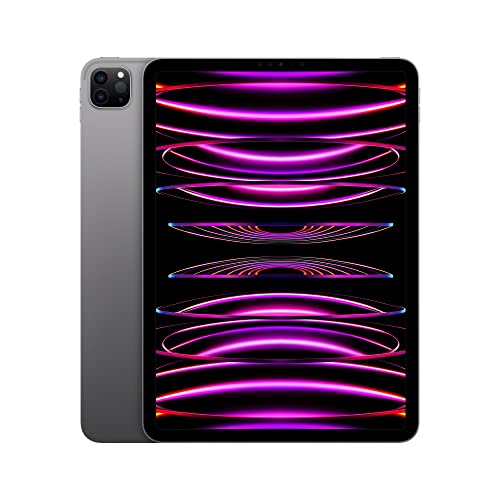
Apple iPad Pro 11-inch M2 128GB Wi-Fi

HOTWAV R9 Ultra 5G Rugged Tablet with Pen 11″

Samsung Galaxy Tab S7 11-inch 128GB Wi-Fi

HOTWAV R8 Rugged Tablet Android 14 10.1″
AOC 10 Inch Tablet Android 16 120Hz 128GB
Taking A Closer Look At The Options
The HOTWAV R11 Pro is a tiny, tough slate that fits where most note-taking tablets won’t: a coat pocket, a clipped pouch on a tool belt, the inside pocket of a backpack. The 8.7-inch screen is small by modern standards, but that’s the point for people who write standing up or one-handed.
It runs Android 16 and ships with a stylus, which removes the usual extra-purchase headache. The rugged body should shrug off the kind of knocks that would end a meeting on a regular tablet. It suits outdoor pros, inspectors, and anyone who treats their gear roughly.
What Earns Its Place
- Compact 8.7-inch form slips into pockets and small bags
- Bundled stylus means no accessory hunting
- Rugged shell built for drops and rough handling
- NFC support for quick pairing and card tasks
- Android 16 keeps the software current
Honest Caveats
- The small screen can feel cramped for long-form handwriting
- Carrier compatibility is limited, so cellular shoppers must check their network
- Rugged cases tend to add noticeable weight compared to slim consumer tablets
Who It Suits Best
Field workers, contractors, and outdoor note-takers who want a small, durable slate they can carry everywhere without babying it.
Skip It When
Heavy readers and writers should look at the Samsung Galaxy Tab S7, whose 11-inch canvas gives handwriting far more room to breathe.
The 9.7-inch iPad is the familiar entry point for tablet note-taking, and that familiarity is part of its charm. Apps are plentiful, stylus support is solid through compatible third-party pens, and the Retina display keeps handwriting legible without strain.
The A10 Fusion chip handles note-taking apps with ease, though it is starting to feel its age for heavier multitasking. Storage at 32GB fills quickly if you cache a lot of video, but text notes and PDFs take very little room. Students and casual writers on a budget get the most from it.
Notable Gains
- 9.7-inch Retina screen makes handwriting feel natural
- Touch ID fingerprint sensor for quick, secure unlock
- Wi-Fi only keeps the price accessible
- Mature app ecosystem for notes and markup
Points To Note
- 32GB fills fast when storing video alongside notes
- Older chip may lag with the heaviest multitasking apps
- Apple Pencil compatibility requires a first-generation Pencil bought separately
Made For
Students and casual note-takers who want a simple, affordable tablet with a generous app library.
Look Elsewhere When
Creatives who lean on pressure-sensitive drawing should consider the Apple iPad Pro 11-inch M2 for its smoother graphics and brighter canvas.
The iPad Pro with M2 is the slate you reach for when note-taking is just the start of what you do. The 11-inch Liquid Retina display renders fine strokes and faint annotations clearly, and the M2 chip chews through split-screen workflows without breaking a sweat.
Wi-Fi 6E keeps cloud syncing fast on supported routers, and the 12MP front camera sharpens video calls during remote meetings. Face ID replaces the home button for a cleaner screen real estate. It’s a polished choice for pros who treat handwriting, sketching, and document review as one continuous flow.
Features That Help
- M2 chip keeps multitasking and big files responsive
- Liquid Retina display is easy on the eyes during long sessions
- Wi-Fi 6E for quick cloud syncs over modern routers
- Face ID streamlines unlocking mid-task
- 128GB base storage handles typical note libraries comfortably
A Few Limitations
- Costs considerably more than entry-level options
- Best stylus experience requires a separately purchased Apple Pencil
- Glossy screen shows glare under harsh overhead lighting
Quick Facts
Best Suited To
Creative professionals and heavy multitaskers who need flagship speed and an excellent display for mixed writing and design work.
Where Another Pick Suits Better
Budget-focused shoppers who mainly type and jot should consider the Apple iPad 9.7-inch 32GB, which covers the basics for less.
The R9 Ultra is the bigger sibling to the R11 Pro, swapping pocket-portability for an 11-inch canvas that gives handwriting plenty of room. The waterproof shell means rain, splashes, and dusty environments don’t have to interrupt a thought mid-sentence.
Running Android 15 with 5G onboard, it stays connected when Wi-Fi isn’t around, and the included stylus removes another accessory decision. It makes sense for site supervisors, engineers, and field researchers who write a lot and worry about their gear.
Positive Takeaways
- Large 11-inch screen gives handwriting generous space
- Waterproof build handles wet and dusty environments
- 5G connectivity keeps work moving off Wi-Fi
- Bundled stylus simplifies the out-of-box setup
Things To Weigh
- 5G variants typically cost more than Wi-Fi-only models
- Carrier support excludes some major networks, so checking compatibility matters
- Rugged chassis adds heft compared to glass-and-metal tablets
Key Specs
Perfect Match For
Site supervisors and outdoor professionals who need a larger, tougher tablet that stays online almost anywhere.
Consider Something Else When
Light travelers who don’t need waterproofing should consider the AOC 10 Inch Tablet, which is lighter and more polished for indoor use.
The Galaxy Tab S7 is the Android note-taking tablet most people picture when they think about stylus-first slates. The included S Pen clicks onto the back magnetically, charges while it sits, and responds with low-latency strokes that feel closer to pen-on-paper than to finger-on-glass.
The 11-inch display sits comfortably between phone-sized and laptop-sized, and 128GB gives room for a healthy mix of notes, ebooks, and reference materials. The Mystic Black finish keeps it looking grown-up in client meetings. It hits the sweet spot for writers, students, and pros who want the S Pen experience without jumping to a flagship phone’s price tier.
Strengths Worth Knowing
- Low-latency S Pen included in the box
- 11-inch display balances portability with writing space
- 128GB storage swallows most note libraries
- USB-C charging matches modern accessories
Things To Consider
- Wi-Fi only at this listing means no built-in cellular option
- Some carriers will require checking LTE band support separately
- S Pen is easy to misplace since it doesn’t lock into a silo
Feature Snapshot
Who Should Grab It
Android-first note-takers who want a refined stylus experience without paying flagship prices.
A Better Fit Elsewhere
Users who need cellular on the go should look at the HOTWAV R9 Ultra 5G, which adds 5G alongside a rugged build.
The R8 sits in the middle of HOTWAV’s rugged lineup with a 10.1-inch Incell HD+ display, which is a comfortable size for taking notes without needing a backpack-sized slate. Android 14 keeps the software close to current, and the waterproof shell shrugs off splashes in a shop or garage.
4G cellular support means it can tether on the road when Wi-Fi disappears. For mechanics, makers, and workshop tinkerers who want to scribble measurements, mark up diagrams, or stream tutorials between tasks, it covers a lot of ground without the flagship price tag.
Practical Pluses
- 10.1-inch screen is a friendly size for handwriting
- Waterproof build handles shop and outdoor spills
- Android 14 with octa-core processor keeps multitasking smooth
- 4G option for connectivity outside Wi-Fi
Less Ideal Details
- Incell HD+ is sharp but not the brightest in direct sunlight
- Carrier restrictions apply, so checking network bands matters
- Stylus is typically sold separately from the base package
Right Fit For
Workshop users and hands-on hobbyists who want a mid-sized, rugged tablet that can take a beating.
Swap It Out When
Note-takers who prefer a stylus in the box should consider the Samsung Galaxy Tab S7, which ships with its pen ready to go.
AOC’s 10-inch tablet leans into the modern software side of things, running Android 16 on an 8-core processor with a 120Hz IPS display. That higher refresh rate, the number of times the screen redraws per second, makes scrolling and stylus strokes feel noticeably smoother than older 60Hz panels.
The metal body gives it a more polished feel than plastic alternatives, and Widevine L1 support unlocks HD streaming from common services for downtime between note sessions. 128GB of storage, expandable to 1TB, leaves plenty of room for offline notes, lectures, and reference files. Students juggling study notes with video lectures will appreciate the split-screen-friendly software.
Where It Excels
- 120Hz display makes stylus input feel responsive
- Android 16 brings current software features
- Metal body adds a touch of refinement
- Widevine L1 for HD streaming from popular services
- Storage expands up to 1TB via microSD
Some Limits To Know
- Wi-Fi only, no cellular option
- Stylus is typically a separate purchase
- Battery life depends heavily on refresh rate and brightness settings
At A Glance
Built With In Mind
Students and home note-takers who want a current-software tablet with smooth visuals and HD streaming between sessions.
Reach For A Different Pick When
Outdoor workers who need cellular and waterproofing should look at the HOTWAV R9 Ultra 5G instead.
What To Weigh Before Picking Your Next Note Tablet
Screen Size And Writing Comfort
Tablet screens are measured diagonally from corner to corner, so a 10-inch panel offers more writing space than an 8.7-inch one. For long handwriting sessions, anything from 10 inches upward tends to feel less cramped. Smaller slates win on portability but trade away room for margin notes and PDF markup.
Stylus Support And Feel
A good stylus should feel low-latency, meaning the ink appears almost instantly under the pen tip. Pressure sensitivity, the pen’s ability to detect how hard you’re pressing, helps when sketching or shading. Some tablets ship with a pen in the box, while others treat it as an extra purchase worth budgeting for.
Software And Updates
A newer Android version usually means longer software support and better app compatibility. Notes apps on Android are mature, but specific features like split-screen multitasking and stylus hover tools vary by version and manufacturer skin.
Build And Environment
A slim glass-and-metal tablet looks elegant but doesn’t forgive drops. Rugged models add bulk and weight in exchange for waterproofing and shock resistance. Match the build to where the tablet will actually live: desk, bag, job site, or somewhere in between.
Key Considerations Across These Picks
Common Shopping Slip Ups
The easiest mistake is choosing a tablet based on screen size alone and forgetting the stylus situation. Some slates ship without a pen, leaving you hunting for a compatible accessory later. Carrier compatibility is another quiet trap: not every cellular tablet works on every network, so verifying bands saves headaches before unboxing.
Where The Extra Money Goes
Spending more typically buys a faster processor, a higher-refresh display, and better stylus latency. Premium models also tend to include longer software support and brighter screens for outdoor use. The upgrade pays off when you multitask heavily or write for hours at a stretch, but casual note-takers often find mid-tier hardware more than sufficient.
Frequently Asked Questions
Which screen size is best for handwriting on Android tablets?
For comfortable handwriting, 10 inches and up gives strokes room to flow. Smaller slates work for quick notes but feel cramped during long sessions.
Do all Android tablets support a stylus?
Most modern Android tablets support some form of active stylus, but pressure levels, latency, and bundled pens vary widely between models.
Is a rugged tablet worth it for everyday note-taking?
Rugged builds help if you commute, travel, or work outdoors, but they add weight and bulk that may feel excessive for desk-bound writing.
How much storage do I need for notes?
Text notes and PDFs are small, so 64GB handles most libraries. Add room if you plan to store videos, ebooks, or large sketches.
Can Android tablets replace a laptop for note-taking?
For handwritten notes, markup, and reading, yes. For heavy document editing, spreadsheets, or multitasking with many windows, a laptop still has the edge.
Wrap Up
The best Android tablet for note-taking is the one that matches where and how you write. Casual students and budget shoppers will feel right at home with the iPad 9.7-inch or the AOC 10-inch. Creative pros and multitaskers get the most headroom from the iPad Pro M2 or the Galaxy Tab S7. Outdoor and field note-takers will appreciate the rugged builds from HOTWAV. Pick the slate that fits your routine, and the writing habit tends to follow.
