

Mobile gaming on an Android tablet gets dramatically better the moment a real gamepad enters the picture. Touch controls work fine for casual puzzles, but anything competitive, anything twitch-based, anything with virtual joysticks glued to the screen, feels cramped and imprecise. I put together this list for anyone who wants console-feel input without giving up the convenience of a tablet, covering nine controllers that span casual streaming sessions, serious competitive play, and everything in between.
A Side-By-Side Look

abxylute S9 Full-Size Gaming Phone Controller

Razer Kishi V3 Gaming Controller (USB-C)

abxylute S8 Lite Type-C Mobile Gaming Controller
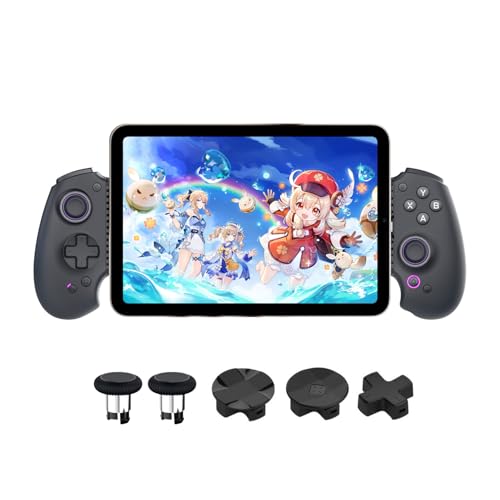
abxylute S9 Full-Size Bluetooth Controller

GameSir G8 Plus Bluetooth Mobile Game Controller (Renewed)

Razer Kishi V3 Pro Gaming Controller (USB-C)

Crotrain Wireless Gaming Controller with Hall Sticks

Crotrain Wireless Gaming Controller with Hall Triggers

Razer Kishi V3 Pro XL for 13-inch Tablets
The Picks, Examined More Closely
The abxylute S9 stands out right away because it commits to a genuine full-size gamepad shape instead of the cramped telescopic grip many mobile controllers settle for. Hall effect joysticks and triggers (sensors that detect stick position magnetically rather than through physical contact, so they don’t wear out from rubbing) handle the inputs, and free button mapping through the companion app means I can rearrange layouts per game without fighting against locked defaults.
Bluetooth pairing over USB-C works smoothly with most modern Android tablets and recent iPad Mini models. For marathon Genshin Impact sessions, the larger handles actually rest in my palms instead of forcing a claw grip, which is the kind of comfort difference that matters after hour two.
Everyday Perks
- Full-size chassis mimics console controllers for familiar muscle memory
- Hall effect sticks and triggers resist stick drift over time
- Companion app offers free button mapping per game
- USB-C connection keeps latency tight for competitive titles
Things To Consider
- Heavier than telescopic grips, so pockets are out of the question
- iPhone 17 Pro is explicitly excluded from compatibility
- Companion app learning curve if mapping feels new
Who It Suits Best
Genshin Impact and similar long-session players who want console-grade ergonomics over portability.
Consider Something Else When
The Razer Kishi V3 is a better fit for anyone who prioritizes a pocketable, travel-first design over full-size handles.
Razer’s Kishi V3 collapses around an Android phone or supported iPhone and turns the screen into a handheld console. Full-sized TMR thumbsticks (tunneling magnetoresistance sensors, a step up from standard Hall effect for even tighter precision) feel noticeably more precise than the rubber nubs on budget alternatives, and the dual mouse-click back buttons give my index fingers somewhere useful to land during FPS firefights.
Compared to the abxylute S9 above, this design is dramatically more compact once you pop the phone out. That tradeoff is exactly the point: travel-friendly, console-feeling, and ready to slide into a backpack.
What It Does Well
- TMR thumbsticks deliver high-accuracy aiming
- Mouse-click back buttons speed up reloads and weapon swaps
- Telescopic design collapses flat for travel
- USB-C passthrough means play-while-charging works without adapters
Trade Offs
- Only fits phones up to a certain size, so larger Android tablets need the Pro or Pro XL version
- TMR sticks are precise but feel slightly stiffer to push than Hall effect alternatives
Made For
Travelers and commuters who want console-class control that disappears into a bag when the session ends.
Skip It When
The Razer Kishi V3 Pro XL is the smarter pick for anyone gaming on a 13-inch iPad or full-sized Android tablet.
The S8 Lite is the kind of plug-and-play controller that just works the moment you slide a phone in. No Bluetooth dance, no app download, no driver hunt. Hall effect joysticks and triggers handle the precision side, and the device fits phones and tablets up to 216mm in length, which covers most phones plus smaller Android tablets comfortably.
It’s lighter and simpler than its S9 sibling above, trading the full-size chassis for a slimmer portable profile. For casual sessions and cloud streaming, that tradeoff works.
Key Advantages
- Plug-and-play USB-C connection skips pairing headaches
- Hall effect sticks promise long-term drift resistance
- Passthrough charging keeps the phone topped up mid-game
- Customizable buttons let me reassign controls per title
Worth Noting
- Smaller form factor means shorter handles than full-size alternatives
- May not grip the largest Android tablets in the 11-to-13-inch range
Best Suited To
Casual mobile gamers who want a simple, no-fuss USB-C controller for shorter sessions and cloud play.
Look Elsewhere When
The Razer Kishi V3 is a stronger match for anyone who wants refined build quality and tighter thumbstick precision.
Where the original S9 ties you to a USB-C connection, this Bluetooth-equipped sibling frees the tablet from the controller’s tether. I can prop the tablet on a stand and play from the couch, or hook it up wired when latency matters more than freedom. Hall effect joysticks and triggers keep aiming sharp across both modes.
It also plays nicely with the Nintendo Switch, which broadens its usefulness beyond just Android tablets. The trade-off versus the wired S9 is battery management, since Bluetooth means another device to keep charged.
Bright Spots
- Dual Bluetooth and USB-C modes cover couch play and competitive wired sessions
- Switch compatibility adds console-library value
- Hall effect inputs resist long-term drift
- Companion app unlocks free key mapping
Points To Note
- Internal battery adds charging responsibility the wired S9 doesn’t have
- Bluetooth latency is fine for most games but lags behind wired USB-C for twitch play
Perfect Match For
Multi-device households with a Switch, a tablet, and a phone all sharing one controller.
Reach For A Different Pick When
The GameSir G8 Plus makes more sense for shoppers who prioritize the lowest cost over Switch compatibility.
The GameSir G8 Plus is sold here as a renewed unit, which keeps the price down while still delivering Hall effect sticks and triggers, a 6-axis gyroscope (a motion-sensing chip that detects tilt and rotation, useful for racing and motion-controlled Switch games), and an extendable design that grips phones, Switch, and tablets alike. For shoppers who care more about the hardware inside than a fresh box, the value story is strong.
Build quality on renewed units varies, and the listing explicitly notes that color selection isn’t available, so I go in expecting a functional controller with cosmetic quirks rather than a pristine shelf queen.
Useful Strengths
- Hall effect sticks and triggers rival new units at this tier
- 6-axis gyro brings Switch-style motion aiming
- Extendable design fits phones, Switch, and smaller tablets
- Renewed pricing makes premium features more accessible
Minor Gripes
- Renewed condition means cosmetic wear varies unit to unit
- No color choice at checkout
- Battery longevity on a renewed unit isn’t guaranteed
Who Should Grab It
Cost-conscious shoppers comfortable with renewed gear who still want Hall effect precision.
A Better Fit Elsewhere
The Crotrain Wireless Gaming Controller is worth a look for anyone who wants brand-new RGB lighting alongside similar Hall stick hardware.
The Kishi V3 Pro takes the V3 formula and stretches it for tablets up to 8 inches, which is where the iPad Mini and many smaller Android tablets land. The larger ergonomic handles feel closer to a console gamepad than to a phone accessory, and the telescopic mechanism handles the size jump cleanly.
Compared to the standard V3 above, the Pro earns its place the moment a phone screen starts feeling cramped. The catch is bulk: this isn’t going in a jacket pocket.
Reasons It Performs
- Larger grips match console controller ergonomics
- Fits phones, iPad Mini, and Android tablets up to 8 inches
- Telescopic bridge adapts without loose wobble
- USB-C passthrough charging keeps tablets topped up
Areas To Watch
- Bulky enough to need a dedicated bag pocket
- Won’t fit tablets larger than 8 inches
Right Fit For
Pro gamers and streamers running an iPad Mini or 8-inch Android tablet who refuse to compromise on grip comfort.
Swap It Out When
The Razer Kishi V3 Pro XL is the only sensible choice for 11-inch and 13-inch tablet owners.
This Crotrain controller stuffs a lot of features into a small Bluetooth gamepad: Hall effect sticks and triggers, a 6-axis gyroscope, RGB lighting with three modes, dual vibration motors with three intensity levels, and a 600mAh battery that stretches playtime into the 15-18 hour range per charge. For cloud-gaming subscribers, the broad support across Xbox Game Pass, GeForce NOW, and similar services seals the deal.
It pairs with phones, tablets, PCs, and the Switch 2 (minus wake and the C button), so it handles almost any Bluetooth gaming scenario.
What Pays Off
- Hall effect sticks, triggers, gyro, and rumble cover the feature checklist
- RGB lighting offers three preset modes
- 600mAh battery delivers 15-18 hour sessions
- Cloud-gaming platform support across major services
Practical Considerations
- Switch 2 lacks wake and C button support
- RGB adds battery drain if left on at high brightness
Whose Shelf It Belongs On
Cloud-gaming subscribers and RGB-loving gamers who want a single Bluetooth pad for every device in the house.
Where A Sibling Pick Shines
The abxylute S9 wired model is the stronger choice for competitive players chasing minimum input lag.
The second Crotrain entry on this list shares nearly identical hardware with the previous pick, but the difference shows up in the device priority list, where phones and iPads are mentioned first. For households where the primary gaming happens on an iPhone or smaller iPad, this version feels like the natural pick.
Like its sibling, it covers Hall effect sticks, RGB lighting, gyro, vibration, and cloud platforms. The honest read is that the two Crotrain controllers are extremely close, and the choice mostly comes down to which device ecosystem I use most.
Real-World Strengths
- Hall effect sensors across sticks and triggers
- Bluetooth pairing with phones, tablets, PCs, and Switch 2
- 600mAh battery keeps sessions running for hours
- RGB and vibration add polish without breaking the budget mindset
Honest Caveats
- Bluetooth latency is fine for casual play but trails wired controllers
- Charging port placement is awkward during gameplay
Built With In Mind
iPhone and iPad-first households who want a single Bluetooth controller that works everywhere.
Not Your Match When
The abxylute S9 Bluetooth model is a better fit for Switch owners who want wider console compatibility.
The Kishi V3 Pro XL exists because Razer’s smaller Kishi models simply can’t grip a 13-inch iPad or full-sized Android tablet. This version stretches the telescopic bridge to handle those larger screens, which means the viewing area finally feels worthy of AAA cloud-streaming sessions.
It’s the heaviest and bulkiest controller in Razer’s mobile lineup, so this is firmly a home-couch or desk pick rather than a travel one. For serious tablet gamers, the tradeoff is well worth it.
The Case For It
- Fits iPads and Android tablets up to 13 inches
- Console-grade ergonomic grip for marathon sessions
- Telescopic bridge adapts securely to large screens
- USB-C passthrough charging supports long play
Less Ideal Details
- Too bulky for daily backpack carry
- Overkill if you only game on a phone or 8-inch tablet
Right Fit For
Owners of 11-inch to 13-inch iPads and Android tablets who want a dedicated living-room controller.
Where Another Pick Suits Better
The Razer Kishi V3 Pro is a smarter choice for 8-inch tablet owners who don’t need the XL’s reach.
Choosing the Right Android Tablet Controller for Your Setup
Picking a controller for an Android tablet starts with the screen size. Tablets up to 8 inches pair well with the smaller Kishi V3 and Pro models, while 11-inch and 13-inch slates really need an XL-class design. Beyond size, the choice between wired USB-C and Bluetooth comes down to how you play. Wired connections shave milliseconds off input lag, which competitive players notice. Bluetooth freedom is more comfortable for couch sessions and cloud streaming.
Stick and Trigger Technology
Hall effect sticks and triggers use magnetic sensing rather than physical contact, so they hold up against drift far longer than traditional potentiometer-based sticks. TMR thumbsticks take that a step further with even tighter precision. If you’re buying a controller you’ll use for years, Hall or TMR is worth prioritizing.
Form Factor and Portability
A controller you actually carry gets used. A controller that lives in a drawer collects dust. Full-size gamepads feel best for long sessions but won’t fit in a small bag. Telescopic designs split the difference. Match the form to how often you’ll leave the house with it.
Battery and Charging
Wired controllers never need charging but tether the tablet. Bluetooth controllers free the tablet but require charging every week or two depending on use. Passthrough charging on USB-C models solves the battery problem mid-session without unplugging anything.
Platform Compatibility
Most modern controllers support iOS, Android, and PC, but check the small print. Switch 2 support, for example, sometimes drops wake functions or specific buttons. Cloud-gaming platforms like Xbox Game Pass and GeForce NOW generally accept any standard Bluetooth gamepad, but controller-mapped games vary by title.
Smart Considerations Before You Buy
Pitfalls Shoppers Hit
The biggest mistake is choosing a phone-only controller for a tablet that physically won’t fit. The second is ignoring stick technology: a cheap potentiometer stick might feel fine for six months, then start drifting mid-match. Third, shoppers sometimes skip checking whether their specific tablet’s USB-C port sits centered enough for the controller’s bridge to clamp evenly.
Where The Extra Money Goes
Premium controllers like the Kishi V3 Pro and Pro XL cost more because of better ergonomics, refined thumbsticks, and larger telescopic bridges that handle bigger screens. You’re paying for build quality and engineering that survives daily transport. For casual weekend gaming, mid-tier options work fine. For daily use across multiple devices, the upgrade pays off quickly in comfort and longevity.
Frequently Asked Questions
Do Android tablet controllers work with iPads?
Most modern controllers support both ecosystems. The Razer Kishi line, abxylute models, and Crotrain pads all list iPad compatibility alongside Android. Always check the specific iPad model in the compatibility list.
What is stick drift and why does it matter?
Stick drift happens when a controller registers movement even when you’re not touching the stick. It’s usually caused by worn potentiometer contacts. Hall effect and TMR sticks avoid this by using magnetic sensing instead.
Can I charge my tablet while using a wired controller?
Yes. Most USB-C controllers include a passthrough charging port that routes power to the tablet while the controller handles input.
Are Bluetooth controllers laggy for gaming?
Modern Bluetooth gamepads have latency in the single-digit milliseconds range, which is fine for most games. Competitive FPS players usually prefer wired USB-C for the lowest possible input lag.
Will these controllers work with cloud gaming services?
Yes. Xbox Game Pass, GeForce NOW, and similar services recognize standard Bluetooth gamepads. The Crotrain models and the abxylute S9 Bluetooth version explicitly list cloud platform support.
Closing Thoughts
The best Android tablet controllers split into a few clear paths: full-size comfort for long sessions, telescopic travel designs for daily carry, and XL bridges for serious tablet gamers. Match the form factor to your screen size, decide wired versus Bluetooth based on how you play, and prioritize Hall effect or TMR sticks for long-term reliability. The right pick makes a tablet feel like a real gaming handheld.
