

A new wave of Android tablets has made it easier than ever to spend less without giving up the things that matter, like a sharp screen, smooth streaming, or a pen for notes. I focused this roundup on models that genuinely earn a spot in a tight budget, from kid-proof 10-inch options to bigger Samsung S Pen slabs for creators and students. I leaned on specs, use cases, and who each tablet realistically serves, so the right fit stands out quickly.
A Closer Look At The Lineup

Xiaomi Redmi Pad 2 11″ 2.5K Tablet (Graphite Gray, 256GB + 8GB)

SVITOO Kids Tablet 10 Inch, Android 16, 20GB RAM, 32GB Storage

SAMSUNG Galaxy Tab S6 Lite 10.4″ 128GB WiFi Android Tablet w/ S Pen (Gray)

Samsung Galaxy Tab S9 FE 10.9″ 128GB WiFi Android Tablet (Gray)

Gleeso 10 Inch Android 16 Tablet, 24GB+64GB, 6000mAh Battery
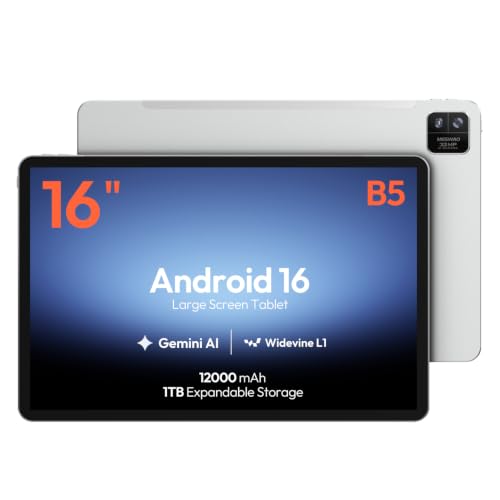
MESWAO 16-Inch Android 16 Tablet, Helio G99, 12GB RAM, 128GB
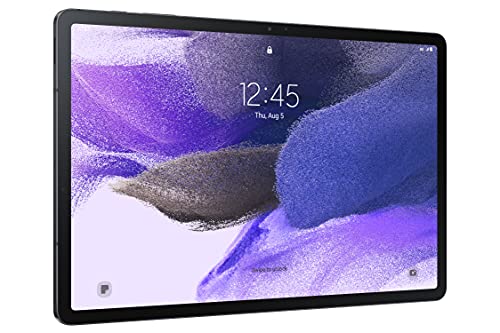
SAMSUNG Galaxy Tab S7 FE 12.4″ 64GB WiFi Android Tablet (Mystic Black)

Samsung Galaxy Tab S10 FE 128GB WiFi Android Tablet (Blue)

Samsung Galaxy Tab S7 11-inch Android Tablet 128GB Wi-Fi (Mystic Black)
AOC 10 Inch Tablet Android 16, 120Hz IPS, 8-Core, 4GB RAM, 128GB (Gray)
The Details Behind The Selections
The Redmi Pad 2 is the kind of budget tablet that quietly outclasses its price tier. The 11-inch 2.5K display is sharper than what most rivals offer at this level, which matters a lot for streaming, reading PDFs, or scrolling through photos. The metal unibody shell feels reassuringly solid, closer to a midrange phone than a cheap slate.
Inside, an octa-core processor, 8GB of RAM, and 256GB of storage keep things moving smoothly through apps, light gaming, and split-screen multitasking. The 9000mAh battery handles long study sessions or cross-country flights without begging for an outlet. Bluetooth 5.3 helps wireless earbuds stay stable, and the quad-speaker array does real work for movie nights.
Positive Takeaways
- 2.5K resolution on an 11-inch panel means text stays crisp and colors look rich, which is a genuine upgrade over standard HD budget tablets
- 256GB of built-in storage swallows large game installs and offline video libraries without the need for an SD card right away
- Quad speakers produce room-filling sound for shows and casual music, reducing the urge to grab external speakers
- The 9000mAh cell comfortably lasts a full day of mixed browsing, streaming, and reading
Points To Note
- This is a Wi-Fi-only model with no cellular option, so hotspot use is mandatory outside the home
- The 8MP rear camera handles scans and reference shots but is not built for serious photography
Who It Suits Best
Students, casual streamers, and anyone who wants a polished daily tablet without stretching into premium pricing.
A Better Fit Elsewhere
Creators who need a stylus should look at the SAMSUNG Galaxy Tab S6 Lite 10.4″ with its included S Pen.
The SVITOO Kids Tablet is built for one job, handing a kid a real-feeling device without handing over a parent’s expensive phone. The 10-inch screen is sized right for reading apps and shows, and the included protective case is a thoughtful add for butter-fingered users. Android 16 gives the parental controls room to breathe with current security and app support.
What makes this one stand out from a generic cheap tablet is how the experience is shaped for young users. Parents can set time limits, restrict app installs, and curate which learning tools are available. The bundled gift-ready box also makes it a clean option for birthdays and holidays without extra wrapping.
Key Advantages
- Parental controls sit at the system level, which makes them harder for kids to bypass than app-only solutions
- The protective case absorbs drops during travel or couch-surfing sessions
- A 10-inch display gives reading apps and educational videos enough room to feel immersive
- 20GB of RAM keeps app switching smooth, even with multiple learning tools open
Honest Caveats
- 32GB of built-in storage fills quickly once a few learning games and videos are installed
- Performance targets light use, so heavy games will not feel as responsive as on adult tablets
Made For
Families with children roughly aged 3 to 10 who want a controlled, drop-friendly tablet for learning and entertainment.
Look Elsewhere When
Older teens who need a tablet for schoolwork should consider the Samsung Galaxy Tab S9 FE with its productivity-focused S Pen.
The Galaxy Tab S6 Lite sits in that sweet spot where Samsung’s software polish meets a budget-friendly price. The included S Pen is the headline feature, magnetically attaching to the side so it stays close for notes and sketches. The slim metal body gives it a refined feel that punches above its weight class.
The 10.4-inch display is bright enough for outdoor café work, and the dual speakers carry movies and video calls without sounding thin. Battery life stretches through long class days, which matters for students sketching diagrams or annotating lecture slides. Compared to the Redmi Pad 2 above, this one trades raw resolution for stylus support and Samsung’s deeper software ecosystem.
Positive Points
- The bundled S Pen has low latency and pressure sensitivity, which makes handwritten notes feel natural
- Slim metal chassis slips easily into a backpack without adding bulk
- 128GB of storage leaves room for offline courses, music libraries, and creative files
- Dual speakers deliver clear audio for video calls and casual streaming
Some Limits To Know
- The processor is built for light creative work, so heavy video editing or 3D apps will feel slow
- The 10.4-inch screen is comfortable but feels small for split-screen productivity compared to larger Samsung options
Feature Snapshot
Right Fit For
Art students, journal keepers, and anyone who wants pen input on a tablet that travels well in a small bag.
Consider Something Else When
Users who prioritize a larger canvas for multitasking should look at the SAMSUNG Galaxy Tab S7 FE 12.4″.
The Galaxy Tab S9 FE steps things up from the S6 Lite in meaningful ways, starting with a more powerful processor and a brighter 10.9-inch display. It carries the same S Pen support that makes Samsung tablets attractive for note-takers, but it adds water and dust resistance that the cheaper model lacks. The build feels sturdy enough for daily commuting without a case.
Expandable storage is the unsung hero here, since 128GB is plenty for most apps but can grow when projects pile up. The lightweight body keeps wrist fatigue low during long reading sessions on the couch. Compared to the Xiaomi Redmi Pad 2 above, this one leans harder into productivity and outdoor use.
Strengths Worth Knowing
- A more powerful processor makes multitasking and DeX-style workflows smoother than on older FE models
- Water and dust resistance give peace of mind at the kitchen counter or by the pool
- The included S Pen supports low-latency writing for sketching and annotation
- Expandable storage via microSD handles growing photo and document libraries
Trade-Offs To Consider
- The display is bright but not the highest resolution in this price band
- Long charging times compared to phones with faster wired charging
Best Suited To
Hybrid workers and students who want a durable tablet that handles notes, video calls, and streaming without compromise.
Reach For A Different Pick When
Shoppers who want the largest Samsung display for media should consider the SAMSUNG Galaxy Tab S7 FE 12.4″.
The Gleeso is a textbook budget tablet that focuses on everyday usability without flashy extras. The 10-inch HD display is sharp enough for YouTube and casual reading, and the lightweight chassis makes it easy to hold one-handed for long stretches. Android 16 brings current features without the bloat that plagues older cheap slates.
Fast charging is a quiet perk here, since budget tablets often leave you tethered overnight. The face ID unlock keeps security simple when handing the tablet around the family. Compared to the SVITOO Kids Tablet above, this one trades parental controls for general-purpose flexibility at a similar price point.
Noteworthy Benefits
- 24GB of combined RAM helps the tablet stay responsive when several apps are open at once
- Expandable storage up to 1TB via TF card handles large movie and music libraries
- Widevine L1 support enables HD playback from major streaming services
- Lightweight body reduces wrist strain during long reading or video sessions
A Few Limitations
- The HD display is sharp but cannot match the 2.5K panel of the Redmi Pad 2
- Camera quality is fine for video calls but lacks detail for anything beyond casual snapshots
Built With In Mind
Casual users who want a responsive tablet for streaming, browsing, and light multitasking on a tight budget.
Swap It Out When
Users who care about display sharpness for media should look at the Xiaomi Redmi Pad 2 with its 2.5K screen.
The MESWAO 16-inch tablet is a niche pick, but it fills a real gap for musicians and visual creators who need a big workspace. The 1920×1200 IPS display on a 16:10 panel is shaped specifically for sheet music, chord charts, and PDFs, so a full page lays out without endless scrolling. Android 16 keeps app compatibility current.
The Helio G99 chip is a well-known midrange workhorse, paired here with 12GB of RAM for steady performance across music apps and browser tabs. 128GB of storage handles a healthy library of scores and recordings. Compared to the Samsung Galaxy Tab S7 FE above, this one trades Samsung’s stylus polish for sheer screen real estate.
A Few Strong Suits
- The 16-inch canvas fits two pages of sheet music side by side, which is rare at this price
- 1920×1200 resolution keeps small notation legible at typical reading distance
- Helio G99 with 12GB RAM maintains steady performance across music and productivity apps
- The 16:10 aspect ratio suits widescreen video alongside standard documents
Practical Considerations
- A 16-inch slate is heavier and harder to hold for long reading sessions than a 10-inch tablet
- Larger size makes it less convenient for casual couch use or travel in small bags
Quick Facts
Whose Shelf It Belongs On
Musicians, music teachers, and students who regularly read sheet music, chord charts, or large PDFs on a single screen.
Where A Sibling Pick Shines
Casual everyday users are better served by the AOC 10 Inch Tablet with its lighter 10-inch form factor.
The Galaxy Tab S7 FE is built around a simple idea: give shoppers a 12.4-inch canvas without forcing them into the most expensive Samsung tier. The included S Pen attaches magnetically and feels balanced for long note sessions. The large display makes split-screen multitasking feel genuinely useful rather than cramped.
Battery life stretches through a full day of classes or back-to-back meetings, and multi-device connectivity helps it play nicely with a Samsung phone or laptop. Dual speakers are positioned for landscape viewing, which is how most people watch shows. Compared to the Galaxy Tab S9 FE above, this one offers more screen at the cost of some processing muscle.
Useful Highlights
- 12.4-inch screen gives split-screen apps enough room to breathe
- S Pen is included, removing the need for a separate purchase
- Long-lasting battery handles back-to-back lectures or meetings
- Multi-device connectivity ties into Samsung phones and laptops seamlessly
Things To Consider
- 64GB of storage runs thin for heavy media users without an SD card
- The processor is fine for study and streaming but slower than the newer Tab S9 FE
Perfect Match For
Students and remote workers who split between reading, video calls, and note-taking on a single device.
Skip It When
Shoppers who want the latest Samsung performance should look at the Samsung Galaxy Tab S9 FE 10.9″.
The Galaxy Tab S10 FE is the newer cousin of the S9 FE, and it brings a smoother 90Hz refresh rate to a slate that is otherwise positioned as a midrange productivity device. That refresh bump matters more than people expect, since scrolling feeds and pen strokes both feel noticeably cleaner. The blue finish is a small touch that helps it stand out from the usual gray slab.
128GB of internal storage is a comfortable starting point for most shoppers, and Samsung’s long software support window keeps the tablet relevant for years. Dual speakers handle movie nights and video calls with the kind of clarity that defines Samsung’s tablet line. Compared to the Tab S9 FE above, this one is the smarter pick for media lovers who want that smoother motion.
What Earns Its Place
- The 90Hz refresh rate delivers visibly smoother scrolling than 60Hz alternatives
- Dual speakers produce room-filling audio for shows and group calls
- 128GB of storage leaves headroom for offline media and creative projects
- Long software support helps the tablet stay current for years of use
Worth Bearing In Mind
- The display is bright but does not match the OLED contrast of Samsung’s higher-tier tablets
- Pricing sits above many budget picks, so it is a real stretch for shoppers watching every dollar
Who Should Grab It
Shoppers who want Samsung polish and a smoother display without jumping into flagship pricing territory.
Not Your Match When
Tight-budget shoppers are better served by the Gleeso 10 Inch Tablet for everyday streaming and browsing.
The Galaxy Tab S7 has aged into a value pick that still feels relevant for hybrid use. The 11-inch display sits in the middle of the lineup, larger than the S6 Lite but smaller than the FE models, which makes it a comfortable middle ground. The included S Pen handles note-taking and sketching with low latency.
Fast charging through the USB-C port is a practical perk, especially for users who top up between meetings rather than overnight. Bluetooth connectivity ties into wireless headphones and keyboards without fuss. Compared to the Galaxy Tab S10 FE above, this older model trades modern refresh rates for a lower price on a proven design.
The Upside
- 128GB of storage provides a comfortable starting point for apps and media
- Fast charging tops up the battery quickly between uses
- 11-inch screen is a versatile size for reading, streaming, and split-screen work
- S Pen support adds creative flexibility at no extra cost
Where It May Fall Short
- An older chipset means future software updates may slow sooner than on newer models
- The 60Hz display cannot match the smoother feel of the Tab S10 FE
Core Details
The Right Fit
Hybrid users who want a proven Samsung tablet with stylus support at a price below current flagships.
Where Another Pick Suits Better
Shoppers who want a smoother display should consider the Samsung Galaxy Tab S10 FE with its 90Hz refresh rate.
The AOC 10-inch tablet is built around one specific strength, smooth motion, and the 120Hz IPS display delivers on that promise. For anyone who watches a lot of sports, action movies, or fast-pace gaming clips, the difference is immediately visible. The metal body adds a touch of premium feel that most budget tablets skip.
Widevine L1 support is the other key feature here, since it unlocks HD playback on major streaming platforms instead of being limited to standard definition. The 6000mAh battery handles long binge sessions, and expandable storage up to 1TB keeps media libraries growing. Compared to the Gleeso above, this one leans harder into a smooth viewing experience.
Practical Advantages
- The 120Hz refresh rate makes scrolling and video noticeably smoother than 60Hz budget tablets
- Widevine L1 certification unlocks HD streaming from major services
- Metal body gives the slate a more refined hand-feel than typical plastic builds
- Expandable storage up to 1TB handles growing movie and music collections
A Few Details To Watch
- 4GB of RAM is enough for everyday use but limits heavy multitasking
- The HD resolution does not match the sharpness of the 2.5K Redmi Pad 2
Who Will Love This
Streaming fans and casual gamers who value smooth motion and HD playback over maximum screen sharpness.
Another Choice May Suit
Shoppers who prioritize display resolution should consider the Xiaomi Redmi Pad 2 with its 2.5K panel.
Picking The Right Tablet For Real Life
A budget tablet earns its keep by matching the screen size, software, and stylus support to how it will actually be used. A 10-inch display hits the sweet spot for streaming, casual reading, and couch browsing, while 12-inch and up slates make more sense for split-screen work and creative tasks. Storage matters more than shoppers expect, since downloaded videos and offline music fill internal space faster than most people plan for.
Processor choice shapes how the tablet feels two years down the road, not just on day one. An octa-core chip with at least 8GB of RAM handles modern apps and future updates with more breathing room than older quad-core designs. Stylus support is worth budgeting for if sketching or handwritten notes are even occasional habits, since the S Pen experience on Samsung tablets is a genuine productivity perk.
Battery life and charging speed quietly decide whether a tablet feels convenient or frustrating in daily use. A 6000mAh or larger cell gets through a long day of mixed tasks, while fast charging matters for travelers who top up between flights. Connectivity, like Bluetooth 5.3 or Wi-Fi 6, keeps wireless audio and hotspot use stable.
What Shoppers Often Overlook
Where Shoppers Go Wrong
The most common slip is chasing the lowest sticker price without checking the software version, since older Android builds cut shoppers off from current apps and security updates. Another trap is underestimating storage, where 32GB feels roomy on day one and cramped after a year of photos and downloads. Buyers also forget to check whether the tablet supports Widevine L1, which decides whether HD streaming actually works on major platforms.
What Separates Premium From Basic
Higher-tier tablets earn their cost through smoother displays, like 90Hz or 120Hz refresh rates, and stronger processors that age gracefully across years of updates. Premium models also tend to include stylus support, water resistance, and longer software support windows. The upgrade is worth it for shoppers who use a tablet daily for work or creative projects, while casual users can stay comfortably on the budget tier.
Frequently Asked Questions
How much storage do I really need?
A 128GB tablet fits most apps, a healthy photo library, and several downloaded shows. Shoppers who hoard offline video or large creative files should look for expandable storage or step up to a higher capacity.
Is a stylus worth it on a budget tablet?
A bundled S Pen or active stylus turns a tablet into a proper note-taking tool, which matters for students and visual thinkers. Shoppers who only stream and browse can skip it and save the cost.
How important is the refresh rate?
A higher refresh rate, like 90Hz or 120Hz, makes scrolling and pen strokes feel smoother and reduces eye strain during long sessions. Standard 60Hz is fine for casual use, but motion lovers notice the upgrade.
Can a budget tablet replace a laptop?
For light browsing, email, streaming, and note-taking, a modern budget tablet handles most everyday tasks well. Heavy document editing, video work, or professional software still calls for a traditional laptop.
Are kids tablets safe without parental controls?
Generic tablets skip parental controls, so a family-friendly model with built-in time limits and app restrictions is the safer bet. The SVITOO Kids Tablet is the clearest example in this roundup.
Closing Remarks
The right budget tablet depends on what fills most of your screen time, whether that is streaming, sketching, studying, or keeping the kids quiet on a long drive. Match the size and software to the use case first, then weigh extras like stylus support and storage. Any of the picks above will serve a clear purpose, and the honest read is that the best tablet is the one that disappears into your routine and just works.
