

The right tablet-and-keyboard combo turns a slab of glass into a real workstation, the kind that fits in a backpack, runs for a workday, and handles notes, email, sketching, and streaming without breaking a sweat. I’ve rounded up six setups that pair Android tablets with usable keyboards or full accessory bundles, mixing premium flagships, mid-range workhorses, and budget-friendly all-in-one kits. Each pick fits a different kind of owner: a student juggling lectures, a frequent flyer who writes on planes, a hobbyist who wants stylus input, or anyone stepping up from a phone screen.
A Snapshot Of The Selections

SAMSUNG Galaxy Tab S6 Lite 10.4″ 128GB WiFi Tablet w/ S Pen (Gray)

Samsung Galaxy Tab S9 FE 10.9″ 128GB WiFi Tablet (Gray)

JUNINKE 11″ Android 16 Tablet with Keyboard and Stylus

Samsung Galaxy Tab S7 11-inch 128GB Wi-Fi Tablet (Mystic Black)

COLORROOM 2026 11″ Android 16 Tablet (Blue)
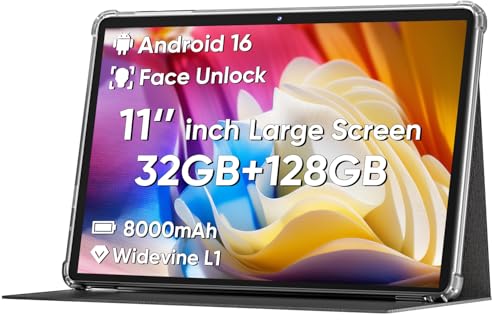
COLORROOM 2026 11″ Android 16 Tablet (Black)
A Deeper Look At The Lineup
The Galaxy Tab S6 Lite has earned a long run as the Android tablet I keep recommending to students and casual note-takers, and the 2026 market hasn’t really changed that. Its 10.4-inch display gives handwritten notes and PDF markup enough room to breathe, while the slim metal body slides into a backpack sleeve without adding bulk. The included S Pen magnetically docks to the side, so it charges wirelessly and stays put during commutes.
For anyone moving from a phone to a tablet for the first time, the learning curve here is genuinely short. Samsung’s One UI on Android handles split-screen well, so a PDF on one half and a notes app on the other works for lecture halls and research sessions alike. Compared to the flagship Tab S9 FE in position 2, this S6 Lite makes a few trade-offs on display brightness and processor speed, but for typing, browsing, and stylus work it’s plenty.
The Helpful Details
- S Pen included in the box, no separate purchase needed
- Lightweight metal build makes it easy to hold one-handed for reading
- 128GB of internal storage handles a semester of textbooks and slides
- Dual speakers add real punch for movie nights without headphones
- Battery easily covers a full day of mixed classes and downtime
Trade Offs
- Keyboard is sold separately, so the typing setup costs extra
- Display brightness trails the Tab S9 FE for outdoor use in strong sun
- Camera performance is basic, fine for documents but not much else
Who It Suits Best
Students, journal writers, and casual creators who want a proven stylus experience without paying flagship prices.
Where Another Pick Suits Better
Power users who push heavy multitasking should look at the Samsung Galaxy Tab S7 in position 4 for its faster processor.
The Tab S9 FE is Samsung’s sweet spot for buyers who want flagship polish without the full flagship price. Its 10.9-inch display runs at a smoother refresh than the S6 Lite, which makes scrolling through long documents and sketching feel noticeably more fluid. The lightweight, durable body holds up well to daily bag duty, and the included S Pen means stylus work is ready out of the box.
For mobile professionals and frequent travellers, the expandable storage and 8MP camera add real flexibility. You can pop in a microSD card to carry project files or extra video, and the camera handles quick scans for receipts and whiteboards without complaint. Battery life is generous enough to skip the charger on most day trips, which is one of the quiet wins that separates this FE model from budget picks further down the list.
What Helps Most
- Larger 10.9-inch display with smoother refresh for scrolling and drawing
- Expandable storage via microSD for project files and media libraries
- Long battery life reduces charger anxiety on work trips
- Included S Pen for notes and sketches from day one
- IP-rated durability adds confidence around coffee shops and commutes
Things To Consider
- Keyboard cover still costs extra, unlike the bundled picks below
- Performance sits below the older Tab S7 for sustained heavy workloads
- Charging speed is slower than the COLORROOM models with 18W fast charging
Right Fit For
Working professionals and frequent travellers who want premium display quality and a stylus in one reliable package.
Consider Something Else When
Shoppers who want a keyboard included from the start should consider the JUNINKE 11-inch Android 16 bundle in position 3.
The JUNINKE bundle solves a problem most first-time tablet shoppers don’t think about until it’s too late: the keyboard is always sold separately. This 11-inch Android 16 tablet ships with a Bluetooth keyboard, a protective case, a stylus pen, and a mouse in one box, so unboxing it feels like opening a small laptop kit rather than a single slab.
Its octa-core processor handles everyday school and work apps, and the shockproof case adds a layer of drop protection that bare tablets lack. For parents buying a tablet for a teen, or for adults setting up a kitchen workstation, having everything in one purchase removes the usual accessory scavenger hunt. Compared to the Samsung flagships above, the trade-off is camera and display refinement, but for typing, browsing, and streaming it’s a complete starter package.
Why It Works Well
- Bluetooth keyboard, case, stylus, and mouse included
- Protective case absorbs minor drops during backpack travel
- Android 16 keeps the software modern and compatible with current apps
- Octa-core CPU handles document editing and online learning smoothly
Points To Note
- Display brightness is lower than the Tab S9 FE for outdoor reading
- Camera quality is basic, suitable mainly for video calls
- Bundle weight is heavier once the keyboard case is attached
Best Suited To
First-time tablet shoppers, parents setting up a family device, and anyone who wants every accessory in a single purchase.
Skip It When
Buyers chasing premium display and stylus precision should step up to the Samsung Galaxy Tab S6 Lite in position 1.
The Galaxy Tab S7 is the tablet in this lineup I’d hand to a power user. Its Snapdragon processor and 128GB of storage handle split-screen productivity, video editing, and large app switching without the stuttering that mid-range chips sometimes show. The 11-inch display pushes a fast refresh rate, so stylus latency feels low and games look smooth.
USB-C fast charging means short top-ups during a coffee break are genuinely useful rather than token gestures. For anyone who treats a tablet like a secondary computer, the S7 keeps pace without complaint. The trade-off is the age of the model, since Samsung’s newer Tab S9 FE in position 2 brings better efficiency and an IP rating, but raw horsepower and accessory ecosystem still favour the S7 for serious work.
Key Advantages
- Snapdragon-class processor handles heavy multitasking
- USB-C fast charging reduces downtime between sessions
- Bluetooth and Wi-Fi support solid accessory pairing
- S Pen included with low-latency drawing feel
Potential Drawbacks
- Older model means shorter remaining software support window
- Keyboard cover sold separately
- Heavier than the S6 Lite for extended handheld reading
Who Should Grab It
Power users, digital artists, and multitaskers who want flagship-class speed and aren’t worried about buying an older generation.
Look Elsewhere When
Buyers wanting a fresher warranty and water resistance should pick the Samsung Galaxy Tab S9 FE in position 2 instead.
The COLORROOM 11-inch tablet lands in the sweet spot for shoppers who want modern Android without flagship pricing. Its Android 16 system runs on a Unisoc octa-core chip with 32GB of combined RAM and 128GB of storage, enough for streaming, light gaming, school apps, and casual work. Face unlock adds a small daily convenience for grab-and-go use.
The 18W fast charging support is genuinely useful at this price tier, since waiting hours for a refill is one of the most common complaints about budget tablets. For a student heading into a new school year, or a household setting up a secondary screen, the blue finish adds a bit of personality over standard black. Owners commonly pair it with a third-party Bluetooth keyboard for a lightweight workstation.
Useful Strengths
- Android 16 keeps the software current with modern apps
- Octa-core CPU handles everyday streaming and browsing
- 18W fast charging refills the battery quickly between classes
- Face unlock speeds up daily grab-and-go use
- 128GB storage holds a healthy media and app library
Worth Noting
- No keyboard in the box, unlike the JUNINKE bundle
- Display brightness is modest for outdoor use in direct sun
- Camera is basic, fine for video calls but not photography
Made For
Students, casual users, and first-time tablet owners who want a modern OS, fast charging, and friendly pricing in one device.
A Better Fit Elsewhere
Shoppers who want a keyboard and case included should consider the JUNINKE 11-inch Android 16 bundle in position 3.
The black version of the COLORROOM 2026 tablet offers the same internal package as its blue sibling, wrapped in a finish that disappears into office and home setups. For shared spaces like a family kitchen counter or a small business reception desk, the muted colour avoids drawing attention to the device.
The 18W fast charging support matters just as much here, since quick top-ups between meetings keep the tablet useful as a point-of-sale screen or a recipe viewer. Combined with face unlock for fast waking, the experience feels smooth for casual productivity. Compared to the Samsung Galaxy Tab S9 FE in position 2, the COLORROOM gives up some display refinement and ecosystem polish in exchange for a noticeably lower price tier.
What Stands Out
- Same Android 16 and octa-core setup as the blue model
- Black finish fits office and shared-space environments
- 18W fast charging reduces downtime in busy settings
- Face unlock adds everyday convenience for shared devices
Honest Caveats
- Keyboard and stylus are not included
- Display brightness trails flagship tablets outdoors
- Build materials feel lighter than the Samsung metal bodies
Whose Shelf It Belongs On
Home offices, small business counters, and shared family setups where a low-key tablet that charges fast and runs modern Android is enough.
Reach For A Different Pick When
Anyone wanting premium stylus work and metal build should pick the Samsung Galaxy Tab S6 Lite in position 1.
What Matters Most Before Choosing Android Tablet And Keyboards
Start With The Typing Setup
A tablet without a keyboard is just a big phone, so the typing experience should drive the decision. Bundles like the JUNINKE 11-inch remove the guesswork by shipping a Bluetooth keyboard and protective case together, which saves money and hassle. Samsung tablets like the S6 Lite and S9 FE deliver excellent displays and stylus support, but their keyboard covers cost extra and must be matched to the exact model.
For school essays and work emails, look for keys with reasonable travel and a trackpad that doesn’t fight your gestures. If most typing happens at a desk, a standalone Bluetooth keyboard paired with any of these tablets often beats the official keyboard covers on comfort.
Match The Specs To The Workload
Processor and RAM decide how many apps can stay open before the tablet stutters. Power users running split-screen productivity should look at the Galaxy Tab S7’s Snapdragon chip, while students doing note-taking and reading can comfortably run on the S6 Lite or the COLORROOM octa-core setups. Storage matters more than people expect: 128GB covers textbooks and media, but anyone carrying video project files should plan for a microSD slot like the Tab S9 FE offers.
Consider Battery, Charging, And Daily Carry
A tablet that dies before lunch doesn’t earn its space in the bag. Look for models that genuinely last a workday under mixed use, and check the charging speed. 18W fast charging on the COLORROOM models and USB-C fast charging on the Tab S7 turn short breaks into meaningful top-ups. Weight and case durability also matter, since a bare tablet is more likely to crack from a backpack drop than one tucked in a bundled protective case.
Key Considerations Across These Picks
Common Buying Traps
Skipping the keyboard budget is the most common mistake. Shoppers focus on the tablet price and forget that official keyboard covers can add up, which is exactly why bundles like the JUNINKE 11-inch make sense for accessory-first buyers. Another trap is ignoring the difference between Wi-Fi-only and cellular models, since downloading on the go requires a cellular plan that not every tablet supports. Finally, chasing the largest screen without checking weight leads to tablets that feel great in the store but tire the wrist during commute reading.
What The Higher Tier Buys
Stepping up from the COLORROOM models to the Samsung Galaxy Tab S9 FE or S7 brings meaningful upgrades in display brightness, stylus precision, and metal build quality. The faster processors in flagship territory also handle sustained multitasking better, which matters for anyone running video calls alongside documents. Whether the upgrade pays off depends on how the tablet gets used: for casual streaming and email, the budget tier is plenty, while daily productivity and creative work justify the premium spend.
Frequently Asked Questions
Do these tablets come with a keyboard?
Only the JUNINKE 11-inch Android 16 bundle ships with a keyboard and protective case in the box. Samsung tablets like the Galaxy Tab S6 Lite, S9 FE, and S7 work with separately purchased keyboard covers matched to their specific models.
Can I use any Bluetooth keyboard with these tablets?
Yes, any standard Bluetooth keyboard pairs with Android tablets once the tablet’s Bluetooth settings are open and discoverable. Owners commonly pair third-party keyboards with the COLORROOM models for a lightweight workstation setup.
Are styluses included with all picks?
The Samsung Galaxy Tab S6 Lite, S9 FE, and S7 all include an S Pen in the box. The JUNINKE bundle includes its own stylus, while the COLORROOM 2026 tablets do not include a stylus and would need a separate capacitive or active pen purchase.
How important is fast charging on a tablet?
Fast charging matters most for shared household tablets or commuters who top up between short breaks. 18W fast charging on the COLORROOM models and USB-C fast charging on the Tab S7 turn a quick coffee stop into meaningful battery recovery, which removes one of the most common complaints about budget tablets.
What size screen is best for keyboard use?
For laptop-style typing, 10.4 to 11 inches tends to hit the sweet spot. Screens in this range, like the S6 Lite, Tab S9 FE, and COLORROOM 11-inch models, give keyboard cases enough surface area to feel stable without making the device too heavy to carry.
The Takeaway
The right Android tablet and keyboard combo depends on how the device gets used daily, whether that’s lecture-hall note-taking, kitchen-counter streaming, or a mobile workstation that fits in a messenger bag. The Samsung picks offer polished displays and reliable stylus support, while the COLORROOM models and the JUNINKE bundle bring modern Android and complete accessory kits at friendlier prices. Match the keyboard situation, the display size, and the charging speed to the routine, and any of these six picks will pull its weight.
