

I spent weeks digging through spec sheets, owner threads, and reading-room conversations to pull together a list that actually helps people who love books find the right screen. Whether you read before bed, commute with a library in your bag, or annotate PDFs for work, the right tablet changes the whole habit. Below, I break down eight solid options across full-fat Android slates and dedicated E Ink readers, so you can pick based on how, where, and how much you actually read.
A Snapshot Of The Selections

Lenovo Idea Tab Plus Lightweight Tablet 12.1″ 2.5K
Amazon Fire HD 10 Tablet 10.1″ 64 GB Black

Amazon Fire HD 10 Tablet 32GB Harry Potter Edition

Lenovo Idea Tab College Tablet 11″ 256GB
Kobo Clara Colour eReader 6″ Waterproof 16GB

Musnap Neo 2 6″ E Ink eReader 64GB Android

Musnap Neo 2C 6″ Color E Ink eReader 64GB

Lenovo Tab One 8.7″ HD Tablet 64GB Folio Case
The Strengths Of Each Pick
The Lenovo Idea Tab Plus leans into the sweet spot where reading meets everything else: a 12.1-inch 2.5K IPS panel at a smooth 90Hz, paired with the included Tab Pen and Folio case so you can mark up PDFs or sketch beside your notes without buying extras. It runs Android with the MediaTek Dimensity 6400 and 8GB of RAM, which keeps app switching painless when you’re jumping between a Kindle app, a browser, and a chat window.
For readers who treat books like a workspace, comic fans who want a big canvas, or anyone who wants one device for streaming and study, this one earns its keep. The 128GB storage is enough for a deep offline library, though heavy media hoarders may want more headroom.
The Case For It
- 2.5K resolution at 90Hz makes text crisp and scrolling feel paper-smooth during long reading sessions.
- The included Tab Pen turns the slate into a margin-annotation tool for PDFs and textbooks.
- 8GB of RAM keeps Kindle, Libby, and a browser open without the OS kicking anything out.
- The 12.1-inch screen gives comics, manga, and split-screen reading room to breathe.
Worth Noting
- Battery life sits well below a dedicated E Ink reader when brightness climbs for outdoor reading.
- 128GB fills up fast once you start caching large audiobook collections locally.
Key Specs
Made For
Readers who annotate heavily, students juggling PDFs, and anyone who wants a single tablet for comics, color magazines, and casual streaming alongside reading.
Look Elsewhere When
Bedtime purists who want pure E Ink comfort for hours of novel reading should weigh the Kobo Clara Colour instead, since its front-lit panel is gentler on tired eyes.
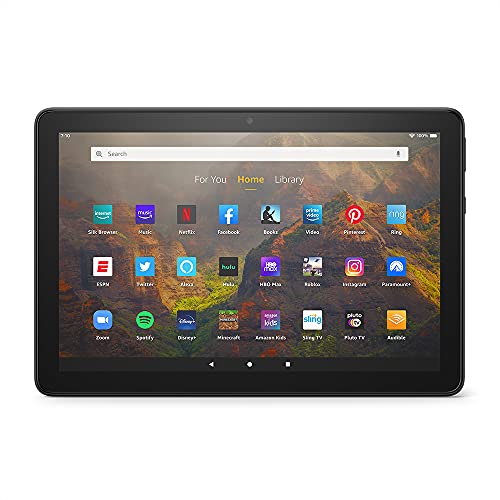
The Amazon Fire HD 10 (2021) is the budget workhorse of the list, pairing a 10.1-inch 1080p Full HD display with 64GB of internal storage that expands via microSD. It’s the kind of slate I recommend to family members who want a simple reader, a Netflix screen, and the occasional Zoom call, all in one affordable package.
For casual readers dipping into Kindle, Libby, or Audible without worrying about premium build or flagship speed, this Fire tablet hits the mark. It’s not the snappiest slate in this roundup, but at its price tier, it covers the basics honestly well.
What Makes Sense
- 1080p Full HD on a 10.1-inch screen keeps novel text readable without squinting.
- 64GB of internal storage, expandable with microSD, swallows a personal library without fuss.
- Wide app support through Amazon’s storefront, including Kindle, Audible, and Libby.
- A lightweight body makes it easy to pass between family members on a shared couch.
Trade Offs
- The Fire OS app catalog is narrower than full Google Play, so niche reading apps may be missing.
- Screen brightness trails premium IPS panels, making midday patio reading tougher.
Who It Suits Best
Casual readers and gift shoppers who want a dependable, low-fuss tablet for novels, audiobooks, and streaming without stretching the budget.
Swap It Out When
Students who need Google Docs, Drive, and a wider app ecosystem should pivot to the Lenovo Idea Tab, since full Android access makes study workflows smoother.
The Harry Potter edition of the Fire HD 10 takes the same 10.1-inch reading slate and dresses it up with a themed design tied to the Full-Cast Audio Editions on Audible. It’s a tidy bundle for someone rebuilding their audiobook habit around a beloved series, and it works just like the standard Fire HD 10 for reading, streaming, and casual browsing.
For fans who want a little shelf personality alongside their library app, this is a fun pickup that doesn’t ask you to sacrifice function for style. The 32GB storage is tighter than the 64GB standard model, which matters if you hoard audiobooks locally.
Benefits That Matter
- Themed exterior turns a basic slate into a gift-worthy piece for Harry Potter readers.
- Plays nicely with Kindle, Audible, and Libby, which covers most reading and listening routines.
- Lightweight enough for bedtime reading or a long car ride with the family.
- Front-facing camera works fine for the occasional video call with grandparents.
Honest Caveats
- 32GB fills quickly with audiobooks, so an SD card becomes almost mandatory for heavy listeners.
- Theme is skin-deep, so spec-wise it’s a close sibling to the standard Fire HD 10 rather than an upgrade.
Right Fit For
Audiobook-first readers, gift shoppers, and Harry Potter collectors who want a slate that doubles as a small piece of fandom decor.
Consider Something Else When
Hardcore readers who want pen input, larger storage, or a more open Android app catalog should reach for the Lenovo Idea Tab Plus instead.
The Lenovo Idea Tab steps the screen down to 11 inches but bumps storage up to 256GB, making it a strong study-buddy slate for readers who carry entire textbook libraries offline. The MediaTek Dimensity 6300 paired with 8GB of RAM is enough to keep lecture recordings, notes, and a Kindle window all open without flinching.
It runs the same 2.5K IPS panel at 90Hz as its larger sibling, so text and comics stay sharp during long sessions. For college students juggling PDFs, slide decks, and an ever-growing reading list, this is the more portable counterpart to the Idea Tab Plus.
Good Reasons To Consider
- 256GB of internal storage holds semesters of textbooks, papers, and downloaded audiobooks.
- 11-inch form factor splits the difference between paperback portability and laptop territory.
- Included Tab Pen and Folio case keep the slate study-ready out of the box.
- Full Android app access means Google Drive, Docs, and reference apps all behave normally.
A Few Limitations
- Smaller screen means comic pages feel less cinematic than on the 12.1-inch Idea Tab Plus.
- Long study sessions still drain the battery faster than E Ink alternatives.
Feature Snapshot
Best Suited To
University students and lifelong learners who want one device that handles reading, research, and note-taking across a heavy semester or independent study plan.
A Better Fit Elsewhere
Readers who care more about outdoor visibility and battery endurance than storage should consider the Kobo Clara Colour, which trades size for eye-friendly E Ink.
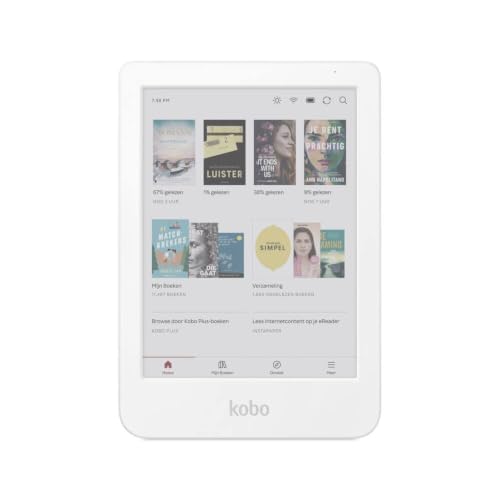
The Kobo Clara Colour is the dedicated reader’s choice: a 6-inch E Ink Kaleido 3 display that brings gentle color to book covers, comics, and highlights without the eye fatigue of LCD. It’s waterproof, pocketable, and pairs naturally with library lending apps, which makes it my top pick for travelers and bath-time readers.
Where the Lenovo and Fire tablets multitask their hearts out, the Clara Colour commits to one job: long, comfortable reading sessions. The 16GB of storage is modest but ample for thousands of novels, and audiobook support means it covers both eyes-free and ears-free habits.
The Upside
- E Ink Kaleido 3 adds soft color for covers, comics, and illustrations while staying easy on the eyes.
- Waterproofing means the bathtub, pool deck, and rainy commutes stop being off-limits.
- Weeks-long battery life beats every LCD tablet on this list for endurance.
- Pocket-friendly 6-inch form factor slips into a coat or jacket without a bag.
Points To Note
- 16GB is enough for books but tight if you load up on graphic novels and audiobooks together.
- No app store parity with Android tablets, so the Clara Colour stays focused on reading rather than general computing.
Quick Facts
Whose Shelf It Belongs On
Avid novel readers, commuters, and travelers who want a pocket-sized, eye-friendly device that lasts through long trips and lazy weekends.
Where Another Pick Suits Better
Anyone who needs pen annotation or a full app ecosystem should pivot to the Lenovo Idea Tab, which trades color E Ink for a more versatile Android experience.
The Musnap Neo 2 takes the E Ink concept and bolts Android onto it, giving tinkerers a 6-inch black-and-white reader that handles third-party apps beyond a walled garden. The 300 ppi panel feels crisp for novels and manga, and the quad-core processor with 4GB of RAM keeps app switching manageable.
For readers who want eye-friendly text without giving up access to niche reading apps or sideloaded libraries, the Neo 2 is the rare E Ink device that flirts with openness. It sits comfortably between the Kobo’s focused simplicity and the Lenovo’s full Android freedom.
The Good Stuff
- 300 ppi E Ink display keeps text sharp and page turns responsive for novels and manga.
- 64GB of storage swallows a hefty sideloaded library plus comics without begging for an SD card.
- Android foundation supports third-party reading apps the Kobo storefront doesn’t carry.
- Glare-free, auto-adjusting front light adapts as you move from a sunny porch to a dim bedroom.
Some Limits To Know
- App compatibility on E Ink can feel sluggish compared to LCD tablets, especially with heavy animations.
- Brand support and firmware polish trail the bigger names in this roundup, so research before committing to niche apps.
Feature Card
Perfect Match For
Self-reliant readers who want E Ink comfort, broader app support, and enough storage for a deeply personal digital library.
Reach For A Different Pick When
Readers who prefer a polished, mainstream ecosystem with predictable customer support should consider the Kobo Clara Colour instead.
The Musnap Neo 2C layers a Kaleido 3 color display onto the same Android-powered E Ink body as its sibling, giving manga and comic readers a softer, less fatiguing way to enjoy their collections. The 4096-color panel adds warmth to illustrations without the harshness of a backlit LCD in bed.
Where the Neo 2 is the introvert’s reader, the Neo 2C is the collector’s reader. You get 64GB of storage and the flexibility of third-party apps, which matters when your habits span web novels, fan translations, and indie comics all at once.
What Helps Most
- Color E Ink Kaleido 3 brings covers, comics, and graphic novels to life without LCD glare.
- 64GB of storage handles hefty manga libraries and sideloaded files comfortably.
- Auto-adjusting front light eases the transition from bright cafes to late-night reading.
- Android access opens up niche readers and library apps that mainstream stores sometimes overlook.
Practical Considerations
- Color saturation looks gentler than a tablet, so reviewers used to vivid LCD art may need to recalibrate expectations.
- E Ink refresh still feels slower than LCD, which can show up while scrolling through menus or image-heavy apps.
Who Will Love This
Manga and comic readers who want color, comfort, and library depth without lugging a full tablet to bed or onto the train.
Where A Sibling Pick Shines
Readers who don’t need color and want a tighter mainstream experience should weigh the Kobo Clara Colour, which feels more polished day to day.
The Lenovo Tab One is the smallest, lightest slate on this list, weighing under a pound with an 8.7-inch HD display that’s easy to hold one-handed on a crowded train. The MediaTek Helio G85 and 4GB of RAM aren’t flagship numbers, but they keep reading apps, light browsing, and casual streaming smooth enough for everyday use.
For commuters and casual readers who want something between a phone and a full tablet, this one slips into a coat pocket or a small bag without ceremony. The included Folio case is a quiet perk, since most compact slates charge extra for that protection.
Where It Delivers
- Under-a-pound build feels closer to a thick paperback than a traditional tablet.
- 8.7-inch HD screen is large enough for comics while staying comfortable one-handed.
- Included Folio case saves the extra buy and protects the slate from daily bag scuffs.
- Full Android access means Google Play Books, Kindle, and library apps all behave normally.
Where It May Fall Short
- HD resolution on an LCD panel looks softer than the 2.5K IPS screens on the larger Lenovo tabs.
- 4GB of RAM is enough for reading but tight once multiple heavy apps compete for resources.
Quick Technical Notes
Who Should Grab It
Commuters, travelers, and casual readers who want a featherweight Android tablet that handles books, podcasts, and streaming without bulk.
Skip It When
Avid comic readers who want a more cinematic canvas should pivot to the Lenovo Idea Tab Plus, whose 12.1-inch 2.5K display shows art off far better.
Picking A Tablet That Fits How You Read
Choosing the right reading screen starts with honesty about your habits, not chasing specs. If you read for an hour before sleep, an E Ink panel like the Kobo Clara Colour or Musnap Neo 2C eases eye strain in ways LCD simply can’t. If you treat books like a workspace and need to mark up PDFs, pen-equipped Android tablets such as the Lenovo Idea Tab Plus and Lenovo Idea Tab earn their place on your desk.
Storage is the next quiet decision. Audiobook collectors and manga readers fill up space surprisingly fast, and a 32GB Fire HD 10 will feel tight within months without a memory card. Anyone carrying large PDF libraries should aim for the 256GB Idea Tab or one of the 64GB Musnap models.
App ecosystem matters more than people expect. Mainstream Kindle and Audible users will feel right at home on any Fire HD 10, but anyone tied to Google Play Books, Libby, niche indie readers, or sideloaded collections will breathe easier on full Android. The Musnap Neo devices split the difference with their open Android base on E Ink hardware.
Build and accessories round out the picture. The included Folio cases and stylus pens on Lenovo tablets save real money, while the Kobo’s waterproofing quietly pays for itself at the pool or in the bath. Match the slate to the moments you actually read, and the rest tends to fall into place.
Mistakes Worth Dodging And Where The Extra Money Goes
Pitfalls Shoppers Hit
The most common trap is buying a tablet purely on screen size and ignoring weight. A 12-inch slate sounds great until you try holding it on a morning commute with one hand, at which point an 8.7-inch Lenovo Tab One feels much friendlier. Comfort matters more than diagonal inches for sustained reading.
Another misstep is overlooking app access. Shoppers drawn to a low Fire HD 10 price sometimes hit walls when a favorite reading app isn’t in Amazon’s storefront. Before committing, confirm that your must-have apps are available on the platform you’re eyeing.
When Paying More Pays Off
Higher-tier models in this category tend to spend the extra money on three things: pen input, sharper displays, and longer software support. The Lenovo Idea Tab Plus and Idea Tab justify their cost with included styluses, 2.5K panels, and generous storage, which together turn reading into annotation and research rather than passive scrolling.
E Ink models like the Kobo Clara Colour earn their premium through waterproofing, weeks of battery life, and a calmer reading surface that LCD can’t replicate. For novelists and series bingers, that comfort can be the difference between a tablet that gathers dust and one you actually finish books on.
Frequently Asked Questions
Are E Ink readers better than LCD tablets for books?
For long, distraction-free novel reading, E Ink panels cause less eye fatigue and last far longer on a charge than tablets like the Fire HD 10 or Lenovo Idea Tab. LCD slates win when you want color, video, and pen annotation alongside reading.
Can I use Kindle and Libby on every tablet here?
Kindle and Libby run on all of these slates, though Fire OS on the Amazon Fire HD 10 models means sideloading Google Play versions for full feature parity. The Kobo Clara Colour uses Kobo’s own store but supports OverDrive library lending through its built-in app.
How much storage do I actually need?
A heavy novel reader can live comfortably with 32GB to 64GB, while audiobook listeners and manga collectors should aim higher. The Lenovo Idea Tab’s 256GB and the Musnap Neo 2’s 64GB give breathing room for graphic-heavy libraries without leaning on memory cards.
Is pen input worth it for casual readers?
For pure novel reading, pen support is a luxury. The moment you start marking up PDFs, study notes, or margin annotations, however, the Lenovo Tab Pen included with the Idea Tab and Idea Tab Plus earns its keep fast.
Are waterproof eReaders worth the cost?
If you read near water, in the bath, or by the pool, waterproofing pays for itself the first time you avoid a repair. The Kobo Clara Colour’s waterproof shell is a real perk for travelers and bath-time readers, and it adds little bulk to the device.
