

I spend a lot of time typing on tablets, and the on-screen keyboard stops cutting it the moment anything longer than a text message shows up. A proper keyboard turns a slate into something close to a laptop, and Bluetooth makes the pairing painless on Android. The six picks below cover desk setups, travel bags, and even a protective case that solves a different but related problem.
Your Options, Compared
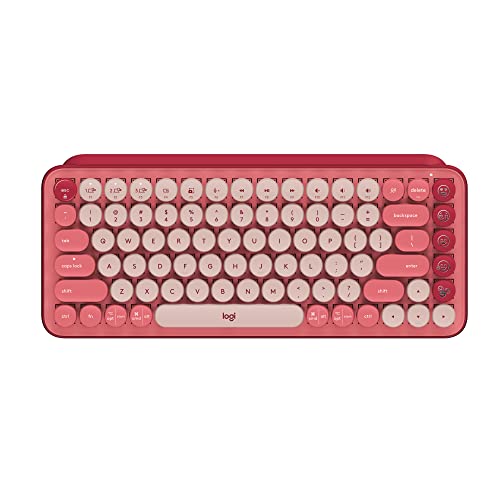
Logitech POP Keys Wireless Mechanical Keyboard (Rose)

Nillkin Foldable Bluetooth Keyboard with Touchpad (Gray)

Fintie Shockproof Case for Samsung Galaxy Tab 11-Inch (Black)

Logitech K780 Multi-Device Wireless Keyboard with Cradle

Nillkin Foldable Bluetooth Keyboard with Touchpad (Black)

Logitech K380 Multi-Device Wireless Keyboard (Off White)
A Breakdown Of The Leading Choices
The POP Keys breaks from the usual black-and-gray slab with a playful rose finish and a row of swappable emoji shortcuts. Mechanical switches sit underneath, which means the typing action is tactile and audible rather than the flat feel of a typical tablet keyboard. I like the way it pairs over Bluetooth or a Logi Bolt receiver, so it works fine with Android tablets, phones, and laptops without juggling cables.
It weighs more than a travel keyboard, but that heft keeps it planted on a desk during long writing sessions. For anyone turning a tablet into a primary workstation at home, the POP Keys feels closer to a real computer keyboard than a tablet accessory.
Notable Upsides
- Mechanical key switches give a satisfying click-and-clack that flat keyboards never match
- Swappable emoji keys add a personal touch, useful for chat-heavy workflows
- Dual wireless options mean the keyboard stays useful when switching between Android and a laptop
- Solid desk weight prevents the board from sliding while typing fast
Things To Consider
- Louder typing may bother roommates or shared offices
- Heavier than most tablet-focused options, so it rarely leaves a fixed desk
Quick Facts
Who It Suits Best
A writer or content creator who parks a tablet at a home desk and wants a full mechanical feel with personality.
Skip It When
The Nillkin Foldable Keyboard (Gray) is a smarter match for anyone who needs typing comfort that fits inside a backpack.
The Nillkin folds down to something you can drop into a jacket pocket, yet it unfolds into a full 105-key layout, which is rare in this category. A built-in touchpad and number pad mean an Android tablet can act as a real laptop replacement without a separate mouse. At roughly 9 ounces, it barely registers in a backpack.
Unlike the POP Keys, this one is built for movement rather than desk duty. I find it works well in cafés, hotel rooms, and trains, where carrying a full mechanical board would be absurd. The thin profile takes some getting used to, but typing accuracy holds up once hands adjust.
Features That Help
- Full layout including number pad stays useful for spreadsheets and data entry
- Built-in touchpad removes the need to tap the screen or carry a mouse
- Lightweight 9-ounce chassis slips into a bag without a dedicated pocket
- Folding mechanism needs no latch, so setup is fast
Honest Caveats
- Flat, no-tilt profile may feel low compared to a sloped laptop keyboard
- 16mm keycaps are smaller than a desktop keyboard, so bigger fingers may slow down
- Crease point in the middle can take adjustment during first few uses
Made For
Digital nomads and remote workers who want a complete layout without hauling a full-size keyboard.
Where Another Pick Suits Better
The Logitech K780 fits people who stay at one desk and want a tablet cradle built into the board.
This Fintie case solves a different problem than a keyboard, yet it sits in the same workflow. It is built specifically for the Samsung Galaxy Tab A11 Plus and A9 Plus 11-inch models, with a reinforced shell that absorbs drops and a built-in kickstand for propping the tablet up during typing sessions. The shell design lets a Bluetooth keyboard sit in front of the propped-up tablet, completing a portable workstation.
Compatibility is the headline here. The case only fits two specific Samsung tablets, so anyone on a different model should move on. For the supported Tab A11+ and A9+, owners commonly report the fit feels snug and the kickstand holds position under typing pressure.
Reasons It Performs
- Tailored cutouts keep the camera and ports accessible without removing the case
- Built-in kickstand props the tablet at a viewing angle suited for keyboard use
- Reinforced shell helps absorb everyday bumps during commute or travel
Practical Considerations
- Model-specific fit means it cannot move between tablets in a household
- The kickstand hinge sees the most wear and benefits from gentle handling over time
Best Suited To
Samsung Galaxy Tab A11+ or A9+ owners who want a protective shell and a typing-friendly stand in one piece.
Reach For A Different Pick When
Anyone without one of those specific Samsung models should look at the Logitech K380 for a keyboard-first solution that works with any Android tablet.
The K780 leans into desk duty, with a rubberized groove along the top edge that holds a tablet or phone upright. Pairing three devices at once lets me switch between an Android tablet, a desktop, and a phone with a button press, which feels closer to a proper workstation than a single-use keyboard. Quiet scissor-switch keys keep the noise low in shared spaces.
It weighs more than the Nillkin foldable option, so it does not earn points for travel. What it does offer is a familiar full-size layout with a number pad, which matters for spreadsheet work and longer documents. The cradle groove also charges nothing, which is refreshing in a sea of accessories that demand wall power.
What Helps Most
- Built-in cradle props tablets and phones at a comfortable viewing angle
- Three-device pairing makes switching between Android, desktop, and phone seamless
- Quiet key action suits shared offices and late-night work
- Full-size layout with number pad handles spreadsheet and data tasks
Points To Note
- Bulkier footprint than compact boards, so it suits a permanent desk
- Lacks the tactile snap of a mechanical keyboard like the POP Keys
Feature Snapshot
Perfect Match For
A home-office user who rotates between an Android tablet, a desktop, and a phone throughout the day.
Look Elsewhere When
The Nillkin Foldable Keyboard (Black) is a better match for anyone whose tablet lives in a travel bag, not on a desk.
This is the same board as the gray Nillkin covered earlier, finished in black for a more understated look. The full 105-key layout, built-in touchpad, and folding hinge carry over, so the only real decision is color coordination with the rest of the gear. For someone who likes their tech to blend in, black tends to disappear in a bag better than the gray version.
I find that the folding mechanism rewards a gentle touch. Owners commonly report that snapping the hinges shut too aggressively can stress the plastic over time, so a careful fold at the end of the session pays off in long-term reliability.
Real Benefits
- Black finish hides scuffs during daily carry better than lighter colors
- Full layout including number pad covers spreadsheet and accounting tasks
- Built-in touchpad eliminates the need for a separate pointing device
- Folding form factor fits in coat pockets and small bag sleeves
Trade Offs
- Flat typing angle may feel uncomfortable during multi-hour sessions
- Plastic hinge benefits from gentle handling to maintain alignment over time
Spec Overview
The Right Fit
Commuters and frequent travelers who want a pocket-friendly full layout without a separate mouse.
A Better Fit Elsewhere
The Logitech K780 suits people who stay parked at one desk and want a built-in tablet cradle above the keys.
The K380 is the lightest Logitech in this roundup, and it pairs with three devices simultaneously while staying small enough to toss in a bag. The round keycaps give it a slightly retro feel, and the layout automatically remaps to match the operating system, so Android shortcuts land where they should. I appreciate how quickly it wakes from sleep when a paired tablet wakes up.
It lacks the touchpad and cradle of the larger boards above, so the tablet screen handles cursor duty. For someone who wants a no-fuss keyboard for short bursts of typing, the K380 is hard to overcomplicate.
What Stands Out
- Three-device pairing keeps a tablet, phone, and laptop in rotation without re-pairing
- Auto OS detection remaps keys for Android, iOS, Windows, and Chrome
- Lightweight plastic body slips into a small sleeve or backpack pocket
- Long battery life keeps charging interruptions rare
Less-Strong Areas
- No touchpad, so the tablet screen handles all cursor work
- Compact round keys take adjustment for users with larger hands
Feature Card
Whose Shelf It Belongs On
Anyone who wants a low-fuss wireless keyboard that travels well and pairs across multiple devices without fuss.
Swap It Out When
The Nillkin Foldable Keyboard (Gray) is a stronger match if a built-in touchpad and number pad matter for on-the-go productivity.
What Matters Most Before Choosing Android Tablet Keyboards
A keyboard for an Android tablet is not just a smaller version of a laptop keyboard. The use case drives nearly every decision, and a board that excels on a permanent desk can feel miserable on a commute.
Connection And Compatibility
Bluetooth is the standard for Android tablets, and the Logitech K380 and K780 both support three simultaneous pairings, which matters when a tablet, phone, and laptop all want keyboard time. Foldable options from Nillkin use Bluetooth as well. Most modern Android versions pair a keyboard without extra apps, though checking for HID profile support removes guesswork. Anyone with an older tablet should confirm the operating system version supports Bluetooth keyboards before committing.
Layout And Footprint
A full 105-key layout, like the Nillkin foldables, covers the number pad without a second accessory. Compact boards like the K380 sacrifice the number pad for portability, which is fine for writing but slows spreadsheet work. Cradles and kickstands, like the one on the K780, change how the tablet sits relative to the keyboard, so it helps to picture the desk or lap setup before choosing.
Power And Portability
Mechanical keyboards feel great but weigh more and need more charging attention. Scissor-switch designs, like the K380 and K780, sip battery and stay light. Foldable boards split the difference, with reasonable travel and slim profiles, at the cost of a folding crease and a flatter angle. For a tablet that moves between rooms daily, weight and battery life matter more than switch type.
Build And Long-Term Use
Hinges on folding keyboards see real wear, so owners commonly report that gentle folds extend their lifespan. Cases like the Fintie shell handle drops rather than typing comfort, and they pair naturally with a Bluetooth keyboard for a complete travel kit. Choosing between protection and typing gear often comes down to whether the tablet already has a case.
Key Considerations Across These Picks
Where Shoppers Go Wrong
The most common mistake is buying a keyboard without checking tablet compatibility. The Fintie case only fits two Samsung tablets, and some Bluetooth boards pair but then fight with Android’s keyboard shortcuts. Confirming the tablet model and the operating system version removes most frustration before it starts.
Where The Extra Money Goes
Higher-priced boards usually bring better switches, longer battery life, or multi-device pairing. The POP Keys charges more for a mechanical feel and swappable emoji keys, while the K780 earns its place with a built-in cradle and three-device switching. For someone who types for a living, the upgrade shows up in daily comfort. For casual use, a simpler board like the K380 often does the job.
Frequently Asked Questions
Do all Bluetooth keyboards work with Android tablets?
Most modern keyboards pair with Android through the standard Bluetooth profile used for external keyboards, but older tablet versions may need a check before buying. The Logitech K380, K780, and Nillkin foldables all list Android among their supported operating systems.
Can a tablet replace a laptop with the right keyboard?
For email, documents, and light spreadsheets, a tablet plus a keyboard like the Nillkin foldable or K780 handles most daily work. Heavy video editing or complex software still pushes toward a traditional laptop, but typing-driven tasks feel close enough.
Are mechanical keyboards worth it on a tablet?
The POP Keys brings a satisfying tactile feel, which helps during long writing sessions. The trade-off is louder typing and extra weight, so mechanical boards make more sense at a fixed desk than on a commute.
How do I clean a folding keyboard?
A soft, dry brush works well for the gap between keys, and a lightly damp microfiber cloth handles the surface. Owners commonly report that keeping the folding hinge dry and free of crumbs extends the lifespan noticeably.
Do I still need a case if I have a keyboard?
A keyboard and a case serve different purposes, with the keyboard handling typing and the case protecting against drops. The Fintie case pairs well with a separate Bluetooth keyboard for a complete tablet setup, especially on the go.
The Takeaway
A good Android tablet keyboard turns a slate into something close to a real workstation, and the right pick depends on where the tablet lives. Desk dwellers tend to favor the K780 or the POP Keys, while travelers lean toward the Nillkin foldables or the K380. Anyone with a supported Samsung Tab should consider the Fintie case alongside a keyboard for full protection. Match the keyboard to the routine, and the tablet starts to feel a lot more like a computer.
