

Finding the right tablet for mobile gaming usually means balancing screen size, processing muscle, and battery endurance against what fits in your bag. I’ve looked at six strong options covering everything from powerhouse flagship silicon to budget-friendly 10-inch screens built for casual play. Whether you’re chasing frame rates in competitive shooters or just want a reliable screen for indie titles and cloud streaming, there’s something here worth a closer look.
A Quick View Of The Lineup
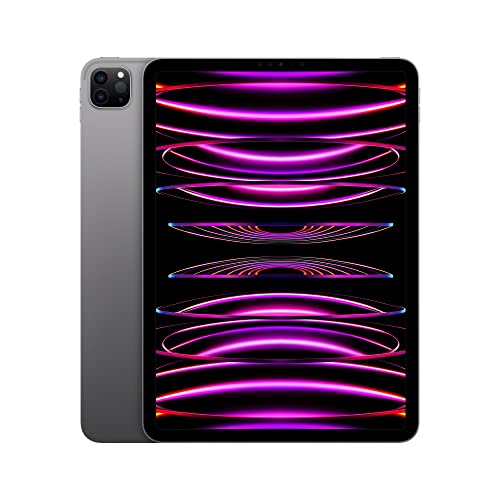
Apple iPad Pro 11-inch (4th Generation) M2 Chip 128GB Wi-Fi 6E Space Gray

SVITOO Kids Tablet 10 Inch Android 16 Tablet 20GB RAM 32GB Storage

Samsung Galaxy Tab S7 11-inch Android Tablet 128GB Wi-Fi S Pen Mystic Black

COLORROOM 2026 Android16 Tablet 11-inch Face Unlock 18W Fast Charge Blue
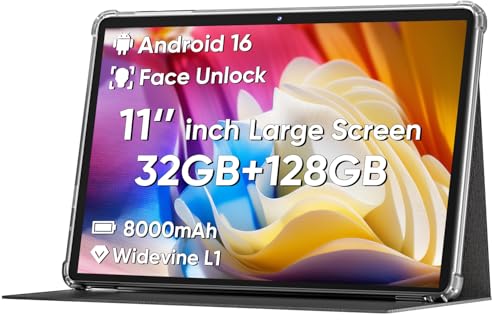
COLORROOM 2026 Android16 Tablet 11-inch Face Unlock 18W Fast Charging Black
AOC 10 Inch Tablet Android 16 120Hz IPS Display 8-Core 4GB RAM 128GB Storage Metal Body Gray
The Details Behind The Selections
The 11-inch iPad Pro is the heavyweight on this list, and its M2 chip is the reason. That silicon, the same family used in recent MacBooks, handles demanding 3D titles with a kind of headroom most Android tablets can’t match.
Compared to the budget picks further down, this one trades affordability for raw speed and a polished Liquid Retina panel. You also get Wi-Fi 6E (the latest wireless standard, offering faster and more stable connections on supported routers) and up to 2TB of storage if you want it, though the 128GB base keeps the price approachable for anyone willing to lean on cloud saves.
Real Benefits
- The 8-core CPU and 10-core GPU combo pushes high-frame-rate play in graphics-heavy games without thermal throttling in short sessions.
- Wi-Fi 6E keeps multiplayer lag in check on modern routers, a real plus for competitive online titles.
- 128GB of starting storage leaves room for a healthy library of large AAA-style mobile games.
- All-day battery life means marathon sessions on a long flight won’t hunt for an outlet.
- The Liquid Retina display renders colors and contrast at a level casual screens can’t approach.
Points To Keep In Mind
- The premium build carries a premium price tag, putting it out of reach for budget shoppers.
- Storage fills up fast with modern game installs, so managing space becomes part of the routine.
- You’ll want a quality case; the slim aluminum frame, while beautiful, doesn’t love accidental drops.
Feature Snapshot
Whose Shelf It Belongs On
Gamers who want the smoothest possible mobile experience and don’t mind paying flagship prices for it.
Swap It Out When
The AOC tablet makes more sense for shoppers who want a 120Hz screen in a much smaller budget.
The SVITOO tablet leans hard into the family-friendly lane, and it does so without skimping on Android 16, the latest version of Google’s tablet operating system. That makes it a useful everyday gadget rather than just a kids’ toy.
The bundled protective case and parental controls target parents who want peace of mind during car rides or quiet afternoons. Where the iPad Pro aims for power, this one aims for a safe, contained play space at a price that won’t sting if it gets dropped.
Benefits That Matter
- Parental controls built into Android 16 let parents tailor screen time and content access.
- The included protective case handles the usual bumps and drops kids throw at gear.
- 20GB of RAM keeps app switching smooth for schoolwork and casual games alike.
- Gift-ready packaging removes the wrapping-paper scramble on birthdays and holidays.
Honest Caveats
- 32GB of internal storage fills quickly with game installs and videos; expansion planning helps.
- Casual games play fine, but the hardware isn’t aimed at demanding 3D titles.
- The kid-focused design limits appeal for adult-only households.
Who Will Love This
Parents of younger children who want a contained, durable tablet for learning apps and light gaming.
Another Choice May Suit
The COLORROOM 11-inch tablet fits older kids or casual adult gamers who want a bigger screen without the parental scaffolding.
Samsung’s Galaxy Tab S7 sits in a comfortable middle ground that Android fans tend to gravitate toward. The 11-inch screen pairs with a bundled S Pen, giving gamers a stylus for touch-driven games or for sketching between matches.
You also get 128GB of storage as standard and a USB-C port for fast charging when the battery runs low. Compared to the COLORROOM options below, the Tab S7 brings more polish and a tighter software experience, though it carries a slightly higher price to match.
Positive Takeaways
- The bundled S Pen adds versatility for touch-based games and note-taking.
- Fast charging through USB-C minimizes downtime between long sessions.
- 128GB of internal storage holds a healthy mix of games and media.
- Bluetooth connectivity makes pairing with controllers and headphones straightforward.
Trade Offs
- The Mystic Black finish attracts fingerprints, so a microfiber cloth becomes part of the kit.
- It runs an older Android generation than the COLORROOM and AOC tablets listed below.
- Some users find the slim bezels make extended landscape grip a touch awkward.
Quick Facts
Built With In Mind
Android loyalists who want a versatile tablet for gaming, streaming, and productivity in one device.
Skip It When
The AOC tablet offers a higher refresh-rate screen and newer Android for shoppers prioritizing those specifics.
The COLORROOM 11-inch tablet arrives running Android 16 out of the box, which immediately gives it a future-friendly edge over older Android tablets still floating around. The blue finish adds a little personality without crossing into flashy.
Under the hood, an octa-core processor (a CPU with eight processing cores that handles multiple tasks simultaneously) and an 18W fast-charging setup cover the basics without burning a hole in your wallet. You trade premium materials for a price that lets you buy a controller or a case with money left over.
Notable Upsides
- Android 16 means longer software support compared to older-generation Android tablets.
- Face unlock speeds up logins between gaming sessions.
- 18W fast charging refills the battery quicker than standard chargers.
- The 11-inch screen gives games and video a comfortable viewing area.
Small Caveats
- The plastic build feels lighter but less premium than metal-bodied alternatives.
- Heavy 3D titles may push the processor harder than flagship chips can handle.
- Color options may be limited depending on availability.
Right Fit For
Casual gamers and students who want a current-generation Android tablet without paying flagship prices.
Not Your Match When
The Apple iPad Pro is the better route for shoppers chasing top-tier processing power for demanding games.
Think of this as the COLORROOM blue model’s sibling in a stealthier outfit. The black finish appeals to anyone who prefers a tablet that blends into a desk setup or backpack without drawing attention.
The internals mirror the blue version closely: Android 16, octa-core processing, and 18W charging. That makes this less about new features and more about giving shoppers a color choice that suits their style.
What Makes Sense
- The understated black finish fits professional and casual settings equally well.
- Same Android 16 foundation as the blue model, so software support stays current.
- Face unlock keeps daily logins fast and friction-free.
- 18W charging cuts downtime between gaming and streaming sessions.
Less-Strong Areas
- Shares the same processor limits as the blue model for heavy 3D titles.
- The plastic construction may show scuffs over time without a case.
Made For
Shoppers who want budget-friendly Android 16 gaming in a neutral color that pairs with any setup.
A Better Fit Elsewhere
The Samsung Galaxy Tab S7 makes more sense for anyone wanting a stylus and a more refined build.
The AOC tablet earns its place at the bottom of the list by bringing something the others mostly skip: a 120Hz IPS display. That refresh rate (the number of times per second the screen redraws the image) makes scrolling menus and motion in supported games noticeably smoother than the standard 60Hz panels on most budget tablets.
A metal body rounds out the package, lending a more durable feel than the plastic COLORROOM models. Add in Widevine L1 support for HD streaming from major services, and you’ve got a well-rounded 10-inch option that punches above its weight class.
The Practical Payoff
- 120Hz refresh rate delivers visibly smoother gameplay in supported titles.
- Metal body holds up better to daily wear than plastic alternatives.
- Widevine L1 certification unlocks HD playback on popular streaming apps.
- 128GB of storage with expansion up to 1TB covers large game libraries.
- 6000mAh battery gives long sessions between charges for most users.
A Few Limitations
- The 10-inch screen is smaller than the 11-inch COLORROOM and Samsung models.
- 4GB of RAM can bottleneck heavy multitasking compared to higher-spec tablets.
Feature Card
Best Suited To
Gamers who care about smooth screen motion and want a sturdy metal tablet without breaking the bank.
Consider Something Else When
The Apple iPad Pro is the stronger pick for shoppers who want flagship-tier performance and don’t mind paying for it.
What To Weigh Before Choosing Your Next Gaming Tablet
Refresh Rate And Display Smoothness
The single biggest upgrade a tablet screen can offer for gaming is the refresh rate, measured in hertz (Hz). Standard panels run at 60Hz, meaning the image updates 60 times per second. Step up to 120Hz, like the AOC tablet offers, and motion looks noticeably smoother, especially in racing games, shooters, and any title with fast camera pans. For casual puzzlers and slower strategy games, the difference matters less.
Processor Power And Game Compatibility
The chip inside your tablet determines which games you can run and at what quality. Flagship processors like Apple’s M2 handle top-tier mobile titles without breaking a sweat, while octa-core chips in the COLORROOM and AOC tablets cover the vast majority of popular games with sensible settings. Look at the specific games you love and check their recommended specs before committing.
Battery Life And Charging Speed
A 6000mAh battery or larger tends to deliver multi-hour sessions for most users, though demanding 3D titles drain faster than casual games. Fast charging at 18W or higher, like the COLORROOM tablets offer, cuts downtime when you do need to plug in. Frequent travelers and long commuters benefit most from generous battery capacity and quick top-ups.
Storage And Expandability
Modern games regularly exceed 1GB per install, and some push past 3GB. Starting storage of 128GB suits most shoppers, but the AOC tablet’s expandable storage up to 1TB offers headroom for anyone building a large library over time.
Key Considerations Across These Picks
Common Buying Traps
Many shoppers fixate on screen size and overlook processor generation, which leads to frustration a month later when a favorite game stutters on launch. Resolution matters too, but a sharp 1080p panel with a strong chip beats a fuzzy high-res screen running on an aging processor every time.
Where The Extra Money Goes
Paying more for a tablet usually buys you a faster processor, a higher-quality display panel, and better build materials like aluminum or magnesium. For gamers specifically, the upgrade often translates directly into smoother frame rates and longer software support, which keeps the device relevant for several years instead of feeling dated after one major Android release cycle.
Frequently Asked Questions
What Size Tablet Is Best For Gaming?
Most gamers find 10 to 11 inches hits the sweet spot between portability and screen real estate. Anything smaller sacrifices immersion, while larger tablets get bulky for handheld play on a commute.
How Much RAM Does A Gaming Tablet Need?
For casual and mid-tier mobile games, 4GB of RAM covers most situations comfortably. Heavy multitaskers or anyone playing demanding 3D titles benefits from 8GB or more when the budget allows.
Is A Higher Refresh Rate Worth It For Gaming?
Yes, if the games you play support it. The jump from 60Hz to 120Hz makes a visible difference in motion clarity, particularly in fast-paced genres. Slower-paced games won’t benefit as much.
Can Budget Tablets Run Popular Mobile Games?
Most budget tablets running recent Android versions handle popular casual and mid-tier games without issues. Demanding 3D titles may require lower graphics settings or reduced frame rates to stay smooth.
Do I Need A Stylus For Gaming On A Tablet?
Not for most genres. Styluses help with precision in certain touch-driven games and add versatility for note-taking between sessions, but traditional gamepads or touch controls work fine for the majority of mobile titles.
Bottom Line
A great gaming tablet balances the screen, processor, and battery around the games you actually play. Flagships like the iPad Pro deliver unmatched performance for shoppers willing to invest, while the COLORROOM and AOC options give solid Android 16 experiences at a fraction of the cost. Match the tablet to your play style, and the rest tends to fall into place.
