

Picking an Android tablet for business isn’t just about screen real estate or RAM numbers. The right device has to survive coffee spills, run split-screen reports without choking, and stay connected on the road. I’ve spent time comparing specs, build quality, and use-case fit to narrow down the tablets that actually earn their place in a working professional’s bag.
The Shortlist At A Glance

AD16WUVI 11 inch Android 16 Tablet 32GB RAM 128GB Storage 8000 mAh
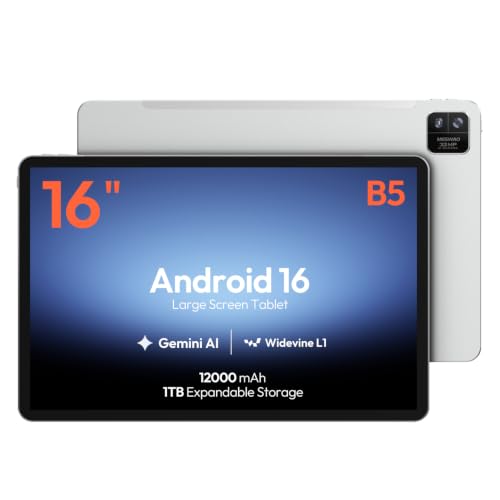
MESWAO 16-Inch Android 16 Tablet Helio G99 12GB RAM

AD16WUVI 10 inch Android 16 Tablet 26GB RAM 128GB Storage 7000 mAh
AD16WUVI 10 inch Android 16 Tablet 26GB RAM 128GB ROM

HOTWAV R9 Ultra 5G Rugged Tablet with Pen 11″ 2K

HOTWAV R9 Plus Rugged Tablet 11″ 2K 24GB 512GB

Samsung Galaxy Tab S7 11-inch 128GB Wi-Fi S Pen Mystic Black
AOC 10 Inch Tablet Android 16 120Hz IPS Metal Body Gray
What Each Pick Brings To The Table
An 11-inch form factor hits the sweet spot between portability and usable workspace, and this AD16WUVI leans into that middle ground hard. The 32GB of total RAM (8GB physical plus 24GB of extended virtual memory) keeps split-screen workflows, browser tabs, and cloud apps running side by side without the dreaded reload churn that haunts weaker tablets.
Running Android 16 with an octa-core processor, it has enough headroom for spreadsheet work, video calls, and PDF review in the same session. Compared to the 10-inch AD16WUVI picks lower on this list, the extra screen real estate and larger 8000 mAh battery make a noticeable difference during back-to-back meetings.
A Favorable Mix
- 32GB combined RAM keeps multitasking fluid across email, browser, and documents
- 8000 mAh battery covers a full workday of mixed light and heavy use
- Android 16 with Gemini AI support means longer software support runway
- 11-inch display offers enough room for split-screen productivity without feeling cramped
Trade Offs
- Brand is less recognizable, so long-term firmware support depends heavily on the manufacturer
- Extended RAM (the virtual portion) helps but doesn’t fully match true physical RAM for heavy workloads
Quick Facts
Who It Suits Best
Hybrid and remote workers who split time between documents, video calls, and cloud dashboards and want a balanced everyday driver.
Where Another Pick Suits Better
Field technicians and outdoor crews get more value from the HOTWAV R9 Ultra 5G Rugged Tablet with Pen, where 5G connectivity and ruggedization matter more than screen size.
A 16-inch IPS panel at 1920×1200 with a 16:10 aspect ratio gives this MESWAO tablet an unusually roomy canvas for an Android device. The wider format is built for displaying dense documents, dashboards, or large spreadsheets without endless scrolling.
Under the hood, a Helio G99 octa-core chip paired with 12GB of RAM handles everyday productivity smoothly. Compared to the 11-inch AD16WUVI at the top of this list, this one trades portability for screen real estate, making it a strong fit for desk-bound roles or client-facing presentations where the tablet doubles as a display.
Everyday Wins
- 16-inch IPS panel with 16:10 ratio accommodates multiple document windows side by side
- Helio G99 chip is efficient for sustained office-style workloads
- 12GB of physical RAM handles browser-heavy workflows without stutter
- 128GB of internal storage holds project files and presentations locally
Things To Consider
- 16-inch size pushes it toward laptop-replacement territory and is harder to hold one-handed
- Heavier and bulkier than the 10-inch and 11-inch picks, so daily commuting bags feel the weight
- Wi-Fi only configuration limits true mobile flexibility without a hotspot
Made For
Analysts, consultants, and executives who treat the tablet as a primary workstation and prioritize screen size over portability.
Consider Something Else When
Mobile sales reps who carry their tablet everywhere should reach for the AOC 10 Inch Tablet Android 16, which slips into a small bag without ceremony.
For business users who want a tablet that disappears into a tote or messenger bag, the 10.1-inch footprint here is genuinely easy to live with. It runs the same Android 16 + Gemini AI stack as the larger AD16WUVI but in a chassis that rarely feels oversized.
Powering the experience is a Unisoc T606 octa-core processor with 26GB of total RAM (6GB physical plus 20GB extended). The eye-care display and built-in gravity sensor add polish for reading-heavy or presentation-heavy workflows. You may find the smaller screen less forgiving for dense spreadsheets, though, so pairing it with a Bluetooth keyboard helps.
Useful Highlights
- 10.1-inch form factor is genuinely portable for daily commuting
- T606 octa-core handles email, browsing, and standard office apps reliably
- Eye-care display reduces strain during long document review sessions
- Gravity sensor automatically rotates content for shared viewing in meetings
Points To Note
- Smaller screen makes complex spreadsheets and multi-window workflows cramped
- 7000 mAh battery is smaller than the 11-inch AD16WUVI’s 8000 mAh unit, so heavy days may need a top-up
Best Suited To
Field sales reps, consultants, and remote workers who want a pocketable tablet for client meetings and travel days.
Skip It When
Project managers reviewing Gantt charts and large dashboards benefit more from the MESWAO 16-Inch Android 16 Tablet, where the larger display is the main selling point.
This second AD16WUVI 10.1-inch model shares nearly identical internals with the pick above it, leaning on the same T606 octa-core platform and 26GB combined RAM. The positioning here is straightforward: an accessible entry point for small businesses outfitting multiple seats without breaking the equipment budget.
Android 16 with Gemini AI support means small teams get access to the same software baseline as more expensive options. For most back-office environments handling email, scheduling, POS-style apps, and web-based dashboards, the spec sheet is more than enough. Owners commonly report that extended RAM helps with app-switching, though very heavy multitasking still leans on the 6GB physical portion.
What Pays Off
- 26GB combined RAM keeps multi-app workflows responsive for everyday office tasks
- Android 16 gives access to the latest productivity and security updates
- Compact 10.1-inch chassis suits POS counters and reception desks
- 128GB storage handles a reasonable catalog of business apps and local files
Honest Caveats
- Performance sits below the 11-inch AD16WUVI and 16-inch MESWAO for demanding workloads
- Smaller battery than the 11-inch sibling means shorter unplugged runtime under heavy use
Feature Snapshot
Who Will Love This
Small business owners outfitting reception, retail counters, or field-checking stations where budget matters and the workload stays light to moderate.
A Better Fit Elsewhere
Crews working on active construction sites or in wet outdoor environments should look at the HOTWAV R9 Plus Rugged Tablet, which is built to take abuse.
The HOTWAV R9 Ultra leans into a specific use case: working professionals who can’t rely on Wi-Fi and need a tablet that survives the environment. Built-in 5G with dual SIM support keeps field crews, technicians, and remote managers connected wherever there’s signal.
Add a rugged chassis, 24GB of combined RAM, 512GB of internal storage expandable to 2TB, and a stylus pen for signing forms or marking up drawings, and you’ve got a serious tool. The 11-inch 2K display stays sharp for technical documents. Running Android 15, it’s a step behind the Android 16 picks on software freshness, though depending on your app requirements that may not matter.
Key Advantages
- 5G connectivity with dual SIM support for true mobile productivity
- 512GB storage expandable to 2TB holds large project files and offline maps
- Included stylus pen supports markup, signatures, and field notes
- Rugged construction designed to handle drops, dust, and moisture
A Few Limitations
- Rugged body adds noticeable bulk and weight compared to slimmer picks
- Runs Android 15 rather than the newer Android 16 found on several competing picks
Feature Rundown
Perfect Match For
Field engineers, surveyors, and remote project managers who depend on constant connectivity and need a tablet that survives the work site.
Reach For A Different Pick When
Office-based knowledge workers in standard corporate settings will get more refinement from the Samsung Galaxy Tab S7 11-inch, which trades ruggedization for a sleeker everyday experience.
The R9 Plus is HOTWAV’s Wi-Fi-only sibling to the 5G-equipped Ultra, aimed at professionals who work tough environments but stay within range of a wireless network. A Unisoc T7280 octa-core processor paired with 24GB of total RAM (8GB physical plus 16GB virtual) handles demanding multitasking without flinching.
The standout spec is the 20080 mAh battery, which translates to multi-day runtime for crews who can’t recharge midday. The 11-inch 2K display stays crisp for technical drawings and detailed reports. Compared to the 5G Ultra above, this one sacrifices cellular connectivity for a lower price point, which makes sense for warehouse logistics and on-premise industrial workflows.
What Earns Its Place
- 20080 mAh battery delivers multi-shift runtime without hunting for outlets
- 24GB total RAM with 8GB physical keeps heavy multitasking smooth
- 512GB storage expandable to 2TB accommodates large industrial files
- Rugged build is suited to warehouses, workshops, and outdoor deployments
Worth Bearing In Mind
- Wi-Fi only means no connectivity on the road without a mobile hotspot
- Weight and bulk are unavoidable trade-offs for the rugged build and oversized battery
Spec Overview
Built With In Mind
Warehouse supervisors, factory floor technicians, and logistics coordinators who need battery endurance and ruggedness more than cellular mobility.
Where A Sibling Pick Shines
Traveling technicians who work across multiple sites per day should consider the HOTWAV R9 Ultra 5G Rugged Tablet with Pen for its cellular connectivity and included stylus.
The Galaxy Tab S7 sits in a different category from the rest of this list. It’s a Samsung-built tablet with the fit, finish, and ecosystem polish that comes from a major manufacturer. The included S Pen magnetically attaches, charges, and supports low-latency input that genuinely feels good for handwritten notes.
The 11-inch display, 128GB of storage, USB-C fast charging, and Bluetooth accessory support make it a productivity workhorse for hybrid office use. Compared to the newer AD16WUVI and AOC picks, the Galaxy Tab S7 is older hardware running an earlier Android version, but Samsung’s mature ecosystem and the S Pen experience still hold up well for creative and note-heavy roles.
The Practical Payoff
- Included S Pen offers a refined writing and drawing experience with low latency
- Samsung’s mature ecosystem supports DeX-style productivity and broad accessory compatibility
- Premium build quality with metal finish and reliable construction
- USB-C fast charging gets the battery topped up quickly between meetings
Some Limits To Know
- Older hardware running an earlier Android version means shorter remaining software support runway
- Wi-Fi only configuration requires a hotspot for true mobile productivity
The Right Fit
Creative professionals, executives, and note-takers who value the S Pen experience and a refined Samsung ecosystem over the latest Android version.
Swap It Out When
Buyers who prioritize the newest Android 16 software and maximum RAM headroom should look at the AD16WUVI 11 inch Android 16 Tablet with 32GB of total RAM instead.
AOC brings a known display heritage to this tablet, and it shows. The 10-inch IPS panel runs at 120Hz with high-brightness output, which makes scrolling, document navigation, and presentation playback noticeably smoother than standard 60Hz business tablets. A Widevine L1 certification means HD streaming works properly in apps that require it.
An octa-core processor paired with 4GB of RAM and 128GB of storage (expandable to 1TB) handles split-screen multitasking and Android 16’s productivity features. The metal body gives it a more polished feel than many plastic-bodied competitors in the same size class, and Face ID adds a corporate-friendly login option. For most office workflows, the lower physical RAM is the main trade-off to weigh.
What Makes Sense
- 120Hz IPS display delivers smoother scrolling and crisper text than typical 60Hz panels
- Widevine L1 unlocks HD content in Netflix, Prime Video, and similar services
- Metal body adds a premium feel uncommon in this size class
- Face ID provides fast, secure biometric login for shared or kiosk use
Practical Considerations
- 4GB of physical RAM is lower than other picks, so heavy multitasking can feel constrained
- 6000 mAh battery is the smallest in this list, so unplugged days need charging discipline
Feature Breakdown
Whose Shelf It Belongs On
Customer-facing retail staff, hospitality teams, and reception desks where the tablet’s polished look and smooth display make a real impression.
Not Your Match When
Power users running heavy multitasking workflows should instead consider the AD16WUVI 11 inch Android 16 Tablet, which offers substantially more RAM headroom.
What Matters Most Before Choosing An Android Tablet For Work
Software Version And Long-Term Support
Android 16 is the current generation, and several picks on this list run it while others (the Samsung Galaxy Tab S7 and the HOTWAV R9 Ultra) ship with Android 15. Newer Android versions typically mean longer security update windows, better Gemini AI integration, and compatibility with the latest business apps. For organizations standardizing on a multi-year device fleet, software support runway often matters more than raw specs.
RAM, Storage, And Multitasking Headroom
Total RAM figures can be misleading because manufacturers advertise both physical RAM and extended (virtual) RAM. Physical RAM is what actually keeps apps running smoothly without reloads. Extended RAM borrows from storage to help with lighter tasks. For document-heavy workflows and split-screen productivity, 8GB or more of physical RAM is a sensible baseline. Storage of 128GB covers most business use, and expandable storage (microSD or similar) helps teams handling large media files or offline datasets.
Screen Size Versus Portability
A 10-inch tablet fits in a small bag and disappears in daily carry. An 11-inch tablet hits the productivity sweet spot for most office roles. A 16-inch tablet like the MESWAO behaves more like a portable monitor and is best for desk-bound workflows. Matching screen size to how the tablet will actually travel and where it’ll be used most days prevents overspending on form factors that don’t fit real habits.
Connectivity And Battery Life
Wi-Fi-only models work fine for office-based roles, but traveling professionals benefit from 5G models like the HOTWAV R9 Ultra. Battery capacity varies wildly on this list, from 6000 mAh on the AOC to over 20000 mAh on the HOTWAV rugged picks. Long field shifts need the bigger batteries; standard office days with access to charging don’t.
Smart Considerations Before You Buy
Pitfalls Shoppers Hit
The most common mistake is chasing headline RAM numbers without checking how much is physical versus extended. A tablet advertising 32GB of RAM with only 8GB physical won’t match a competitor with 12GB of true physical memory for sustained workloads. Another trap is buying a Wi-Fi-only model when the work actually demands mobile connectivity, or skipping expandable storage when file sizes are unpredictable.
Where The Extra Money Goes
Spending more on a business tablet typically buys three things: a stronger physical RAM ceiling, cellular connectivity, and rugged construction. The HOTWAV R9 Ultra adds 5G and a stylus for field roles. The Samsung Galaxy Tab S7 adds ecosystem polish and the S Pen experience. For office-bound roles with reliable Wi-Fi, the mid-tier AD16WUVI 11-inch offers the best balance of capability and value.
Frequently Asked Questions
What size Android tablet works best for business?
Most professionals find an 11-inch tablet hits the sweet spot between portability and usable workspace. Smaller 10-inch models suit travel-heavy roles, while 16-inch models work best for desk-bound workflows where screen real estate matters most.
How much RAM does a business tablet really need?
For everyday office tasks, 6GB to 8GB of physical RAM is a sensible baseline. Heavy multitasking, large spreadsheets, and split-screen workflows benefit from 12GB or more. Extended (virtual) RAM helps but doesn’t fully replace physical memory.
Is a rugged tablet worth it for business use?
Rugged tablets earn their cost in environments with drops, dust, or moisture: construction sites, warehouses, and outdoor deployments. Office-based professionals rarely need the extra bulk and weight.
Should I get 5G or Wi-Fi only?
5G matters most for field workers, traveling professionals, and roles where reliable Wi-Fi isn’t guaranteed. Office-based professionals with dependable wireless networks can save money with Wi-Fi-only models.
What is Widevine L1 and does it matter?
Widevine L1 is a security level that allows HD streaming from services like Netflix and Prime Video. L1 means full HD playback; lower levels restrict to standard definition. For media-rich business presentations, L1 makes a noticeable difference.
Closing Remarks
The right tablet depends on where work actually happens. Office-based professionals typically find their stride with an 11-inch AD16WUVI or the polished AOC, while field crews get the most out of a HOTWAV rugged pick. Match the screen size, RAM, and connectivity to the real workflow rather than the spec sheet, and the rest tends to fall into place.
