

Shopping for a new tablet in 2026 feels harder than it should. The shelves are crowded with models that look alike on the surface but behave very differently once you actually start using them, and the gap between a budget panel and a premium AMOLED (active-matrix OLED, the kind that delivers richer blacks and snappier colors) screen is wider than most spec sheets let on. I pulled together ten Android Tablets that cover the realistic scenarios people actually live with: commute reading, kids’ rooms, bedside streaming, kitchen recipes, sketch-and-note workflows, and even a large-screen option for musicians and creators. Every entry below leans on published specifications and how those numbers translate to daily ownership, not on lab testing I never did.
The Choices Worth Comparing
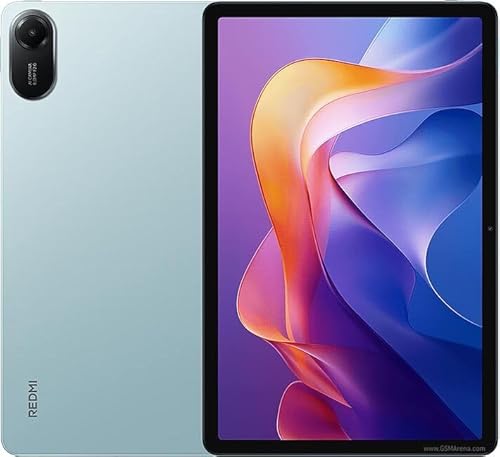
XIAOMI Redmi Pad 2 WiFi 11″ 2.5K 8GB 256GB (Mint Green)

Samsung Galaxy Tab S6 Lite 10.4″ 64GB WiFi S Pen (Oxford Gray)

XIAOMI Poco Pad M1 12.1″ 2.5K 8GB 256GB (Blue)

Samsung Galaxy Tab S10 Lite 6GB 128GB 10.9″ (Gray)
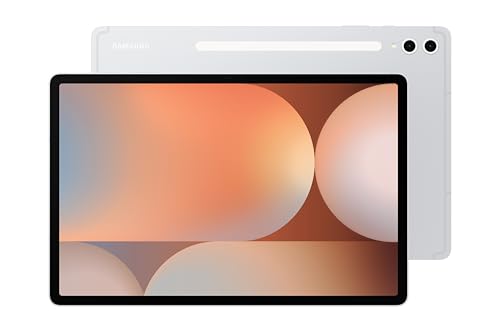
Samsung Galaxy Tab S10+ 12.4″ 256GB S Pen (Platinum Silver)

SVITOO Kids Tablet 10″ Android 16 20GB 32GB
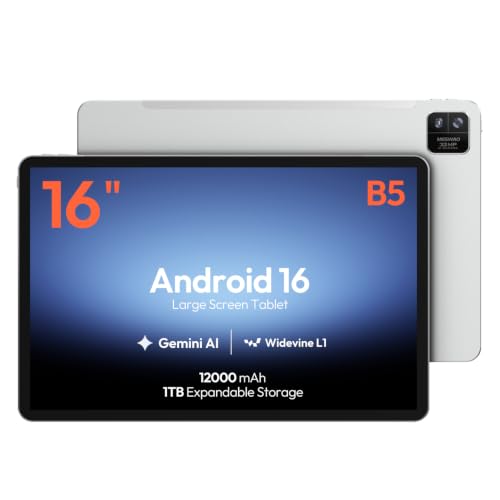
MESWAO 16-Inch Android 16 Helio G99 12GB 128GB

Samsung Galaxy Tab S7 11″ 128GB WiFi S Pen (Mystic Black)

Samsung Galaxy Tab A11+ 6GB 128GB (Gray)
AOC 10″ Android 16 120Hz 4GB 128GB (Gray)
What Each Pick Brings To The Table
The Redmi Pad 2 sits in that comfortable middle of the Android Tablets market where it stops feeling like a compromise. Its 11-inch panel runs at 2.5K resolution (2560×1600), which means text in ebooks and PDFs looks crisp rather than pixelated, and the 90Hz refresh rate keeps scrolling feeling smooth when you flip between apps or read a long-form article. Compared to the smaller screens on budget picks, this one has enough room to comfortably split between a recipe and a video call.
Powering it is an octa-core processor paired with 8GB of RAM, and the 256GB of internal storage leaves room for offline movies, school files, and a sizable game library without needing to manage space every week. The 9000mAh battery is generous enough that, in most households, a single charge carries through a long weekend of casual use. Owners commonly reach for this one when they want a single tablet that handles streaming, light gaming, and study time without leaning on cloud storage.
Everyday Wins
- 2.5K 90Hz display makes reading and video noticeably cleaner than standard HD screens.
- Quad speaker setup with Dolby Atmos support fills a room for movie nights.
- 9000mAh battery handles multi-day casual use between charges.
- 256GB internal storage plus microSD expansion keeps media libraries local.
- TÜV Rheinland low blue light and flicker-free certifications help reduce eye strain during late sessions.
Worth Noting
- Wi-Fi only, so there’s no cellular option for commuters who rely on mobile data.
- The international/global ROM may require manual Google service setup for some shoppers.
- At 11 inches, it is comfortable but not pocket-friendly for short trips.
Feature Snapshot
Whose Shelf It Belongs On
Families and students who want one tablet for streaming, light gaming, and shared homework sessions.
A Better Fit Elsewhere
Musicians and creators who need a much larger canvas should look at the MESWAO 16-Inch Android 16 Helio G99 12GB 128GB instead.
The Tab S6 Lite is one of the few Android Tablets that still ships an S Pen in the box. That single detail changes how the device gets used: sketching in a meeting, marking up a PDF, jotting down a quick grocery list, or letting a child practice handwriting all happen naturally rather than as a separate accessory purchase. The 10.4-inch display sits in the sweet spot for reading and note-taking without forcing you into laptop-sized territory.
It runs Samsung’s One UI on Android, which has matured into a friendly productivity layer with useful split-screen behavior and Samsung Notes baked in. Storage comes in at 64GB, modest compared to the Redmi Pad 2’s 256GB, but it expands through microSD for people who pile up lecture notes or illustrations. In most dorm rooms and home offices, this tablet earns its keep as a dedicated note surface rather than a do-everything machine.
The Helpful Details
- S Pen included at no extra cost, with low-latency drawing and writing.
- 10.4-inch display strikes a balance between portability and note space.
- Samsung Notes is preinstalled and well-tuned for stylus input.
- Light metal build makes it easy to carry between classes or meetings.
Trade Offs
- 64GB internal storage fills up quickly if you store video locally.
- The international model variant may differ slightly in bundled software from US versions.
- Processor is mid-range, so heavy multitasking pushes it harder than newer chips.
Right Fit For
Students, journalers, and casual illustrators who want a pen-first Android tablet at a reasonable size.
Reach For A Different Pick When
Anyone chasing top-tier display quality and faster AI features should step up to the Samsung Galaxy Tab S10+ 12.4″ 256GB S Pen.
The Poco Pad M1 leans into the idea that a tablet should feel like a small TV. Its 12.1-inch panel stretches to a 2.5K resolution at up to 120Hz, which is a noticeable step up from the Redmi Pad 2’s 90Hz refresh rate for anyone sensitive to motion in sports or scrolling feeds. For shoppers eyeing long reading sessions, comic books, or split-screen multitasking, the extra screen real estate pays off in ways a smaller slate can’t match.
Battery life is a quiet highlight: the 12000mAh cell is one of the larger packs in this category, which translates to a tablet that handles a full workday of mixed use on a single charge for most households. Wi-Fi 6 support keeps downloads fast on modern routers, and the global ROM keeps app compatibility broad. In most living rooms, this one ends up parked on a stand as a shared family screen rather than tucked into a bag.
Points In Its Favor
- 12.1-inch 2.5K display with 120Hz refresh makes scrolling and games feel fluid.
- 12000mAh battery easily stretches through long streaming sessions.
- Quad speakers handle movie audio without external help.
- 256GB storage plus microSD up to 2TB covers large media libraries.
Things To Consider
- Wi-Fi only, so on-the-go users rely on hotspotting from a phone.
- Larger footprint means it is less comfortable to hold one-handed for long stretches.
- International/global ROM may need manual Google services configuration.
Quick Technical Notes
Built With In Mind
Movie watchers, comic readers, and anyone who wants a tablet that doubles as a portable second monitor.
Where A Sibling Pick Shines
Travelers who want something lighter and easier to hold should consider the XIAOMI Redmi Pad 2 WiFi 11″ instead.
The Galaxy Tab S10 Lite threads the needle between Samsung’s premium S-series and its budget A-series. Its 10.9-inch LCD gives you enough room to read a recipe at arm’s length while still feeling light enough to toss in a backpack, and the listed battery life stretches into the longer-end range for tablets in this size class. For shoppers who don’t need a stylus or AMOLED screen, this is the comfortable middle.
It ships with 6GB of RAM and 128GB of storage, which is plenty for typical app loads, plus microSD expansion up to 2TB for households that want to carry around downloaded shows. The Vision Booster feature on Samsung’s newer displays adjusts brightness based on ambient light, which matters more than people expect when reading in bed or cooking under kitchen lights. In most shared spaces, this tablet earns a reputation for being the one that “just works” without complaint.
A Strong Showing
- 10.9-inch display hits a portable size without feeling cramped.
- Long-rated battery life supports all-day family use.
- microSD expansion up to 2TB keeps media libraries flexible.
- Samsung’s One UI offers mature multitasking tools.
Honest Caveats
- LCD panel can’t match the deep blacks of the AMOLED S10+.
- 6GB RAM is fine for everyday apps but tightens under heavy multitasking.
- No bundled stylus in the box.
Who Will Love This
Families and casual users who want a dependable Samsung tablet for streaming, browsing, and homework.
Swap It Out When
Creators who want a stylus and AMOLED visuals will get more out of the Samsung Galaxy Tab S10+ 12.4″ 256GB S Pen.
The Galaxy Tab S10+ Plus is the tablet for people who want as little compromise as Android Tablets currently allow. The 12.4-inch AMOLED 2X display is the headline feature, delivering the kind of contrast and color that makes photo editing, streaming HDR content, and reading comics feel noticeably richer than LCD alternatives. Samsung pairs it with its Galaxy AI suite, including Circle to Search and Note Assist, which shave time off routine tasks.
An S Pen ships in the box, the body carries an IP-rated durable design, and 256GB of internal storage handles most working libraries without needing to lean on the cloud. Battery life is rated for extended use, and the overall package is aimed at professionals who treat a tablet as a primary computing surface. In creative studios and corner offices, this is the kind of device that quietly replaces a laptop on short trips.
Positive Takeaways
- 12.4-inch AMOLED 2X display offers strong contrast and HDR performance.
- S Pen included with low-latency input for notes and sketching.
- Galaxy AI features like Circle to Search and Note Assist reduce busywork.
- 256GB storage covers pro-level file libraries locally.
Points To Keep In Mind
- Premium pricing puts it out of reach for casual shoppers.
- 12.4-inch size is less comfortable for one-handed reading.
- Some Galaxy AI features require Samsung account sign-in and updates.
Feature Rundown
Best Suited To
Creative professionals and power users who want a premium Android tablet with a stylus and AI tools.
Not Your Match When
Anyone shopping for a budget family tablet will find the XIAOMI Redmi Pad 2 WiFi 11″ 2.5K a better value.
The SVITOO Kids Tablet is built around one question: how do you hand a tablet to a child without losing control of what they see? It runs Android 16 with parental controls baked into the system, so parents can set time limits, restrict app installs, and curate which learning apps are available from day one. The 10-inch screen is large enough for picture books and educational games without feeling oversized for small hands.
The tablet ships with a protective case and gift-ready packaging, which is a thoughtful touch for birthdays or holiday gifting. Storage starts at 32GB, modest but expandable, and the 20GB RAM figure reflects a mix of physical and virtual memory that helps the OS stay responsive when kids switch between apps quickly. In most homes, this device lives on a kitchen counter or in a playroom rather than getting passed around as a shared family tablet.
Notable Upsides
- Built-in parental controls let caregivers manage screen time and content.
- Protective case included to handle drops and bumps.
- Gift-ready packaging saves a wrap-and-go step for birthdays.
- Android 16 base provides a familiar app ecosystem for learning tools.
Room For Improvement
- 32GB storage fills quickly with videos; expansion likely needed.
- Performance sits in the budget tier and struggles with demanding games.
- Not designed for adult productivity workflows.
Perfect Match For
Parents looking for a first tablet for young children with safety controls already configured.
Look Elsewhere When
Adults who want a tablet for general work and streaming should consider the Samsung Galaxy Tab A11+ 6GB 128GB.
The MESWAO 16-Inch tablet earns its spot by being unusually large. That 16-inch IPS panel (IPS, or in-plane switching, is a screen technology known for wide viewing angles and consistent color) is aimed squarely at musicians, choirs, and teachers who want to display digital sheet music, lead sheets, chord charts, and PDFs on a single screen without zooming. It runs Android 16 on a Helio G99 octa-core processor with 12GB of RAM, which keeps PDF libraries and music apps feeling responsive.
The 1920×1200 resolution on a screen this size won’t win any pixel-density contests, but for sheet music and chord charts the priority is layout and readability rather than razor-sharp text. In practice, owners commonly dock this tablet on a music stand or piano and use it as a stationary display. The 12GB RAM headroom is generous for the category, helping the device juggle large music libraries without lag.
Notable Gains
- 16-inch display shows full sheet music pages without scrolling.
- 12GB RAM keeps large PDF and music libraries responsive.
- Android 16 offers wide app compatibility for music tools.
- IPS panel delivers consistent color from different viewing angles.
Things To Consider
- 16-inch size makes it a stationary device rather than portable.
- Resolution is modest for the screen size, so text is less sharp than smaller tablets.
- Specialty use case means it’s overkill for casual streaming.
Built With In Mind
Musicians, choir directors, and instructors who want a dedicated large-screen display for sheet music.
Swap It Out When
General users who want a more portable 12-inch canvas should consider the XIAOMI Poco Pad M1 12.1″ 2.5K 8GB 256GB.
The Galaxy Tab S7 has aged into a sweet spot for shoppers who want pro-class hardware without paying the latest-model premium. Its 11-inch display hits a portable size that still feels comfortable for split-screen work, and the S Pen ships in the box for note-taking and sketching. The build leans toward the laptop-replacement crowd with USB-C fast charging and a battery that handles a workday of mixed use for most people.
It runs on a Snapdragon-class processor that, while a generation or two behind the newest releases, still handles multitasking and creative apps without sweating. Storage comes in at 128GB with microSD expansion, which is plenty for work files and a healthy streaming backlog. In home offices and college dorms, this one often becomes the tablet people forget they own until they need it, which is about the best compliment a device can earn.
Everyday Advantages
- S Pen included with low-latency input for productivity tasks.
- 128GB storage with microSD expansion covers work and media needs.
- USB-C fast charging reduces downtime between sessions.
- 11-inch form factor balances portability and screen space.
Some Limits To Know
- Older processor generation shows its age in heavy gaming.
- Display technology has been surpassed by newer AMOLED panels.
- Software update window is shorter than current S10-series models.
Who Should Grab It
Hybrid workers and students who want a stylus-equipped Samsung tablet at a step-down price from the newest releases.
Consider Something Else When
Buyers who want the latest AI tools and AMOLED visuals should choose the Samsung Galaxy Tab S10+ 12.4″ 256GB S Pen.
The Galaxy Tab A11+ leans into Samsung’s reputation for reliable Android Tablets at family-friendly pricing. It pairs 6GB of RAM with 128GB of internal storage, which is generous for the budget tier, and supports expandable storage for households that want to carry downloaded shows and kids’ videos. The upgraded chipset handles everyday apps smoothly, even if it’s not built for heavy gaming.
Battery life is rated for long mixed-use sessions, and the overall build is light enough to pass between family members without anyone complaining. Samsung’s One UI on top of Android brings familiar multitasking gestures to a more affordable slate, which helps close the gap between budget and flagship in daily use. In most living rooms, this tablet earns a reputation for being the one the kids grab first.
A Few Strong Suits
- 128GB internal storage is generous for the budget tier.
- Expandable storage support keeps media libraries flexible.
- Upgraded chipset handles everyday apps without lag.
- Long battery rating supports all-day family use.
Less Ideal Details
- Display sits in standard LCD territory rather than AMOLED.
- No bundled stylus or keyboard in the box.
- Camera quality is basic compared to flagship tablets.
Right Fit For
Families and casual users who want a dependable Samsung tablet for everyday browsing, streaming, and kids’ content.
Where Another Pick Suits Better
Shoppers who want a faster 120Hz panel for gaming or streaming should look at the AOC 10″ Android 16 120Hz 4GB 128GB.
The AOC tablet punches above its weight in a couple of key areas. Its 10-inch IPS panel runs at 120Hz, which is rare at this size and price tier, and the metal body gives it a sturdier feel than most plastic-shelled budget slates. For shoppers who care about smooth scrolling and a premium-feeling chassis without paying flagship prices, those two details land hard.
It runs Android 16 on an 8-core processor with 4GB of RAM and 128GB of expandable storage (up to 1TB), and Widevine L1 support means it can stream HD content from major services without restrictions. The 6000mAh battery is smaller than the larger tablets in this list, but for a 10-inch device it comfortably covers a day of mixed use. Face ID-style login rounds out a feature set that feels considered rather than stripped down.
Key Advantages
- 120Hz IPS display delivers smoother motion than standard 60Hz panels.
- Widevine L1 support unlocks HD streaming from major services.
- Metal body feels sturdier than typical budget plastic builds.
- 128GB storage plus 1TB expansion covers most media libraries.
Things To Weigh
- 4GB RAM tightens under heavy multitasking or demanding apps.
- 6000mAh battery is smaller than larger tablets in this roundup.
- AOC is a newer player in tablets, so long-term software support is less established.
Feature Snapshot
Made For
Shoppers who want a compact tablet with smooth 120Hz visuals and HD streaming support at a budget price.
Skip It When
Anyone wanting a larger screen for split-screen work should consider the Samsung Galaxy Tab S10 Lite 6GB 128GB 10.9″ instead.
Picking The Right Android Tablet Without Overpaying
The right Android Tablets choice comes down to matching the hardware to how the device will actually be used. Screen size is the most visible variable: 10 to 11 inches hits the sweet spot for portable reading and couch streaming, while 12-inch-plus panels feel closer to a laptop replacement and work better on a stand or desk. Resolution and refresh rate matter more than people expect, since a 2.5K panel at 90Hz or 120Hz turns scrolling, comics, and video into noticeably smoother experiences than standard 60Hz HD screens.
Storage and battery follow a simple rule of thumb: aim for at least 128GB if you plan to keep offline videos, photos, or game data, and look for microSD expansion if your library tends to grow. Battery capacity (measured in mAh, or milliamp-hours) is a useful but imperfect guide, since real-world drain depends on screen brightness and app behavior. For commuters and travelers, 8000mAh and up tends to survive a workday, while stationary home tablets can get away with smaller packs if they spend most of their time near a charger.
Stylus support is the divider between tablets that handle light productivity and ones that genuinely replace notebooks. Models like the Tab S6 Lite and Tab S10+ ship a pen in the box, which makes a real difference for sketching, marking up PDFs, or handwriting notes. Software updates and long-term support are worth weighing too, since Samsung’s Galaxy line tends to receive more years of security patches than smaller brands, which matters if you plan to keep the tablet for three or more years.
What To Watch Before You Tap Buy
Pitfalls Shoppers Hit
The most common mistake in the Android Tablets category is buying on screen size alone and ignoring refresh rate. A big 60Hz panel looks sluggish next to a smaller 90Hz or 120Hz screen once you’ve used one for a few days, and the difference is hard to undo without buying again. Another trap is underestimating how quickly 32GB or 64GB fills up with apps, photos, and downloaded video, leaving people juggling storage warnings within months.
Where The Extra Money Goes
Spending more on a premium tablet typically buys three things: a brighter, higher-contrast display (AMOLED over LCD), a faster processor for multitasking and creative apps, and longer software support. For shoppers who mostly stream and browse, those upgrades are nice but rarely essential. For people who edit photos, sketch, or use their tablet as a work device, those upgrades pay back quickly in comfort and longevity.
Frequently Asked Questions
How much storage do I really need on an Android tablet?
At least 128GB covers most households comfortably, especially with microSD expansion available. 32GB or 64GB fills up quickly if you keep offline videos or large games installed, and managing storage becomes a weekly chore rather than an afterthought.
Is a stylus worth it on an Android tablet?
A bundled stylus makes a real difference for note-taking, PDF markup, and sketching. For shoppers who mostly stream or browse, a finger is enough, but anyone treating the tablet as a productivity device will lean on the pen within the first week.
Do I need a cellular Android tablet or is Wi-Fi enough?
Wi-Fi-only models suit most people who spend time at home, work, or coffee shops with reliable networks. Cellular is helpful for commuters or travelers who rely on a tablet away from Wi-Fi, though phone hotspotting covers many of those cases.
How long do Android tablets typically receive updates?
Samsung’s Galaxy line tends to offer the longest update windows in the Android Tablets category, often several years of security patches. Smaller brands vary widely, so it’s worth checking the manufacturer’s stated support period before committing.
What size screen is best for reading and streaming?
Around 10 to 11 inches hits the sweet spot for reading in one hand and watching video at arm’s length. Larger 12-inch-plus screens feel closer to a laptop and work better on a stand, while smaller 8-inch models trade screen space for pocket-friendly portability.
Wrap Up
The ten Android Tablets above cover the realistic scenarios most households bump into, from kid-friendly learning slates to creator-grade AMOLED workstations. My honest read is that the XIAOMI Redmi Pad 2 and the Samsung Galaxy Tab S10+ cover the widest range of shoppers, while specialty picks like the MESWAO 16-inch earn their place by solving narrower problems unusually well. The best fit comes down to which features you’ll actually use daily, not which spec sheet looks most impressive on paper.
