

Choosing the right art tablet changes the daily experience of sketching, illustrating, or photo-editing. I focused this roundup on pen displays and graphics tablets that handle real creative workloads, from quick concept sketches to long studio sessions. The lineup spans compact travel-friendly models up through full 4K desktop canvases, so there’s something here whether you’re a hobbyist drawing on the couch or a pro painting for clients.
An Overview Of The Picks
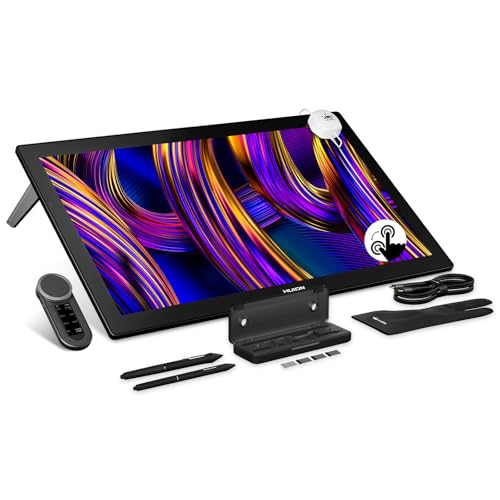
HUION KAMVAS Pro 27 (144Hz) 4K UHD Touchscreen Drawing Tablet

HUION Kamvas 13 (Gen 3) Drawing Tablet with Screen

HUION Kamvas Pro 16 Drawing Tablet with Screen

HUION KAMVAS 16 (Gen 3) 2.5K QHD Drawing Tablet
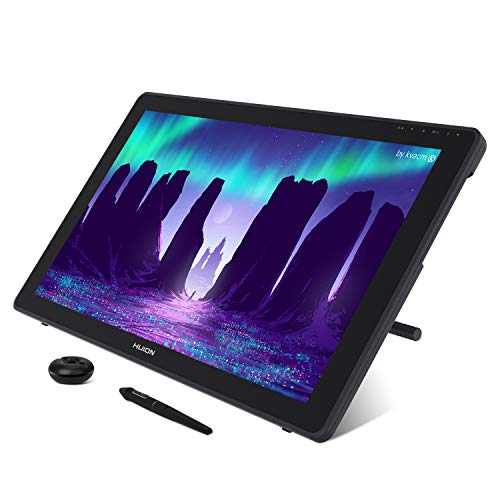
HUION KAMVAS 22 120% sRGB Drawing Tablet

HUION KAMVAS Pro 19 4K UHD Touchscreen Drawing Tablet

HUION KAMVAS Pro 24 (Gen 3) UHD Drawing Tablet

XPPen Artist 24 Pro 2.5K QHD Drawing Tablet

HUION KAMVAS Pro 27 4K UHD Drawing Tablet
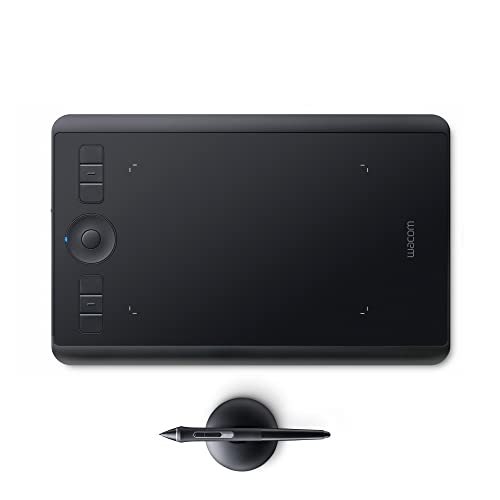
Wacom Intuos Pro Drawing Tablet, Small
More On The Choices That Made The List
For artists working in animation, motion design, or any field where brush responsiveness matters, this 27-inch pen display stands out as one of the most capable in HUION’s current lineup. The 4K UHD (3840×2160) panel delivers sharp detail while the 144Hz refresh rate means strokes appear instantly, with no perceptible lag between pen and pixel. PenTech 4.0 is the company’s latest pen technology, designed for improved pressure response and a more natural grip feel. A touchscreen interface adds the convenience of tapping menus and pinching to zoom directly on the canvas.
Where this screen really earns its place is on long, intricate pieces. Photographers retouching high-resolution files will appreciate not constantly zooming, and concept artists can storyboard across a generous workspace without feeling cramped. It is a serious desk investment, so you want a sturdy monitor arm or dedicated stand before committing.
Notable Upsides
- 4K resolution on a 27-inch panel gives fine detail without constant zooming.
- 144Hz refresh rate keeps strokes flowing smoothly, which matters for animation and inking.
- PenTech 4.0 offers 16,384 pressure levels for nuanced line weight control.
- Touchscreen gestures let you pan and zoom without leaving the canvas.
Things To Consider
- A 27-inch pen display needs a deep desk, around 28 inches of clearance feels right.
- Owners commonly report color calibration out of the box is close, but worth checking with a calibrator for print work.
At A Glance
Built With In Mind
Studio illustrators, animators, and concept artists who want a spacious, high-refresh display for daily professional work.
Skip It When
The HUION Kamvas Pro 19 4K UHD Touchscreen Drawing Tablet is a better match if you need 4K detail on a smaller, more portable canvas.
Sketching on the road or working from a small apartment, this 13.3-inch pen display is the most portable option in this roundup. The fully laminated screen pairs with HUION’s Canvas Glass 2.0, a textured surface that mimics paper friction and cuts glare in bright environments. Dual physical dials on the side give you analog control over brush size, zoom, or rotation, a rare feature at this size. It’s the kind of tablet that fits in a laptop sleeve alongside a notebook.
Compared to the larger Pro 27, this one trades canvas real estate for mobility. Digital nomads and art students hauling gear between classes will find the compact footprint genuinely liberating, though anyone working on detailed illustrations may feel the screen size limiting.
Real-World Strengths
- 13.3-inch form factor slips into most laptop bags without a dedicated case.
- Dual dials provide tactile shortcut access without touching the keyboard.
- Canvas Glass 2.0 surface reduces glare in cafés and sunlit rooms.
- Connects to a computer or laptop, no standalone processing power needed.
Honest Caveats
- The 13.3-inch screen means more zooming for full-page illustrations.
- Requires a host computer connection, so it won’t work as a standalone sketching device.
- Owners report the cable setup can take a few tries to organize cleanly for travel.
Whose Shelf It Belongs On
Traveling illustrators, digital art students, and anyone sketching in coffee shops or co-working spaces.
Look Elsewhere When
The Wacom Intuos Pro Drawing Tablet, Small is a better fit if you want a screenless, ultra-portable graphics tablet that runs wireless and slips into a small bag.
The Kamvas Pro 16 has been a workhorse in HUION’s pen display family for a while, and it remains a sensible middle-ground choice. The 15.6-inch fully laminated panel comes with anti-glare etched glass, giving the nib enough friction to feel pen-on-paper rather than pen-on-plastic. A touch bar along the side offers quick access to common shortcuts like brush switching and canvas scrolling. With 120% sRGB color coverage, it handles most illustration and design tasks without obvious color gaps.
This is the tablet I’d point most hobbyists toward. It lacks the 4K sharpness of the Pro 19 and Pro 27, but for someone drawing for fun or building a portfolio, the resolution is plenty, and the price tends to be friendlier. It also pairs naturally with a 15-inch laptop for a clean desk setup.
Useful Touches
- 15.6-inch size mirrors most laptops, so it slots neatly into existing workspaces.
- Anti-glare etched glass gives the pen tip a slight drag, mimicking real paper.
- Side touch bar keeps shortcuts within thumb reach without taking screen space.
- 120% sRGB gamut handles vibrant illustration and casual photo editing.
Worth Noting
- Resolution is Full HD, so fine retouching on large photos may feel less crisp than the 4K options.
- No dual dials like the newer Kamvas 13 (Gen 3), so shortcuts are mostly software-based.
Right Fit For
Hobbyist illustrators and design students who want a reliable, mid-size pen display without stretching into premium pricing.
Reach For A Different Pick When
The HUION KAMVAS 16 (Gen 3) 2.5K QHD Drawing Tablet is a stronger match if you need sharper resolution for detailed design work.
The Kamvas 16 Gen 3 takes the familiar 16-inch footprint and pushes it into sharper territory. With 2.5K QHD resolution (2560×1440) and a pixel density of 186 PPI, the image stays crisp even when you’re zoomed into fine line work. Color coverage spans 99% sRGB and Rec.709 plus 90% Adobe RGB, so it holds its own against professional monitors for most creative work. PenTech 4.0 brings the same updated pen feel found in the larger Pro series.
Think of this as a step up from the older Kamvas Pro 16 without jumping to a full 4K panel. For illustrators who need color accuracy but don’t want to commit desk space to a 24-inch display, the 15.8-inch viewing area hits a comfortable sweet spot. It’s also light enough to reposition on a sit-stand desk without much hassle.
What Earns Its Place
- 2.5K QHD resolution at 186 PPI keeps fine line work crisp.
- 99% sRGB and Rec.709 coverage supports accurate color across most workflows.
- PenTech 4.0 pen offers 16,384 pressure levels for nuanced strokes.
- 15.8-inch size works well for compact desks and sit-stand setups.
Trade Offs
- Smaller than the 22-inch and up options, so panoramic timelines may feel constrained.
- Owners commonly mention adjusting the included stand takes some patience to find the right tilt.
Feature Snapshot
Best Suited To
Illustrators and designers who want crisp resolution and accurate color on a moderately sized canvas.
Where Another Pick Suits Better
The HUION KAMVAS Pro 19 4K UHD Touchscreen Drawing Tablet is a better fit if 4K resolution and a slightly larger screen are higher priorities than compact size.
The Kamvas 22 brings a 21.5-inch canvas to artists who want a generous workspace without going all the way to a 24-inch or 27-inch display. It displays 16.7 million colors with 120% sRGB coverage and a 1000:1 contrast ratio, which together produce vivid, well-saturated artwork. A 178° wide viewing angle means colors hold up even when leaning over the screen to inspect details. For home studios where one tablet doubles as both a drawing surface and a reference monitor, this size lands nicely.
It is the kind of tablet a hobbyist can grow into. Beginners get a roomy canvas that won’t feel limiting as skills develop, while more experienced artists get a reliable secondary display. The trade-off is resolution, which sits at Full HD, so pixel peepers working on very fine retouching may notice the difference compared to the 2.5K or 4K options on this list.
Everyday Perks
- 21.5-inch canvas suits full-page illustrations and side-by-side reference images.
- 120% sRGB coverage delivers vibrant, saturated colors out of the box.
- 178° viewing angle keeps colors consistent from different sitting positions.
- 1000:1 contrast ratio supports clear differentiation between subtle tones.
Points To Keep In Mind
- Full HD resolution means less pixel density than 2.5K or 4K alternatives.
- At 21.5 inches, the tablet is large enough that you may want a dedicated stand rather than the included one.
Made For
Home studio hobbyists and illustrators who want a roomy workspace for personal projects and casual client work.
A Better Fit Elsewhere
The HUION KAMVAS Pro 24 (Gen 3) UHD Drawing Tablet is a stronger match if you need 4K resolution on a similarly large canvas for sharper detail.
For artists who obsess over pixel-level detail, the Pro 19 packs 4K UHD resolution into an 18.4-inch panel, an unusual size that bridges the gap between the smaller Gen 3 models and the full-size desktop displays. The full-lamination build and Canvas Glass 2.0 anti-sparkle etched surface deliver a textured feel that helps simulate the drag of pen on paper. PenTech 4.0 rounds out the package with refined pressure sensitivity. It’s the kind of tablet a detail-oriented illustrator or photo editor gravitates toward.
Compared to the Kamvas 13 Gen 3, this trades portability for resolution and screen space. The 18.4-inch size means a dedicated spot on a desk rather than tossing it in a bag, but for studio work where every pixel counts, the tradeoff feels worthwhile.
Features That Help
- 4K UHD resolution on an 18.4-inch panel keeps detail razor-sharp.
- Canvas Glass 2.0 etched surface adds pen-to-paper friction.
- Full lamination eliminates the parallax gap between nib and cursor.
- PenTech 4.0 brings 16,384 levels of pressure sensitivity.
Soft Spots
- Not designed for travel, owners typically treat it as a desk-bound tablet.
- At 18.4 inches, it requires a sturdy surface and adequate lighting to avoid reflections.
Who Will Love This
Detail-driven illustrators and photo editors who want 4K sharpness on a moderately sized studio display.
Swap It Out When
The HUION KAMVAS Pro 27 4K UHD Drawing Tablet is a better match if you need an even larger canvas for panoramic work or split-screen multitasking.
The Pro 24 Gen 3 carries forward a 23.8-inch screen size with slim bezels, giving it a modern, near-edge-to-edge appearance. 4K UHD resolution ensures every brushstroke and color gradient comes through with clarity, while PenTech 4.0 delivers the refined grip and tip response found across HUION’s professional line. For illustrators, animators, and editors who want room to spread out without committing to a 27-inch footprint, this hits a comfortable middle ground.
It also helps that 23.8-inch VESA-compatible monitor arms handle this size easily, so mounting it above a desk or alongside an existing monitor is straightforward. If the Pro 27 feels like too much screen but the Pro 19 feels like too little, this is the middle stop worth considering.
What Helps Most
- 23.8-inch 4K panel offers pro-level sharpness without dominating the desk.
- Slim bezels create an immersive, modern aesthetic.
- PenTech 4.0 supports 16,384 pressure levels for nuanced strokes.
- VESA-compatible mounting makes integration into existing setups straightforward.
Potential Drawbacks
- At 23.8 inches, the tablet still demands a dedicated workspace and sturdy support.
- Color coverage specs were not detailed in the source, so calibration may be needed for print-critical work.
Perfect Match For
Professional illustrators, animators, and editors who want a generous 4K canvas with a refined pen experience.
Not Your Match When
The HUION KAMVAS 22 120% sRGB Drawing Tablet is a better fit if you prefer a slightly smaller, more budget-friendly display for home studio use.
The XPPen Artist 24 Pro is the only non-HUION entry in this roundup, and it earns its spot largely because of the productivity-focused design. Its 23.8-inch IPS panel renders 2.5K QHD resolution (2560×1440) with 16.7 million colors and a 178° viewing angle. What really sets it apart is the inclusion of 20 physical shortcut keys along the side of the display, a meaningful workflow upgrade for anyone bouncing between brushes, layers, and tools throughout a session.
The 8192-level battery-free stylus removes one more charging concern from the daily routine. Compatibility covers Windows, Mac, Chrome OS, and Linux, which matters for studios running mixed environments. Anti-glare film on the screen reduces reflections in well-lit rooms, though some owners note the film adds a slight grain to the image that’s noticeable only on very smooth gradients.
Points In Its Favor
- 20 physical shortcut keys accelerate tool switching for heavy workflow days.
- 2.5K QHD resolution keeps illustrations and photo edits sharp.
- Battery-free stylus means no mid-session charging interruptions.
- Works across Windows, Mac, Chrome OS, and Linux for flexible studio setups.
A Few Limitations
- Anti-glare film can introduce faint texture on smooth gradient-heavy artwork.
- 8192 pressure levels are lower than the 16,384 offered by PenTech 4.0 models, though most artists won’t notice in practice.
Who Should Grab It
Multi-tasking illustrators, video editors, and animators who rely on physical shortcut keys for fast tool changes.
Consider Something Else When
The HUION KAMVAS Pro 24 (Gen 3) UHD Drawing Tablet is a stronger fit if 4K resolution and higher pressure sensitivity matter more than built-in shortcut keys.
Where the Pro 27 with 144Hz leans into animation and motion, this Pro 27 sibling focuses on color-critical work. The 27-inch 4K UHD panel covers 98% of Adobe RGB, which puts it in the same conversation as professional reference monitors for print and editorial design. PenTech 4.0 keeps the in-hand feel consistent with the rest of HUION’s pro lineup. Concept artists storyboarding wide scenes and retouchers working on high-resolution images benefit from the combination of color depth and screen real estate.
It’s worth distinguishing this model from the 144Hz variant reviewed earlier. Both share the 27-inch 4K canvas, but this one prioritizes color gamut over refresh rate. For stills, photo editing, and print prep, that distinction matters more than frame rate.
Useful Highlights
- 98% Adobe RGB coverage supports print and editorial color standards.
- 27-inch 4K UHD panel gives ample room for full-page compositions.
- PenTech 4.0 pen delivers 16,384 pressure levels.
- Reduces the need for constant zooming on large illustration canvases.
Honest Caveats
- Lacks the 144Hz refresh rate of the sibling Pro 27 model, less ideal for animation workflows.
- 27 inches is a serious desk commitment, so plan monitor arm or stand space accordingly.
Right Fit For
Photographers, print designers, and illustrators working in color-critical workflows who need wide-gamut coverage on a large canvas.
Another Choice May Suit
The HUION KAMVAS Pro 27 (144Hz) 4K UHD Touchscreen Drawing Tablet is a better fit if you prioritize high refresh rate for animation over Adobe RGB coverage.
Rounding out the list is the only screenless tablet here, and the only Wacom. The Intuos Pro Small offers roughly a 7-inch active drawing area on a slim, sub-one-pound body that runs wirelessly. The Pro Pen 2 is widely considered one of the most responsive pens in the category, and the included touch ring gives analog control over canvas rotation, brush size, or scrolling. For artists who already have a quality monitor they like and just want a dedicated drawing surface, this is a clean, focused tool.
The trade-off is the lack of a screen. Drawing while looking at a separate monitor takes adjustment, especially for those transitioning from paper or pen displays. But for traditional illustrators, animators doing rough work, and anyone who values portability above all else, the Intuos Pro remains a respected choice.
Bright Spots
- Wireless operation removes cable clutter from the desk.
- Sub-one-pound weight slips into a backpack alongside a laptop.
- Pro Pen 2 delivers reliable pressure and tilt response.
- Touch ring adds tactile control without taking screen space.
Things To Weigh
- No built-in display means a learning curve for those new to screenless drawing.
- Smaller active area can feel cramped for full-page compositions.
- Owners report battery life is solid but requires routine charging for daily use.
Built With In Mind
Illustrators and photo editors who prefer a screenless, portable tablet and already have a monitor they trust.
Skip It When
The HUION Kamvas 13 (Gen 3) Drawing Tablet is a better match if you want a compact tablet with a built-in screen for direct-on-canvas drawing.
What To Weigh Before Picking Your Art Tablet
Screen vs. Screenless
The first real fork in the road is whether you want to draw directly on the screen or on a separate pad while watching your monitor. Pen displays like the Kamvas series reduce the eye-hand coordination gap, which feels natural for anyone coming from paper. Graphics tablets like the Wacom Intuos Pro demand adjustment but reward you with lighter, more portable gear and zero glare on your drawing surface. Most beginners find pen displays easier to settle into, while many traditional illustrators stick with screenless setups for the precise cursor control.
Resolution and Color Accuracy
Resolution shapes how sharp lines and textures appear at typical viewing distance. 4K UHD panels like the Pro 19, Pro 24, and Pro 27 models keep detail crisp even when zoomed out. 2.5K QHD models like the Kamvas 16 Gen 3 and XPPen Artist 24 Pro offer a noticeable upgrade over Full HD without the cost jump. Color gamut matters more for photo editors and print designers than for hobbyist sketchers, so the 98% Adobe RGB Pro 27 is genuinely aimed at a specific audience.
Size and Workspace
Tablet size affects both desk footprint and how often you zoom or pan. Smaller screens around 13 to 16 inches travel well and fit beside laptops, while 22-inch and up models function as primary studio monitors. Match the size to your typical workflow: tight storyboards fit anywhere, but panoramic digital paintings breathe better on larger canvases.
Key Considerations Across These Picks
Wrong Turns To Avoid
A common misstep is choosing the largest screen possible without considering desk depth. A 27-inch pen display needs around 28 inches of clearance to angle properly. Another is overlooking cable requirements, since most pen displays connect to a computer via HDMI and USB and need a powered hub or dedicated port setup.
When Paying More Pays Off
The jump from a Full HD panel to 2.5K or 4K UHD is most noticeable for anyone doing detailed retouching, animation, or print work. Higher pressure sensitivity (16,384 vs 8,192 levels) gives finer control over line weight, though many illustrators won’t perceive a practical difference. Color gamut improvements like 98% Adobe RGB only matter if your final output requires it, such as editorial photography or fine art prints.
Frequently Asked Questions
Do I need a computer to use a pen display?
Most pen displays, including every HUION Kamvas model on this list, require a host computer connection to function. The Wacom Intuos Pro also connects to a computer but does so wirelessly, which adds flexibility but still needs a paired device.
What is sRGB and why does it matter?
sRGB is a standard color space used across most digital content. Higher sRGB coverage, like 120%, means the screen can display more vivid colors than the baseline. For accurate color reproduction in design and photo editing, look for high sRGB or Adobe RGB coverage.
How much desk space does a large pen display need?
A 27-inch pen display works best with around 28 inches of front-to-back desk depth to allow for tilting. Smaller 13 to 16-inch models fit comfortably on most laptop desks without special planning.
Are screenless tablets harder to learn?
Yes, there is an adjustment period. Drawing on a pad while watching a separate monitor requires retraining hand-eye coordination, but many traditional illustrators prefer the precision once adapted.
Can these tablets work with Chromebooks or Linux?
Several models support multiple operating systems. The XPPen Artist 24 Pro lists compatibility with Windows, Mac, Chrome OS, and Linux, while many HUION models support the major three. Check the specific product page for current OS compatibility before buying.
Wrap Up
The right art tablet depends on where and how you create. Compact pen displays like the Kamvas 13 Gen 3 serve travelers, while the Pro 27 models anchor serious studio work. Mid-size options like the Kamvas 16 Gen 3 and Pro 19 cover most hobbyist and semi-pro needs, and the Wacom Intuos Pro remains a solid pick for screenless purists. Match the screen size, resolution, and color accuracy to your actual workflow, and the rest tends to fall into place.
