

Mounting a TV into a corner changes how the room works, and finding a bracket that actually pulls its weight there is harder than it looks. Corner walls force the mount to swing wider, the studs sometimes land in awkward spots, and a flimsy arm starts to droop after a month of use. I put together this roundup for renters and homeowners who want a clean, swiveling setup without a furniture store visit.
The Shortlist At A Glance
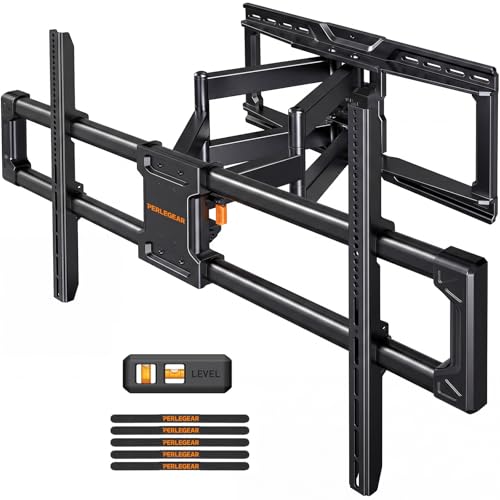
Perlegear Large Full Motion TV Wall Mount for 55–120 inch TVs

Perlegear Full Motion TV Wall Mount for 42–97 inch TVs

Perlegear TV Wall Mount Full Motion for 42–97 inch TVs

Mounting Dream TV Wall Mount Swivel and Tilt for 26–55 inch TVs

Mounting Dream Long Arm TV Wall Mount for 37–75 inch TVs

MOUNTUP Long Arm TV Wall Mount with 40-inch Extension

Mounting Dream Long Arm TV Wall Mount for 42–94 inch TVs
monTEK Heavy Duty Tilting TV Wall Mount Bracket for 37–90 inch TVs

monTEK Heavy Duty Tilting TV Wall Mount for 55–105 inch TVs

monTEK TV Wall Mount Extension Bracket for 16–24 inch Studs
A Breakdown Of The Leading Choices
Bigger screens need thicker steel, and this Perlegear bracket leans into that reality. The frame uses 20% thicker steel than the brand’s earlier models, paired with a wider wall plate that resists flex when the arm is fully extended.
For households that pulled the trigger on an 85-inch or larger TV, that extra rigidity matters. The reinforced plate stops the wobble some cheaper mounts show when the screen is angled out toward the room. Most owners in standard stud framing find the install straightforward, with the bulk of the time going to fishing HDMI cables rather than fighting the bracket.
What Stands Out
- Handles up to 220 lbs, so it carries even the heaviest flagship TVs without strain
- Thicker steel wall plate keeps the screen locked in place when swiveled out
- Wide VESA range covers most large-format flat panels in one bracket
- Full-motion arm lets the TV pull away from the corner for cable access
Worth Noting
- The bulk of the steel makes this bracket heavier to lift during install
- Larger TVs may need a second pair of hands to seat safely on the arm
- Stud spacing outside 16 inches will require the brand’s extension accessory
Best Suited To
Home theater owners with 85-inch-plus screens who want a sturdy, swivel-ready corner setup that won’t drift over time.
Consider Something Else When
Apartment dwellers with sub-55-inch screens should look at the Mounting Dream TV Wall Mount Swivel and Tilt for 26–55 inch TVs instead, since the lighter plate is easier to handle.
First-time installers tend to dread the unboxing. This Perlegear bracket tackles that anxiety with a preassembled telescopic front support that pulls straight out of the box and only needs two screws to lock down.
The whole process often wraps up in around ten minutes once the wall plate is anchored. Compared with the heavier Perlegear Large Full Motion bracket earlier in this list, this one trades some weight capacity for a friendlier install. People mounting a 55-inch or 65-inch panel in a bedroom corner usually find this balance hits the sweet spot.
Real-World Strengths
- Preassembled arm skips the loose-hardware puzzle most mounts create
- Ten-minute install is realistic for one person with basic tools
- Covers 42 to 97 inch TVs, so it grows with most household upgrades
Points To Keep In Mind
- 132 lb weight cap rules out the heaviest flagship TVs on the market
- Stud spacing outside 16 inches still needs an accessory bracket
- Pulling the arm out far means planning cable length ahead of time
Feature Snapshot
Who It Suits Best
First-time installers with mid-size TVs who want a clean corner mount without borrowing a second drill.
A Better Fit Elsewhere
Anyone mounting a 100-inch-plus display should reach for the Perlegear Large Full Motion TV Wall Mount for 55–120 inch TVs, since this one’s 132 lb cap will feel tight.
The middle child of the Perlegear lineup earns its keep by being unremarkable in the best way. It handles VESA patterns from 200x100mm up to 600x400mm, anchoring into standard 12 or 16 inch wood studs, plus concrete or brick for townhouse owners.
For most mid-size living rooms, this bracket settles into the corner and largely disappears. The articulating arm reaches out far enough to clear side furniture and pulls back close to the wall for movie night. VESA is the four-hole pattern on the back of your TV that the bracket screws into, and this one covers the common sizes without complaint.
What Helps Most
- Broad VESA range keeps it compatible across TV brands and generations
- Anchors into wood studs, concrete, or brick without specialty hardware
- Full articulation covers the usual corner viewing angles
Honest Caveats
- Stud spacing beyond 16 inches requires a separate extension bracket
- 132 lb ceiling still leaves the heaviest TVs out of reach
- The arm does not extend as far as the long-reach mounts later in this list
Made For
Mid-size living rooms where a 55 to 75 inch TV lives in a corner and the studs are standard 16 inch spacing.
Look Elsewhere When
Rooms with unusual stud spacing or older framing will benefit more from the monTEK TV Wall Mount Extension Bracket, since this bracket alone won’t bridge the gap.
Bedrooms, dorm rooms, and small dens usually don’t need a 100 lb beast on the wall. This Mounting Dream model targets the smaller end of the spectrum, supporting TVs from 26 inches up to 55 inches at 60 lbs or under.
Its centered design sits the screen close to the wall without a thick visible arm, which keeps the room feeling open. Compared with the larger Perlegear picks earlier, this one trades reach and capacity for a lighter touch. People mounting a bedroom TV in a tight corner usually appreciate the swivel range without overshooting into a heavy-duty bracket.
Notable Gains
- Lightweight frame is easy to lift solo during install
- Swivel and tilt adjust for off-angle bedroom viewing
- Low-profile look keeps smaller rooms from feeling crowded
Trade Offs
- 60 lb weight cap rules out anything beyond a mid-size LED panel
- VESA range tops out at 400x400mm, so big-format TVs won’t fit
- Arm extension is shorter than the long-reach corner mounts
Right Fit For
Bedrooms, guest rooms, and dorms where a 32 to 50 inch TV lives in a corner and the wall can spare a single stud.
Swap It Out When
Anyone mounting a 60-inch-plus display should reach for the Mounting Dream Long Arm TV Wall Mount for 37–75 inch TVs, since this one’s 60 lb cap will feel restrictive.
Tight corner angles are where short arms fall short. This Mounting Dream model extends 32 inches from the wall, letting the TV swing into the room where a standard bracket would leave it jammed against the side wall.
It fits 16, 18, and 24 inch stud spacing, which matters in older homes where the framing doesn’t follow modern code. For most owners living in pre-1980s houses with non-standard spacing, this is the bracket that finally clears the corner geometry. The arm retraction pulls back close for a cleaner look when the TV isn’t in use.
Advantages To Know
- 32-inch extension reaches out where short arms hit the side wall
- Fits 16, 18, and 24 inch stud spacing without extra hardware
- Handles up to 100 lbs, covering most 75 inch panels
Possible Compromises
- Longer arm shows more visible profile when fully retracted
- 100 lb ceiling leaves the heaviest large-format TVs out of reach
- More moving parts mean occasional leveling checks after install
Technical Highlights
Perfect Match For
Pre-war homes and tight corner angles where the studs don’t follow modern 16 inch spacing and the TV needs to swing wide.
Reach For A Different Pick When
Open-plan layouts that need even more reach should look at the MOUNTUP Long Arm TV Wall Mount with 40-inch Extension, which extends further out.
Open-plan living rooms ask a lot of a corner mount. The MOUNTUP bracket answers with a 40-inch extension, which lets the TV swing from a tight corner out to where a kitchen island or sectional lives.
It also handles 150 lbs, so it pairs with bigger 80-inch-plus panels without flex. For most households where the TV has to face two rooms, this reach removes the usual swivel compromises. The retract pulls back to a few inches off the wall when the screen isn’t being repositioned, keeping the corner tidy.
Everyday Perks
- 40-inch extension reaches across open-plan layouts
- 150 lb capacity handles 80-inch and 90-inch panels
- VESA range covers most large-format TVs
Potential Drawbacks
- Long arm adds visible bulk in tighter corner placements
- Stud spacing outside 16, 18, or 24 inches still needs an accessory
- Heavier build makes solo install more challenging
Built With In Mind
Open-plan living spaces where the TV faces two rooms and the corner needs to clear side furniture.
Skip It When
Smaller 50-inch bedroom setups are better served by the Mounting Dream TV Wall Mount Swivel and Tilt for 26–55 inch TVs, since the long arm is overkill.
Bigger TVs come with bigger mounting hole patterns. This Mounting Dream model pushes VESA compatibility up to 800x400mm, which keeps it relevant for newer 85-inch and 90-inch flagships that older brackets can’t accept.
The 40-inch extension matches the MOUNTUP bracket’s reach, but the slightly broader VESA ceiling gives owners more flexibility when upgrading screens. Most people running a 90-inch panel in a corner end up weighing this model against the MOUNTUP option, and either choice works.
Real Benefits
- VESA range up to 800x400mm covers newer 90-inch flagships
- 40-inch reach clears open-plan corner angles
- Fits 16, 18, and 24 inch stud spacing
Less-Strong Areas
- Heavier 150 lb capacity bracket can be tough on solo installs
- Long arm shows visible profile when retracted
- Studs outside standard spacing still require an extension accessory
The Right Fit
Households with large-format 85-inch-plus TVs who want maximum VESA flexibility and a long-reaching corner arm.
Where A Sibling Pick Shines
Anyone who only needs 32 inches of reach can save cost with the Mounting Dream Long Arm TV Wall Mount for 37–75 inch TVs earlier in this list.
Not every setup needs a swivel. This monTEK bracket tilts only, hugging the wall at a low profile once the TV is locked in place.
The tilt adjustment helps cut glare from overhead lights or windows, which is the main complaint in rooms where the screen sits higher on the wall. Compared with the long-arm mounts earlier, this one keeps the corner tight and uncluttered. The 200 lb rating is generous, so it carries even the heaviest large-format panels without strain.
Practical Advantages
- 200 lb capacity handles the heaviest flagship panels
- Low-profile design keeps the corner visually clean
- Tilt range helps with glare from overhead lighting
A Few Limitations
- Tilt-only design means no swivel toward side seating
- Stud spacing outside 16, 18, or 24 inches needs an accessory
- VESA tops out at 600x400mm, so some newer large TVs won’t fit
Who Should Grab It
Set-and-forget corner setups where the viewing position is fixed and the screen just needs to sit close to the wall.
Not Your Match When
Rooms with multiple seating zones will want the Mounting Dream Long Arm TV Wall Mount for 37–75 inch TVs instead, since swiveling matters more than tilt.
Media walls and dedicated theater rooms often push past 90 inches, which is the size ceiling for most mounts. This monTEK bracket extends up to 105 inches, with VESA support reaching 1000x600mm for the newest large-format displays.
The 200 lb rating pairs with that screen range without complaint. For most dedicated theater builds, the tilt-only profile keeps the screen looking like part of the wall rather than a piece of furniture. Stud compatibility runs to 32 inches, which is uncommon in this category.
Everyday Wins
- Up to 105 inch screen support covers the largest consumer panels
- VESA up to 1000x600mm fits newer large-format displays
- 200 lb rating handles flagship screens comfortably
Soft Spots
- Tilt-only design rules out swivel toward side seating
- Heavier build adds solo-install difficulty
- Stud spacing outside standard options still needs an extension bracket
Quick Facts
Whose Shelf It Belongs On
Dedicated media walls and theater rooms running 90-inch-plus flagship screens where the wall is the centerpiece.
Another Choice May Suit
Anyone who needs swivel action over size capacity should look at the Mounting Dream Long Arm TV Wall Mount for 42–94 inch TVs, which trades size range for reach.
Older homes and additions often have stud spacing that doesn’t match modern brackets. This monTEK extension bridges 16, 18, and 24 inch stud gaps, letting an otherwise incompatible TV mount reach the framing.
It works with fixed, tilt, and full-motion brackets, so it slots in as a side accessory rather than a complete replacement. For households that already own a great mount and just need to span wider studs, this is the missing piece. The lateral shift design also helps center the TV on the wall when studs aren’t symmetrical.
The Case For It
- Bridges 16, 18, and 24 inch stud spacing without specialty hardware
- Universal design works with fixed, tilt, and full-motion mounts
- Lateral shift helps center the TV on off-center studs
Where It May Fall Short
- 154 lb ceiling caps which TV mounts it can pair with
- Adds visible bulk behind the TV on the wall
- Requires the user to verify their existing mount is compatible
Who Will Love This
Older homes and additions where the existing mount fits the TV but the studs don’t follow modern spacing.
Look Elsewhere When
Standard 16 inch stud framing already covers the install, in which case the Perlegear TV Wall Mount Full Motion for 42–97 inch TVs alone is enough.
What To Weigh Before Picking A Corner Bracket
Stud spacing is the detail most shoppers miss until they’re staring at the wall. Measure between studs first, because a bracket that maxes at 16 inches becomes useless in a pre-war house. VESA compatibility runs second, since the four-hole pattern on the back of the TV has to match the bracket’s stated range, or the mount simply won’t bolt up.
Arm reach matters more than most people expect. A 32 or 40 inch extension lets the TV clear the side wall and swivel toward open-plan seating, while a shorter arm leaves the screen jammed at an angle. Weight capacity is the safety floor, and going right up against the ceiling leaves no margin for movement stress over years of use.
Stud Framing And Wall Material
Wood studs are the common case, but concrete and brick walls need different anchors and a drill that can handle masonry. The monTEK extension bracket helps when spacing is wider than standard, while most full-motion mounts need a clean hit on two adjacent studs.
VESA Patterns And Weight Limits
VESA patterns read as width-by-height in millimeters, like 400×400 or 600×400. A bracket’s stated range should fall inside your TV’s pattern, and its weight rating should sit well above the actual screen weight for safety margin.
Things To Weigh Before The Final Choice
Pitfalls Shoppers Hit
The most common mistake is buying a mount with a VESA range that tops out below the TV’s actual pattern. Another trap is ignoring stud spacing and discovering the bracket won’t reach the framing after the box is open. Skipping the weight check is also common, especially with newer 85-inch-plus panels that exceed what a basic mount can carry.
Why Top Tier Costs More
Higher-end corner mounts use thicker steel, longer arms, and smoother articulation hardware, which all add manufacturing cost. The upgrade usually pays off in fewer wobbles, longer service life, and better clearance in tight corner angles. For screens above 75 inches or for open-plan layouts, the price step is usually worth the engineering behind it.
Frequently Asked Questions
What VESA pattern do I need?
The VESA pattern is the four-hole spacing on the back of your TV, measured in millimeters. Most modern TVs list it on the spec sheet, and your bracket’s range must cover that number exactly or the mount won’t bolt up.
Can I mount a corner TV bracket on any wall?
Most brackets need wood studs, concrete, or brick behind the drywall. Metal studs, hollow plaster, or older lath walls require specialty anchors, so check your wall material before choosing a mount rated for standard studs.
Do I need a long-arm mount for a corner?
Corners with side furniture or open-plan layouts benefit from a 32 to 40 inch extension. Smaller bedrooms with the TV facing one fixed position usually do fine with a short or tilt-only arm that keeps the profile low.
Will a heavy mount damage my wall?
A properly anchored bracket distributes load across two studs and won’t damage the wall during normal use. Reinforced steel mounts add weight to the bracket itself, but the wall anchors handle that load without strain when installed correctly.
Is professional installation necessary?
Most homeowners with basic tools and a stud finder can install these mounts themselves. Larger screens above 85 inches or unusual wall materials often justify a professional installer, especially when the wall anchors need masonry drilling.
Closing Remarks
A corner mount earns its keep when it disappears into the room and leaves the TV where it should be. Match the VESA range to your screen first, then pick the reach and weight capacity that fit your space. The right bracket turns a tricky corner into the most comfortable seat in the house.




