

A muffled hybrid meeting ruins a perfectly good Tuesday. I’ve sat through my share of hollow calls where half the room sounds like they’re speaking from inside a filing cabinet, so I put together a list of conference room mics that actually earn their spot on the table. Whether you run a four-person huddle or a busy boardroom, the right pickup pattern and noise handling matter more than any spec sheet.
A Snapshot Of The Selections

Jabra Speak 410 Corded Speakerphone, MS-Optimized
Jabra Speak 410 UC Speakerphone for PC

COOLPO 360 Conference Camera, Mic and Speaker, PANA

COOLPO Video Conference Camera 4K Webcam

COOLPO Camera 360 Smart Conference Camera and Mic, PANA

Bluetooth Conference Speakerphone, 4-Mic 360 Pickup

Yealink SP92 Conference Speaker and Mic, Teams Certified
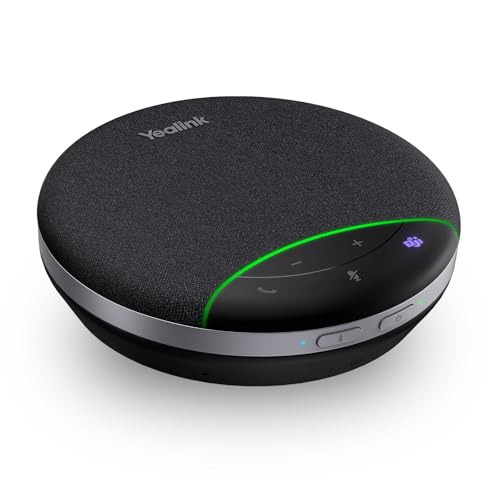
Yealink SP92 USB Speakerphone, Bluetooth
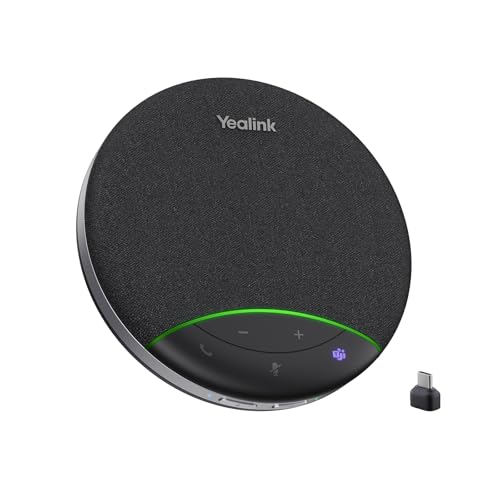
Yealink SP92 Conference Speaker and Mic with Bluetooth Dongle

Yealink SP92 Bluetooth Speaker and Mic, USB C/A, Teams
Inside Each Recommended Option
The Jabra Speak 410 earns the top spot because it does the simple things extremely well. Plug the integrated USB cable into a Windows laptop running Microsoft Teams, and the unit wakes up almost instantly with no driver fuss. For solo callers bouncing between hot desks, that’s a real relief.
Its omnidirectional capsule, a mic that picks up sound evenly from every direction, handles a one-on-one call across a small desk cleanly. I like that the cable wraps neatly around the base for travel, and the unit is light enough to toss in a laptop bag. It’s a tool that respects your time.
Everyday Advantages
- True plug-and-play with Microsoft Teams out of the box
- Wideband audio keeps voices natural on long calls
- Compact disc shape travels well for remote weeks
- Integrated cable means nothing to forget at the office
Things To Consider
- Corded design limits where you can place it on a crowded table
- Pickup range is best for one or two voices, not a full huddle
Who It Suits Best
Solo professionals and Microsoft Teams users who take frequent calls from a laptop and want zero setup friction.
Consider Something Else When
The Jabra Speak 410 UC Speakerphone for PC is a smarter match if your daily driver runs on multiple softphone platforms.
The UC version of the Speak 410 trades Teams-specific tuning for broader compatibility across unified communications platforms. If your shop uses Zoom, Google Meet, Webex, and the occasional Teams call all in the same week, this model slips between them without complaint.
The physical design mirrors the MS-Optimized version we just looked at, including that tidy wrap-around cable. It lands on the table with a reassuring weight and stays put during long calls. For mixed-software offices, the flexibility alone justifies the choice.
Where It Helps
- Universal compatibility across major softphone clients
- Omnidirectional pickup works from any seat at a small table
- Same portable footprint as the Teams-tuned sibling
Worth Noting
- Lacks the deep Teams button integration of the MS model
- Best suited to small groups, not boardroom-scale conversations
- Corded only, so placement is tied to your laptop’s USB port
Made For
Cross-platform professionals who switch between Zoom, Meet, and other UC apps daily.
Skip It When
The Jabra Speak 410 Corded Speakerphone, MS-Optimized is the cleaner pick if your workflow lives entirely in Microsoft Teams.
Stepping away from pure speakerphones, the COOLPO PANA folds a 360-degree camera and a beamforming mic array into one tabletop unit. For a small huddle room, having video and audio in a single device simplifies cable management and reduces the gear pile on your credenza.
The omnidirectional pickup captures voices around a four-to-six-person table without forcing people to lean toward a single capsule. I find this format particularly useful for hybrid teams who want remote colleagues to see the whole table, not just the speaker. It’s a tidy bridge between conference mic and webcam.
Strong Points
- Combines camera and microphone in a single tabletop unit
- 360-degree framing keeps everyone visible on video calls
- USB plug-and-play avoids extra drivers or hubs
Trade Offs
- Audio pickup range tops out around a small table, not a boardroom
- Camera quality is fine for calls but limited for recorded presentations
Right Fit For
Small huddle rooms where teams want video and audio from one device without a stack of peripherals.
Look Elsewhere When
The COOLPO Camera 360 Smart Conference Camera and Mic, PANA suits larger round-table discussions that demand tighter zoom framing.
If your meetings lean more presentation than roundtable, this 4K COOLPO camera tilts the priorities toward picture quality. The 110-degree wide field of view covers a conference setup without making faces look stretched at the edges. Gesture-activated focus is the party trick: raise a hand and the camera zooms in.
Compared to the all-in-one PANA model above, this unit leans harder into video performance while keeping a built-in microphone for casual audio pickup. For sales pitches and client-facing webinars where the speaker’s face matters, that’s a worthwhile trade.
Noteworthy Benefits
- 4K resolution keeps presenter details crisp on large monitors
- Gesture-activated focus lets the speaker direct framing hands-free
- Wide 110-degree view covers a typical conference setup
Points To Note
- Audio pickup is adequate but not the star of the show
- Gesture controls take a little practice to trigger reliably
Best Suited To
Presenter-led meetings and webinars where image clarity matters more than full-room voice coverage.
A Better Fit Elsewhere
The COOLPO 360 Conference Camera, Mic and Speaker, PANA is a smarter pick when round-table discussion dominates the agenda.
The original PANA 360 carries the same all-in-one philosophy as its sibling above, but with a stronger emphasis on a no-stitching video experience. The 360-degree lens sits at table center and frames everyone naturally, so remote attendees feel like participants rather than spectators.
For round-table brainstorms, this format works better than a forward-facing camera. The integrated microphone array picks up multiple voices clearly across a typical huddle. Owners should expect to dust the lens occasionally and confirm firmware stays current for best results.
Notable Upsides
- 360-degree lens removes the need for stitching software
- Multidirectional mic array handles multiple speakers well
- Single-unit setup reduces cable clutter on the table
Honest Caveats
- Lens placement in the center of the table can feel intrusive for some teams
- Best results assume a moderately sized huddle room, not a long boardroom table
Who Will Love This
Round-table teams who want every participant visible and audible on a single, tidy tabletop device.
Swap It Out When
The COOLPO Video Conference Camera 4K Webcam fits presentations better, since it prioritizes a sharp single-speaker frame.
This AV Access speakerphone leans hard into flexibility with both USB-C and Bluetooth 5.0 connectivity, so it pairs with a laptop, a phone, or a tablet without fuss. The four-mic array covers a 360-degree pickup zone up to roughly 10 feet, fitting a typical four-to-eight-person meeting comfortably.
Echo cancellation and speech enhancement handle the noisy office better than older single-mic designs. For hybrid workers bouncing between home setups and corporate desks, the dual-connection design removes the daily cable swap. Battery life between calls is a real convenience.
Useful Strengths
- Bluetooth 5.0 and USB-C cover modern and legacy devices
- Four-mic array covers up to 10 feet of pickup range
- Built-in echo cancellation suits lively office environments
- Wireless operation removes cable clutter from the table
Things To Consider
- Bluetooth adds pairing steps for guests who want quick plug-and-play
- Audio quality leans heavily toward voice, not music playback
Perfect Match For
Hybrid professionals who alternate between a desktop at the office and a Bluetooth device at home.
Another Choice May Suit
The Yealink SP92 USB Speakerphone, Bluetooth is worth considering for Microsoft Teams rooms that need certified performance.
Yealink’s SP92 targets the Microsoft Teams crowd specifically, with a dedicated certification that promises smoother integration with the platform’s call controls. A 50mm full-range speaker handles the outgoing audio, while an omnidirectional mic pulls voices from a 13-foot radius.
The standout feature is real-time AI noise cancellation that filters over a thousand ambient noise patterns, including keyboard taps and HVAC hum. In a busy open office, that processing makes a noticeable difference. Battery life around 20 hours covers a full workweek between charges, depending on call volume.
A Few Highlights
- Microsoft Teams certification for native call control
- AI noise cancellation filters keyboard and HVAC sounds
- 13-foot pickup radius handles medium-sized rooms
- Around 20 hours of call time per charge cycle
Minor Gripes
- Teams-first tuning means slightly less polish on other platforms
- Charging routine requires planning for back-to-back meeting days
Who Should Grab It
Teams-first offices that want certified hardware and AI-driven noise reduction for open-plan environments.
Reach For A Different Pick When
The Yealink SP92 USB Speakerphone, Bluetooth suits remote workers who travel and value a smaller travel footprint.
This travel-focused variant of the SP92 keeps the AI noise reduction core but trims the footprint for life on the road. For remote workers who set up shop in cafés, hotel rooms, and coworking spaces, the smaller shell slips into a backpack pocket without much complaint.
USB and Bluetooth connectivity covers both laptop-first and phone-first workflows, and the omnidirectional capsule still pulls voices from a reasonable radius. Owners commonly report that the AI noise filter handles espresso machine hum and street noise surprisingly well.
A Favorable Mix
- Compact shell suits backpack travel and small desks
- AI noise reduction cleans up ambient café and street sounds
- Dual USB and Bluetooth covers laptop and phone setups
Room For Improvement
- Smaller driver than the room-sized SP92 models
- Charging between long travel days takes some planning
Built With In Mind
Traveling remote professionals who hop between cafés, coworking spots, and home offices throughout the week.
Where Another Pick Suits Better
The Yealink SP92 Conference Speaker and Mic with Bluetooth Dongle is the better choice for legacy PCs without built-in Bluetooth.
This SP92 variant ships with a dedicated Bluetooth dongle for PCs that lack reliable built-in wireless. For older office machines running Windows 10 or a fixed conferencing cart, that little USB receiver sidesteps driver headaches and gets the speakerphone paired in seconds.
AI noise cancellation and the 50mm speaker carry over from the core SP92, so audio quality stays consistent with its siblings above. Teams certification keeps call controls familiar for users in the Microsoft ecosystem. It’s a small but meaningful upgrade for legacy hardware.
Positive Takeaways
- Included Bluetooth dongle solves wireless pairing on older PCs
- Teams certification maintains familiar call controls
- AI noise filtering matches the rest of the SP92 family
Points To Keep In Mind
- Dongle occupies a USB port that some compact laptops can’t spare
- Easy to misplace the small dongle during travel days
Whose Shelf It Belongs On
Offices running older hardware or shared meeting room PCs that need wireless audio without built-in Bluetooth.
A Different Pick May Suit
The Yealink SP92 Bluetooth Speaker and Mic, USB C/A fits newer laptops better, since native Bluetooth removes the dongle step entirely.
The flagship SP92 rounds out Yealink’s lineup with both USB-C and USB-A cables included, a 13-foot 360-degree pickup radius, and full-duplex audio, which means the mic and speaker run simultaneously without clipping the far end. That combination makes it the most conference-ready unit of the bunch.
AI noise reduction tackles over a thousand background patterns in real time, and a virtual bass feature gives music playback between calls a richer tone. For larger Teams-equipped rooms where voice clarity and natural conversation matter, this is the SP92 variant I’d anchor the room around.
The Upside
- Full-duplex audio keeps natural back-and-forth conversation flowing
- USB-C and USB-A cables cover modern and legacy ports
- AI noise reduction handles over a thousand ambient sound types
- 13-foot pickup radius fits medium to larger meeting rooms
Less Ideal Details
- Premium feature set commands a higher investment than entry models
- Bass-leaning tuning leans slightly warm for purely clinical audio needs
Right Fit For
Larger Teams-equipped rooms that need reliable full-duplex performance and a generous pickup radius.
Where A Sibling Pick Shines
The Yealink SP92 Conference Speaker and Mic, Teams Certified covers most small-to-medium rooms at a friendlier cost.
What To Weigh Before Picking Your Next Conference Room Mic
Pickup Pattern And Room Size
The pickup pattern decides how many people the mic hears without leaning in. Omnidirectional capsules, found in every pick above, treat all directions equally and suit round tables. Beamforming arrays, which focus on the active speaker and reject side noise, work better in long boardrooms with one talker at a time. Match the pattern to the room shape, not the brand name on the box.
Connectivity And Compatibility
USB remains the most reliable connection for fixed rooms, while Bluetooth earns its keep when laptops and phones rotate through the space. Confirm the speakerphone lists compatibility with your conferencing platform, whether that’s Microsoft Teams, Zoom, Google Meet, or Webex. A generic USB unit often works across all four, but certified models deliver tighter call control.
Portability And Power
Travel-heavy roles benefit from a battery-powered unit with 15 to 20 hours of call time, like the Yealink SP92 variants above. Stationary rooms can rely on USB-powered designs that never need charging. For hybrid users, a dual-mode unit that switches between wired and wireless covers both styles in one device.
Key Considerations Across These Picks
Pitfalls Shoppers Hit
A common mistake is buying a 360-degree speakerphone and expecting it to fill a 30-foot boardroom. Most models cap out at a 10 to 13-foot pickup radius, so measure the space first. Another trap is assuming Teams certification means every feature works on Zoom; the label applies to one platform’s native integration, not universal polish.
Where The Extra Money Goes
Premium picks add AI noise cancellation, full-duplex audio, and longer battery life, all of which pay back in busy open offices where ambient noise is the main complaint. For quieter rooms and smaller groups, an entry-level USB unit often delivers enough clarity without the higher cost. Spend up when the room gets loud, not just because the spec sheet looks impressive.
Frequently Asked Questions
How Many People Can A Single Conference Room Mic Cover?
Most omnidirectional units handle four to eight people within a 10 to 13-foot radius. Beyond that, pickup quality drops and voices from the far end of a long table may sound hollow.
What’s The Difference Between USB And Bluetooth Speakerphones?
USB models draw power from the cable and pair instantly with the host computer. Bluetooth models free you from cables but require charging and occasional re-pairing, especially in shared rooms.
Do I Need Teams Certification For My Office?
Certified hardware adds native call control and better integration with Microsoft Teams, but generic USB speakerphones usually work fine for audio on any platform. Certification matters more for organizations standardized on Teams than for mixed-platform teams.
Can One Speakerphone Replace A Full Conference System?
In small to medium rooms, yes. Larger boardrooms with multiple zones of speakers typically need dedicated installed systems. For most huddle spaces, a single quality speakerphone is enough.
How Long Do Conference Room Mic Batteries Typically Last?
Battery life varies widely, but many portable models advertise 15 to 20 hours of call time per charge. Standby time runs longer, so a unit can sit on a shelf between meetings without daily charging.
The Takeaway
The right conference room mic comes down to your room size, your platform, and how often the gear travels. Small huddles do well with simple USB options, while open offices and larger rooms benefit from AI noise filtering and full-duplex performance. Pick the model that matches the space you actually use, and the rest of your meetings sound better from day one.




