

A desktop setup without dedicated low end feels thin, especially for movies and games. I put together this roundup for shoppers who want fuller sound from a compact footprint, covering a mix of mini, monitor-style, and full 2.1 rigs.
A Closer Look At The Lineup

Divoom MiniToo Retro PC-Style Speaker

BESTISAN Bluetooth PC Speakers (White)

FUNLOGY 14W Stereo PC Speakers (White)
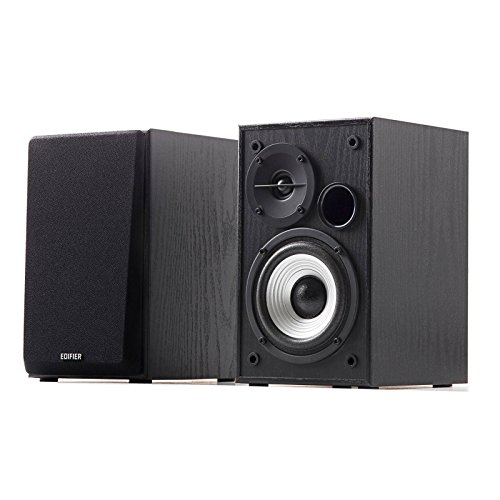
Edifier R980T 4-Inch Bookshelf Speakers

Creative Pebble 2.0 USB Speakers

FUNLOGY 14W Stereo PC Speakers (Black)
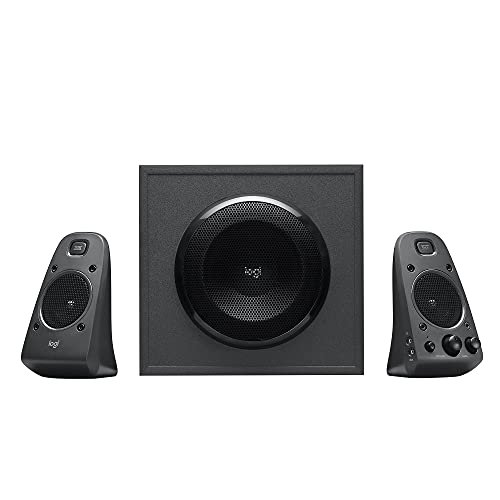
Logitech Z625 THX 2.1 Speaker System

Bluedee 2.1 PC Speakers with Subwoofer

FUNLOGY Speaker Plus 14W USB-C Desktop

LENRUE Under-Monitor Sound Bar
More Details On Our Top Picks
Looking at the lineup, this is the speaker I’d describe first as decor rather than gear. The Divoom MiniToo mimics a tiny 90s desktop PC, complete with a 1.77-inch pixel display that shows clock faces, animations, and short messages you customize through the companion app. Real audio output sits at 5W, which is honest near-field volume for a desk a foot from your ears.
It suits small spaces where style matters as much as sound. If your desk already leans retro or you want a focal point that doubles as a speaker, it earns its place over a plain black bar.
A Strong Showing
- Distinctive pixel display adds personality most speakers in this category lack.
- 5W output is well-matched for a personal near-field setup, keeping dialogue clear during podcasts and study sessions.
- Compact footprint fits beside a monitor or on a nightstand without crowding.
Worth Noting
- No subwoofer, so bass feels light next to the Bluedee or Logitech rigs later in this list.
- Most useful features depend on the app, which adds a setup step some shoppers would rather skip.
Best Suited To
Design-focused shoppers building a curated desk or nightstand where visual charm matters as much as audio.
Swap It Out When
The Logitech Z625 is a stronger call when you want a real dedicated subwoofer for movies and games.
Compared to the Divoom’s personality-first approach, the BESTISAN set leans into flexibility. It functions as a powered monitor pair with both RCA and optical inputs on the back, which is rare at this size and lets you hook up a TV, console, or older audio source alongside a PC. Bluetooth mode adds wireless convenience when you want to stream from a phone.
The white finish stands out in a category dominated by black and wood. For shared spaces where the speakers stay visible, the lighter color blends into bright rooms rather than disappearing.
Where It Helps
- Optical and RCA inputs cover legacy gear and modern displays.
- Bluetooth adds cable-free streaming without swapping cables.
- Clean white finish suits bright, modern rooms.
Trade Offs
- Lacks a dedicated subwoofer, so deep bass relies on the built-in drivers.
- Powered design means one unit must sit near an outlet.
Feature Snapshot
Who Will Love This
Shoppers juggling a PC, a console, and a phone who want one set of speakers to cover them all.
Look Elsewhere When
The Bluedee 2.1 rig fits better when you specifically need a dedicated subwoofer for deep bass.
Where the BESTISAN pair stretches across a wider desk, the FUNLOGY set shrinks to palm size. The 30-degree upward tilt aims the dual 48mm drivers at ear level when the speakers sit on a flat surface, which is a thoughtful touch for short monitor stands. Total output is 14W, which is plenty for personal listening without filling a large room.
The volume dial on the front removes the need to dig through software menus, and a single USB cable handles power. For anyone running a laptop with limited ports, that simplicity matters.
Noteworthy Benefits
- Tilted driver angle directs sound where you sit, not at your keyboard.
- USB power eliminates a second cable and adapter.
- Passive radiators add more low-end weight than the small size suggests.
Small Caveats
- White plastic shows dust and scuffs more easily than darker finishes.
- No Bluetooth, so wireless streaming requires a separate adapter.
Right Fit For
Laptop users with tight desk space who want clean, angled audio without cable clutter.
Skip It When
The Creative Pebble 2.0 is a smarter pick if you prefer single-cable USB and even smaller speakers.
Stepping up from plastic shells, the Edifier R980T uses real wood enclosures, which naturally tame resonance and produce a warmer midrange. The flared front bass reflex port pushes 24W of total RMS output, enough to fill a small office without strain. Two AUX inputs let you keep a PC and a phone connected at once.
They read as studio monitors more than computer speakers. For someone who listens to music first and treats work audio as secondary, that matters more than RGB or novelty features.
Reasons It Performs
- Wood enclosures deliver a fuller, warmer sound than plastic competitors.
- Dual AUX inputs let two sources stay connected simultaneously.
- Cables and speaker wire ship in the box, so setup is immediate.
- Universal 110V to 240V power supply works in varied regions.
Honest Caveats
- 2.0 setup means no subwoofer, so low-frequency depth trails the Logitech and Bluedee picks.
- Larger footprint demands more shelf or desk depth than compact alternatives.
Feature Snapshot
Made For
Music-focused listeners who want a more refined, monitor-like presentation from a powered bookshelf pair.
Reach For A Different Pick When
The Bluedee 2.1 system is the better answer for shoppers who specifically want a dedicated subwoofer included.
If the FUNLOGY pair is compact, the Creative Pebble is minimal. A single USB cable handles both power and audio from a laptop, so there’s no adapter brick and no second cord to hide. The 45-degree elevated drivers angle toward your ears, which makes a real difference at a desk versus flat-faced speakers.
Passive radiators on the back help compensate for the tiny cabinets. For someone furnishing a first apartment or a dorm setup, the Pebble hits a sweet spot of price and footprint.
Advantages To Know
- Single USB cable cuts clutter on small desks.
- Elevated driver angle improves clarity at seated ear height.
- Minimal design fades into the background visually.
Points To Note
- No subwoofer, so bass impact is limited compared to 2.1 systems.
- USB-only power means no standalone use away from a computer.
Whose Shelf It Belongs On
Minimalist laptop users and students who want clean sound without a cable mess or adapter.
A Better Fit Elsewhere
The FUNLOGY Speaker Plus adds USB-C power and DSP tuning for shoppers wanting a step up in refinement.
This is the same FUNLOGY speaker covered earlier, finished in black rather than white. The 30-degree tilt, 14W output, and front-mounted volume dial carry over unchanged. The dark color hides smudges better in a high-touch workspace, which matters if the speakers live next to a frequently used keyboard.
For dark-themed battlestations or minimal black desks, this finish blends where the white version would stand out.
Positive Takeaways
- Dark finish hides fingerprints and dust between cleanings.
- Same tilted driver geometry directs sound toward seated listeners.
- Compact size keeps desk real estate open.
Things To Consider
- Still lacks a subwoofer for true low-end rumble.
- No wireless option, so all sources must connect by cable.
Who Should Grab It
Shoppers who liked the white FUNLOGY but need a darker finish to match a black-themed setup.
Not Your Match When
The Creative Pebble 2.0 fits better for anyone who wants the smallest possible footprint with single-cable USB.
This is the first true 2.1 system in the list, and the shift shows. The Logitech Z625 pairs two satellite speakers with a dedicated subwoofer that adds real weight to explosions and music basslines. THX certification means the system passed a specific audio performance benchmark, and 400W peak power gives it room to play loud without distortion.
Optical, 3.5mm, and RCA inputs run simultaneously, so a PC, console, and TV can all stay hooked up at once. For a desk that doubles as a media station, that flexibility is hard to beat.
Why It Works Well
- Dedicated subwoofer delivers deep, room-filling bass the smaller speakers can’t match.
- Multiple inputs run at once for PC, console, and TV connections.
- THX certification indicates a tested audio standard for performance.
Practical Considerations
- Subwoofer demands floor or under-desk space that compact 2.0 sets don’t.
- Larger footprint makes it less suited to minimalist laptop setups.
Feature Snapshot
The Right Fit
Movie watchers and console gamers who want full-range sound with real subwoofer presence on a desk or media shelf.
Consider Something Else When
The Bluedee 2.1 rig is more appropriate for smaller desks where a traditional sub box feels oversized.
If the Logitech Z625 is the heavyweight, the Bluedee 2.1 set is the agile middleweight. It still ships with a dedicated subwoofer for genuine low-frequency response, but the satellites stay compact enough for a standard desk. Peak power lands at 80W, which is meaningful headroom for gaming sessions and movie nights without filling a whole room.
Bluetooth 5.4 handles wireless streaming alongside USB, USB-C, and AUX wired options, which gives it the broadest input mix on this list. RGB lighting adds a gaming flavor that doesn’t intrude when you turn it off.
What Helps Most
- DSP tuning smooths harsh highs for longer, more comfortable listening sessions.
- Independent bass unit delivers real subwoofer performance in a smaller cabinet than the Logitech.
- Bluetooth plus wired inputs cover nearly every source you might use.
A Few Limitations
- Adapter-powered design means one more wall outlet is required.
- RGB lighting is a feature only some shoppers want, and it adds visual noise in a clean workspace.
Perfect Match For
Gamers and movie fans who want subwoofer depth without dedicating a corner of the room to a large bass cabinet.
Where Another Pick Suits Better
The Logitech Z625 is the stronger choice when peak power and THX certification matter more than RGB or wireless.
Building on the smaller FUNLOGY set covered earlier, the Speaker Plus adds dual amplifiers and DSP tuning to the same compact shell. The total output remains 14W, but cleaner amplification and digital signal processing (which adjusts frequencies in real time) help the speakers stay composed at higher volumes. USB-C power modernizes the connection for current laptops.
The 3.5mm AUX input handles audio, while USB-C handles power separately. For owners of newer MacBooks, Chromebooks, or thin Windows laptops, this setup reduces adapter clutter.
What It Does Well
- Dual amplifiers deliver cleaner sound at volume than single-amp designs.
- DSP tuning balances frequencies for more consistent playback across genres.
- USB-C power matches modern laptop ports natively.
Trade-Offs To Consider
- Still a 2.0 set, so no dedicated subwoofer channel.
- Performance gains over the standard FUNLOGY may be subtle for casual listeners.
Feature Snapshot
Built With In Mind
Owners of modern USB-C laptops who want cleaner audio with smarter power delivery than legacy USB offers.
Another Choice May Suit
The Creative Pebble 2.0 is a better fit when single-cable simplicity beats USB-C power separation.
The last pick solves a different problem: freeing up the desk surface entirely. The LENRUE sound bar slides under most monitors, so the speakers occupy dead space rather than competing with a keyboard or notebook. USB powers the unit while 3.5mm AUX carries audio, which keeps the cable count to two without Bluetooth pairing or driver installs.
It suits clean workspaces where every inch of visible desk matters, and the bar shape delivers a wider stereo image than small bookshelf pairs at the same seated distance.
Notable Gains
- Under-monitor placement clears desk space for keyboards and accessories.
- Wired-only design means no pairing delays or battery management.
- Plug-and-play setup suits first-time computer speaker shoppers.
Possible Compromises
- Sound bar form factor limits stereo separation compared to spread satellite pairs.
- No subwoofer, so deep bass remains light relative to the Bluedee or Logitech rigs.
Who It Suits Best
Shoppers with monitor arms or limited desk depth who want audio that disappears into the setup.
Wrong Turns To Avoid
The Edifier R980T fits better when stereo imaging and wood-enclosure warmth matter more than saving desk space.
Choosing Computer Speakers That Match Your Setup
Picking Between 2.0 And 2.1 Systems
The main fork in this category is whether you want a 2.0 system (two speakers, no subwoofer) or a 2.1 system that adds a dedicated bass cabinet. A 2.0 setup keeps your desk clean and works fine for podcasts, calls, and casual music. A 2.1 setup adds real low-end rumble that makes explosions and basslines feel physical, at the cost of a subwoofer box on the floor.
For most backyards… I mean, most home offices, a quality 2.0 system handles daily work audio without strain. Movie watchers, gamers, and bass-heavy music fans will feel the difference a subwoofer makes.
Connectivity And Cabling
Modern desktop speakers pull power and audio through different paths. USB or USB-C powering removes the need for a wall adapter, which matters on clean desks. Optical inputs are useful for TVs and consoles that benefit from a digital signal. Bluetooth adds wireless convenience for phones, but introduces pairing delays that wired connections avoid.
For PC-only setups, USB power plus 3.5mm AUX keeps things simple. Mixed-use setups benefit from the extra input flexibility of BESTISAN or Bluedee.
Physical Footprint And Tilt
Speaker size affects where they actually live on your desk. Compact pairs like the Creative Pebble or FUNLOGY leave room for notebooks and stands. Bookshelf pairs like the Edifier R980T demand more shelf or desk depth but reward you with fuller sound.
The 30- and 45-degree driver tilts found on several picks here are not gimmicks. They aim sound at seated ear height, which improves clarity compared to flat-faced speakers firing across a desk.
Real-World Use Scenarios
Commuters working from a kitchen table need compact, USB-powered options that pack away easily. Gamers want the subwoofer impact that 2.1 systems deliver. Musicians and editors benefit from the warmer, more accurate sound wood-enclosed bookshelf pairs produce. Match your use case to the speaker’s design priorities rather than chasing features you won’t use.
Key Considerations Across These Picks
Common Shopping Slip Ups
The most frequent mistake is choosing a 2.0 system when a 2.1 setup would have made the difference. Shoppers running movies or bass-heavy games from a flat stereo pair often feel something is missing without realizing a subwoofer was the gap. On the other end, buyers grab a 2.1 rig for a tiny laptop desk and end up with a subwoofer box dominating the floor.
Another trap is ignoring power and input needs. Bluetooth sounds appealing until you discover pairing delays during video calls, or you buy a USB-only speaker expecting to use it with a TV. Match inputs to actual sources before settling on a pick.
What The Higher Tier Buys
Stepping up to a dedicated 2.1 system like the Logitech Z625 or Bluedee adds genuine subwoofer performance, which is the single biggest audio upgrade in this category. THX certification and higher peak power give the Logitech more headroom for loud playback without distortion.
Moving from plastic to wood enclosures, as the Edifier R980T does, brings warmer tone and reduced resonance. These jumps cost more but matter most for listeners who spend hours at their desk and notice the difference between thin and full sound.
Frequently Asked Questions
Do I really need a subwoofer for desktop audio?
A subwoofer adds physical impact to low frequencies, which matters most for games, movies, and bass-heavy music. For podcasts, calls, and background music, a quality 2.0 system handles daily use without missing the sub.
What’s the difference between USB power and an AC adapter?
USB-powered speakers draw electricity from your computer through the USB cable, eliminating a wall adapter. AC-powered units use a dedicated adapter, which often allows higher power output and sometimes richer sound.
Can I use these speakers with a TV or gaming console?
Speakers with optical, RCA, or 3.5mm AUX inputs can connect to most TVs and consoles. The Logitech Z625 and BESTISAN set handle this especially well with multiple inputs running simultaneously.
Are Bluetooth computer speakers laggy for video?
Bluetooth can introduce a slight delay between video and audio. Wired connections avoid this entirely, which matters for video editing or gaming where timing precision counts.
How important is driver size?
Larger drivers, like the 4-inch ones on the Edifier R980T, generally move more air and produce fuller sound. Smaller drivers rely on passive radiators or DSP tuning to compensate, which works well within their design limits.
The Takeaway
For shoppers who want genuine bass without giving up desk space, the Bluedee 2.1 system delivers the most balanced package. Minimalist laptop users will be happiest with the Creative Pebble or LENRUE sound bar. Music-first listeners who want warmth should look at the Edifier R980T. Whatever the priority, matching the speaker to the room size, source devices, and how much bass actually matters will lead to a setup that feels right the first time.




