

A good pair of desktop speakers with a headphone jack solves a real problem: you get room-filling audio for everyday work and play, then plug headphones in late at night without swapping cables behind your PC. I’ve put together ten options that cover tight desks, dedicated gaming corners, dorm rooms, and minimalist workspaces, so you can match the speaker to the way you actually sit at your computer.
A Fast Comparison Of The Options

FUNLOGY 14W Stereo PC Speakers 30° Tilt (White)

BESTISAN Computer Speakers with Bluetooth (White)

FUNLOGY 14W Stereo PC Speakers 30° Tilt (Black)

Creative Pebble 2.0 USB Desktop Speakers (Black)
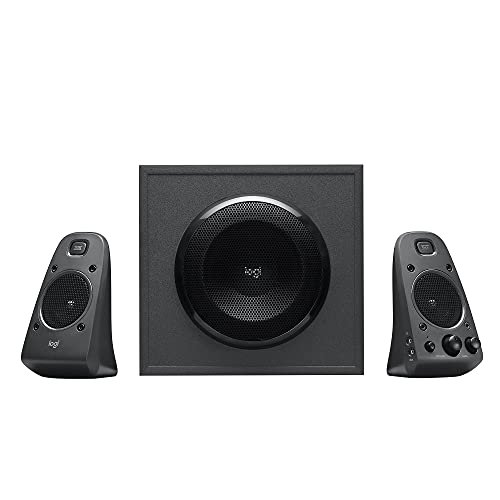
Logitech Z625 THX Certified 2.1 Speaker System

Kanto YU2 Powered Desktop Speakers (Matte Cream)

FUNLOGY Portable Mini2 Bluetooth Speaker (White)

LENRUE Under-Monitor Sound Bar (Black)

FUNLOGY Speaker Plus 14W Stereo PC Speakers (Black)

Edifier G2000 32W PC Gaming Speakers (Black)
Why These Options Stand Out
Most desks under 30 inches deep don’t have room for traditional bookshelf speakers, and that’s exactly where this FUNLOGY pair earns its keep. Each enclosure angles upward at 30°, firing sound toward your ears rather than your chest, which is a small detail that makes a real difference during long focus blocks or late-night video calls.
The 14W output is split across dual 48mm full-range drivers paired with passive radiators (small diaphragms that vibrate sympathetically to deepen bass without a separate subwoofer). The whole unit runs off USB power, so you never hunt for a free outlet behind your monitor.
Bright Spots
- Upward tilt directs sound to ear level, helping dialogue stay intelligible in calls.
- Single USB cable handles both power and audio, cutting cable clutter on small desks.
- Passive radiators add weight to the low end, which is unusual for the size class.
- Front-mounted volume dial is reachable without leaning across the keyboard.
Things To Consider
- Plastic enclosures can pick up fingerprint smudges on the white finish over time.
- No Bluetooth, so wireless phone streaming won’t work alongside your PC.
Who It Suits Best
Folks working from compact desks who want clean stereo for music, calls, and casual gaming without a tangle of cables.
Skip It When
The Kanto YU2 is a smarter pick if you want a built-in DAC (digital-to-analog converter, which improves signal clarity from your computer) and a more audiophile-leaning signal chain.
Some setups pull audio from more than one source. You might game on the PC, queue up a podcast from your phone, and occasionally plug in a turntable or older console. The BESTISAN pair leans into that mixed life with Bluetooth alongside its wired inputs, so the same speakers follow you across devices without swapping cables.
These are tuned for everyday listening rather than reference-grade audio, and the white finish pairs nicely with bright, modern desks. Owners commonly report that the Bluetooth handshake is straightforward across phones and tablets.
Reasons It Performs
- Bluetooth mode means your phone becomes a second source without unplugging the PC.
- Powered design keeps amp hardware inside the cabinets, so no separate brick sits behind your desk.
- Wired input covers the standard 3.5mm headphone jack output from any laptop.
Worth Noting
- Bluetooth compression (which strips some audio detail to send sound wirelessly) means wireless playback won’t match wired quality for serious listening sessions.
- Speaker grilles are exposed mesh, which can collect dust in home-office environments.
Made For
Anyone who bounces between their PC and a phone throughout the day and prefers one speaker pair that handles both.
Look Elsewhere When
The Creative Pebble 2.0 is the better everyday pick if Bluetooth matters less to you and you want a single-cable USB setup for a cleaner workspace.
If the white version of this FUNLOGY set feels too playful for your setup, the black variant carries the same 30° upward tilt and 14W output in a stealthier shell. It blends with monitor bezels, dark desks, and gaming corners without drawing attention to itself.
The mechanics, drivers, and connections are identical to the first pick on this list, so the experience matches. What’s different is purely cosmetic, which makes this a smart alternative for minimalists who want the same proven formula in matte black.
Real Benefits
- Black finish hides scuffs and dust better than lighter plastics in busy rooms.
- Same 30° upward firing design aims audio at ear height.
- USB-powered design requires only one cable to your PC for power and audio.
- Compact footprint fits beside laptop screens as well as monitor stands.
- Front volume dial keeps adjustments within easy reach.
Trade Offs
- No bass or treble controls, so sound tuning comes from your PC’s EQ (equalizer, which adjusts bass, mid, and treble levels in software).
- Glossy plastic on some batches shows fingerprints under bright desk lamps.
Best Suited To
Gamers and remote workers with dark-themed gear who want compact stereo without a visible white accent on the desk.
A Better Fit Elsewhere
The Edifier G2000 is worth a look if you want RGB lighting and a stronger 32W ceiling for louder sessions.
The Creative Pebble has been around long enough to earn a quiet reputation among home-office workers and students. Its rounded shape feels friendly on a desk, but the real genius is the single-cable setup: one USB handles power and audio together, with no drivers to install.
Far-field drivers (designed to project sound across a room rather than only at close range) with rear-facing passive radiators help the Pebble deliver more bass than its tiny footprint suggests. The 45° elevated drivers also angle the sound up toward the listener, which is a thoughtful touch for everyday seated listening.
The Practical Payoff
- Single USB cable removes the need for a wall adapter, freeing outlet space.
- Compact round shape fits beside monitor stands without crowding.
- Plug-and-play behavior works across Windows, macOS, and Linux laptops without software setup.
- Widely reported as durable in home and dorm environments.
Points To Keep In Mind
- Volume control lives on the front of one speaker, which may not suit every desk layout.
- No dedicated subwoofer, so heavy bass tracks feel lighter than larger 2.1 systems.
Who Will Love This
Students and remote workers who want something simple, small, and fuss-free that just works every morning.
Swap It Out When
The Logitech Z625 is a smarter call if deep bass matters and you have room for a dedicated subwoofer under your desk.
When “good enough” isn’t really enough, the Logitech Z625 brings a real subwoofer to the desk. The 2.1 layout (two satellite speakers plus a dedicated subwoofer for low frequencies) means explosions in games and kick drums in music actually register physically, not just audibly.
It also accepts three inputs at once, including optical (a digital audio connection that sends sound without analog conversion loss), 3.5mm, and RCA. You can leave your PC, game console, and TV all hooked up and switch between them through the control pod. That’s a flexibility none of the compact picks on this list can match.
The Upside
- THX-certified tuning targets cinema-grade audio reference levels.
- Dedicated subwoofer handles the low end so satellites can focus on mids and highs.
- Optical, 3.5mm, and RCA inputs let three devices share the same speaker pair.
- Wired control pod keeps volume and input switching within arm’s reach.
- Wired headphone jack on the control pod means late-night gaming doesn’t wake the house.
Honest Caveats
- The subwoofer enclosure takes up floor space under the desk, which isn’t ideal in small rooms.
- It needs a wall outlet for power, so cable management takes a bit more planning.
The Right Fit
Movie watchers and immersive gamers who want full-range sound and don’t mind a subwoofer taking up real estate.
Reach For A Different Pick When
The LENRUE sound bar is a cleaner choice if desk space is tight and you’d rather skip the subwoofer entirely.
The Kanto YU2 sits in a different category from most desktop speakers, and it’s worth understanding why. The built-in DAC routes the digital audio signal from your computer through a dedicated converter before reaching the amps, which sidesteps the noisy analog output built into many motherboards. The result is a cleaner signal reaching the 3″ composite drivers and silk dome tweeters.
At 50W RMS (root mean square, a more accurate measure of continuous power than peak wattage), this pair has real headroom for louder sessions without strain. A subwoofer output also sits on the back panel for anyone who wants to add low-end depth later.
Everyday Perks
- Built-in DAC improves clarity for music production and detail-oriented listening.
- Silk dome tweeters keep highs smooth rather than harsh at moderate volumes.
- Subwoofer output offers an upgrade path without replacing the speakers.
- Matte cream finish adds warmth to neutral or wood-toned desks.
Room For Improvement
- No Bluetooth, so wireless streaming requires a separate adapter.
- Larger cabinets than typical 2.0 desktop sets, so plan your shelf space accordingly.
Perfect Match For
Audio enthusiasts and home producers who want a noticeable step up from mainstream PC speakers.
Where A Sibling Pick Shines
The Edifier G2000 is a more game-oriented pick if you want RGB flair and multiple EQ modes without paying the premium for audiophile tuning.
The Mini2 isn’t really a desktop speaker in the traditional sense, but it solves a different angle of the same problem. Some folks want one compact speaker that travels between their desk, the kitchen, the patio, and the hotel room, and IPX7 waterproofing (rated to survive full submersion in water for a limited time) means it shrugs off splashes and rain.
The 5W driver with passive radiator delivers more low end than the size suggests, and TWS pairing (true wireless stereo, which links two identical speakers for left/right separation) lets you pair two units for genuine stereo when you’re at your desk.
Where It Helps
- Pocketable form factor moves from desk to bag to backpack without a second thought.
- IPX7 waterproofing protects against kitchen splashes and unexpected rain.
- Built-in mic handles hands-free calls when your phone is across the room.
- TWS pairing means two units become a stereo set when you want more separation.
Practical Considerations
- 5W output is fine for solo listening but won’t fill a busy shared workspace.
- Battery-powered, so you’ll need to recharge for long desktop sessions.
Whose Shelf It Belongs On
Travelers, renters, and minimalists who want one speaker that follows them between rooms and locations.
Consider Something Else When
The Creative Pebble 2.0 is the better fit if you stay at the same desk all day and prefer a constant USB power connection.
Two speaker cabinets can crowd a narrow desk. The LENRUE sound bar trades left/right separation for a single horizontal unit that slides neatly under your monitor, leaving both side flanks clear for notebooks, mugs, or a second screen.
It runs USB-powered and accepts audio through a 3.5mm AUX input, which is the same cable you already use for wired headphones. Setup is genuinely plug-and-play with no driver installation, and you can keep your headphones plugged in for late-night listening.
A Few Highlights
- Sound bar shape clears desk space where two cabinets would compete with monitor arms.
- USB power plus AUX audio keeps cable count to two simple lines.
- Under-monitor positioning angles output toward seated listeners naturally.
Points To Note
- Single-cabinet design means true stereo separation is limited compared to spread pairs.
- Bass response is modest because the slim enclosure has limited internal volume for low frequencies.
Built With In Mind
Anyone running a tight monitor arm setup or a shallow standing-desk converter who values desk real estate over wide stereo imaging.
Not Your Match When
The FUNLOGY 14W set is worth a look if wide stereo separation for music matters more than freeing up desk width.
The “Plus” in this FUNLOGY model isn’t marketing fluff: it actually changes the internals. Two amplifiers (one per channel, instead of sharing a single amp) drive the drivers separately, which usually means cleaner separation and less distortion at higher volumes. DSP tuning (digital signal processing that shapes the audio curve in real time) further balances the output for dialogue, effects, and music.
USB-C power delivery makes this a forward-looking choice for newer laptops that have moved away from USB-A, and a 3.5mm AUX input still supports the headphone jack connection this roundup is built around.
What Helps Most
- Dual amplifiers reduce crosstalk (signal bleed between left and right channels) for cleaner stereo imaging.
- DSP tuning balances lows, mids, and highs without manual equalizer tweaking.
- USB-C power suits modern laptops with fewer legacy USB-A ports.
- 3.5mm AUX keeps compatibility with the standard headphone jack output.
Things That May Matter
- Slightly higher cost than the non-Plus FUNLOGY models at the same wattage.
- USB-C power cable may not suit older desktops that lack a USB-C port on the front panel.
Right Fit For
Upgraders moving from basic stereo speakers who want cleaner sound and modern USB-C power without jumping to a bookshelf system.
A Better Fit Elsewhere
The Kanto YU2 is a smarter choice if your priority is audiophile signal purity rather than compact desktop convenience.
The Edifier G2000 leans into gaming culture with 32W total output, RGB lighting, and EQ presets for game, music, and movie modes. The 2.75″ full-range drivers pair with a rear bass port to push low frequencies further than a sealed cabinet would, which helps when a game’s soundtrack leans heavy.
Bluetooth, USB, and 3.5mm AUX inputs cover almost any source, and a subwoofer output sits on the back for anyone planning a future upgrade. For mixed-use battlestations, it’s a flexible all-rounder.
Practical Pluses
- Three EQ presets let you switch profiles without opening software.
- Subwoofer output offers an upgrade path for heavier bass later.
- Bluetooth, USB, and AUX inputs cover PC, console, and phone sources.
- RGB lighting adds visual flair without overwhelming a clean battlestation.
- 32W ceiling handles louder sessions without obvious strain.
Some Limits To Know
- RGB lighting is decorative and contributes nothing to sound quality, so plain-desk users may leave it off.
- Compact 2.75″ drivers can sound bright at maximum volume for some listeners.
Who Should Grab It
Gamers and RGB-friendly setup builders who want louder output, EQ presets, and flexible inputs in one package.
Another Choice May Suit
The Creative Pebble 2.0 is worth considering if RGB and gaming presets don’t matter and you prefer a simpler single-cable USB setup.
Picking Computer Speakers With Headphone Jack That Actually Fit Your Desk
The right pair of computer speakers with a headphone jack depends less on raw wattage and more on how you actually sit at your desk. Start with the connection style that matches your computer. USB-powered pairs like the FUNLOGY 14W set and the Creative Pebble 2.0 keep cabling simple, while traditional powered speakers with optical or RCA inputs (like the Logitech Z625) need a free outlet and more cable planning. A 3.5mm AUX input is the most universal option for headphone jack pass-through, which is why every pick on this list includes one.
Size and placement matter just as much as sound quality. Compact pairs fit beside a laptop on a small desk, while sound bars like the LENRUE slide under a monitor to free side space. If you have room for a subwoofer, a 2.1 system like the Logitech Z625 brings genuine low-end depth. If you don’t, well-tuned stereo pairs with passive radiators can still deliver surprising bass from small cabinets. Look for practical extras like front-mounted volume controls and headphone jacks on the front of the speaker, since reaching behind your monitor every time you want to adjust volume gets old fast.
Consider your listening habits honestly. Audiophiles benefit from a built-in DAC for cleaner signal from the PC, while gamers often want EQ presets and louder peak output. Remote workers who switch to headphones for late-night calls should prioritize a front-panel headphone jack so the transition is one plug, not two cable swaps. Match the speaker to the use case rather than chasing the biggest wattage number on the box.
Key Considerations Across These Picks
Pitfalls Shoppers Hit
The most common mistake is buying speakers that don’t physically fit the desk. Measure the space between your monitor stand and your keyboard before you commit. Another trap is assuming Bluetooth means better sound, when in reality Bluetooth compresses audio and often sounds worse than a wired 3.5mm connection. Finally, ignoring the headphone jack location leaves you crawling behind your desk every time you want quiet listening, which is exactly the hassle this roundup is meant to avoid.
Where The Extra Money Goes
Premium models like the Kanto YU2 charge more for a built-in DAC, higher-quality drivers, and stronger cabinet construction. That extra cost buys cleaner signal from your PC and longer component life, not just louder volume. For most listeners, mid-tier pairs cover everyday needs well, but if you sit at your desk for hours editing audio or focusing on music detail, the upgrade tends to show up where you spend the most time: in the sound quality you stop noticing because it simply feels right.
Frequently Asked Questions
Why do computer speakers need a headphone jack?
A front-panel headphone jack lets you plug in headphones without reaching behind your computer. It’s a convenience feature that turns the speaker into a switch box between open-air listening and private listening.
Do all computer speakers support headphone passthrough?
No, only models with a built-in headphone output on the speaker itself. Most picks on this list include one, but cheaper sets sometimes skip it, so check the spec sheet before you commit.
Are USB-powered speakers loud enough for a regular desk?
For most home and office desks, USB-powered pairs in the 10-14W range deliver plenty of volume for casual gaming, music, and calls. Larger rooms or louder gaming sessions may call for a traditional powered system.
Can I use these speakers with a monitor instead of a PC?
Yes, many modern monitors have a 3.5mm audio output that feeds external speakers directly. You can also route audio through a console or laptop with the same cable type.
Is a subwoofer necessary for good computer audio?
A subwoofer adds physical bass weight, which matters for action games and bass-heavy music. For spoken content, casual gaming, and small rooms, a well-tuned stereo pair often sounds plenty full without one.
Closing Remarks
Whatever your desk looks like and however you use your computer, there’s a speaker pair on this list that fits the way you actually listen. The right pick comes down to your space, your sources, and how often you reach for headphones late at night. Take what matches your habits, and trust your ears once it lands on your desk.




