

Picking a home color printer used to mean choosing between cartridges that drain your wallet and a machine that’s always out of ink. Today’s models split into two camps: cartridge-free ink tanks built for heavy document printing, and specialty printers aimed at crafters, photo lovers, and small businesses. I put this list together for households that print everything from school projects to shipping labels, side hustles that need bold color output, and casual users who just want wireless printing that works without drama. The picks below lean heavily into ink-tank designs, with two specialty options for specific creative needs.
The Lineup, Simplified

MZK A3+ F1080 DTF Printer with Oven & Laptop

Canon MegaTank G3270 All-in-One Wireless Color Printer

Canon SELPHY CP1300 Wireless Photo Printer
Epson EcoTank ET-2720 Wireless All-in-One (White)
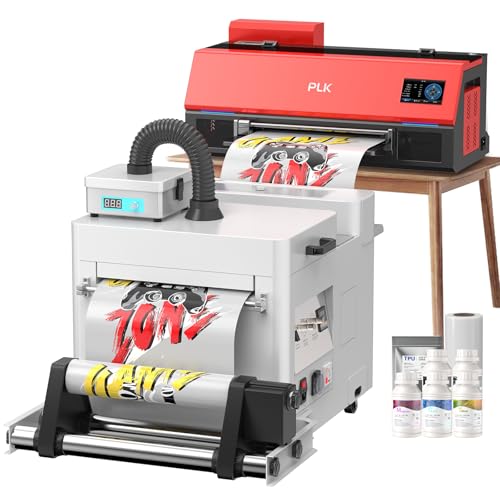
PLK A3 XP600 DTF Printer with Shaker Dryer & Smoke Purifier
Epson EcoTank ET-2720 Wireless All-in-One (Black)

Epson EcoTank ET-2980 Wireless Color All-in-One Supertank
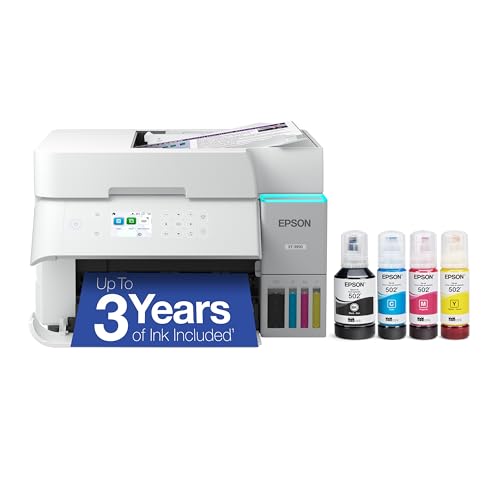
Epson EcoTank ET-3950 Wireless Color All-in-One Supertank
More Details On Our Top Picks
The MZK A3+ F1080 is not a typical home document printer. DTF (direct-to-film) printing is a process where designs are printed onto a special transfer film, then heat-pressed onto fabric, which is how custom t-shirts and tote bags get made. This unit ships with a curing oven and a laptop, essentially a starter workshop for someone launching a small apparel line from a spare room.
The included 5-inch LED touchscreen, timed anti-clog cleaning cycles, and dual ink-level alerts are practical touches for a machine that might sit idle between orders. It’s a niche pick compared to the Canon MegaTank G3270, which serves general family printing. For makers ready to learn the workflow, this package removes the guesswork of piecing components together.
Notable Upsides
- All-in-one bundle includes oven and laptop, so newcomers avoid compatibility headaches
- Anti-clog auto-cleaning mode helps the print head stay healthy during slow weeks
- Dual ink level alerts catch low tanks before a job fails mid-print
- A3+ wide format fits larger design files without tiling
- 5-inch touchscreen simplifies menu navigation versus button-only interfaces
Things To Consider
- DTF requires powder adhesive and heat-pressing, which adds setup steps beyond normal printing
- The included oven needs dedicated counter space and good ventilation
- Learning curve is steeper than a standard inkjet, so casual users may feel overwhelmed
Who It Suits Best
Aspiring apparel creators who want a complete DTF starter kit and have space for a curing oven on a workbench.
Not Your Match When
Households that just need everyday document and photo printing should reach for the Canon MegaTank G3270 instead.
The Canon MegaTank G3270 sits in the sweet spot for most households. It’s a wireless all-in-one that prints, copies, and scans, with refillable ink tanks instead of cartridges, so families stop dreading the next empty cartridge. The included ink yields a multi-thousand-page supply, which translates to roughly two years of typical home use before refills become necessary.
A 1.35-inch square LCD handles basic navigation, and single-sided printing covers most school and homework jobs. Where the MZK F1080 targets crafters with a specialized workflow, this model targets families who need reliable everyday output. For mixed use, it strikes a sensible balance between capability and footprint.
Good Reasons To Consider
- High-volume ink tanks reduce cartridge trips to the store
- All-in-one design handles scanning and copying for school forms
- Wireless setup works with laptops, tablets, and phones
- Compact footprint fits on most home office shelves
Worth Noting
- Single-sided printing only, so double-sided jobs need a manual flip
- Small LCD screen feels dated next to phone-app controls
- Photo printing quality is decent but not gallery-grade
Made For
Families balancing homework, recipes, and occasional color documents who want low-maintenance ink refills.
Skip It When
Anyone printing photos regularly as keepsakes will find the Canon SELPHY CP1300 a better fit for that purpose.
The SELPHY CP1300 is a different animal from the document printers earlier in this list. It is a dedicated compact photo printer, the kind of device that lives on a shelf and pulls out for parties, scrapbook nights, or school memory projects. Dye-sublimation printing (a process that uses heat to bond dye onto paper in layers) produces smudge-resistant photos with a finish that feels closer to a lab print than an inkjet snapshot.
The CP1300 supports multiple print sizes ranging from 2.1 by 2.1-inch stickers up to 4 by 6-inch postcards. Built-in editing tools handle red-eye correction, portrait optimization, and a skin-smoothing feature that subtly softens faces. Where the Canon MegaTank G3270 is a generalist, this one is a specialist.
Features That Help
- Multiple paper sizes cover labels, cards, and standard postcards
- Wireless printing from phones and cameras removes cable clutter
- On-board editing reduces the need for a computer
- Compact body stores in a drawer when not in use
- Dye-sub prints resist smudges and fingerprints
Trade Offs
- Print-only design means no scanning or copying
- Cost per photo runs higher than inkjet photo printing
- Specialty paper and ink cartridges are required, not standard supplies
Right Fit For
Hobbyists, scrapbookers, and parents who print physical photo keepsakes rather than sharing everything digitally.
Where Another Pick Suits Better
Households needing a single device for documents and photos should default to the Epson EcoTank ET-2720 in white for broader versatility.
The EcoTank ET-2720 is the cartridge-free philosophy in a beginner-friendly package. Epson’s supersized ink tanks live on the side of the unit, visible at a glance, so you know exactly when supplies run low. Each replacement bottle set prints thousands of pages, and households typically stretch one set across a year or more of mixed use.
This white-finish version blends into kitchens, craft rooms, or kid homework stations. Compared to the Canon MegaTank G3270 earlier, the ET-2720 leans harder into low-cost-per-page economics. It scans, copies, and prints wirelessly, which covers the usual homework-plus-receipts workload without taking over a desk.
The Case For It
- Cartridge-free design slashes long-term supply costs
- Visible ink tanks make refilling easy and obvious
- Wireless connectivity supports laptops and phones
- Compact body fits tight shelving
- All-in-one scanning covers school paperwork and occasional documents
Minor Gripes
- Print speeds lean toward the slower end of the ink-tank category
- No automatic double-sided printing
- Photo output is decent, but the Canon SELPHY CP1300 delivers sharper dedicated prints
Best Suited To
Budget-aware households printing hundreds of pages a month who want the cheapest possible ink refills.
Consider Something Else When
Families wanting faster throughput should compare this against the Epson EcoTank ET-2980 for noticeable speed gains.
The PLK XP600 steps beyond the MZK F1080’s starter approach into small-business territory. The integrated shaker dryer applies and cures the powder adhesive in one motion, while a smoke purifier captures fumes that DTF printing generates. For someone running multiple orders a week, those extras matter: they cut down on manual handling and keep the workspace breathable.
The A3 print width matches the MZK, but the bundled production workflow targets operators rather than hobbyists. It’s overkill for a household printer, yet well-matched to a garage workshop or basement print room.
Well-Handled Touches
- Integrated shaker dryer removes a manual powder step
- Smoke purifier improves air quality during long runs
- A3 width accommodates larger transfer designs
- XP600 print head is a recognized production-grade component
- Bundled ink and powder supply covers months of work
Points To Note
- Larger physical footprint demands a dedicated workspace
- Higher upfront cost than the MZK starter kit
- Requires DTF-specific knowledge, so first-timers face a learning curve
Who Should Grab It
Print-on-demand sellers ready to produce dozens of garments per week from a home-based setup.
A Better Fit Elsewhere
First-time creators should consider the MZK A3+ F1080 since it ships with a simpler oven-based workflow.
Functionally identical to the white ET-2720 covered earlier, this black-finish model simply offers a different aesthetic. Same cartridge-free ink tanks, same scan-copy-print trio, same wireless connectivity. The dark housing hides fingerprints in busy spaces and visually disappears on darker shelving.
Where the Canon MegaTank G3270 targets families wanting a balance of features and footprint, this ET-2720 prioritizes the lowest possible cost per page. Choose this finish when the printer lives somewhere fingerprints show easily, like a kid’s homework corner.
Real-World Strengths
- Identical ink-tank economics to the white model
- Black finish hides smudges in high-touch areas
- Wireless all-in-one design covers everyday scanning needs
- Compact footprint suits small shelves
Honest Caveats
- No automatic duplex printing
- Slower print speed than the newer ET-2980 covered below
- Photo output, while acceptable, isn’t the unit’s main strength
Built With In Mind
Households that want cartridge-free economics and prefer darker finishes in shared spaces.
Reach For A Different Pick When
Speed-conscious families should consider the Epson EcoTank ET-2980 for noticeably faster output.
The ET-2980 takes the cartridge-free ET-2720 formula and adds notable speed. Epson’s PrecisionCore Heat-Free technology is the engine here: it pushes out pages roughly half again as fast as its predecessor, which makes a real difference when the whole family queues up print jobs at 8 AM on a school day.
It still uses the same refillable tank approach, so the cost-per-page advantage carries over. For households frustrated by the ET-2720’s pace, this model addresses the main complaint without giving up the ink savings.
The Helpful Details
- Faster print speeds suit busy families with simultaneous jobs
- Heat-Free technology reduces warm-up time
- Same cartridge-free tank system as the ET-2720
- Modern design looks at home on a contemporary shelf
- Wireless connectivity supports phones, tablets, and laptops
Some Limits To Know
- No automatic duplex printing
- Larger footprint than the ET-2720
- Refill ink bottles cost more up front than standard cartridges, even if cheaper per page
Whose Shelf It Belongs On
Active families printing dozens of pages daily who can’t wait around for slower tank models.
Swap It Out When
Users wanting even higher volume and productivity features should compare against the Epson EcoTank ET-3950.
The ET-3950 sits at the top of Epson’s home EcoTank lineup, aimed at households running serious volume. It pairs the cartridge-free ink system with print-shop-style productivity features, including faster throughput than the ET-2980 and expanded paper handling for users who batch print mixed jobs.
Photo quality leans toward the higher end of consumer output, which makes this a sensible choice for households that print documents and family photos on the same machine. Compared to the ET-2980, the trade-off is a higher sticker price for noticeably more capability.
Noteworthy Benefits
- High-volume paper handling reduces refill interruptions
- Strong photo output elevates family prints beyond snapshot quality
- Cartridge-free tanks keep per-page costs low
- Wireless connectivity handles multiple device types
- Productivity-focused build suits busy home offices
Factors To Consider
- Higher upfront cost than the ET-2720 or ET-2980
- Larger footprint needs dedicated desk space
- Overkill for households printing only a few pages weekly
Perfect Match For
Home offices with steady, high-volume print needs and households wanting stronger photo output from one machine.
Look Elsewhere When
Light users printing a handful of pages weekly should consider the more compact Canon MegaTank G3270 instead.
What Matters Most Before Choosing Color Printers For Home Use
Ink Tank vs Cartridge Systems
Ink tank printers refill from bottles rather than swapping small cartridges. The refill bottles hold far more ink than a standard cartridge, which translates to lower cost per page and fewer trips to restock. Cartridge printers have a lower entry price but cost more over time. For households printing more than a few pages weekly, ink tanks almost always win on long-term value.
Print Volume and Page Yield
Page yield refers to how many pages a printer produces from one full ink supply. Tank models typically yield thousands of pages per refill set, while cartridge models might manage a few hundred. Match the page yield to your household’s habits, since underestimating volume leads to frustrating mid-month refills.
All-in-One vs Single Function
All-in-one printers combine printing, scanning, and copying in one unit. Single-function models just print. Families usually need scanning for school forms and occasional copying, so all-in-one is the safer choice. Single-function makes sense only for users with very specific dedicated needs, like photo hobbyists using the SELPHY CP1300.
Wireless and Mobile Printing
Wi-Fi connectivity lets a printer sit anywhere on the network rather than tethered to one computer. Mobile printing apps handle jobs from phones and tablets, which matters for households where everyone uses different devices. Make sure the printer supports the operating systems in your home before committing.
Key Considerations Across These Picks
Where Shoppers Go Wrong
A common trap is buying on the lowest sticker price without factoring ink costs. A cheap cartridge printer can cost more in a year than a tank model that costs more up front. Another slip-up is overlooking physical size. Tank printers with extra paper trays are larger than basic models, and finding out after delivery that it doesn’t fit the shelf leads to returns. Also worth noting: photo printing quality varies sharply across models, so households that print photos alongside documents should check dedicated reviews for image output before deciding.
Where The Extra Money Goes
Premium EcoTank models like the ET-3950 earn their higher price through faster speeds, larger paper capacity, and stronger photo output. The upgrade makes sense for households that print heavily and want one machine to handle documents and photos well. For lighter users, a mid-tier tank model delivers most of the savings without the premium features that go unused.
Frequently Asked Questions
Are ink tank printers worth it for home use?
Ink tank printers typically pay back their higher upfront cost within a year or two for households printing regularly. The refill bottles cost less per page than cartridges, so the savings add up with volume. For light users printing a few pages weekly, the difference matters less.
Can home color printers handle photo printing?
Most modern home color printers print acceptable photos on glossy paper. Dedicated photo printers like the Canon SELPHY CP1300 produce sharper, more durable prints through dye-sublimation. For occasional snapshots, a tank printer suffices. For memory keepsakes, a dedicated photo printer delivers better results.
How long do ink tank printers last?
With reasonable care and regular use, ink tank printers commonly last several years. Running the printer occasionally prevents the print head from drying out and clogging. Models with anti-clog cleaning cycles, like the MZK F1080, help extend print head life during slower months.
Do wireless printers work without internet?
Most wireless printers connect through your local Wi-Fi network rather than the internet itself. Once connected to your home router, devices on the same network can print without needing outside access. Some models also support direct Wi-Fi, where the printer creates its own signal for nearby devices.
What’s the difference between inkjet and ink tank printers?
Inkjet is the printing technology, while ink tank is a refill system. Inkjet printers can use either cartridges or tanks. Tank-based inkjets offer lower running costs, while cartridge-based inkjets have lower purchase prices. Both technologies produce similar print quality at their respective tiers.
Closing Thoughts
The right color printer depends entirely on what your household actually prints. Tank models like the Canon MegaTank G3270 or any of the Epson EcoTanks covered here suit most families who print documents and occasional photos. The Canon SELPHY CP1300 fits memory keepers and scrapbookers. The MZK and PLK DTF printers serve a completely different crowd, makers building apparel businesses from home. Pick the design that matches the workload, and the rest tends to fall into place.




