

Starting a YouTube channel usually means watching your budget while your audio slowly drifts into “good enough” territory. I’ve been there, and I know the exact moment when a wobbly built-in laptop mic starts costing you viewers. The fix doesn’t require a studio loan: a thoughtful condenser or lavalier under a sensible spend can lift your voice above the noise floor in a small bedroom or a coffee shop corner. I picked these ten options because each one solves a specific real-world pain, from laptop-only creators to dual-host podcasters.
The Shortlist At A Glance
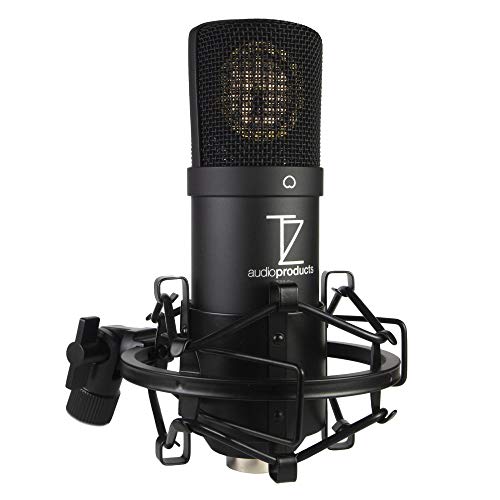
TZ Stellar X2 Large Diaphragm Condenser XLR Mic
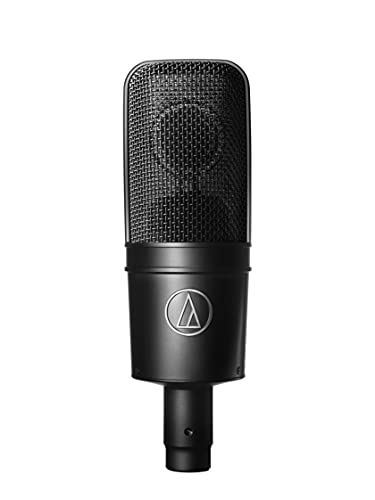
Audio-Technica AT4040 Cardioid Condenser Mic

Blue Yeti USB Microphone Bundle (Blackout)

HyperX QuadCast S RGB USB Condenser Microphone

Audio-Technica AT2020USB+ Cardioid Condenser USB Mic

HyperX QuadCast USB Condenser Gaming Microphone

Wireless Mini Lavalier Microphone with Noise Reduction

RØDE NT-USB Studio-Quality Condenser USB Microphone

A41 Wireless Lavalier Microphone with 2TX Case

Blue Yeti 10-Year Anniversary USB Microphone
A Breakdown Of The Leading Choices
The TZ Stellar X2 earns the top slot for creators who treat their channel like a small studio rather than a quick desk setup. It’s an XLR condenser (XLR meaning the balanced three-pin cable most audio interfaces accept), so you’ll need an audio interface or mixer to run it, but that extra box unlocks noticeably cleaner gain and headroom than a USB plug-in mic. The large diaphragm capsule is tuned for a smooth, non-fatiguing top end, which matters when you’re recording narration that runs 15 minutes or longer.
For a one-person bedroom studio recording voiceovers or sung vocals, this is a deliberate step up from anything USB-first on this list. If you’ve never owned an interface before, expect a small learning curve around gain staging and phantom power (the +48V electricity condenser capsules need to operate).
The Case For It
- Smooth top end that holds up through long-form narration without sounding harsh
- Cardioid pattern (a pickup shape that favors sound directly in front while rejecting the sides) keeps room echo manageable in untreated spaces
- XLR design lets you swap interfaces later as your setup matures
- Large diaphragm brings a fuller low-mid response suited to spoken voice
Things To Weigh Up
- Requires an audio interface and phantom power, adding cost for first-time owners
- No headphone monitoring jack on the mic body itself
- Bulkier than a desktop USB mic, so a boom arm or shock mount becomes a near-necessity
Quick Facts
Whose Shelf It Belongs On
Solo creators ready to invest in a small interface and a boom arm for cleaner long-form recordings.
Look Elsewhere When
The Audio-Technica AT4040 fits better when you want a step-up studio tone and already lean toward the Audio-Technica ecosystem.
The Audio-Technica AT4040 has lived in project studios for years because it threads a careful needle: a low self-noise floor (the hiss a mic produces even in a silent room) and the kind of dynamic range (the span between the quietest and loudest sounds it captures cleanly) that handles a louder vocal without distorting. Like the Stellar X2, it runs on XLR, so plan for an interface. What you trade away in beginner-friendliness you get back in headroom for guests who laugh loudly or singers who push hard.
This is the choice I’d nudge a serious hobbyist toward once they’ve outgrown a basic USB setup. For a YouTuber who wants voice and acoustic guitar to share a single mic chain, the AT4040 holds its own on both sides.
What Works In Its Favor
- Low self-noise keeps quiet ASMR-style or whispered narration clean
- Handles loud sources without clipping, useful for energetic hosts
- Side-address (you speak into the broad flat face) design feels familiar from broadcast-style setups
Honest Caveats
- Pricing tends to sit above entry-level condensers, even on the used market
- Still requires phantom power and an interface to operate
Right Fit For
Creators upgrading from a starter USB mic who want studio-style vocal capture for voice, voice-over, or acoustic instruments.
Consider Something Else When
The TZ Stellar X2 is the better pick if you prefer a slightly warmer tone and want a fresher alternative at a similar tier.
The Blue Yeti Blackout bundle is a one-stop unbox for someone starting from zero. You get the Yeti USB mic, a basic pop filter, and a 4-port USB hub, which is more useful than it sounds when you’re already running a capture card, a webcam, and a stream deck. The Yeti itself has been a living-room fixture for years because the metal stand and the no-latency headphone port let you monitor your own voice as you record.
It plugs straight into a laptop with no extra interface, so the path from box-open to first recording is short. This bundle is the kind of thing I’d hand to a teenager launching a first channel.
Good Reasons To Consider
- True plug-and-play with both Windows and Mac laptops
- Headphone jack on the mic body allows real-time monitoring without audio delay
- Bundle includes a pop filter, removing one accessory from your shopping list
- USB hub eases the cable-crammed reality of a streamer desk
Points To Note
- Yeti’s weight and footprint compete for desk real estate next to a laptop or keyboard
- Pickup is sensitive enough that noisy keyboards and PC fans often bleed into the take
At A Glance
Made For
First-time creators who want one box that ships with the microphone and the basic accessories to start recording right away.
Swap It Out When
The Blue Yeti 10-Year Anniversary Edition suits you more if you want multiple pickup patterns and software-driven voice effects.
The QuadCast S is the streaming-first sibling of the standard QuadCast, and the headline difference is the RGB lighting ring. If your camera frame includes the mic, that glow does real on-screen work. Four selectable polar patterns (stereo, omnidirectional, cardioid, and bidirectional) cover the full range from solo gaming commentary to two-host interview setups, and the tap-to-mute sensor on top is one of the more genuinely useful hardware additions in this category.
It plays nicely with PC, PS4, PS5, and Mac, which matters for creators who split their streaming across console and desktop. In a bedroom setup where lighting and personality matter as much as audio, this earns its spot.
Points In Its Favor
- Customizable RGB lighting personalizes the camera frame for streams
- Built-in shock mount (the elastic suspension that absorbs desk bumps) keeps keyboard rumbles out of the recording
- Tap-to-mute with an LED indicator removes the guesswork on hot mics
- Four patterns let one mic handle solo, duo, and group formats
- Internal pop filter softens plosives (the hard “p” and “b” pops) without an extra accessory
Small Caveats
- RGB customization leans on HyperX’s Ngenuity software, an extra install for non-HyperX users
- Slightly heavier than a typical USB mic, so a sturdy desk mount helps
Who Should Grab It
Streamers who care about the camera-side look as much as the audio, especially those running a Twitch or YouTube gaming channel.
Reach For A Different Pick When
The HyperX QuadCast (without the S) makes more sense if you want the same core feature set without paying for RGB customization.
The AT2020USB+ takes the well-regarded AT2020 capsule and skips the interface by going straight to USB. The built-in headphone jack with its own volume control is genuinely helpful for live monitoring, and Audio-Technica tuned this one with content creators in mind rather than purely studio engineers. If you’ve been bouncing between free apps trying to find one that doesn’t fight you, this mic shows up cleanly in any DAW (digital audio workstation, the software used to record and edit audio) on both Windows and Mac.
It’s the kind of mic a solo podcaster can grow with: serious enough for occasional music recording, simple enough to leave plugged in.
Bright Spots
- Direct USB output means no interface, no phantom power, no extra cables
- Headphone jack with volume knob on the body for live monitoring
- Cardioid pattern reduces room echo in untreated bedrooms
- Audio-Technica’s studio pedigree carries over to the USB version
A Few Limitations
- Fixed cardioid pattern, so multi-format creators may want something with multiple patterns
- Included desk stand is light; a boom arm upgrade is common among owners
Best Suited To
Solo podcasters, voice-over creators, and singer-songwriters who want studio-flavored audio over a single USB cable.
A Better Fit Elsewhere
The RØDE NT-USB suits you more if you record voice-over frequently and want the included pop filter and desktop tripod in the box.
The standard QuadCast keeps the core streaming-friendly features of the S version and trades the customizable RGB for a fixed red LED ring. If lighting personality matters less to you than a slightly friendlier price, this is the same microphone mechanically and acoustically. The four polar patterns, tap-to-mute sensor, built-in shock mount, and internal pop filter all carry over.
It’s the quieter sibling for a creator who wants the streaming feature set without the RGB software setup.
Features That Help
- Four pickup patterns cover solo, interview, and roundtable formats
- Built-in anti-vibration shock mount reduces desk-bump noise
- Tap-to-mute sensor with a clear LED status indicator
- Works across PC, Mac, PS4, and PS5 without driver installs
Trade Offs
- Red LED is fixed, not customizable for camera-side branding
- Same weight and footprint as the QuadCast S, so a stable mount matters
Built With In Mind
Entry-level gaming creators who want streamer-ready features and don’t need RGB customization.
Skip It When
The HyperX QuadCast S suits you better if RGB lighting matters for your on-camera brand and you’re willing to install HyperX Ngenuity.
Walking-and-talking creators need something that disappears onto a shirt collar, and this Rackwaylo lavalier gets out of the way. The receiver plugs straight into a phone or laptop, and the wireless pairing is automatic once the transmitter powers on. The included noise reduction helps tame street and crowd audio, which is the difference between usable B-roll (supplementary footage cut into a main video) and a clip that sounds like it was recorded inside a hair dryer.
For a TikTok creator, a journalist running interviews, or anyone filming on the move, this trades the studio polish of a condenser for mobility.
Real-World Strengths
- Plug-and-play pairing removes setup friction on location
- Noise reduction chip helps cut consistent background hums
- Compact transmitter clips to a collar without pulling fabric
- Works with iPhone, iPad, Android, PC, and laptop without adapters
Possible Compromises
- Battery life on the transmitter caps how long a single interview shoot can run
- Lavalier placement on clothing changes the tonal balance take to take
- Wind protection in outdoor conditions typically requires an extra windshield
Feature Snapshot
Who Will Love This
Mobile-first creators filming interviews, vlogs, and TikToks where a desk condenser would be impractical.
Not Your Match When
The A41 Wireless Lavalier with two transmitters fits better for two-person interview shoots where one lapel won’t cover both hosts.
The RØDE NT-USB has earned its reputation by leaning into the things voice-over creators actually need: a side-address capsule tuned for spoken word, a zero-latency headphone monitor, and a clean mix of included accessories. RØDE ships a pop filter and a desktop tripod in the box, which keeps the unboxing-to-first-recording timeline short.
For YouTube narration, audiobook work, or any creator whose channel is essentially their voice on screen, the NT-USB delivers a refined broadcast-style sound without sending you down the XLR rabbit hole.
Everyday Wins
- Side-address design suits reading-from-a-script workflows
- Zero-latency headphone monitoring for live takes
- Includes a pop filter and desktop stand in the box
- Compatible with Windows, Mac, and iPad recording apps
Where It May Fall Short
- Fixed cardioid pattern, so multi-host formats need a second mic
- Body is on the heavier side for a clamp-mounted arm
Tech Notes
Perfect Match For
Voice-over artists, narrators, and YouTube creators who want a refined broadcast-style sound over a single USB cable.
Where A Sibling Pick Shines
The Audio-Technica AT2020USB+ is the stronger choice if you lean toward music recording or want Audio-Technica’s tuning.
The Linber A41 ships with two transmitters and a charging case, which is the kit shape two-person creators have been waiting for. The dual-interface receiver carries both Lightning and USB-C connectors, so swapping between an older iPhone and a current Android phone doesn’t mean swapping receivers. The ENC (environmental noise cancellation) chip is built specifically for cutting steady background noise, which is the kind of detail that shows up when you film in a coffee shop or a windy plaza.
For interview-style channels and co-hosted podcasts on the move, two mics in one case beats carrying two separate units.
Practical Pluses
- Two transmitters ready for two-person interviews without buying a second kit
- Dual Lightning and USB-C receiver covers older and current phones
- ENC chip reduces environmental hum during outdoor and indoor takes
- Charging case extends field-runtime between sessions
Details To Watch
- Two transmitters mean twice the battery management on long shoots
- Lavalier positioning on two hosts adds a small consistency variable between takes
Feature Card
Who It Suits Best
Co-hosted podcasts, two-person interviews, and creators filming paired segments on a phone.
Another Choice May Suit
The Wireless Mini Lavalier works fine for solo creators who don’t need the second transmitter and want a lower entry cost.
The Blue Yeti 10-Year Anniversary Edition keeps the long-running Yeti formula and adds the Blue VO!CE software path through Logitech G HUB. Four pickup patterns, onboard gain and headphone controls, and a custom finish make this the most format-flexible Yeti in the family. Where the Blackout bundle aims at first-time simplicity, this version leans into creators who want to swap between solo narration and a roundtable without buying more mics.
It’s a sensible fit for multi-format channels that record sitting-down interviews one day and live streams the next.
Positive Points
- Four pickup patterns: cardioid, omni, bidirectional, stereo
- Blue VO!CE software adds broadcast-style vocal effects through G HUB
- Onboard headphone volume, mute, and pattern selection
- Custom anniversary finish stands out on a desk or on camera
Less Ideal Details
- Same weighty footprint as the original Yeti, so desk space matters
- Blue VO!CE requires Logitech G HUB installation, an extra step
- Condenser sensitivity means quiet rooms are still your friend
The Right Fit
Multi-format creators who split time between streaming, podcasts, and music recording on a single mic.
Not Your Match When
The Blue Yeti Blackout bundle suits you better if you want a pop filter and USB hub in the box and don’t need the software-driven effects.
What To Weigh Before Buying A Budget Mic For YouTube
Picking a microphone isn’t really about specs on paper. It’s about how the mic behaves in your specific room, on your specific desk, with the kind of content you actually make. A condenser mic captures more detail than a dynamic (a dynamic uses a moving coil and tolerates loud sources better), but that detail comes with sensitivity to room echo, keyboard clicks, and PC fans. That’s why a budget mic that’s perfect in a quiet bedroom can fall apart in an open living room.
USB versus XLR is the next decision point. USB mics keep your setup simple and your desk uncluttered, and they’re the right answer for most people starting out. XLR mics route through an audio interface, which adds cost and gear, but the upgrade path is smoother as your channel grows. Think of USB as the easy on-ramp and XLR as the next lane over.
Cardioid (front-focused) is the polar pattern most YouTubers want, since it pulls in the voice in front of the mic while ignoring some of what’s behind it. Multi-pattern mics like the QuadCast pair and the Yeti 10-Year Anniversary are useful if your channel mixes solo narration with interview formats, since you can switch patterns instead of swapping mics.
For mobile-first creators, lavalier systems win because they free you from a desk entirely. For studio-style creators, a condenser on a boom arm is the long-term answer. Match the mic shape to the channel shape, and your upgrade cycle slows down considerably.
Key Considerations Across These Picks
Pitfalls Shoppers Hit
The most common mistake is choosing a mic that doesn’t match the room. Condensers in untreated bedrooms can sound echoey without acoustic panels or heavy curtains behind the speaker. The second mistake is ignoring desk noise: a sensitive condenser picks up keyboard typing, mouse clicks, and PC fans more than most beginners expect. A shock mount and a quiet keyboard go a long way.
Why Top Tier Costs More
Higher-tier microphones earn their price through quieter self-noise (less hiss between phrases), wider dynamic range (handling both whispers and loud laughs cleanly), and more consistent capsule matching (each unit sounds like the next). For solo creators on a tight budget, those gains are subtle. For podcasters running two-hour conversations or musicians tracking vocals, the upgrade shows up in sessions, not in spec sheets.
Frequently Asked Questions
Do I need an audio interface for these mics? Only the XLR models on this list, the TZ Stellar X2 and the Audio-Technica AT4040, require an audio interface. Every USB mic here runs straight into a laptop or tablet with no extra hardware.
Are USB mics good enough for professional YouTube work? For most channels under several hundred thousand subscribers, a good USB condenser or lavalier is more than enough. The audio upgrade ceiling matters more when you start running multi-host shows or recording music.
What’s the difference between cardioid and omnidirectional? Cardioid (front-focused) picks up sound mostly from the front of the mic and ignores the sides and rear, which is ideal for solo creators. Omnidirectional captures sound equally from all directions, useful for roundtables or room-tone recording.
Can I use these mics with my phone? The USB mics on this list generally require an adapter for phone use. The wireless lavalier kits (Items 7 and 9) are built specifically for phones and laptops.
How close should I be to the mic? For most condensers, six to ten inches from the capsule is a good starting point. Closer placement adds intimacy and bass warmth, while further placement tames plosives but picks up more room sound.
Wrap Up
The right microphone for your channel depends less on price tags and more on how and where you record. A desktop creator with a quiet bedroom will get more out of a USB condenser like the Audio-Technica AT2020USB+ or the RØDE NT-USB. A mobile creator filming interviews will find the Linber A41 or the Rackwaylo lavalier far more practical. Match the mic shape to the channel shape, and the rest of your upgrade list gets shorter.




