

OLED monitors used to feel like a splurge reserved for professional colorists and competitive gamers with deep pockets. Times have changed. The 2026 lineup brings QD-OLED and WOLED panels down to genuinely approachable price points, with refresh rates that handle fast-paced games, HDR performance that flatters movies, and pixel-perfect blacks that breathe life into dark scenes.
This roundup walks through ten options worth shortlisting, from ultrawide curved flagships to a portable 14-inch travel panel. The picks are grouped around real use cases: immersive sim racing, eSports on a budget, console gaming at 4K, color-accurate creative work, and setups where desk space is tight. Every screen here supports the basics modern shoppers care about, including adaptive sync to fight screen tearing, HDR for brighter highlights, and OLED burn-in protection for daily use.
Whether upgrading from a tired IPS panel or building a first OLED setup, the shortlist below covers most of the right shapes and sizes. Each entry covers real strengths, honest caveats, and who I think will be happiest owning it.
A Fast Comparison Of The Options
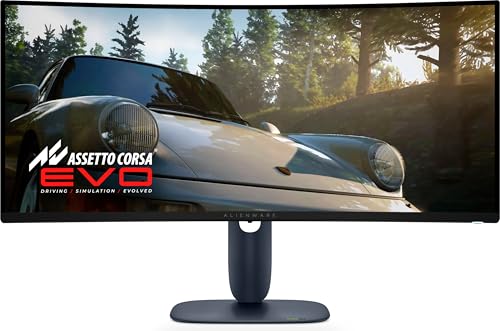
Alienware AW3425DW 34 QD-OLED 240Hz Curved Gaming Monitor

INNOCN 27 QD-OLED 280Hz QHD Gaming Monitor (2780s)

Upperizon 14-Inch 4K Portable OLED Monitor

ASUS ROG XG27AQDMGR 27 1440p Glossy WOLED Gaming Monitor

ASUS ROG PG32UCDM 32 4K 240Hz QD-OLED Gaming Monitor

MSI MAG 271QPX QD-OLED E2 27 QHD 240Hz Gaming Monitor

MSI MPG 272URX QD-OLED 26.5 UHD 240Hz Gaming Monitor

Redragon GM272 27 OLED Flat 360Hz Gaming Monitor

Samsung 32 Odyssey OLED G7 (G73SH) 4K Gaming Monitor

LG 27GX704A-B 27 UltraGear QHD 240Hz OLED Gaming Monitor
More On The Choices That Made The List
There is something special about a 34-inch curved ultrawide pulling a sim racer into the cockpit or a single-player RPG into its world. The Alienware AW3425DW leans into that with a 1800R curve that wraps around the natural field of view, paired with a 240Hz refresh and 0.03ms response for motion that keeps up with frantic inputs. Its QD-OLED panel pushes 99.3% DCI-P3 color and 1000 nits peak brightness for HDR, which means dark corners of a game still hold shadow detail rather than crushing into flat black.
Compared to the flat 27-inch picks further down this list, this one trades pixel density for width. Creators who need a flat reference monitor will want something else, but anyone chasing immersion will appreciate how the curve reduces head movement during long sessions. ComfortView Plus helps dial back blue light without yellowing the image, which matters during late-night play.
Where It Delivers
- 1800R curve and 34.2-inch ultrawide pull racing sims and cinematic games around the viewer.
- 240Hz refresh paired with G-SYNC, FreeSync Premium Pro, and HDMI VRR covers nearly every modern graphics card.
- HDR True Black 400 with 1000 nits highlights keeps dark scenes legible and bright moments punchy.
- ComfortView Plus filtering lowers blue light without the usual color shift that washes out a scene.
- USB-C with 15W passthrough simplifies a laptop connection for anyone working and gaming at the same desk.
Trade Offs
- The ultrawide format demands a deep desk and careful speaker placement to avoid crowding the curve.
- At WQHD rather than 4K, fine text on productivity apps can look slightly soft compared to sharper UHD panels.
- QD-OLED panels benefit from pixel-refresh routines, so owners commonly leave the auto-care features on to protect long-term image quality.
Built With In Mind
Sim racers and immersive single-player gamers who want one screen that swallows their field of view.
Where Another Pick Suits Better
Esports players chasing pure pixel density should look at the ASUS ROG XG27AQDMGR instead, since its 27-inch 1440p panel keeps targets sharp at a glance.
The INNOCN 2780s is the kind of monitor that makes QD-OLED feel reachable. It runs a 27-inch QHD panel at 280Hz with a near-instant 0.03ms response, the same response spec that flagship OLEDs quote. For a competitive Valorant or Apex player who wants deep blacks and fast motion without dropping flagship money, that combination is hard to beat. It also accepts console input, so PS5 and Xbox users can sit alongside PC gamers on the same shortlist.
Compared to the Alienware ultrawide above, this screen is smaller, flatter, and built for twitch gameplay rather than slow burn immersion. The height and pivot adjustment on the stand helps in mixed-use setups where someone codes during the day and queues ranked matches at night.
Practical Advantages
- 280Hz refresh on a QD-OLED panel keeps fast motion crisp during competitive play.
- Height, tilt, and pivot adjustments make it easier to share a desk between productivity and gaming.
- HDMI plus DisplayPort inputs cover both PC towers and modern game consoles on the same screen.
- Built-in speakers give a fallback audio option for casual use without crowding the desk.
Points To Note
- Peak brightness lands at the HDR400 tier, so bright-room HDR impact is more restrained than higher-tier QD-OLED rivals.
- Smaller boutique brands sometimes ship with looser factory calibration, so a quick OSD tweak may be needed out of the box.
Right Fit For
Competitive gamers who want QD-OLED speed without paying flagship prices.
Not Your Match When
Console players chasing sharp 4K HDR should consider the ASUS ROG PG32UCDM instead, since its 32-inch 4K panel gives current-gen consoles more room to breathe.
A portable OLED is one of those products that sounds like a luxury until someone travels with one. The Upperizon 14-inch panel delivers a true 3840×2400 resolution with 100% DCI-P3 color, so the second screen on a hotel desk looks closer to a calibrated reference display than a typical laptop screen. The kickstand folds flat for backpack storage, and VESA mounting offers a more permanent install option at a standing desk.
This screen stands apart from the rest of the roundup because none of the others can fit inside a messenger bag. Creative freelancers who edit photos or color-grade video on the road get the closest thing to a desktop OLED experience without shipping a 27-inch panel through airport security. The USB-C input pulls both power and video from a single laptop cable, simplifying travel setups considerably.
What Stands Out
- True 4K resolution at 14 inches gives an unusually sharp pixel density for a portable screen.
- 100% DCI-P3 color coverage suits photo and video work where accurate color matters.
- USB-C and HDMI inputs cover laptops, tablets, game consoles, and phones with one accessory.
- VESA compatibility adds flexibility for fixed-mount setups at home or in a studio.
Honest Caveats
- 14 inches is compact for split-screen productivity, so spreadsheet-heavy workflows may feel cramped.
- Portable panels tend to attract fingerprints on the kickstand and frame, so a microfiber pouch helps during travel.
Perfect Match For
Traveling creatives and remote workers who want calibrated color in a backpack-friendly package.
A Better Fit Elsewhere
Hardcore PC gamers chasing high refresh rates should pick the Redragon GM272 instead, since its 360Hz panel dominates twitch gameplay in a way a 60Hz portable cannot match.
Glossy OLED panels tend to look more vivid than their matte counterparts, and ASUS leans all the way into that with the ROG XG27AQDMGR. The TrueBlack Glossy WOLED finish gives scenes a slightly more cinematic punch, helped along by 99% DCI-P3 color and VESA DisplayHDR 400 True Black compliance. For an HDR enthusiast who wants inky shadows and crisp highlights in one package, that combination is hard to dismiss.
What separates this panel from the INNOCN and MSI 27-inch QHD rivals is the burn-in protection. The Neo Proximity Sensor detects when the user walks away and drops the panel to a black screen, which reduces static-image wear during long workdays. The 3-year warranty with burn-in coverage adds peace of mind for anyone worried about long-term OLED ownership.
A Few Highlights
- TrueBlack Glossy WOLED coating delivers punchier reflections and contrast than matte finishes.
- 240Hz refresh at 0.03ms response keeps competitive play feeling responsive.
- Neo Proximity Sensor automatically engages pixel protection when the user leaves the desk.
- Three-year warranty with burn-in coverage is rare at this tier.
Soft Spots
- Glossy surfaces reflect windows and lamps more visibly than matte WOLED panels.
- The 27-inch 1440p format means productivity users editing 4K media will need scaling.
Best Suited To
Esports players and HDR enthusiasts who want glossy OLED contrast and serious burn-in safeguards.
Reach For A Different Pick When
Travelers should pick the Upperizon 14-Inch 4K Portable OLED Monitor instead, since this ASUS is built for a fixed desk.
The PG32UCDM is what happens when a 32-inch 4K QD-OLED panel runs at a full 240Hz. Text looks crisp, 4K media has the room to breathe, and HDR games pop the way the developers intended. The custom heatsink and graphene film behind the panel help with longevity, which matters when leaving a screen on for long creative sessions or raid nights.
Among the picks in this roundup, only the Samsung Odyssey OLED G7 also delivers 4K at this screen size. The ASUS distinguishes itself with USB-C at 90W, which is enough to charge a thin-and-light laptop while pushing pixels. For someone running a MacBook Pro or a USB-C docking setup, that single-cable convenience is hard to give up.
Where It Helps
- 4K resolution at 32 inches gives the sharpest text of any pick in this roundup.
- USB-C with 90W Power Delivery charges most laptops while carrying display and data.
- Graphene film and a custom heatsink support long-term panel performance.
- 240Hz refresh at 4K makes this a serious match for both single-player HDR and fast multiplayer.
Worth Bearing In Mind
- 32-inch 4K OLED panels demand a deep desk, since sitting too close exaggerates pixel structure for some viewers.
- Generating 4K at 240Hz requires a high-end GPU, so casual hardware pairings may not feed the panel at full tilt.
Whose Shelf It Belongs On
Owners of high-end GPUs who want 4K HDR gaming with a single USB-C cable running to a laptop.
Swap It Out When
Esports purists should pick the Redragon GM272 instead, since its 360Hz panel pulls more frames at a much friendlier cost.
The MSI MAG 271QPX QD-OLED E2 is the kind of monitor that quietly disappears into a routine. It runs 1440p at 240Hz with a 0.03ms response, which is the same core spec as the INNOCN 2780s above but with MSI’s take on QD-OLED tuning. For someone who games after work, edits photos on weekends, and watches movies on Sunday evenings, this panel handles all three without much fuss.
The tilt and height adjustment keeps the stand flexible without overcomplicating the assembly. Compared to the larger ASUS PG32UCDM, this screen fits in tighter desks and asks less from a mid-range GPU. Owners commonly run the built-in OLED care routines on a schedule to maintain panel health over years of mixed use.
Where It Excels
- 27-inch 1440p format is a comfortable size for mixed gaming, coding, and video work.
- 240Hz refresh and 0.03ms response cover most multiplayer titles without motion blur.
- True Black HDR 400 support gives OLED’s signature inky shadows.
Minor Gripes
- Smaller port selection than premium QD-OLED rivals, so multi-device desk setups may need a dock or hub.
- Peak brightness tops out at the True Black 400 tier, so direct sunlight on the panel reduces HDR impact.
Made For
Mixed-use shoppers who want one screen for gaming, work, and streaming without juggling settings.
Consider Something Else When
Console gamers chasing 4K HDR should consider the Samsung Odyssey OLED G7 instead, since its 32-inch 4K panel better matches PS5 and Xbox output.
The MPG 272URX is built for people who treat a monitor like a docking station. It uses a 5-layer OLED Tandem panel with EL Gen 3 technology, which boosts efficiency and helps long-term brightness. The 26.5-inch 4K panel runs at 240Hz, and USB-C delivers 98W of Power Delivery, enough to charge most productivity laptops while pushing a 4K signal and serving as a USB hub.
What makes this stand out from the ASUS PG32UCDM above is the smaller screen size and the smarter I/O. PiP and PbP modes let owners run a laptop and a desktop at the same time, and KVM support means one keyboard and mouse can switch between both systems. The 4-axis adjustable stand and VESA 100mm mount cover fixed and standing-desk setups alike.
Points In Its Favor
- USB-C at 98W charges most productivity laptops while running the display.
- PiP and PbP modes support a laptop and desktop on the same screen at once.
- OLED Care 2.0 with a graphene radiator supports long-term panel health.
A Few Limitations
- 4K at 240Hz needs a high-end GPU, so older graphics cards will not drive this panel at full speed.
- Smaller 26.5-inch 4K panels can show minor scaling quirks in older productivity apps.
Who Should Grab It
Power users juggling a laptop and desktop who want one screen to dock, charge, and drive both systems.
Where Another Pick Suits Better
Sim racers chasing ultrawide immersion should look at the Alienware AW3425DW instead, since its curved 34-inch panel wraps around the field of view.
The Redragon GM272 is the rare OLED that hits 360Hz without breaking the budget. For competitive Valorant or Counter-Strike players, that extra headroom over 240Hz panels can mean a clearer read on enemy movement at the edge of the screen. The flat 27-inch panel keeps pixel structure uniform across the surface, and the 0.03ms response keeps motion sharp even when frame rates spike.
Compared to the INNOCN 2780s above, this panel focuses more heavily on raw speed than connectivity convenience. The wider port selection with two HDMI and three DisplayPort inputs is generous for a multi-PC setup, but Redragon does not include a USB-C input for laptop docking. VESA wall mount compatibility helps anyone building a multi-monitor battlestation.
Well-Handled Touches
- 360Hz refresh rate pulls ahead of most 240Hz OLED competitors in this price range.
- AMD FreeSync Premium support fights screen tearing across a wide frame-rate range.
- Multiple DisplayPort and HDMI inputs suit multi-PC or streaming setups.
Things To Consider
- No USB-C input means laptop users will need a separate dock or HDMI adapter.
- Eye-care modes tend to be more aggressive on entry OLEDs, so quick OSD tuning helps match personal preference.
Perfect Match For
Esports players chasing the highest refresh rate they can find on a flat OLED panel.
Skip It When
Laptop-first remote workers should pick the MSI MPG 272URX instead, since its USB-C and KVM support simplify a docked setup.
Samsung’s Odyssey G7 OLED leans into versatility with a dual-mode panel. Run it at 4K 165Hz for cinematic single-player and HDR media, or flip into Full HD 330Hz for high-frame competitive play. The 0.03ms response time applies in both modes, so motion handling stays consistent whether someone plays Cyberpunk at 4K or Valorant at FHD.
This is the only 32-inch 4K OLED on the list that explicitly supports dual-mode switching, which gives hybrid gamers real flexibility without swapping screens. The glossy OLED finish helps HDR pop, though it does reflect more ambient light than matte panels. Owners commonly position this screen away from direct window glare for the best result.
The Value In It
- Dual-mode 4K/165Hz and FHD/330Hz adapts to single-player and competitive games on one panel.
- 32-inch 4K gives sharp text for productivity alongside cinematic gaming.
- Glossy OLED panel highlights HDR content with strong contrast.
Some Limits To Know
- Glossy finish reflects windows and bright lamps more visibly than matte alternatives.
- 4K at 165Hz still demands a capable GPU, so older graphics cards will lean on the FHD mode.
Best Suited To
Hybrid gamers who flip between cinematic single-player and high-frame competitive titles.
Look Elsewhere When
Hardcore sim racers chasing curved immersion should pick the Alienware AW3425DW instead, since ultrawide curves handle cockpit views more naturally.
The LG 27GX704A-B closes out this list with a glossy 27-inch QHD OLED tuned for both PC and console play. It supports G-SYNC, FreeSync Premium Pro, and HDMI 2.1, which means a single screen handles a GeForce card, a Radeon card, and a current-gen console without fuss. VESA DisplayHDR TrueBlack 400 certification gives HDR content a baseline of contrast that holds up against pricier rivals.
Compared to the ASUS XG27AQDMGR above, this LG keeps the glossy OLED finish but skips the proximity-sensor burn-in care, leaning on LG’s own panel protection routines instead. For someone running a mixed PC and console desk, the broader sync support matters more than the smart-sensor feature.
Strong Points
- Glossy 27-inch QHD OLED panel gives vivid HDR contrast.
- NVIDIA G-SYNC and AMD FreeSync Premium Pro compatibility covers both major GPU camps.
- HDMI 2.1 input handles PS5 and Xbox Series X at full HDR frame rates.
Where It Is Less Suited
- Lacks a USB-C input, so laptop users will need a dock for a single-cable desk setup.
- Glossy coating benefits from careful placement away from direct window light.
Who Will Love This
Console and PC gamers who want one glossy OLED screen for both setups on the same desk.
Swap It Out When
Travelers should consider the Upperizon 14-Inch 4K Portable OLED Monitor instead, since this LG is firmly a desk-bound panel.
What To Weigh Before Buying A Cheap Oled Monitor
Picking The Right Size And Resolution
A 27-inch QHD panel hits a sweet spot for most desks, since 1440p keeps text legible without demanding a high-end GPU to drive modern games. A 32-inch 4K panel adds sharpness for productivity and console gaming, though the GPU cost climbs. Ultrawide 34-inch curved screens trade pixel density for immersion, which works well for sim racing and cinematic single-player but feels excessive for spreadsheet-heavy work. A 14-inch portable 4K panel is a niche tool, useful for travel and color work but too small for daily split-screen productivity.
Refresh Rate And Response Time
240Hz is the modern baseline for OLED gaming monitors, with the Redragon GM272 pushing that to 360Hz for esports. Response time on OLED panels is virtually identical across the category at 0.03ms, so motion clarity comes down to refresh rate and the GPU feeding it. For most shoppers, 240Hz feels buttery; above that, only competitive players will notice the jump.
Burn-In Protection And Panel Longevity
OLED panels can develop image retention when static UI elements stay on screen for thousands of hours. Most modern OLED monitors include pixel refresh routines, auto-dimming for static logos, and screen savers that kick in after a short idle. ASUS adds a proximity sensor on the XG27AQDMGR that goes further, dropping the panel to black when no one is at the desk. For anyone using their monitor as a productivity display, these routines are worth taking seriously.
HDR, Brightness, And Sync Support
HDR on OLED looks distinctly different from HDR on a standard LCD. True Black 400 certification guarantees deep blacks and at least 400-nit peaks, while 1000-nit QD-OLED panels give more headroom for bright highlights. Adaptive sync, meaning G-SYNC, FreeSync Premium Pro, or HDMI VRR, prevents screen tearing when frame rates fluctuate, so it is worth checking sync support against the GPU and console sitting under the desk.
Smart Shopping Habits For Oled Shoppers
Mistakes Worth Dodging
Buying on peak brightness alone often leads shoppers past the more useful True Black contrast story, since OLED’s black-level advantage matters more in dim rooms than nits do. Skipping the burn-in care settings out of the box is another common slip, since those routines need to run from day one to protect long-term panel health. Forgetting GPU requirements catches many shoppers off guard, particularly with 4K 240Hz panels that need high-end graphics cards to drive them at full speed.
Where The Extra Money Goes
Stepping up to a premium QD-OLED panel brings brighter HDR highlights, denser pixel layouts at 4K, and longer warranty coverage that includes burn-in. Those upgrades matter most for HDR movie fans, console gamers at 4K, and creative pros who need wide color coverage. A mid-range 27-inch QHD panel handles everyday gaming and productivity at a friendlier cost, which makes it the right call for most shoppers who do not need the brightest HDR or the sharpest text.




