

Finding a reliable wall companion for a MacBook Air sounds simple until the cable that came in the box stops reaching the sofa, or you need a second adapter for the travel kit. I spend a lot of time thinking about the small charging decisions that shape a workday, and the right pick depends on how, and where, the laptop actually gets used. The nine options below cover every realistic situation, from a permanent desk setup to a single block for the whole tech drawer.
How The Shortlist Stacks Up

Apple Power Adapter Extension Cable
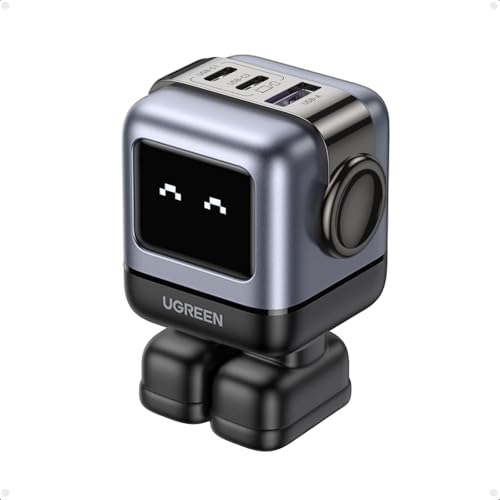
UGREEN Uno 65W 3-Port USB C Charger Adapter

Apple 96W USB-C Power Adapter

Galifan 96W Charger for MacBook Air
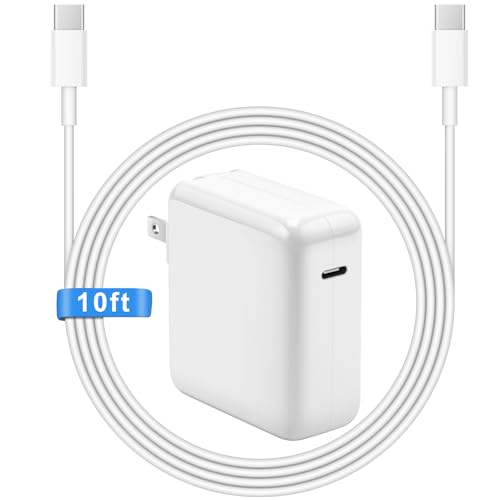
AITISI 118W Charger with 10FT Cable

AITISI 118W Charger with 10FT Cable (Pink)

AITISI 96W Long Cable Charger

AITISI 118W Charger with 10FT Cable (Blue)

Galifan 140W Charger for MacBook
A Closer Look At Each Pick
Outlets in hotel rooms and older apartments tend to live in the least helpful spots, and the standard MacBook Air cable rarely reaches the nearest chair. This 1.8-meter extension cord solves that exact problem without forcing anyone to replace the brick they already own.
Unlike the multi-port options later in this list, this Apple cable is purely a reach extender, so it works alongside MagSafe, MagSafe 2, and a wide spread of USB-C and USB-A adapters from 10W up to 140W. The trade-off is that it does not add any new charging capability; it simply gives the existing setup more slack. Anyone whose brick tucks neatly behind a desk and stays there probably does not need it.
Benefits That Matter
- Works with the entire Apple adapter family, including MagSafe, MagSafe 2, USB-A bricks from 10W to 12W, and USB-C adapters from 29W up to 140W
- Adds a generous 1.8 meters of slack so the laptop can reach the couch, bed, or conference table
- First-party Apple accessory, so fit and finish match what came in the original box
- Removes the need to drape cables across walkways or rearrange furniture around a stubborn outlet
Small Caveats
- It is an extension only, with no additional charging ports or USB slots
- Adds another cable to manage in a bag, which can feel redundant for minimalist travel kits
Made For
Anyone whose outlet sits behind a heavy dresser or under a nightstand and whose existing adapter just falls short.
Skip It When
Travelers running a single multi-port brick like the UGREEN Uno 65W already have a longer reach without adding extra weight.
Most people carry at least two USB-C devices by now, and hauling a separate brick for each one defeats the purpose of a slim laptop bag. The UGREEN Uno uses GaN technology, which keeps the circuitry small and cool enough to live in a coat pocket.
Three ports let a MacBook Air share the outlet with a phone, tablet, or wireless earbuds case from a single wall plug. Compared with the single-port Apple 96W later on this list, this one trades pure wattage for flexibility, and the playful magnetic robot form factor makes it easier to find in a dark hotel room. The 65W ceiling means it tops up a MacBook Air comfortably but is not designed for a 16-inch Pro.
What Makes Sense
- Three USB-C ports replace a stack of single-device bricks on the desk or in the carry-on
- GaN construction keeps the body compact and runs cooler than older silicon adapters
- 65W output handles a MacBook Air quickly while still leaving headroom for phones and tablets
- Magnetic feet let the block stick to metal surfaces, which is handy in a workshop or kitchen
Trade Offs
- 65W maxes out well below the 96W and 140W options on this list, so heavier laptops charge slowly
- When three devices pull power at once, each port gets a smaller slice than when used solo
Right Fit For
Frequent travelers who want one tidy brick to charge a MacBook Air, an iPhone, and a pair of earbuds on the road.
Look Elsewhere When
Studio editors driving a 16-inch MacBook Pro will want the higher wattage of the Galifan 140W instead.
When the adapter that ships in the box finally gives up, replacing it with the same part is often the path of least regret. The Apple 96W USB-C Power Adapter is the genuine article, built to the same spec as the one many people already trust.
It plays nicely with any USB-C charging cable, which makes it a safe choice across MacBook Air, MacBook Pro, iPad, and other modern gear. The 96W output means it can fast-charge a 14-inch MacBook Pro to roughly half capacity in around 30 minutes when paired with a MagSafe 3 or USB-C charge cable. The honest read is that the price premium is real, but the build and the warranty backing are part of the deal.
Well-Handled Touches
- First-party Apple build quality and safety certifications matched to every current MacBook
- 96W ceiling fast-charges a 14-inch Pro and keeps a MacBook Air topped up with plenty of headroom
- Compatible with any USB-C cable, so existing MagSafe 3 or USB-C cords can stay in service
- Foldable prongs in some regions make it easier to slip into a laptop sleeve
Things To Consider
- The charging cable ships separately, which adds a line item the box does not include
- Only one port, so powering a phone at the same time means reaching for a second adapter
Best Suited To
Pure Apple households who value first-party gear and want a charger that mirrors the one originally packed with the laptop.
Swap It Out When
Anyone regularly charging two or three devices at once will appreciate the three-port design of the UGREEN Uno.
A spare brick for the office drawer is one of those quiet upgrades that pays off the first time the original adapter goes missing. The Galifan 96W delivers the same USB-C Power Delivery profile that Apple ships, at a noticeably friendlier price point.
PD 3.0 is the fast-charging protocol that lets the brick and the laptop negotiate the right voltage, which is how this Galifan reaches around 50 percent on a compatible MacBook in roughly half an hour. Compared with the official Apple 96W above, the trade-off is brand familiarity rather than charging capability. Temperature control, short-circuit protection, and current regulation are built in, which is the kind of detail that matters in a busy household.
What Stands Out
- PD 3.0 fast charging matches the speed of Apple’s own 96W brick for compatible MacBooks
- Compatible with MacBook Air 13 and 15, MacBook Pro 14 and 16, and the newer MacBook Neo line
- Built-in temperature control and current regulation add a layer of everyday safety
- Lower cost makes it a sensible second adapter for the office or a family member
Points To Keep In Mind
- Third-party brands occasionally ship with shorter cables than the Apple-branded option
- No multi-port design, so it pairs better with a dedicated outlet than a shared charging hub
Who Should Grab It
Cost-conscious shoppers who want a second charger for travel or the kitchen without paying full retail.
Reach For A Different Pick When
MacBook Pro 16 owners running heavy creative software will appreciate the 140W ceiling on the Galifan 140W reviewed below.
Quick Facts
The default Apple cable reaches about six feet, which sounds generous until the nearest outlet is on the far side of the bedroom. The AITISI 118W ships with a 10-foot USB-C cable, giving the laptop true freedom of movement.
The block pushes 118W, which is more than enough for any MacBook Air and most Pro models. It plays nicely with PD profiles from 29W up to 118W, so it adapts to whatever device gets plugged in. The honest comparison: the extra cable length is the real story here, since most short-cable bricks perform similarly when wall-bound.
Noteworthy Benefits
- 10-foot cable reaches across a room without needing an extension cord
- 118W output comfortably covers any MacBook Air or Pro configuration
- Universal PD profile list covers laptops, tablets, and phones in one block
- Single bundle means no separate cable purchase, which the Apple 96W notably skips
Practical Considerations
- Long cables require a little extra cable management to keep a tidy desk
- A single port means phones still need their own charger or share the cycle
Whose Shelf It Belongs On
Anyone working from a couch, bed, or shared family space where the nearest outlet is never quite close enough.
Not Your Match When
Minimalist travelers will prefer the compact UGREEN Uno 65W, even though it gives up cable length.
Charging gear is usually gray or white, which is fine until the desk is curated around a different palette. This pink AITISI 118W delivers the same hardware as the standard black version above, with a finish that suits softer workspaces.
The technical profile is identical: 118W output, a 10-foot USB-C cable, and PD support across the full MacBook range. For anyone whose setup already includes rose-gold or warm-tone accessories, the color match is a small but real quality-of-life win. In most cases, the trade-off is purely aesthetic, so buyers should weigh style against neutral finishes elsewhere.
Everyday Wins
- Color-matched finish blends into warm-toned or rose-gold desk setups
- Same 118W output and 10-foot cable as the standard AITISI version
- Universal PD profile list covers MacBook Air and Pro models
- Easier to spot in a cluttered bag than generic white bricks
Worth Bearing In Mind
- Color choice rarely affects function, so the price difference should match personal taste
- Single port only, so multi-device households still need a second option
Who It Suits Best
Design-minded shoppers curating a specific color palette on a home or studio desk.
A Better Fit Elsewhere
Practical shoppers who care only about charging speed should save with the Galifan 96W instead.
Households rarely run only one type of device, and a charger that locks itself to a single brand quickly becomes frustrating. The AITISI 96W supports a remarkably broad compatibility list, including MacBook Pro 13/14/15/16, MacBook Air 13, MacBook 12, iPad Pro and Air, plus a long list of phones and accessories.
The 10-foot cable makes it useful anywhere the outlet is inconvenient, and the wattage ladder covers 61W, 87W, and 96W profiles so the brick adapts to whatever demands power. The catch is that this is a single-port solution, so multi-device charging still means swapping cables. In a typical family room, that trade-off is usually fine.
A Few Strong Suits
- Compatibility list spans MacBook, iPad, iPhone, Samsung Galaxy, Google Pixel, and more
- Multiple wattage profiles (61W, 87W, 96W) let one brick serve different laptops safely
- 10-foot cable removes the reach problem common in older homes
- Single brick replaces several brand-tied chargers in a drawer
Where It May Fall Short
- One port only, so charging two laptops at once is not an option
- Long cable needs occasional coiling to avoid tripping in tight spaces
Built With In Mind
Mixed-device households where one charger needs to cover phones, tablets, and laptops without swapping.
Consider Something Else When
Anyone charging a MacBook Pro 16 at full tilt will want the 140W headroom of the Galifan 140W covered later.
Feature Snapshot
Cool-toned accessories are having a moment in modern workspaces, and a blue charging block fits right in beside silver laptops and matte desk gear. This AITISI 118W delivers the same 10-foot reach and PD profile list as the standard version, wrapped in a deeper color finish.
The 118W ceiling is the highest on the AITISI lineup, so it offers more headroom than the 96W Galifan earlier in this roundup. Compared with the pink variant above, the choice comes down to desk palette. In most cases, the blue finish wears a touch better over time than lighter shades that show scuffs more easily.
The Value In It
- Deep blue finish resists visible scuffs better than lighter color options
- 118W output tops the AITISI lineup and covers every MacBook configuration
- 10-foot cable suits open-plan offices and shared workspaces
- Universal PD profiles work across laptops, tablets, and phones
Honest Caveats
- Single port only, so simultaneous charging means swapping cables
- Color choice is a personal preference, so buyers should weigh it against neutral finishes
Perfect Match For
Minimalist workspaces with cool-tone accessories where a blue brick ties the setup together.
Another Choice May Suit
Households already standardizing on neutral black gear will find the AITISI 96W Long Cable a better visual fit.
A MacBook Pro 16 or the newer MacBook Neo can pull serious wattage when editing video or compiling code, and a 65W brick will leave the battery draining faster than it charges. The Galifan 140W solves that ceiling entirely with USB-C PD 3.0 at full gallop.
This block reaches around half a charge in roughly 30 minutes on a compatible Pro, which is the headline benefit for anyone tired of watching a battery icon creep during heavy sessions. Compared with the Apple 96W reviewed earlier, the extra wattage buys faster top-ups on the biggest laptops without sacrificing compatibility with the MacBook Air. The trade-off is size: 140W bricks tend to run a bit heavier than their lower-watt siblings.
A Few Highlights
- 140W output handles a 16-inch MacBook Pro and the MacBook Neo without throttle
- PD 3.0 fast charging reaches roughly 50 percent in about 30 minutes on supported models
- Built-in temperature, short-circuit, and current regulation protect the laptop during long sessions
- Backward compatibility with lower-wattage MacBook Air and iPad Pro models
Less-Strong Areas
- Higher wattage bricks tend to weigh more than 65W or 96W alternatives
- Single-port design means phones and earbuds still need their own charger
The Right Fit
Pro and Neo power users running demanding creative or development workloads who need the fastest possible top-up.
Where Another Pick Suits Better
Travelers prioritizing a lighter bag will find the three-port UGREEN Uno 65W more practical day to day.
Key Product Details
What To Weigh Before Picking A MacBook Air Charger
Wattage is the headline spec, but the right number depends on what actually gets plugged in. A MacBook Air draws around 30W to 45W under normal use, so a 65W brick already leaves comfortable headroom, while a 96W or 140W adapter matters more for Pro and Neo owners running heavier loads. Power Delivery, often shortened to PD, is the protocol that lets the brick and laptop agree on the right voltage. Most modern third-party options support PD 3.0, which covers fast charging across the MacBook lineup.
Cable length and port count shape daily life more than people expect. A 10-foot cable solves outlet placement problems in older homes and shared spaces, while a three-port block reduces the number of bricks in a travel kit. Single-port adapters cost less and stay smaller, but they force cable swapping when a phone needs a top-up at the same time.
Build quality and safety certifications are worth checking, especially for non-OEM brands. Look for mentions of temperature control, short-circuit protection, and current regulation, which together prevent the brick from overworking itself during overnight charges. Color and finish rarely affect performance, but they do matter for anyone curating a specific desk aesthetic, and several AITISI options come in pink, blue, and black to match.
Key Considerations Across These Picks
Where Shoppers Go Wrong
The most common mistake is buying a brick with more wattage than the laptop can actually use, which costs more without speeding anything up. A MacBook Air pulls what it pulls regardless of whether the adapter is rated at 65W or 140W. The reverse error is choosing a low-watt block for a 16-inch Pro, which leads to slow top-ups under load.
Cable quality is another quiet trap. Long cables that ship with third-party bricks can vary in gauge and shielding, so it helps to look for mention of PD compliance and durable insulation rather than just length. Skipping that check sometimes shows up as slower charging or warm connectors.
Why Top Tier Costs More
Higher wattage bricks use more robust internal components, which is why 140W options tend to weigh a bit more than 65W versions. The extra cost covers better thermal management and the safety circuitry that keeps the brick stable under sustained load.
Spending up makes the most sense for Pro and Neo owners running demanding creative work, since the faster top-up saves real time over a week. For MacBook Air users with lighter workloads, a mid-range 65W to 96W adapter covers everything the laptop can ask for, and the savings go toward accessories that matter more in daily use.
Frequently Asked Questions
What wattage does a MacBook Air actually need?
The MacBook Air typically draws around 30W to 45W during regular use, so a 65W brick already provides plenty of overhead. Anything higher simply sits idle most of the time, which is not a problem, just an unused ceiling.
Can I use a third-party USB-C charger safely with a MacBook Air?
Yes, as long as the brick supports USB-C Power Delivery 3.0 and comes from a brand that lists basic safety features like temperature control. The Galifan and AITISI options in this roundup fit that profile and work across the current MacBook lineup.
Do longer charging cables slow things down?
Not when the cable is rated for the wattage being delivered. A 10-foot cable that supports 100W PD will charge just as quickly as a 6-foot one, assuming both meet the same spec.
Is a 140W charger overkill for a MacBook Air?
It is not harmful, but the laptop will only draw what it needs, so the extra wattage goes unused. The real benefit shows up when the same brick is shared with a MacBook Pro or MacBook Neo that can take advantage of the higher ceiling.
What is the difference between GaN and traditional chargers?
GaN, short for gallium nitride, is a newer semiconductor material that lets adapters run cooler and smaller than older silicon designs. That is why multi-port bricks like the UGREEN Uno stay compact even with three USB-C outputs.
The Takeaway
A dependable charger is one of those quiet upgrades that pays off every single day, from a calmer morning routine to a smoother trip. Match the wattage to the laptop, pick a cable length that fits the room, and decide whether one port or three makes more sense for the way the gear actually gets used. The right pick is the one that disappears into the routine instead of demanding attention.




