

Most Apple households I know own at least three things that need power daily: an iPhone, an Apple Watch, and a set of AirPods. Running three separate bricks across a single nightstand gets messy fast, and the wrong charger can quietly overheat a battery or simply under-deliver the wattage your devices expect.
I pulled together this roundup because the category has shifted noticeably. Older 7.5W Qi pads still linger on the market, but Qi2-certified 15W and 25W magnetic stations are now the practical baseline, and GaN-based multi-port desktop hubs have become serious contenders for anyone juggling a MacBook alongside smaller gear. The list below mixes foldable travel stations, fixed desk companions, and high-wattage brick replacements, so you can match the form factor to where you actually charge.
How The Shortlist Stacks Up
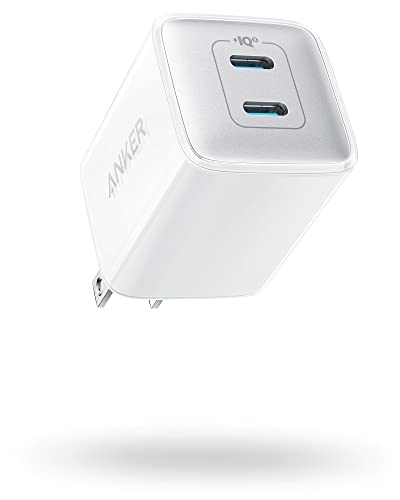
Anker 521 Nano Pro 40W Dual USB-C Charger

TESSAN 65W 9-in-1 USB Charging Station

Anker 112W 6-Port Desktop USB-C Charger

GEEKERA Qi2.2 25W 3-in-1 Apple Charging Station

AOC GW300 Qi2.2 25W Foldable Magnetic Charger

THREEKEY Qi2 25W 3-in-1 Apple Travel Charger

KEEPRO 3-in-1 MagSafe Foldable Charger (Black)

KEEPRO 3-in-1 MagSafe Foldable Charger (White)

KEEPRO 3-in-1 MagSafe Foldable Charger (Blue)
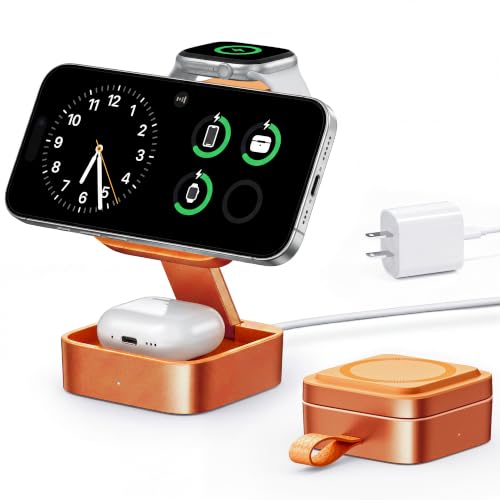
KEEPRO 3-in-1 MagSafe Foldable Charger (Orange)
More On The Choices That Made The List
This is the kind of wall brick that quietly disappears into a kitchen drawer. The Anker 521 Nano Pro pushes 40W total through two USB-C ports using GaN II silicon, which lets it stay cooler than older chargers while still handing out a full 20W to a single iPhone. Owners commonly report the plug housing running warm during a fast top-up, but not uncomfortably so.
For someone who wants one tidy brick to share between an iPhone and an iPad mini on the road, this lands well below the size of a MacBook charger. The fixed (non-folding) prongs are the main ergonomic quirk, so the unit sits a bit proud on wall outlets behind furniture.
What Pays Off
- Dual USB-C ports split 20W each, so two iPhones or an iPhone plus an iPad both charge at full speed.
- GaN II internals keep the housing compact and noticeably lighter than older 40W bricks.
- ActiveShield temperature monitoring scales power back automatically when the brick warms up.
- Compatible with the iPhone 13 onward, Galaxy flagships, and Pixel devices, which covers most households.
Things To Consider
- No cable ships in the box, so a separate USB-C lead is required.
- Prongs do not fold, which makes the brick less pocketable for travel.
- Single-port output tops out at 20W, so an iPad Pro or MacBook Air will trickle-charge rather than fast-charge.
Who It Suits Best
Anyone who wants a small, trustworthy dual-port brick for an iPhone and iPad at home or in a carry-on.
Where Another Pick Suits Better
Users running a MacBook alongside smaller devices will find the Anker 112W 6-Port Desktop Charger a far better fit.
Where most of the picks here aim at one or two devices, the TESSAN 9-in-1 leans the other direction. Its vertical tower shape holds nine USB ports in roughly the footprint of a TV remote, which makes it a natural hub for a shared Airbnb, a kitchen counter, or a home office where everyone drops their phone at the door.
The 65W shared budget gets divided across all ports, so a MacBook Air plus eight phones will not run at full speed simultaneously. For most families, it is plenty.
What Works In Its Favor
- Nine ports let a household charge iPhones, Apple Watches, AirPods, Kindles, and tablets from one tower.
- Vertical layout saves desk space compared with laying multiple bricks end to end.
- Compatible with iPhone 15 and later, MacBooks, and tablets, which covers most modern devices.
Worth Noting
- Shared 65W means power throttles noticeably when many ports are active at once.
- No dedicated magnetic alignment, so iPhones rely on flat cable placement rather than snap-on Qi.
- Plastic housing runs warm during long multi-device sessions in warm rooms.
Quick Facts
Made For
Large households, vacation rentals, and shared workspaces that want one tidy hub instead of a power-strip tangle.
Skip It When
Travelers will prefer the AOC GW300 foldable magnetic charger, which collapses into a backpack pocket.
This is the desktop hub for someone who treats their charging station like a power strip. The 112W total budget feeds six ports, with one USB-C port rated to push a MacBook Air meaningfully faster than the rest of the field. Compared with the TESSAN tower, this Anker sacrifices port count for raw wattage per slot.
It is a great match for a developer desk with a laptop, a phone, a tablet, a set of wireless earbuds, and a smartwatch dock all in arm’s reach.
What It Does Well
- Single-port 30W delivery noticeably shortens MacBook Air and iPhone top-up times.
- Six ports share 112W, which is more headroom than most desk hubs offer.
- Active safety monitoring watches temperature and power draw continuously.
Trade Offs
- Larger footprint than the Anker 521 Nano Pro, so it really wants a permanent desk home.
- No built-in Apple Watch puck, so the watch still needs its own cable or pad.
- Maximum power drops fast once three or more high-draw ports are in use.
Right Fit For
Power users running a MacBook alongside multiple Apple devices at the same workstation.
Look Elsewhere When
Someone wanting a single cable-free nightstand station should consider the GEEKERA Qi2.2 3-in-1 instead.
Qi2.2 is the second-generation standard that fixes the biggest gripe with older Qi pads: alignment. The GEEKERA station uses magnetic rings to lock the iPhone into the coil, which is why it can push a true 25W instead of the 7.5W ceiling that bogged down older wireless gear.
In a typical nightstand setup, the phone lands at the correct sweet spot every time without a fiddly alignment routine. Compared with the AOC foldable later in this list, the GEEKERA trades portability for a more substantial desktop presence.
Useful Strengths
- 25W Qi2.2 wireless output roughly triples the speed of 7.5W legacy pads.
- Magnetic alignment keeps the iPhone locked in place, which improves efficiency.
- Built-in Apple Watch puck plus a third spot for AirPods makes it a true all-in-one.
Honest Caveats
- Stationary design, so it is not the right tool for travel days.
- Phones without MagSafe-compatible rings will not charge on the main pad.
- The dedicated AirPods slot expects a wireless charging case, not a wired one.
Feature Snapshot
Whose Shelf It Belongs On
Anyone building a clean, cable-free nightstand for an iPhone, Apple Watch, and AirPods.
Reach For A Different Pick When
Travelers who want the same trio in a backpack should pick the THREEKEY Qi2 25W travel station.
The GW300 takes the GEEKERA’s Qi2.2 coil and shrinks it into a foldable puck that flattens for a backpack. The interesting twist is the vacuum suction magnets, which AOC claims grip more firmly to glossy phone backs than the standard MagSafe ring.
That grip matters more than it sounds. On a hotel desk or a tray table, a bump no longer means a phone sliding off the pad and breaking the charging session.
Features That Help
- Foldable hinge collapses the three pads into a wallet-sized slab.
- 25W Qi2.2 output keeps full-speed wireless charging on the road.
- Suction magnets reduce slippage on smooth cases and bare glass backs.
Points To Note
- Suction grip depends on a flat, smooth surface; textured cases reduce contact.
- Requires a 20W or higher USB-C PD input brick, which is not always included.
Best Suited To
Frequent flyers and renters who want the same 25W Qi2.2 speed they get at home without packing three cables.
Consider Something Else When
Someone wanting a stronger aesthetic match for a minimalist white desk should pick the white KEEPRO foldable.
THREEKEY targets the same traveler use case as the AOC but skips the suction gimmick in favor of a straightforward foldable stand. The result feels sturdier in hand, with a satisfying hinge that locks flat for packing.
For someone whose hotel routine is iPhone plus Apple Watch plus AirPods on the nightstand, this hits the essentials without overengineering. The brand backs the unit with a 3-year warranty, which is a quieter upside worth noting.
Why It Works Well
- 25W Qi2 wireless output matches the larger desktop stations.
- Sturdy hinge holds the stand open at a useful viewing angle for FaceTime.
- 3-year warranty coverage outlasts most travel electronics.
Minor Gripes
- No AC adapter included, so a 20W USB-C PD brick must be sourced separately.
- Magnetic hold is gentler than the AOC suction design, so a sharp bump can knock alignment loose.
Feature Card
Perfect Match For
Hotel-desk regulars who pack light but still want full-speed Qi2 charging on the road.
Not Your Match When
Owners who prefer a fixed, sculptural desktop station should pick the GEEKERA 3-in-1 instead.
The black KEEPRO is the most familiar shape in this roundup: a wallet-style 3-in-1 that snaps the iPhone, Apple Watch, and AirPods into place and folds flat for travel. It pushes 15W MagSafe-compatible wireless rather than the new 25W Qi2 ceiling, which keeps the price approachable.
For a bedside routine that mostly needs a tidy end-of-day top-up, 15W is plenty. The included 20W USB-C PD brick is a small but meaningful perk that several competitors leave out.
Bright Spots
- 15W MagSafe-compatible wireless charging handles most overnight top-ups without heat complaints.
- Included 20W USB-C PD adapter saves a separate purchase.
- Wide Apple Watch compatibility covers SE, Ultra, and Series 2 through current models.
Soft Spots
- 15W wireless is slower than the Qi2 25W stations from AOC and THREEKEY.
- AirPods 4 charging is limited to the Active Noise Cancellation version.
Spec Overview
Who Should Grab It
Anyone who wants a budget-friendly 3-in-1 with everything in the box and a forgiving 15W profile.
A Better Fit Elsewhere
Power users chasing the newest 25W Qi2 wireless speeds should pick the AOC GW300 instead.
This is the same KEEPRO foldable as the black version, simply dressed in a neutral white that disappears into a light-themed desk. For a Scandinavian-style workspace or a white nightstand, the finish reads calmer than the black sibling.
Functionally, expect the same 15W wireless output and the same included 20W USB-C PD brick. Color is the only meaningful differentiator here.
Useful Touches
- White finish blends with light wood and minimalist desk setups.
- 15W MagSafe-compatible wireless covers overnight iPhone top-ups.
- Includes the 20W USB-C PD adapter in the box.
Small Caveats
- White housing shows scuffs and dye transfer from denim pockets more easily than black.
- Same 15W wireless ceiling as the black version, so power users may want Qi2 instead.
Built With In Mind
Anyone styling a clean white or natural-wood workspace where a black charger would feel out of place.
Another Choice May Suit
Owners wanting more personality should consider the orange KEEPRO further down this list.
The blue KEEPRO trades the white’s neutrality for a saturated cobalt finish that reads as a deliberate desk accent. It is the same MagSafe-compatible foldable hardware underneath, so all the Apple device support and 15W wireless ceilings carry over.
For someone whose phone case is blue, this finish tends to feel like a small styling win on a desk without much visual noise.
Practical Pluses
- Saturated blue finish doubles as a small desk accessory.
- 15W MagSafe-compatible wireless for iPhone with magnetic alignment.
- Included 20W USB-C PD adapter means no extra brick to buy.
Room For Improvement
- Bold color may clash with warmer wood or brass-heavy desk themes.
- Slower than Qi2 25W stations from earlier in this list.
Who Will Love This
Anyone who wants a small visual upgrade on their nightstand without sacrificing the KEEPRO feature set.
Swap It Out When
Minimalist shoppers may prefer the white KEEPRO for a quieter, less attention-grabbing look.
The orange KEEPRO closes the list as the warmest finish of the four-color lineup. It carries the same foldable 3-in-1 hardware and the same 15W MagSafe-compatible wireless ceiling as its siblings, so the case for buying it comes down almost entirely to taste.
On a neutral or monochrome desk, this finish lands as a small dose of personality. Owners commonly report that the orange dye does not scuff as visibly as the white housing does, which is a quiet practical perk.
Practical Advantages
- Warm orange finish reads as a deliberate design accent on a neutral desk.
- Same 15W MagSafe-compatible wireless as the rest of the KEEPRO family.
- 20W USB-C PD adapter included in the box.
Where It May Fall Short
- The bold finish may not blend into conservative office settings.
- Wireless ceiling tops out at 15W, behind the newer Qi2 25W options earlier in this list.
Built With In Mind
Shoppers who want a charger that doubles as a small piece of desk decor, not just a hidden utility.
Reach For A Different Pick When
Someone prioritizing outright charging speed should pick the AOC GW300 Qi2.2 foldable instead.
How To Pick The Right Apple Charging Setup
Wattage is the first spec worth pinning down. A 20W brick will fast-charge any current iPhone from empty to about 50% in half an hour, but it cannot push a MacBook meaningfully. If a laptop is in the mix, look for a desktop hub with 65W to 112W shared output, like the Anker 6-port unit earlier in this list.
Charging standard matters more than brand marketing. MagSafe-compatible pads at 15W cover most overnight needs, while Qi2-certified stations at 25W roughly halve the time to a full charge for compatible iPhones. Older 7.5W Qi pads are still common on the market and noticeably slower; skip them unless budget is the only constraint.
Form factor should match the routine. Foldable travel stations suit hotel rooms and commuting, while stationary desktop stations work better on a fixed nightstand. Port count matters for shared spaces, where a single tower can replace a tangle of wall bricks. Finally, check whether the adapter ships in the box, since several wireless stations require a separate 20W USB-C PD brick to hit their advertised output.
Key Considerations Across These Picks
Where Shoppers Go Wrong
The most common slip is buying a wireless station that needs a 20W or 30W adapter, then plugging it into an old 5W iPhone brick. The station will still work, just far slower than the spec sheet suggests. Always pair a wireless pad with the wall adapter it was designed for, or budget for a separate GaN brick. Another trap is assuming any Qi pad works with an iPhone at full speed. Qi2 certification is what unlocks the 25W ceiling; older 7.5W Qi pads are genuinely slower.
What Separates Premium From Basic
Higher-tier models in this category tend to spend their extra budget on three things: Qi2 certification for faster wireless speeds, GaN internals for cooler and more compact housings, and multi-port GaN desktops that share 65W to 112W across several devices. The case for paying up is strongest when the charger will sit on a desk powering a laptop alongside a phone and watch, or when travel size and weight genuinely matter. For a single-bedroom nightstand with one phone, the included KEEPRO models handle the job without the upgrade.




