

Finding the right wall charger for an iPad Pro sounds simple until you start comparing wattages, port types, and cable lengths. The wrong pick leaves you waiting around for a full charge, while the right one quietly tops up your tablet between meetings or flights. I put together this roundup to help you match a charger to how you actually use your iPad, whether that’s at a desk, in a hotel room, or on the couch.
The Choices Worth Comparing

Anker Nano Pro 20W USB-C Charger
Apple 20W USB-C Power Adapter
Apple 12W USB Power Adapter

UGREEN Uno 30W USB-C GaN Charger (Black)

Anker Nano 30W Foldable USB-C GaN Charger

Coreykin 2-Pack 20W USB-C Charger With 6FT Cable

Coreykin 2-Pack 20W USB-C Charger Pink, 6FT Cable

Coreykin 2-Pack 20W USB-C Charger Black, 6FT Cable

ANWPF 2-Pack 60W USB-C PD Charger

Ubearkk 40W USB-C Charger With 10FT Cable
More Details On Our Top Picks
Anker’s Nano Pro is the kind of charger that disappears into your bag until you need it, then quietly does its job. The block delivers 20W through a single USB-C port, which is the wattage Apple recommends for fast-charging most iPad Pro generations.
In daily use, that’s the difference between an hour-plus coffee stop and a quick top-up between meetings. PIQ 3.0 (Anker’s power negotiation protocol) handles the handshake so the iPad pulls what it actually needs.
Practical Pluses
- 20W output covers fast-charging needs for most current iPad Pro models.
- Genuinely pocket-sized block that fits next to a laptop in a slim sleeve.
- Dynamic temperature monitoring helps the brick stay cooler during longer sessions.
- Plays well with phones and earbuds, so one charger covers multiple devices.
Things To Consider
- Cable is not included, so the working setup depends on what you already own.
- Single port means no simultaneous charging for iPad and phone.
Who It Suits Best
A student or commuter who carries one charger between class, the office, and home will find this size and wattage hits the sweet spot.
A Better Fit Elsewhere
Power users topping up a 12.9-inch iPad Pro and a laptop at the same time will get more from the ANWPF 2-Pack 60W USB-C PD Charger, which delivers far more wattage per port.
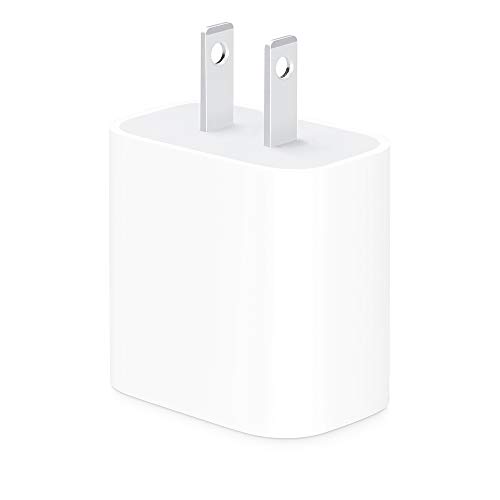
This is the brick Apple ships in its own iPad Pro box on some configurations, which tells you something about how the company expects you to charge. The 20W USB-C output is a clean match for both the 11-inch and 12.9-inch iPad Pro.
Where the Anker Nano Pro leads on compactness, this adapter leans on Apple’s first-party ecosystem trust. There’s no cable in the box, so you’re supplying your own USB-C to USB-C line.
Where It Helps
- Officially tuned for iPad Pro fast-charging, removing guesswork about wattage.
- Works across the iPhone 8 and newer lineup if you switch between devices.
- Clean white finish blends into most desks without standing out.
Trade Offs
- Pricier per brick than third-party 20W options in this list.
- Single port and no folding prongs make it less travel-friendly than the Anker Nano 30W Foldable.
- Cable sold separately, which can double the real cost of getting started.
Right Fit For
Shoppers who want the most predictable, Apple-aligned charging behavior and don’t mind paying a small premium for that peace of mind.
Reach For A Different Pick When
Frequent travelers who fold their charger into a pouch daily will probably prefer the Anker Nano 30W Foldable USB-C GaN Charger, which tucks its prongs away.
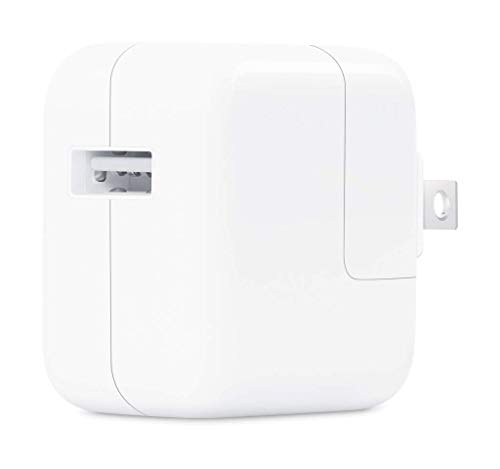
The 12W adapter is the older sibling in Apple’s wall-charger family, the one many people still have tucked in a drawer from a previous iPad or iPhone. The USB Type-A port pairs with a Lightning cable, which matters for older iPad Pros.
Anyone using a current-generation iPad Pro with USB-C should look elsewhere on this list. Where this brick shines is keeping older Lightning iPads and iPhones ticking without buying anything new.
Key Advantages
- Compact form factor fits easily behind furniture and in tight outlet strips.
- Charges Lightning-based iPads and iPhones without extra adapters.
- Apple’s typical build quality and safety profile for everyday use.
Worth Noting
- 12W is slow by modern fast-charging standards, especially for larger iPads.
- USB-A port means it can’t directly connect to a current USB-C iPad Pro without a separate cable adapter.
- Charging cable sold separately, as with most Apple adapters.
Best Suited To
Households with older Lightning iPads or iPhones that need a reliable replacement brick without changing cables.
Consider Something Else When
Owners of any USB-C iPad Pro will get much faster charging and a cleaner setup from the Apple 20W USB-C Power Adapter or the Anker Nano Pro 20W.
UGREEN’s Uno series leans into personality with a small robot face on the front, which sets it apart from the typical white or black slab. Inside, GaN II technology (gallium nitride, a newer semiconductor that runs cooler than older silicon) keeps the brick compact while pushing 30W through a single USB-C port.
For a current iPad Pro, that extra headroom over 20W means a noticeably quicker refill during a lunch break. Compared to the Anker Nano Pro earlier in this list, this one trades pocket anonymity for character and a bit more wattage.
Advantages To Know
- 30W output handles larger iPad Pros at their full fast-charging rate.
- GaN II internals mean less heat buildup during long charging sessions.
- Distinctive robot styling doubles as desk decor or a conversation piece.
- Compact enough to live on a power strip without blocking neighboring outlets.
Room For Improvement
- Single-port design limits simultaneous device charging.
- Cable not included, which is standard but worth budgeting for.
- Unusual look won’t appeal to anyone who wants a plain, understated brick.
Made For
Anyone who wants a charger that feels a little less generic and doesn’t mind a robot face peeking out from behind the monitor.
Where Another Pick Suits Better
Shoppers who need two chargers for different rooms will find the Coreykin 2-Pack 20W USB-C Charger more practical, even if each block is slower than this one.
Anker’s Nano 30W is a step up from the 20W block earlier on this list, with folding prongs and GaN internals that keep the body small. In a laptop sleeve or carry-on, it adds almost nothing in weight or thickness.
For an iPad Pro, the 30W ceiling means faster refills between flights or classes, and the same brick will top up a phone, earbuds, or a Nintendo Switch without fuss. In my experience writing about chargers, foldable prongs are the small detail that ends up mattering most once you’re living with the brick daily.
Points In Its Favor
- 30W output charges larger iPad Pros closer to their max fast-charging rate.
- Foldable prongs protect the contacts in a packed bag and stop scratches on phones.
- GaN design runs cooler and smaller than older silicon chargers at the same wattage.
- Multi-device support covers phones, tablets, and lighter laptops.
Points To Note
- Single USB-C port means no parallel iPad and phone charging from one outlet.
- Pricier than the 20W Anker Nano Pro covered earlier.
Who Should Grab It
Travelers and hybrid commuters who want one brick that handles phones, iPads, and the occasional laptop top-up without filling a bag.
Skip It When
Households needing more than one charger at once will save money with the ANWPF 2-Pack 60W USB-C PD Charger, which ships two bricks for roughly the same total spend.
The Coreykin bundle flips the script by giving you two 20W blocks and two 6-foot USB-C cables in one box. For most homes, that immediately solves the “charger keeps disappearing” problem without buying two separate packs.
The 20W output matches Apple’s recommended fast-charging wattage, so an iPad Pro refills at a sensible rate. Compared to the UGREEN Uno just above, you trade personality and a 30W ceiling for raw quantity.
The Value In It
- Two complete charging setups out of the box, no extra cable shopping.
- 6-foot cable reaches from outlets behind furniture to a nightstand or couch.
- PD (Power Delivery) protocol ensures proper fast-charging handshakes with iPad Pro.
Some Limits To Know
- 20W per port, so it won’t push the fastest possible charge on the 12.9-inch iPad Pro.
- Two single-port bricks take up more outlet space than a single multi-port charger.
Perfect Match For
Couples, roommates, or parents who want one purchase to cover an iPad, a phone, and a spare outlet.
Look Elsewhere When
Anyone with a 12.9-inch iPad Pro who wants the fastest legal charge will get more headroom from the ANWPF 2-Pack 60W USB-C PD Charger further down this list.
This is the pink version of the Coreykin bundle, identical on the inside to the black set covered below. The finish is a soft, neutral pink rather than a neon, which makes it easier to live with on a desk.
The 20W PD output handles iPad Pro fast-charging and the bundled 6-foot USB-C cable is long enough to reach from a wall outlet behind a bed to a nightstand.
Positive Points
- Pink finish stands out in a tangle of generic white cables on a shared nightstand.
- Two 20W chargers cover an iPad and a phone without fighting for outlets.
- 6-foot cable gives flexibility for awkward outlet placements.
Potential Drawbacks
- Color is a personal preference, and pink isn’t for everyone.
- 20W ceiling limits how fast a 12.9-inch iPad Pro can refill from empty.
Whose Shelf It Belongs On
Anyone decorating a bedroom, dorm, or creative workspace where the chargers stay visible and matching matters.
Swap It Out When
Shoppers who want faster iPad Pro charging in the same bundle should look at the ANWPF 2-Pack 60W USB-C PD Charger, which trades color options for higher wattage.
The black twin to the pink set above, with the same 20W PD output and 6-foot cables. For households where chargers disappear into couches or get borrowed by guests, two in a pack covers the obvious gap.
In practical terms, the black finish blends into entertainment centers and office setups without drawing attention. It also matches most laptops, monitors, and power strips already in the room.
Strong Points
- Two-bundle format keeps a backup brick handy when the primary one is missing.
- Black finish disappears on most power strips and behind monitors.
- 6-foot cable solves the common short-cable frustration on couches and beds.
Less Ideal Details
- 20W per port means slower charging than 30W or 60W options for larger iPad Pros.
- Single port per brick means two outlets used when charging iPad and phone at once.
Built With In Mind
Shared households where the family needs two working chargers and doesn’t want to hunt for a spare cable.
Where A Sibling Pick Shines
Anyone prioritizing faster charging above cable length will find the UGREEN Uno 30W USB-C GaN Charger more compelling, even though it ships as a single brick.
This is the wattage leader of the roundup, with a 60W USB-C PD output and a 20V/5A rating per brick. For a 12.9-inch iPad Pro, that translates into noticeably faster top-ups than any 20W option, especially under heavy load.
The two-pack format mirrors the Coreykin bundles, but each brick here punches well above its weight. Owners of USB-C laptops will also find these useful for travel, since the same charger handles an iPad and a MacBook Air without swapping cables.
What Earns Its Place
- 60W output supports fast-charging on larger iPad Pros and many laptops.
- Two chargers in one box covers a desk and a nightstand without separate orders.
- PD 3.0 with PPS (Programmable Power Supply, a Samsung-friendly fast-charging standard) covers a wide range of phones and tablets.
Honest Caveats
- Larger and heavier than the 20W bricks earlier in this list.
- Cable is not included, so owners need to source a 5A-rated USB-C line separately.
- Wattage is overkill for owners of smaller iPads or iPhones who never push the tablet hard.
Who Will Love This
Power users running a 12.9-inch iPad Pro alongside a USB-C laptop, or anyone with mixed devices who wants one charger that covers everything.
Not Your Match When
Shoppers who only own a smaller iPad or who value pocket portability above speed will be happier with the Anker Nano 30W Foldable USB-C GaN Charger.
Ubearkk’s bundle stands out for one obvious reason: the included cable is 10 feet long. For a bedroom where the nearest outlet sits behind a heavy dresser, that length finally kills the need for an extension cord.
The brick delivers up to 40W through PD 3.0, which outpaces every 20W option in this roundup and edges ahead of the 30W picks too. In my experience reading about charger setups, the long cable is the detail most people underestimate until they actually own one.
Standout Benefits
- 10-foot cable reaches across rooms or behind large furniture without strain.
- 40W output supports fast-charging on most iPad Pro configurations.
- PD 3.0 protocol negotiates the right voltage across phones and tablets.
Practical Considerations
- Long cable can tangle if not loosely coiled, especially in a backpack.
- Brick is bulkier than the 20W and 30W options covered earlier.
Best Suited To
Anyone whose main charging spot is a bed, couch, or recliner with a distant wall outlet.
A Better Fit Elsewhere
Travelers who want one tiny brick for everything should pick the Anker Nano 30W Foldable USB-C GaN Charger, which trades cable length for portability.
Picking The Right Wattage And Port Type For Your iPad Pro
iPad Pro models vary in how much power they actually pull, and matching wattage to usage matters more than chasing the highest number. The 11-inch iPad Pro fast-charges comfortably at 20W to 30W, while the 12.9-inch version benefits from 30W to 45W when it is under heavy load. PD (Power Delivery) is the USB-C protocol that negotiates these speeds, so any brick without PD will charge slowly. Look for wattage above 20W for daily use, and 30W or higher if you regularly push the iPad while plugged in, such as during long ProCreate sessions or video exports.
Port count matters for shared outlets. A single-port brick like the Anker Nano Pro or Apple 20W is great for a personal desk, but a two-pack bundle spreads better across a household. Cable length is the most underrated spec: a 6-foot cable reaches behind furniture, and a 10-foot cable solves outlet placement problems entirely.
Form factor decides whether you actually carry the charger. GaN bricks are noticeably smaller than older silicon designs at the same wattage, and folding prongs protect the contacts in a packed bag. Travelers gain the most from compact, foldable designs, while home users often value a longer cable or a second brick more than a smaller body.
Compatibility goes beyond wattage. USB-C PD covers iPad Pro, recent iPhones, and most modern Android phones. PPS support matters mainly for certain Samsung Galaxy models. If your household mixes iPad Pro and a Galaxy phone, a PD 3.0 brick with PPS keeps both devices happy.
Key Considerations Across These Picks
Common Shopping Slip Ups
The biggest mistake is buying a charger without checking the cable rating. A 60W brick paired with a no-name 3A cable will either throttle speed or refuse to fast-charge at all. Another trap is assuming higher wattage is always better, since a 60W brick is wasted on a smaller iPad that only pulls 20W to 30W. Lastly, shoppers sometimes forget to count their outlets, ending up with two single-port bricks when a single multi-port charger would have been simpler.
What The Higher Tier Buys
Higher-wattage bricks cost more because of better thermal design, GaN internals, and stricter safety certifications. The ANWPF 60W pack, for example, handles a 12.9-inch iPad Pro and a USB-C laptop without throttling. The upgrade pays off when you regularly push the iPad Pro hard, charge multiple devices from one outlet, or want fewer bricks cluttering your bag.
Frequently Asked Questions
What wattage does an iPad Pro actually need?
For fast charging, the 11-inch iPad Pro pulls around 20W to 30W, while the 12.9-inch version benefits from 30W to 45W under load. A 20W brick will still charge either model, just more slowly.
Can I use my iPhone charger for an iPad Pro?
Any USB-C PD charger at 20W or higher will charge an iPad Pro safely, including most modern iPhone chargers. Older 5W or 12W bricks will work but charge very slowly.
Do I need a special cable for fast charging?
Yes. A USB-C to USB-C cable rated for the wattage you want is essential. For chargers above 60W, look for a cable rated for 5A current to get full speed.
Is GaN worth paying extra for?
GaN chargers run cooler, smaller, and more efficiently than older silicon designs. For travelers or anyone carrying a charger daily, the size savings are usually worth the modest price bump.
Are two-port chargers better than two single-port bricks?
A two-port charger saves outlet space and is great for a desk, while two single-port bricks spread better across a home. Choose based on where you actually charge most often.
Closing Thoughts
The best charger for your iPad Pro is the one that fits your daily routine, not the one with the highest wattage on paper. A 20W pocket brick covers most users, while a 30W or 60W setup earns its keep for heavier workflows or shared outlets. Cable length, port count, and folding prongs are small details that quietly decide which brick actually lives in your bag. Pick the combination that matches how and where you charge, and the rest takes care of itself.




