

Whether I’m wiring a home lab in a spare closet, organizing AV gear in a living room, or piecing together a quiet corner of a small office, the right enclosure and cabling change the whole experience. A loose tower balanced on a shelf feels temporary; a wall-mounted cabinet with proper cable management feels like infrastructure. I’ve gathered nine picks that span floor-standing racks, open frames, wall-mount cabinets, bulk cabling, and one boxed CPU, so the category feels covered end to end.
A Closer Look At The Lineup

Sysracks 42U Server Rack Cabinet, 39″ Deep

Intel Core i5-12400 Boxed CPU LGA1700

TRUE CABLE Cat6 Riser CMR 1000ft Blue

CableCreation Flat Cat8 Ethernet Cable 3.3ft
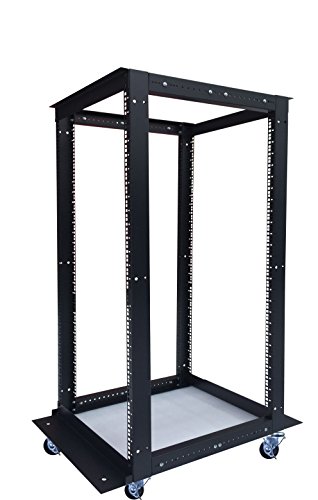
Sysracks 18U 4-Post Open Frame Server Rack

Brozzag CAT6 Plenum Cable 500ft Blue
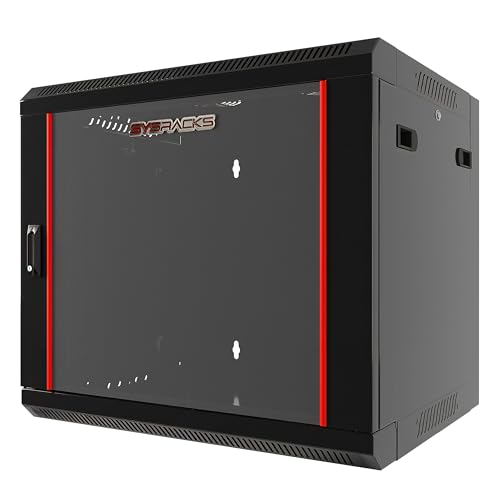
Sysracks 9U Wall Mount Home Lab Server Rack

Sysracks 18U Wall Mount Server Rack Cabinet 24″ Deep
Sysracks 22U Wall Mount Server Rack Cabinet 24″ Deep
Taking A Closer Look At The Options
When a home lab graduates from a single tower to something resembling a real data closet, this 42U floor-standing cabinet is the kind of enclosure that lets the project breathe. The 39-inch depth swallows full-size servers and leaves real room behind the rails for cable bundles, while the glass front door keeps dust away from switch faces.
Four cooling fans and an integrated PDU (power distribution unit, basically a rack-mounted multi-outlet strip) come pre-installed, so the basics of thermal management and power delivery are handled out of the box. Owners commonly report that the cabinet arrives in well-labeled boxes and assembles with the included hardware in a few hours with a helper.
Useful Strengths
- 39-inch depth supports full-length servers and deep chassis without forcing tight internal bends
- Built-in fan array and PDU remove the need to spec and source those parts separately
- Glass door and lockable side panels protect gear from curious pets and household dust
- 42U of vertical room scales with projects, from a couple of switches to a multi-node rack
- Removable panels make side-cable access far easier than on fully welded cabinets
Trade Offs
- Floor footprint is large; measure the room and the doorways before unboxing
- Weight once loaded is significant, so empty placement and leveling matter more than with lighter wall units
Feature Snapshot
Who Will Love This
Home-lab builders and small-office IT folks who want a serious floor-standing enclosure without cobbling together a dozen accessories.
Skip It When
The Sysracks 9U Wall Mount Home Lab Server Rack is the smarter fit for apartment dwellers with only a router, switch, and NAS to house.
For a custom-built home server or quiet workstation, this boxed Intel Core i5-12400 processor hits a comfortable middle ground. It runs six cores on the LGA1700 socket (the physical CPU slot on compatible Intel motherboards), comes with a stock cooler in the box, and sips power compared to enthusiast chips.
Compared with the giant 42U cabinet earlier, this part is what actually goes inside one of those boxes. Media-server users, light virtualization hobbyists, and Plex/Jellyfin builders tend to land here because it balances thread count with thermal efficiency, so a small tower or rack-mounted chassis stays quiet.
What Helps Most
- Six-core, twelve-thread design handles multiple background services without breaking a sweat
- Included stock cooler keeps the bill down and avoids third-party cooler compatibility guesswork
- Low thermal output suits fanless or near-silent server chassis better than hotter K-series chips
- Broad LGA1700 motherboard compatibility at the time of release meant easy part matching
Room For Improvement
- Older generation silicon may fall behind newer chips for heavily threaded workloads
- Stock cooler can run audible under sustained load in tight enclosures
Made For
DIY builders assembling a compact home server, media library, or light virtualization node on a sensible budget.
Consider Something Else When
Shoppers needing deep server-room capacity should focus on the Sysracks 42U Server Rack Cabinet instead of a CPU-only buy.
A thousand-foot spool of solid bare copper Cat6 riser cable is the kind of unglamorous purchase that quietly solves whole-house networking. The CMR rating (Communications Riser, a jacket rating for vertical runs between floors in non-plenum spaces) makes it suitable for runs inside walls and between floors in most residential settings, and the 23 AWG conductor thickness (American Wire Gauge, where lower numbers mean thicker wire) supports Power over Ethernet at meaningful distances.
Where the slim CableCreation patch cable handles desk-level runs, this spool is for the permanent infrastructure feeding a rack like the Sysracks 42U earlier in this list. In-wall installation takes a little planning but pays back every time a switch or AP needs relocating.
Bright Spots
- Solid bare copper conductors hold up better over long runs than copper-clad alternatives
- 550 MHz headroom leaves room for multi-gig upgrades without re-pulling cable
- CMR jacket suits vertical and in-wall residential runs where plenum isn’t required
- Spool packaging reduces kinks during pull and keeps the box tidy in storage
Honest Caveats
- Solid conductors are not for repeated flexing; termination points need strain relief
- A 1000-foot spool is more than most home users need, so it pays off mainly for whole-building projects
Quick Facts
Best Suited To
Homeowners or small-office IT folks pulling structured cabling to multiple rooms and wanting one solid-copper pull to anchor the job.
A Better Fit Elsewhere
Shoppers wiring a single desk should grab the CableCreation Flat Cat8 patch cable and skip the bulk spool.
Patch cables are the unsung heroes of a tidy rack, and this short flat Cat8 lead shines where space is tight. The slim profile slides under carpets, along baseboards, and between a NAS and a switch without bulging, which is why it’s a favorite for home theater setups and minimalist desks.
Unlike the 1000-foot TRUE CABLE spool, this is a finished patch cord aimed at the last few feet between devices. Cat8 supports 40 Gbps (gigabits per second) data rates, which is overkill for most home networks today but future-proofs the run for years to come.
Noteworthy Benefits
- Flat profile routes along walls, under rugs, and behind furniture without drawing attention
- 3.3-foot length suits patch-panel-to-switch runs in compact wall cabinets
- 40 Gbps capability means it won’t bottleneck a 10-gig switch upgrade down the road
- Flexible jacket simplifies tight bends inside shallow enclosures like the 9U wall cabinet later in this list
Points To Keep In Mind
- Short fixed length leaves no slack; double-check the distance between your switch and device
- Cat8 speed far exceeds what most consumer routers can actually push today
Right Fit For
Apartment dwellers and minimalist desk builders who want a clean, near-invisible patch cable for the last few feet of a home network.
Swap It Out When
Long horizontal or vertical runs through walls call for the TRUE CABLE Cat6 Riser spool instead of a finished patch lead.
An open-frame rack is the honest choice when noise, airflow, and easy access matter more than dust protection. This 18U four-post unit adjusts from 24 to 37 inches deep, so it accommodates gear most shallow cabinets can’t, and the casters with brakes make it possible to roll the whole rack out for re-cabling.
It sits in the middle of this list between the giant enclosed 42U Sysracks and the compact wall-mount options further down. For a basement, garage, or dedicated utility room, the open design often cools better than any closed door, depending on dust levels in the space.
Everyday Advantages
- Adjustable depth fits shallow switches or full-depth servers without leaving huge gaps
- Open frame keeps airflow unrestricted and equipment visible for quick diagnosis
- Casters with brakes let one person reposition the rack for cleaning or cable work
- Included cage nuts and hardware cut down the parts list on day one
Things To Consider
- No door means dust and curious fingers can reach the gear, so the location needs to stay clean
- Footprint is still substantial; tight closets may favor the wall-mount options instead
At A Glance
Whose Shelf It Belongs On
Workshop and garage-lab builders who want ventilation-first housing for switches, patch panels, and a couple of compact servers.
Look Elsewhere When
Apartment dwellers worried about dust or curious pets should pick the Sysracks 9U Wall Mount Home Lab Server Rack with its locking door instead.
This 500-foot Cat6 spool goes a step beyond indoor riser cable: it’s rated for plenum spaces (CMP-rated jacket, meaning low-smoke insulation for air-handling ducts and drop ceilings), outdoor exposure, and direct burial. For anyone running cable between buildings, up an exterior wall, or through a return-air ceiling, that versatility matters more than raw length.
Compared with the TRUE CABLE CMR spool earlier, this one trades indoor-only rating for jacket flexibility across harsher environments. The 23 AWG construction still supports PoE (Power over Ethernet, sending electrical power through the same cable as data) at useful distances, depending on the camera or AP load.
Practical Pluses
- Plenum, outdoor, and direct-burial ratings cover the most demanding residential routing
- 550 MHz bandwidth supports 10-gig networking over typical in-home distances
- Tangle-free spool pays off when pulling through conduit or underground runs
- Blue jacket is easy to spot in crowded conduit or ceiling cavities
Worth Noting
- Plenum jackets can be stiffer than riser-only cable, making tight corners harder to negotiate
- 500 feet is shorter than the 1000-foot TRUE CABLE spool, so very large projects may need more than one pull
Who Should Grab It
DIY networkers running camera, access-point, or outbuilding links that face weather or plenum spaces.
Reach For A Different Pick When
The job stays entirely indoors on standard riser runs, where the TRUE CABLE Cat6 Riser spool is a simpler and longer-lasting fit.
For a router, modem, switch, and a small NAS, a giant floor cabinet is overkill. This 9U wall-mount cabinet gets the gear off the floor and behind a locking tempered glass door, with 18 inches of usable depth to handle most consumer networking equipment without cramping cables.
It’s the smallest enclosed Sysracks option in this list, and a great match for an apartment closet or a pantry-converted network nook. Where the open-frame 18U earlier prioritizes airflow and access, this one trades that for dust protection and a lock.
What It Does Well
- Locking tempered glass door adds a real layer of physical security for shared spaces
- 18-inch depth accepts most consumer routers, switches, and small NAS units
- Wall-mount design frees up floor space in tight apartments
- Removable side panels simplify initial equipment loading and later swaps
Things To Weigh
- 9U limits growth; once a second switch or UPS is added, the cabinet fills up fast
- Wall mounting requires studs or masonry anchors; hollow drywall alone isn’t sufficient
Perfect Match For
Renters and apartment dwellers who want a tidy, lockable enclosure for a small home network without giving up closet space.
Another Choice May Suit
Growers planning to add more gear should step up to the Sysracks 18U Wall Mount Server Rack Cabinet before they outgrow this one.
This 18U wall-mount cabinet is the natural next step up from the 9U model and a meaningful size jump without going to a floor-standing rack. The 24-inch overall depth leaves room for proper shelves, a PDU, and a fan kit, all of which come bundled in the box, so the cabinet arrives ready for real equipment.
Home-lab builders who want something between the compact 9U and a full 42U floor enclosure tend to land here. The locking glass door and removable side panels make it feel more like a small data closet than a hobby box, depending on how it’s loaded.
Advantages To Know
- Two included shelves give a stable home for non-rack-mount gear like a small desktop server
- Integrated PDU removes the need to source a separate power strip
- Locking door and removable panels balance security with serviceability
- Wall-mount keeps the floor clear while still offering serious internal room
A Few Limitations
- Wall-mounting at this size demands solid studs or masonry; surface area is non-trivial
- 18U fills quickly once patch panels, switches, and a NAS are stacked together
Feature Rundown
The Right Fit
Home-lab enthusiasts with a mix of rack-mount and shelfable gear who want wall-mount convenience and bundled accessories.
Not Your Match When
Shoppers who already know they need maximum headroom and floor flexibility should jump to the Sysracks 42U Server Rack Cabinet instead.
When an 18U wall cabinet is almost enough but not quite, this 22U version adds four extra rack units in the same 24-inch depth. That extra headroom makes the difference between a cramped, cable-stuffed interior and a clean layout that breathes and stays serviceable.
Compared with the 18U model just above it, the trade-off is weight and wall requirements: at this size, the wall and mounting hardware matter more, and the location of studs or masonry needs to be confirmed before purchase. For committed home labs, it’s the sweet spot before stepping up to a full floor enclosure.
What Pays Off
- 22U gives meaningful headroom over the 18U while staying wall-mountable
- Same bundled fan, PDU, and shelves as the smaller Sysracks cabinet, so accessories stay familiar
- 24-inch depth supports shelves, UPS units, and modest half-width servers
- Locking door and removable panels simplify long-term maintenance and expansion
Points To Note
- Loaded weight at 22U demands solid mounting into framing or masonry, not just drywall anchors
- For projects that need even more room, a floor-standing 42U cabinet becomes the sensible move
Built With In Mind
Home-lab builders whose 9U or 18U cabinet is already filling up and who want a single step up before going floor-standing.
Where A Sibling Pick Shines
Anyone running a single router and switch is better served by the more compact Sysracks 9U Wall Mount Home Lab Server Rack and its lower wall-load demand.
Matching Boxes And Cabling To Real Setups
The right enclosure is the one that fits the room, not the one with the most rack units on the spec sheet. Apartment dwellers and closet labs do well with a wall-mount cabinet in the 9U to 22U range, where dust protection and a lock matter more than raw capacity. Floor-standing cabinets only earn their footprint in dedicated utility rooms or basements with stable temperatures.
Depth deserves attention as much as rack-unit count. A cabinet listed at 24 inches overall typically offers around 20 inches of usable rail depth, which determines whether full-size servers, UPS units, and NAS boxes actually fit. Adjustable-depth frames like the Sysracks 18U open rack help when gear is mixed.
Cable choice follows environment. Indoor riser runs between floors call for CMR-rated cable like the TRUE CABLE spool, while outdoor or plenum runs benefit from a CMP-rated cable such as the Brozzag plenum spool. Patch cables like the CableCreation Cat8 cover the short, visible last few feet inside the cabinet.
Key Considerations Across These Picks
Pitfalls Shoppers Hit
Underestimating depth is the most common mistake. A shallow cabinet that swallows the router but not the UPS forces a re-buy, so measuring gear against usable rail depth before purchase saves frustration. Wall-mount cabinets also need studs or masonry; drywall anchors alone won’t hold a loaded 18U or 22U cabinet, and relying on them risks damage to walls and gear.
Where The Extra Money Goes
Larger cabinets and higher-rated cables cost more because they bundle accessories and use better materials. The 42U Sysracks arrives with fans and a PDU already installed, which is why it costs more than a bare open frame. Plenum-rated cable uses jacket compounds that meet stricter fire codes, so a 500-foot spool costs more per foot than a basic riser spool. The upgrade pays off when the environment actually demands those ratings.
Frequently Asked Questions
How Many Rack Units Do I Really Need?
Count your current devices, then add a few units of growth room. A typical home router, modem, switch, and small NAS uses 4U to 6U once patch panels are included, so a 9U cabinet fills fast.
Wall Mount Or Floor Standing?
Wall-mount cabinets save floor space and suit closets, while floor-standing cabinets handle heavier loads and more gear. Wall mounting also requires solid framing behind the drywall.
Solid Or Stranded Ethernet Cable?
Solid conductors are best for permanent in-wall runs because they carry signals farther, while stranded patch cables flex better at the device end. Mixing the two at the wrong ends causes connection problems.
What Does CMR And CMP Mean?
CMR (Communications Riser) is rated for vertical runs between floors, and CMP (Communications Plenum) is rated for air-handling spaces like drop ceilings. CMP cable costs more because its jacket produces less smoke in a fire.
Is Cat8 Overkill For Home Use?
For most homes, yes. Cat6 handles multi-gig speeds at typical distances, and Cat8’s 40 Gbps capability really shines in short data-center patch runs. It still works fine at home, just without exercising its full potential.
Wrap Up
Picking a box for a server really comes down to room, gear size, and how visible the install needs to be. Match the cabinet to the room, match the cable to the route, and leave room for one or two more devices than the current count. The picks above cover that spectrum from a tidy 9U closet cabinet to a full 42U data-room enclosure, so the right fit is somewhere in the list.




