

Large-screen ebook readers change how I read. Manga panels breathe, PDFs stay readable, and side-by-side notes feel natural. I put together this list for anyone whose back-of-the-handphone screen feels cramped, and who wants something closer to a slim tablet that lasts weeks on a charge.
The Leading Options At A Glance

Kobo Libra Colour 7” Kaleido 3 Waterproof
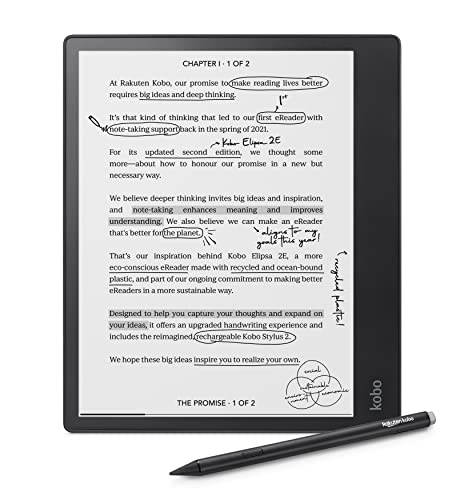
Kobo Elipsa 2E 10.3” EReader with Stylus 2

Kobo Libra Colour eReader 7” Black

Musnap Neo 2 64GB+4GB 6” B/W EReader

Musnap Neo 2C 64GB+4GB 6” Color EReader
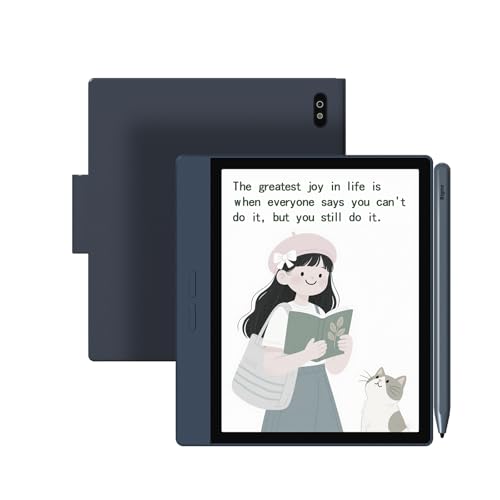
Bigme B7 Color ePaper Tablet 7” 4G
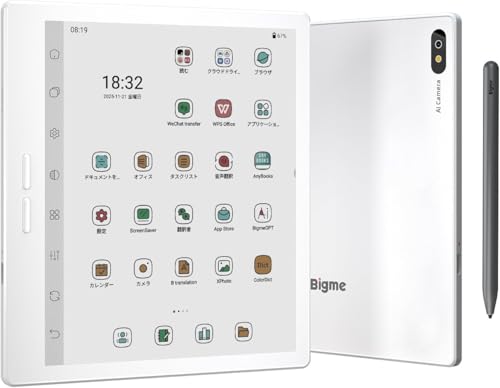
Bigme B7 Pro Color eReader 7” 256GB
More Details On Our Top Picks
The white Kobo Libra Colour is the friendliest doorway into color E Ink (electronic paper that uses charged pigments to render text and images, mimicking printed paper). The 7-inch Kaleido 3 panel (a third-generation color E Ink filter layer that sits over a high-resolution monochrome screen) renders book covers and comics with a soft, paper-like warmth that holds up outdoors. Side buttons make one-handed reading comfortable on a long flight.
For my daily commute, audiobook support via Bluetooth means I can switch from text to narration when my eyes need a break. The waterproof shell survives the occasional coffee splash on my nightstand. Owners commonly report the recessed side grip is comfortable but collects lint in a bag.
Noteworthy Benefits
- Color screen brings covers, comics, and highlights to life without glare in direct sun
- Audiobook playback through Bluetooth headphones frees my hands during chores
- Waterproof build handles bath, kitchen, and beach reading without panic
- Dark mode option eases late-night sessions and cuts blue light exposure
- Physical page-turn buttons feel more reliable than tapping the glass for marathon reads
Things To Consider
- Color layer reduces effective text sharpness compared to the mono Libra 2, so small fonts can look slightly grainy
- The recessed grip area tends to collect pocket lint over weeks of carry
Who It Suits Best
Daily readers who split time between novels and graphic work, and anyone who wants color without giving up outdoor readability.
Consider Something Else When
Note-heavy academics should look at the Kobo Elipsa 2E for its larger canvas and bundled stylus.
The Elipsa 2E is what I reach for when reading slides into working. The 10.3-inch Carta E Ink panel (a paperlike display known for crisp 300 ppi text) gives academic PDFs room to breathe, and the included Kobo Stylus 2 turns the device into a quiet notebook. ComfortLight PRO shifts both brightness and color temperature across the day, which matters during long sessions.
At 32GB of storage, it swallows a graduate-level library with margin. The chassis uses recycled and ocean-bound plastic, which feels like a small but real win. It is heavier than the Libra Colour and less pocketable, so my couch tends to be its home.
Bright Spots
- 10.3-inch surface renders two-column PDFs and manga without endless zooming
- Bundled stylus turns margin scribbles, journal entries, and reading lists into searchable notebooks
- 32GB holds roughly 25,000 average ebooks, enough for serious research
- Adjustable color temperature helps my eyes wind down in the evening
Points To Keep In Mind
- It weighs noticeably more than a 7-inch reader, so one-handed reading tires the wrist
- No color screen, so comics and color-coded notes stay grayscale
- Stylus nibs are consumables that need replacing every few months with heavy use
Built With In Mind
Students, researchers, and writers who annotate constantly and want one device that replaces a tablet of paper.
Skip It When
Casual novel readers will find the Bigme B7 Pro more versatile if color and Android apps matter.
The black edition of the Libra Colour uses the same Kaleido 3 panel and waterproof chassis as the white model on my desk. The dark finish hides scuffs that show on lighter plastic, which is the main practical reason I suggest it for backpack commuters. It pairs with the Kobo Stylus 2 for handwritten sticky notes and margin scribbles.
Functionally, it sits as a peer to the white Libra Colour rather than an upgrade. The decision comes down to aesthetic and how hard you are on your gear.
Positive Points
- Dark finish hides everyday wear on the plastic frame better than light shells
- Same 7-inch color panel and waterproof rating as the white Libra Colour
- Compatible with Kobo Stylus 2 for color highlighting in supported books
- Bluetooth audiobook support matches the rest of the current Libra family
Honest Caveats
- Stylus is sold separately, raising the real cost if markup matters to you
- Color layer still softens small monochrome text compared to non-color Kindles and Kobos
The Right Fit
Readers who want the color Libra experience and prefer a stealthier look for daily commuting.
Swap It Out When
Shoppers wanting a larger canvas for PDFs should step up to the Kobo Elipsa 2E.
The Musnap Neo 2 is what I’d hand a tinkerer. The 6-inch black-and-white E Ink screen reads at 300 ppi (pixels per inch, where higher means sharper text), and the quad-core processor with 4GB of RAM keeps the interface snappy compared to older locked-down readers. Because it runs Android with third-party app support, I can sideload reading apps beyond a single storefront.
The 64GB of internal storage swallows audiobooks, sideloaded novels, and comic archives without a memory card. The trade-off shows up in ecosystem fit: there’s no integrated bookstore experience, and firmware updates depend on a smaller manufacturer.
What Earns Its Place
- Android openness lets me run Kindle, Libby, KOReader, and Pocket readers side by side
- 64GB holds roughly 50,000 ebooks, dwarfing most factory readers
- Quad-core chip with 4GB RAM keeps page turns and app switching responsive
- Glare-free, auto-adjusting front light handles long reading sessions indoors and out
Points To Note
- No integrated bookstore means sourcing content through apps or sideloading
- Brand-ecosystem perks like Kindle’s X-Ray or Kobo’s Pocket integration are absent
- Smaller manufacturer support means firmware quirks can take longer to patch
Made For
Tinkerers and app-juggling readers who want flexibility over a curated ecosystem.
Look Elsewhere When
If you’d rather plug in and read, the Kobo Libra Colour delivers a polished, hands-off experience.
The Neo 2C is the color sibling of the Neo 2, layering a Kaleido 3 color filter over the same 6-inch panel. For my comics and cookbook reading, those few thousand extra shades matter: recipe photos stop looking like muddy watercolors. The same quad-core chip and 64GB storage carry over, and the front light auto-adjusts as I move from kitchen window to dim counter.
It still runs Android with third-party app support, so I keep my library and reading apps in one place. The honest read is that this sits in a niche: anyone who only reads novels can save money on the Neo 2.
Where It Delivers
- Kaleido 3 color makes cookbook photos, maps, and comics genuinely readable
- 64GB storage lets me keep a color-heavy library plus audiobook files on board
- Android app support means I can swap reading apps without juggling devices
- Auto-adjusting front light eases eye strain across changing light conditions
Worth Bearing In Mind
- At 6 inches, color comics feel small compared to the 7-inch Kobo Libra Colour
- Color filter dims the panel, so I rely on the front light more in dim rooms
Best Suited To
App-friendly readers who want color for cookbooks, comics, and travel guides without a bigger device.
Reach For A Different Pick When
Color comic fans craving a larger page should consider the Kobo Libra Colour instead.
The Bigme B7 Color is the only reader in my roundup that doubles as a 4G phone. The 7-inch color E Ink panel runs Android 14, so I can install reading apps and basic productivity tools. The 3000 mAh battery is generous for an ePaper tablet, helping it survive multi-day trips away from a charger.
On a recent train ride through dead-zone country, the 4G calling kept my reading group chat reachable without draining my phone. The blue finish stands out, for better or worse, in a tote bag.
Points In Its Favor
- Built-in 4G lets me browse, call, and download books away from Wi-Fi
- Android 14 opens the door to mainstream reading and productivity apps
- 3000 mAh battery stretches across long travel days with mixed use
- Color ePaper panel handles comics, PDFs, and web articles in shade
Minor Gripes
- E Ink refresh still lags LCD for video or fast-scrolling web pages
- 4G data plan adds a recurring cost that pure Wi-Fi readers avoid
- Blue plastic finish shows fingerprints more than matte black shells
Whose Shelf It Belongs On
Frequent travelers and remote workers who want a single ePaper device for reading and staying online.
A Better Fit Elsewhere
Homebodies who never leave Wi-Fi will get more mileage from the Musnap Neo 2C and its 64GB storage.
The B7 Pro is what I’d call a heavyweight among color readers. The 7-inch Kaleido 3 panel runs at 300 ppi, and the bundled stylus turns the screen into a notebook with OCR text recognition for converting handwritten notes to typed text. The 256GB of storage holds a working library of research papers and audiobooks without a memory card.
Android and 4G keep it connected on the road. The fast refresh mode (a setting that reduces ghosting on E Ink screens for smoother scrolling) helps with web articles and light app use, though it’s still E Ink, not a tablet. It’s the priciest pick here, and it earns that by doing more.
What Helps Most
- Bundled stylus with OCR turns handwriting into searchable typed notes
- 256GB stores roughly 200,000 ebooks, leaving room for audiobooks and PDFs
- Fast refresh mode smooths web browsing and app navigation on E Ink
- 4G connectivity handles downloads and calls away from home Wi-Fi
Room For Improvement
- Cost lands higher than every other reader on this list
- Learning curve is real: stylus gestures, OCR, and refresh modes take patience
- Even fast refresh lags behind a standard tablet for video or gaming
Who Should Grab It
Power users who want one ePaper device that reads, annotates, and connects on the go.
Where A Sibling Pick Shines
Casual readers should save money with the Kobo Libra Colour, which handles the basics with less setup.
What Matters Most Before Choosing Big Ebook Readers
Screen Size and Resolution
Screen size changes how I use a reader every day. A 6-inch panel suits pocket carry and quick reading sessions, while 7 to 10.3 inches make PDFs, manga, and journals genuinely usable. Resolution, measured in ppi (pixels per inch), determines text crispness; 300 ppi is the standard for reading fine print without eye strain.
Color vs Monochrome Panels
Color E Ink, using Kaleido 3, brings book covers, comics, and highlights to life. The trade-off shows up in text sharpness, since the color filter softens monochrome rendering. For pure novels, a 300 ppi black-and-white panel still wins on crispness. For cookbooks, comics, or color-coded notes, color earns its keep.
Storage and App Ecosystem
Built-in storage ranges from around 32GB to 256GB across the picks here. That decides how many ebooks, audiobooks, and PDFs you can keep on board. App ecosystems matter just as much: Kobo offers an integrated bookstore, while Android-based readers like the Musnap Neo and Bigme B7 line open third-party apps at the cost of curated simplicity.
Stylus, Audiobooks, and Connectivity
A bundled stylus turns a reader into a notebook, handy for students and annotators. Bluetooth audiobook support lets my eyes rest on long days. Built-in 4G, as on the Bigme B7 models, lets me download and call without Wi-Fi, though it adds a data plan to consider.
Key Considerations Across These Picks
Pitfalls Shoppers Hit
Chasing the largest screen can backfire. A 10.3-inch reader is harder to hold one-handed and heavier in a bag. Color E Ink looks tempting for novel reading, but the color filter can dim fine text, so monochrome 300 ppi panels still win for long-form prose. Picking a reader without checking its app ecosystem leaves you locked to a single bookstore or stuck sideloading.
Where The Extra Money Goes
Higher-tier models like the Bigme B7 Pro add bundled styluses, OCR, larger storage, and 4G connectivity. Those features help power users who annotate daily or travel without Wi-Fi. Casual readers rarely need them, and the savings on a 7-inch Kobo or Musnap Neo can fund a stack of new books instead. The upgrade pays off when you actually use the extras; otherwise the extra cost just sits in the device.
Frequently Asked Questions
Are bigger ebook readers worth it over standard 6-inch models?
Bigger screens help with PDFs, comics, and annotations, and they reduce zooming and scrolling. For pure novel reading, a 6-inch reader stays lighter and more portable, so the upgrade only pays off when your content benefits from the extra inches.
Do color E Ink screens look as sharp as regular tablets?
Color E Ink uses a filter layer over a monochrome panel, so text and color images look softer than on LCD or OLED screens. For reading in sunlight, they beat tablets on glare and eye comfort, but they still lag for video and fast scrolling.
Can I read library ebooks on these readers?
Library lending depends on the app ecosystem. Kobo readers support OverDrive and Libby natively, while Android-based readers like the Musnap Neo and Bigme B7 line can install Libby directly. Closed-ecosystem readers may need workarounds for some formats.
How long does the battery really last?
Most E Ink readers run for weeks on a single charge with moderate daily use, since the screen only draws power when refreshing. Using the front light at high brightness, Bluetooth audiobooks, or 4G drains faster, cutting battery life to several days for heavy travelers.
Is a stylus necessary on a large-screen reader?
A stylus turns the screen into a notebook for handwritten notes, margin markup, and searchable OCR. It is invaluable for students and researchers, while casual readers can skip it and save money by choosing a non-stylus model.
Wrap Up
A larger ebook reader turns reading into a more relaxed, less squinty habit. The right pick depends on what fills the screen: novels, color comics, or annotated PDFs. Match the device to your content, and the rest of the decision takes care of itself.




