

Good content starts with the right capture setup. I put together this roundup because choosing a camera for Instagram isn’t about chasing megapixels; it’s about finding gear that fits how you actually shoot, edit, and post.
The Essentials At A Glance

Yeaki Vlogging Kit for iPhone/Android with Wireless Microphone and RGB Fill Light

Uytya 5K Video Camera Camcorder with 270° Rotatable Touch Screen and Microphone
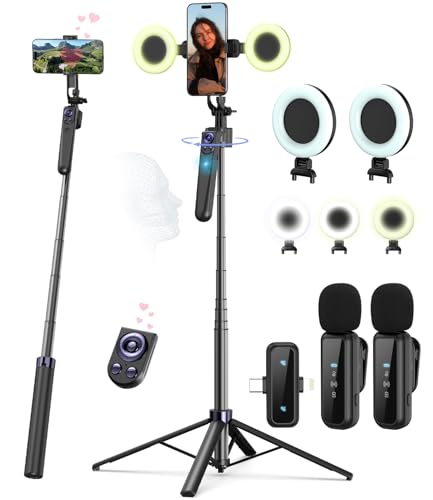
Yeaki Vlogging Kit with 63” Auto Face Tracking Tripod and Wireless Microphones
Frenitt 4K Digital Camera for Photography Travel with 56MP Autofocus

Yeaki Vlogging Kit with 71′ Selfie Stick Tripod and Wireless Microphone

SMARTKLIK 4K Digital Camera with 75MP WiFi and 180° Flip Screen
Taking A Closer Look At The Options
Starting with a kit that solves most beginner headaches at once, Yeaki bundles a wireless microphone, two tripod styles, an RGB fill light, and a phone clamp into one box. That matters because the biggest jump in early-stage content quality usually comes from better lighting and clearer audio, not from upgrading the phone itself.
Compared to the standalone tripods further down the list, this one offers more creative range: the flexible tripod wraps around railings or branches for travel shots, while the sturdier option handles tabletop recording. For anyone whose Instagram starts and ends on a phone, it’s the closest thing to a turnkey studio in a single purchase.
What Makes Sense
- RGB fill light lets you match room ambience or add bold color accents without buying extra gear
- Wireless microphone improves voice clarity in noisy kitchens, cafes, or outdoor settings
- Two tripod styles expand shooting angles for both flat lays and standing talking heads
- Phone clamp keeps the device steady during longer Reels or TikToks without slipping
Points To Note
- Bundles run through batteries faster than standalone gear, so spares tend to matter
- The wireless mic pairs with phones but may need an adapter on older Android models
Feature Snapshot
Made For
Phone-first creators who want a complete starter setup without buying accessories one at a time.
Consider Something Else When
You mainly shoot outdoors in wide spaces, where the Yeaki Vlogging Kit with 71″ Selfie Stick Tripod gives you more reach and height.
Stepping away from phone kits, this Uytya camcorder is built for creators who want a dedicated capture device. With 5K video and a 3″ touch screen that rotates a full 270°, it handles self-recording and traditional shooting without forcing a compromise on either side.
Where the Yeaki kits lean on the phone you already own, this one replaces that pipeline. Creators filming sit-down reviews, cooking demos, or travel vlogs get the benefit of a high-resolution sensor and a screen that flips forward for confident framing. It also doubles as a webcam over WiFi, which keeps the workflow simple for live streams.
Noteworthy Benefits
- 5K capture with a high-sensitivity sensor delivers sharper footage than typical phone output
- 270° rotating touch screen simplifies self-recording and odd-angle framing
- IR night vision extends shooting into dim restaurants or evening walks
- 16X zoom offers flexibility for event coverage and travel scenes
- Included 32GB card and two batteries reduce early add-on purchases
Trade Offs
- Larger than a phone rig, so pocketable travel filming takes planning
- External mic is included but still benefits from closer positioning for best results
Feature Snapshot
Best Suited To
Creators who post high-resolution video and want a dedicated camcorder instead of relying on their phone.
Skip It When
You mostly post casual Reels and want a phone-first workflow, where the SMARTKLIK 4K Digital Camera with 75MP WiFi is more compact and familiar.
This kit solves the solo-creator problem: filming yourself without someone behind the camera. The AI-driven face tracking follows movement while you walk, cook, or unbox, and gesture controls let you start and stop recording without touching the phone.
Where the first Yeaki kit focuses on flexibility and lighting, this one leans into automation. Solo creators running tutorials or fitness demos find it especially useful, since the tripod rotates on its own. It stands about 63 inches tall, putting the phone closer to eye level for natural-looking talking-head content.
Key Advantages
- 360° face tracking removes the need for a second person behind the camera
- Gesture control starts and stops recording hands-free
- Tall 63″ reach keeps eye-level framing comfortable for standing shots
- Dual wireless microphones handle two-person interviews without extra gear
- Built-in fill lights handle dim rooms and golden-hour transitions
Honest Caveats
- Face tracking works best with good lighting, so dim rooms may confuse the sensor
- Taller tripod needs more floor space in tight apartments
- Gesture controls sometimes need a clear line of sight to the camera
Who It Suits Best
Solo creators who move around during filming and want the camera to follow them automatically.
Look Elsewhere When
You want a steadier static setup for seated vlogs, where the Uytya 5K Video Camera Camcorder delivers higher resolution without the tracking feature.
The Frenitt leans into what most casual Instagrammers actually need: a simple point-and-shoot that handles both stills and video without a learning curve. A 3″ 180° flip screen and fast autofocus make self-portraits and travel shots feel intuitive from day one.
Compared to the camcorder option, this one trades raw resolution for portability and ease. The 16X zoom covers most travel situations, and the included lens hood helps cut glare on bright days. For teens, beginners, or anyone stepping away from a phone for the first time, it removes the intimidation factor.
Positive Takeaways
- Autofocus keeps moving subjects sharp with a simple half-press of the shutter
- 180° flip screen helps with self-recording and framing confirmation
- Lens hood reduces lens flare for outdoor daytime shooting
- Compact body fits in small bags for daily carry
Things To Consider
- No built-in WiFi transfer, so files move through a cable or card reader
- Smaller sensor struggles in very low light compared to the camcorder options
Quick Facts
Right Fit For
Beginners and teens who want a dedicated camera for travel photos and short video clips.
Another Choice May Suit
You shoot more video than stills, where the SMARTKLIK 4K Digital Camera with 75MP WiFi adds image stabilization and wireless transfer.
Travel and outfit creators usually want one thing: height. This Yeaki kit stretches to 71 inches, giving you overhead angles and full-body framing without dragging a chair into the shot. It folds back into a compact selfie stick when you’re moving between locations.
What separates this from the first Yeaki kit is the dual fill lights and the taller stick. The lights handle indoor cafe shoots where natural light falls off, and the wireless mic keeps voice clear when filming street scenes. For creators who record on the move, it’s the most portable all-in-one option in the roundup.
The Value In It
- 71″ reach supports full-body outfit checks and overhead flat-lay content
- Selfie stick and tripod combo transitions between handheld and hands-free shooting
- Dual fill lights even out harsh shadows during golden-hour transitions
- Wireless remote supports starting recordings without touching the phone
Small Caveats
- Fully extended, it can wobble on uneven pavement in busy streets
- Bluetooth mic pairing occasionally takes a retry on first connection
Who Will Love This
Outfit, travel, and lifestyle creators who film full-body shots and need a tall, portable tripod.
Reach For A Different Pick When
You prefer automated framing, where the Yeaki Vlogging Kit with 63″ Auto Face Tracking Tripod handles solo shooting without manual adjustments.
The SMARTKLIK closes the list with a hybrid that does both jobs well. 4K video pairs with 75MP stills, and built-in WiFi means you can pull clips off the camera and onto your editing app without a cable. Digital image stabilization smooths out walking shots, which is where compact cameras usually fall apart.
Compared to the Frenitt, this one adds WiFi and a higher photo resolution. For creators who split time between Instagram photo carousels and short-form video, it handles both without forcing a choice. Two batteries also mean you can shoot a full day trip without recharging.
What It Does Well
- WiFi transfer speeds up the workflow from camera to editing app
- Anti-shake stabilization keeps walking shots usable without a gimbal
- 180° flip screen simplifies self-framing and vlog-style content
- 64GB SD card and two batteries support extended shooting days
- Compact travel-friendly body fits in a jacket pocket
Factors To Consider
- Digital stabilization trims the frame slightly, so wide shots feel tighter
- Higher megapixel count produces larger file sizes that fill memory cards faster
Feature Overview
Perfect Match For
Hybrid creators who post both photos and video and want one device for everything.
Where A Sibling Pick Shines
You prefer a phone-based workflow, where the Yeaki Vlogging Kit for iPhone/Android with Wireless Microphone and RGB Fill Light builds on the device you already carry.
What To Weigh Before Buying A Camera For Instagram
Sensor Size And Resolution
Megapixels matter less than sensor size for most creators. A larger sensor captures more light, which translates to cleaner low-light shots in restaurants or at golden hour. Resolution above 20MP rarely changes how an Instagram post looks, since the platform compresses images anyway. Prioritize a sensor that handles mixed lighting over a headline megapixel count.
Flip Screen And Framing
A flip screen makes solo filming dramatically easier. Side-hinged designs tilt better for low-angle food shots, while upward-flipping screens keep self-recording framing simple. Creators who film themselves walking or cooking save real time when they can confirm framing without guessing.
Audio Quality
Built-in phone mics pick up too much room noise. A wireless lavalier or shotgun microphone cleans up dialogue in cafes, kitchens, and outdoor settings. Most beginners notice the audio jump before they notice the video jump, so a kit with a bundled mic pays off fast.
Stabilization And Tripod Support
Optical stabilization smooths handheld footage, while digital stabilization crops the frame slightly. A tripod or gimbal handles longer static shots and walking sequences that would otherwise shake. Creators who film tutorials or unboxings benefit most from a stable base.
Smart Shopping Habits For Camera Gear
Where Shoppers Go Wrong
A common misstep is chasing the highest megapixel count and ignoring sensor size, low-light performance, and bundled accessories. A 75MP camera with poor audio support produces worse content than a 20MP setup with a wireless mic. Match the gear to your actual content style, not to a spec sheet.
When Paying More Pays Off
Spending more usually buys better autofocus, stronger stabilization, and longer-lasting batteries. For creators filming daily or traveling often, these upgrades cut editing time and reduce frustration. Casual creators posting weekly may find a mid-range option covers everything they need without the extra investment.
Frequently Asked Questions
Do I really need a separate camera for Instagram?
A separate camera helps when you want better low-light photos, optical zoom, or a flip screen for self-recording. Phone cameras handle casual posts well, but dedicated gear delivers more control over framing and depth.
What resolution should I look for?
4K video is the practical sweet spot for most Instagram and short-form content. Higher resolutions like 5K offer editing flexibility, but the platform compresses uploads, so the visible difference shrinks. For photos, 20MP to 50MP covers nearly every use case.
Are vlogging kits worth it for beginners?
Bundled kits save money compared to buying a tripod, mic, and light separately. They also reduce setup confusion, which matters when you’re learning. The trade-off is that each piece may be mid-range rather than premium.
Can these cameras double as webcams?
Several options in this roundup, including the Uytya camcorder, support webcam mode over WiFi or USB. That makes them useful for live streams, video calls, and hybrid workflows beyond just content creation.
How important is WiFi transfer?
WiFi transfer saves time when you move files from the camera to your phone for editing. Without it, you rely on a cable or card reader, which slows down the posting cycle for creators who publish often.
Wrap Up
The right camera for Instagram is the one that fits how you actually create. Phone-first creators get the most from a Yeaki kit, while dedicated shooters benefit from a camcorder or stabilized point-and-shoot. Match the gear to your content style, and the rest tends to fall into place.




