

I put this shortlist together for anyone who keeps reaching for their phone for quick math and wants a more comfortable, reliable alternative for the desk, the classroom, or the kitchen table. The picks below cover scientific and basic desktop calculators that pair naturally with Android phones, from a textbook-friendly scientific model to oversized big-button machines made for long stretches of work.
How The Shortlist Stacks Up

Texas Instruments TI-30XS MultiView School Calculator
Casio MH-10M Desktop Calculator

NGIFERA 12 Digit HD Display Calculator
Casio MS-80B Desktop Calculator

CATIGA 12 Digit Desk Calculator (CD-2786)

CATIGA SD-1292 Desktop Calculator (Green)

UNIONE Dual Power Calculator (Blue)

Empire Desk Calculator with Angled Display

Pendency OS-6815 5-Inch LCD Calculator
The Picks, Examined More Closely
The TI-30XS is the one I lean toward for anyone who wants a real scientific calculator rather than a basic four-function tool. Its MultiView screen (a four-line readout that shows the full equation plus the answer) makes it easy to spot a misplaced parenthesis before it ruins an exam. Pretty Print keeps fractions and roots formatted the way they look in a textbook, which keeps homework checking faster than rewriting math on paper.
Dual power from solar cells plus a backup battery means it stays alive in dim dorm rooms and dimmer lecture halls. The Equation Recall feature lets you step back into a previous entry and edit a digit without retyping the whole line, a quiet timesaver when working through long statistics problems.
Points In Its Favor
- Four-line MultiView display shows the full expression and answer at once.
- Pretty Print keeps fractions, exponents, and roots in textbook-style format.
- Statistics and scientific functions cover most high school and intro college work.
- Equation Recall lets you edit past entries without starting over.
- Solar plus battery backup keeps it running in low light.
Worth Noting
- Solar cells need reasonable room light, so a dead battery in a dark room can leave you hunting for the backup.
- Plastic keys tend to feel lighter than the metal-plate scientific models.
Key Specs
Made For
High school and early college students working through algebra, statistics, and trigonometry on a daily basis.
Look Elsewhere When
Quick everyday arithmetic on a kitchen counter calls for the Casio MS-80B instead, since it skips the scientific depth most shoppers in that setting will never touch.
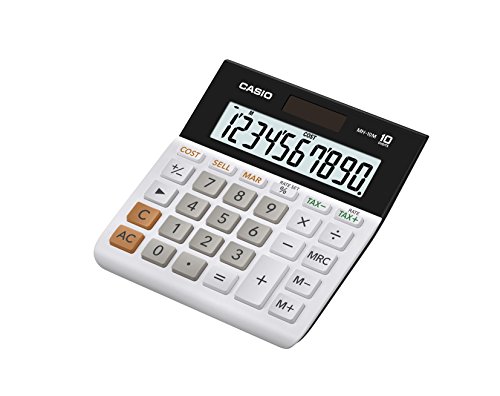
The Casio MH-10M earns its spot by leaning hard into what a small-business owner actually needs at the register. The 10-digit readout is sized large enough to read across a counter, and the dedicated cost, sell, and margin keys mean a quick markup calculation does not require any mental gymnastics. Tax keys are also built in, which is helpful during seasonal price changes.
Compared with the NGIFERA mechanical model later in this list, the MH-10M feels more traditional under the fingers, with a quieter membrane keyboard. Owners commonly report that the dual solar plus battery setup keeps the unit alive even when the front counter sits in shadow for most of the afternoon.
Strengths Worth Knowing
- 10-digit display is oversized enough to read across a checkout counter.
- Cost, sell, and margin keys streamline retail markups without extra steps.
- Built-in tax keys simplify sales-tax adjustments.
- Solar with battery backup keeps it alive in dim front-of-house lighting.
Small Caveats
- Membrane keys feel softer than the mechanical switches on the NGIFERA model.
- Ten digits may fall short for users who routinely run figures past nine figures.
Right Fit For
Small store owners, market vendors, and side-hustlers who want a reliable register-side calculator with markup tools built in.
Skip It When
Anyone who wants typing that feels closer to a keyboard should consider the NGIFERA 12 Digit HD Display model with its mechanical keycaps.
The NGIFERA calculator stands out because it borrows from the mechanical keyboard world. Blue-switch keycaps give each press a defined click and a small bump on the way down, which is unusual in the calculator space. The keycaps are removable, so a shopper can pull one off for cleaning after a coffee mishap instead of fishing around the edges with a cotton swab.
The 12-digit HD display handles long figures without crowding the screen. Compared with the Casio MH-10M reviewed earlier, this model trades quietness for tactile feedback, and shoppers who type a lot may appreciate that swap.
Everyday Perks
- Mechanical blue-switch keys give a clear, tactile press.
- Removable keycaps simplify cleaning after spills.
- 12-digit display fits longer figures without scrolling.
- HD screen stays readable at an arm’s length on the desk.
Points To Keep In Mind
- Mechanical keys are louder than membrane calculators, which matters in quiet offices.
- The unique key feel takes a short adjustment if you are coming from a traditional desktop model.
Feature Snapshot
Perfect Match For
Home-office workers and tactile-typing fans who want a desktop calculator that feels closer to a quality keyboard.
Swap It Out When
Shared spaces where clicky noise would bother nearby coworkers make the Casio MH-10M a quieter alternative.
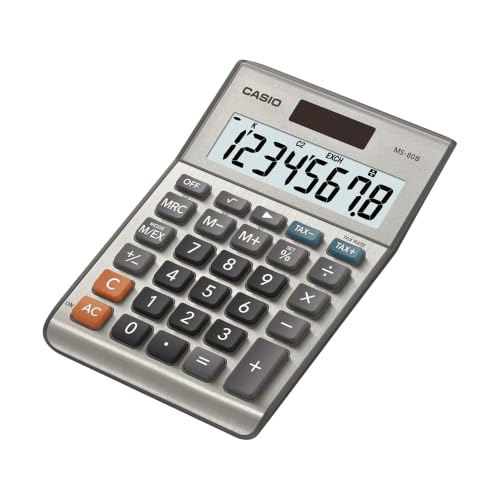
The MS-80B is the kind of calculator that quietly disappears into a kitchen drawer or a home-office shelf and gets used for years. The eight-digit readout keeps the layout simple, while the tax and currency conversion keys handle the everyday math most households actually run. Solar Plus power keeps it awake under a desk lamp, and the battery backup catches the rare dim evening.
Compared with the bigger CATIGA SD-1292 below, the MS-80B feels more compact on a tight shelf, and its key layout is closer to what longtime Casio users already know. Owners commonly mention that the silver-metallic finish wipes clean easily after a dusty day on the desk.
Good Reasons To Consider
- Tax and currency keys handle real household math without extra steps.
- Eight-digit display is clear and uncluttered for everyday figures.
- Solar Plus power keeps the unit running under typical indoor lighting.
- Compact footprint fits smaller desks and crowded drawers.
Honest Caveats
- Eight digits will feel tight if you track figures past the millions.
- Lacks the oversized keys some users prefer for arthritis or large fingers.
Best Suited To
Home budgets, side-hustle invoicing, and small-office desks where simple math and currency conversion do most of the work.
A Better Fit Elsewhere
Long bookkeeping sessions with bigger numbers fit the Pendency OS-6815 better, since its 5-inch screen and giant keys are built for that workload.
The CATIGA CD-2786 is the basic desktop calculator I would hand to someone who just needs the four functions and a screen they can actually see. The LCD is sized larger than average, and the buttons are big enough that the wrong key rarely gets hit during a fast entry. Solar plus battery power means it stays alive in a windowless office as long as a desk lamp is nearby.
Stacked against the NGIFERA above, this CATIGA feels simpler and quieter, without mechanical switches or removable keycaps. That trade-off usually suits a shared office where typing noise matters and a calculator rarely needs cleaning beyond the occasional wipe.
What Earns Its Place
- Big buttons reduce mis-presses during fast data entry.
- Large LCD stays readable from a few feet away.
- Dual solar and battery power keeps it running in low light.
- Four-function layout is straightforward for new users.
Things To Consider
- Lacks tax, currency, or cost-sell-margin shortcuts found on the Casio MH-10M.
- Plastic body feels lighter than metal-shell competitors.
Whose Shelf It Belongs On
Shared office desks and small home workspaces that need a no-fuss, big-button basic calculator.
Consider Something Else When
Retail markups and tax math belong on the Casio MH-10M, which has the dedicated keys this model leaves out.
The SD-1292 is the friendlier-looking sibling to the CD-2786 reviewed just above. The green color and rounded buttons make it feel less like office equipment and more like a study companion, which helps younger students stay willing to pick it up. It is light enough to drop into a backpack, so a quick move between a kitchen table and a homework desk is easy.
The 12-digit display gives plenty of headroom for figures, and the round buttons register presses quickly. Owners commonly note that the plastic shell is light to carry but feels sturdy enough for daily student use.
Strong Points
- Round, responsive buttons reduce mis-presses for younger users.
- Lightweight build moves easily between rooms and backpacks.
- Colorful finish adds a friendlier look than a plain office calculator.
- 12-digit display handles most homework and basic budgeting figures.
Less-Strong Areas
- Colorful plastic may not suit a professional desk environment.
- Same four-function limits as the CD-2786, with no tax or margin keys.
Quick Facts
Who Should Grab It
Students and parents who want a portable, friendly-looking calculator for everyday homework.
Reach For A Different Pick When
Office use where a neutral color and tax keys matter makes the Casio MS-80B a more grown-up choice.
The UNIONE earns its place for shoppers who do not sit at one desk all day. It works as a handheld on the move and as a desktop unit on a counter, with a bright LCD that stays readable in both roles. The blue color helps it stand out in a crowded bag, which matters when a quick grab is needed between meetings.
Compared with the Empire desk calculator below, this one is smaller in the hand and lighter on the shelf. The 12-digit display carries enough room for most business math without forcing a shopkeeper to lean in.
Real-World Strengths
- Handheld size slips into a laptop bag or coat pocket.
- Bright LCD stays readable at a tilted viewing angle.
- Dual power covers both travel and desk use.
- 12-digit display handles typical business figures with room to spare.
Some Limits To Know
- Smaller footprint means smaller keys than full-size desk models.
- Lacks the angled screen that the Empire calculator uses for long sessions.
Built With In Mind
Mobile office workers, traveling estimators, and anyone who splits time between a desk and the road.
Where A Sibling Pick Shines
Long stationary sessions at a single desk favor the Empire Desk Calculator with its tilted, eye-level display.
The Empire desk calculator is built around one idea: a screen that meets your eyes instead of forcing you to look down. The 30-degree tilted display reduces neck strain during long budgeting sessions, and the raised 12-digit readout makes the figure visible from a normal sitting posture. Large keys sit at a comfortable spacing, so fingers land where they should.
Compared with the CATIGA SD-1292 above, this one feels more grown-up and more office-shaped. Solar with battery backup keeps it ready on a windowless corner of the desk, and the included battery helps the unit work straight out of the box.
Useful Strengths
- Tilted display sits at eye level for less neck bending.
- Large keys reduce mis-hits during long input runs.
- 12-digit readout handles everyday business figures comfortably.
- Battery included means it works on day one without a trip to the store.
A Few Limitations
- Larger footprint needs more desk space than the UNIONE handheld model.
- No built-in tax or currency keys like the Casio MS-80B.
Who Will Love This
Anyone running long hours of input work at a single desk, especially small-business owners and remote bookkeepers.
Not Your Match When
Travel-heavy shoppers should pick the UNIONE Dual Power Calculator, which slips into a bag more easily.
The Pendency OS-6815 is the calculator I would put in front of someone who lives in spreadsheets. The 5-inch LCD is large enough to read across a wide desk, and the giant response keys make a full day of entries feel less like a finger workout. The 30-degree viewing angle puts the screen right where a seated user naturally looks, so the neck does not pay for the math.
Stacked against the Empire model reviewed just above, this Pendency unit pushes everything a step larger: bigger screen, bigger buttons, more aggressive accounting layout. The silver-and-color key panel leans into a bookkeeper’s desk rather than a homework corner, and that shows in how the keys are grouped.
Real Benefits
- 5-inch LCD stays readable from the far side of a wide desk.
- Giant keys reduce finger fatigue during long input sessions.
- 30-degree screen angle supports a natural seated posture.
- Accounting-style key grouping matches daily bookkeeping workflows.
- Solar and battery power keeps it running in dim offices.
Trade-Offs To Consider
- Large size demands significant desk space.
- Heavier than compact picks like the UNIONE handheld model.
The Numbers That Matter
Who It Suits Best
Bookkeepers, accountants, and small-business owners who spend hours each day entering and reviewing figures.
Where Another Pick Suits Better
Students who want a friendlier look and lighter backpack weight should consider the CATIGA SD-1292 in green.
Choosing The Right Desktop Calculator For Everyday Work
The biggest decision is whether you need scientific depth or just clean four-function math. Students in algebra through intro college courses get the most out of a scientific calculator like the Texas Instruments TI-30XS, while household budgets and small-business counters usually do better with a basic desktop unit. Pick the wrong category and you either pay for features you never touch or run out of room when the math grows up.
Digit count matters more than most shoppers expect. An eight-digit display covers groceries and utility bills comfortably, but anything that touches payroll, inventory, or accounting starts to push toward 12 digits. If the numbers on your desk ever cross the million mark, save yourself the re-entry and step up early.
Power source is the easiest detail to overlook. Solar-only units dim out in basement offices, while battery-only units die in the middle of a tax run. Dual-power models that pair a solar cell with a small battery backup keep working in both situations, which is why almost every pick on this list uses that approach.
Finally, think about where the calculator will live. A handheld unit like the UNIONE slips into a laptop bag for travel, while an oversized 5-inch display like the Pendency OS-6815 wants a permanent spot on a wide desk. The right footprint matters as much as the right feature list.
Key Considerations Across These Picks
Mistakes Worth Dodging
A common slip is grabbing a solar-only calculator for a windowless home office and watching it fade mid-calculation. Dual-power models sidestep that by holding a backup battery for dim rooms. Another easy miss is choosing too few digits for figures that will eventually grow, then retyping everything when the budget expands. Match the digit count to the largest realistic number you expect, not the smallest.
When Paying More Pays Off
Higher-tier desktop calculators tend to buy three things: larger and clearer displays, more comfortable key layouts, and dedicated keys for tax, currency, or margin math. For shoppers who use the calculator daily, those upgrades add up to less eye strain and fewer keystrokes. For occasional use, the basic four-function models do the job without the extra spend.




