

Hanging a TV isn’t just about saving space. The right mount turns a flat panel into something you actually want to watch from anywhere in the room, swiveling toward the kitchen during dinner prep, tilting down from a high mantle, or pulling out flat from a tight corner. I’ve pulled together ten angle TV mounts that handle those real-life room quirks, covering everything from modest 32-inch bedroom screens to 90-plus-inch living room centerpieces, so you can stop propping your set on a flimsy stand and start using the wall.
An Overview Of The Picks

Perlegear Long Arm Full Motion TV Wall Mount 42–97 Inch
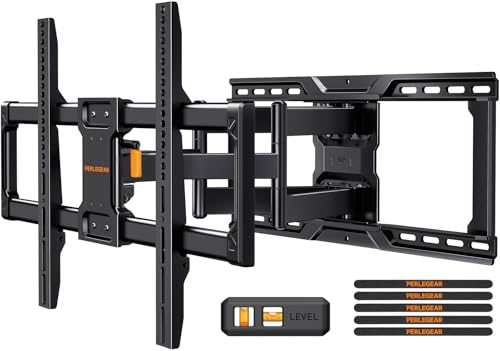
Perlegear Full Motion TV Wall Mount 45–95 inch

Kanto PX600 Dual Stud Full Motion TV Wall Mount
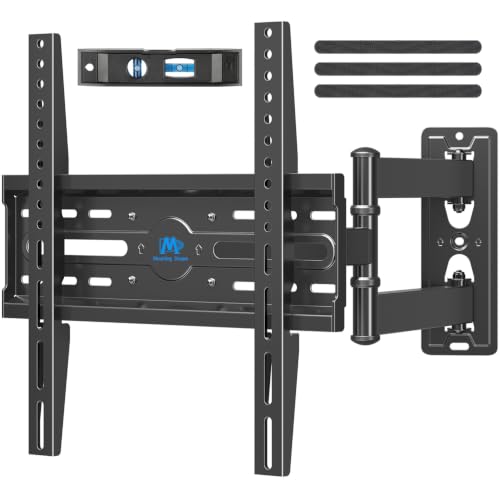
Mounting Dream TV Wall Mount Swivel and Tilt 26-55 Inch

MOUNTUP Long Arm TV Wall Mount 40″ Extension

Mounting Dream Full Motion TV Wall Mount 32-70 Inch

Perlegear Long Arm TV Wall Mount 26–70 inch

Perlegear Long Arm TV Wall Mount 32-65″ 37.4″ Extension

Perlegear UL Listed Full Motion TV Wall Mount 42-90″

Perlegear Ultra Slim TV Wall Mount 1.1″ Low Profile
Taking A Closer Look At The Options
Big TVs need a mount that doesn’t flinch, and the Perlegear Long Arm Full Motion TV Wall Mount 42–97 Inch is built around exactly that problem. The cold-rolled steel frame handles sets up to 150 lbs, while a wide wall plate spreads the load across 8, 12, 16, or 24-inch wood stud spacing, which is a relief when your studs land in awkward places. Compared to the simpler mounts on this list, this one reaches out far enough to swing a 75-inch panel toward a kitchen island or back against the wall when movie night ends.
It arrives mostly pre-assembled, so most of the bracket work is already done before you open the box. The max VESA pattern of 800x400mm covers nearly every modern flat panel on the market, and the long articulating arm makes corner mounting genuinely practical rather than just theoretically possible.
What Helps Most
- Wide 42–97 inch size range handles nearly any modern living room set without swap-outs.
- 150 lb weight capacity leaves headroom for heavier premium OLEDs and flagship QLEDs.
- Multi-stud spacing (8/12/16/24 inch) makes it easier to land a solid anchor in older homes.
- Long articulating arm pulls the screen out far enough for true corner placement.
- Pre-assembled construction cuts install time, especially helpful for first-timers.
Honest Caveats
- Long arm extension means the mount sits several inches off the surface when fully retracted.
- Heavier steel body makes solo ceiling or high-wall installs a two-person job in most cases.
Right Fit For
Anyone mounting a 65-inch or larger flagship TV in a living room where the screen needs to swing between seating zones or pull out from a corner.
Consider Something Else When
The Mounting Dream Full Motion TV Wall Mount 32-70 Inch fits better if your set tops out around 60 inches and you prefer a lighter bracket for solo install.
If you’ve got an 85-inch screen and a wall that doesn’t quite cooperate, the Perlegear Full Motion TV Wall Mount 45–95 inch steps in with one of the broadest compatibility ranges in this roundup. It accepts VESA patterns from 200x100mm up to 600x400mm and mounts to wood, concrete, or brick, so older apartments and newer builds both stay in play. The 150 lb load rating clears most flagship TVs with room to spare, and the dual articulating design pulls the screen out, tilts it down, and swivels it across a room when needed.
Versus the larger PGXLF02 covered above, this one trades the absolute biggest size range for a slightly cleaner profile that sits closer to the wall at rest. It’s a practical everyday workhorse rather than a specialist corner piece.
Everyday Perks
- Accepts wood studs, concrete, and brick, so most wall types are covered out of the box.
- Wide VESA support means the same mount can follow a TV upgrade cycle.
- 150 lb rating comfortably handles premium 85-inch panels.
- Full motion design tilts and swivels enough to chase glare throughout the day.
Trade-Offs
- Drywall-only walls are a no-go, requiring anchors into studs, masonry, or a backing plate.
- At full extension, the articulating arms leave a visible gap that may bother minimalists.
Built With In Mind
Homeowners with a 55 to 85-inch TV on a standard stud wall who want genuine full motion without committing to the largest arm.
Reach For A Different Pick When
Pick the MOUNTUP Long Arm TV Wall Mount instead if you need to swing a screen around a 90-degree corner where 40 inches of extension actually matters.
The Kanto PX600 is the mount you choose when the screen needs to vanish when you’re not watching it. It retracts to just 2 inches from the wall, then pulls out to nearly 22 inches when you want to angle it toward the dining table. The solid steel body with powder-coated finish feels like furniture hardware rather than DIY gear, and the integrated cable management keeps HDMI and power cords tucked along the arm instead of dangling behind the panel.
It’s sized for 37 to 75-inch TVs up to 125 lbs, which fits most mid-size living room and large bedroom setups. The 22-inch dual stud wall plate handles standard 16-inch stud spacing, and the accessible tilt mechanism lets you adjust downward angle without removing the screen.
Notable Upsides
- Retracts to just 2 inches for a flush, gallery-style appearance when not in use.
- 21.8 inches of extension handles deep corner or open-layout seating.
- Built-in cable channel keeps wiring tidy along the articulating arms.
- Powder-coated steel finish resists scratches and scuffs in busy living areas.
Points To Note
- 125 lb capacity means the largest 75-inch premium TVs sit close to the limit.
- Swivel range depends on screen size, so wider panels lose some side-to-side swing.
Feature Snapshot
Whose Shelf It Belongs On
Apartment dwellers or design-conscious households with a 55 to 65-inch TV who want the screen to disappear into the wall when nothing is playing.
Swap It Out When
The Perlegear Ultra Slim TV Wall Mount 1.1″ Low Profile works better if your priority is the absolute tightest gap and a 42-inch or larger screen.
Small TVs shouldn’t mean settling for a wobbly fixed bracket, and the Mounting Dream TV Wall Mount Swivel and Tilt 26-55 Inch is built for the bedroom and kitchen-counter crowd. It supports 26 to 55-inch panels up to 60 lbs, which covers basically every bedroom, dorm, and kitchen set on the market today. The centered design keeps the TV directly over the wall plate, which matters when you’re working with narrow stud spacing or a small entertainment nook.
It doesn’t try to be a giant corner arm. Instead, it delivers smooth swivel and tilt in a compact body, so you can angle a 43-inch bedroom set toward the bed without the bracket dominating the wall.
Notable Gains
- Centered design keeps smaller TVs balanced without heavy offset arms.
- 60 lb rating handles most OLED and LED bedroom sets with room to spare.
- Compact body keeps the wall looking tidy in tight rooms.
- Full motion at this size works well for kitchen or office viewing angles.
Where It Is Less Suited
- Not designed for 60-inch-plus screens, so it won’t follow a TV upgrade to a bigger panel.
- Lower capacity means heavier flagship OLEDs in this size range may push the limit.
Best Suited To
Anyone mounting a 32 to 50-inch TV in a bedroom, kitchen, or small office where the screen needs to swivel toward different zones.
Look Elsewhere When
Pick the Mounting Dream Full Motion TV Wall Mount 32-70 Inch if you want to leave room to upgrade from a 50-inch to a 65-inch panel later.
Corner installations are where most mounts give up, but the MOUNTUP Long Arm TV Wall Mount 40″ Extension is happy to swing out a full 40 inches from the wall. The MU0059 handles 42 to 90-inch TVs up to 150 lbs, with VESA support from 150x100mm to 800x400mm. That reach lets you mount the screen on a side wall and pull it across to face the main seating area, or angle it toward a kitchen open to the living room.
It fits 16, 18, and 24-inch stud spacing, which covers most residential framing. The arm retracts close to the wall when not in use, so the screen doesn’t dominate the room when the movie’s over.
The Practical Payoff
- 40-inch extension arm is among the longest on this list, ideal for true corner setups.
- 150 lb rating handles big flagship TVs without flex.
- Multiple stud spacing options cover unusual framing layouts.
- Retracts back close to the wall when extended viewing isn’t needed.
Practical Considerations
- At full extension, even a small push can sway the screen, so plan viewing positions carefully.
- Long arm adds visual bulk that may clash with minimalist decor.
Quick Facts
Who Should Grab It
Anyone with an open-plan living room or awkward corner where a standard-reach mount just won’t reach the right angle.
Skip It When
The Perlegear Long Arm TV Wall Mount 32-65″ 37.4″ Extension makes more sense for tighter bedroom corners where 40 inches of swing is overkill.
The Mounting Dream Full Motion TV Wall Mount 32-70 Inch is the sort of bracket that just gets the job done without forcing a decision. It fits 32 to 70-inch TVs up to 99 lbs, with a max VESA pattern of 400x400mm. It tilts up 5 degrees and down 15 degrees to handle glare from windows and overhead lights, and the standard 16-inch stud spacing covers most homes. Compared to the wider Mounting Dream in this list, this one stays in the middle lane, sized for the family room TVs that most households actually own.
It’s a sensible pick for someone who isn’t sure what they’ll upgrade to next.
A Favorable Mix
- Mid-size 32 to 70 inch range fits the most common household TV sizes.
- 15-degree downward tilt helps manage glare from windows or opposite walls.
- 99 lb rating covers mainstream TVs without strain.
- Full motion design handles swivel and tilt in a single bracket.
Worth Noting
- 400x400mm VESA cap excludes some 70-inch plus panels with wider hole patterns.
- 16-inch stud spacing default means older homes with wider studs need a different mount.
Perfect Match For
Family households with a 55 to 65-inch TV on standard 16-inch studs who want a flexible, no-fuss full motion mount.
A Better Fit Elsewhere
The Perlegear UL Listed Full Motion TV Wall Mount 42-90″ suits larger TVs and offers multi-stud compatibility if your framing isn’t standard.
Renters and apartment dwellers often hit the same wall, literally, when their stud layout doesn’t match a standard dual-stud mount. The Perlegear Long Arm TV Wall Mount 26–70 inch solves that by anchoring into a single wood stud or solid concrete, which opens up rooms where the framing simply won’t cooperate. It fits 26 to 70-inch TVs up to 100 lbs and supports VESA patterns from 100x100mm to 400x400mm.
The thicker steel body and reinforced wall plate give it the strength to hold steady from a single anchor point, which is genuinely useful in older buildings or concrete condos.
Strong Points
- Single stud or concrete mounting works where dual stud brackets won’t fit.
- 26 to 70 inch range covers everything from a kitchen counter set to a family room flagship.
- Reinforced wall plate handles the leverage forces from a long arm.
- VESA range matches the most common hole patterns from 100×100 to 400x400mm.
Points To Keep In Mind
- Drywall-only mounting is off the table, so a stud or concrete anchor is required.
- At maximum extension, single-stud mounts can show a small amount of flex compared to dual-stud models.
Made For
Renters and condo owners with non-standard stud layouts who still want a full motion mount with genuine corner reach.
Another Choice May Suit
The Mounting Dream Full Motion TV Wall Mount 32-70 Inch is a better fit for standard 16-inch stud walls where you don’t need single-stud flexibility.
The Perlegear Long Arm TV Wall Mount 32-65″ 37.4″ Extension, model PGMF25B, hits the sweet spot between bedroom and living room reach. Its 37.4-inch arm pulls a mid-size TV out from a corner or side wall without the visual bulk of the longest-reach brackets. It’s compatible with 32 to 65-inch TVs across VESA patterns from 100x100mm to 400x400mm, and it mounts to a single wood stud or solid concrete.
For someone with a 50 or 55-inch set who wants more swing than a standard mount offers, this lands in a comfortable middle ground.
The Upside
- 37.4-inch extension handles most bedroom and small living room corner setups.
- Single stud or concrete compatibility simplifies install planning.
- VESA range covers mainstream mid-size TVs from 32 to 65 inches.
- Long arm geometry keeps the screen stable at full extension.
Factors To Consider
- Drywall-only installs are not supported, so solid backing is required.
- Size range caps out at 65 inches, so future upgrades to larger screens would need a new mount.
Who Will Love This
Anyone with a 50 to 55-inch TV in a corner bedroom or small open-concept space who needs genuine swivel reach without going to a 40-inch arm.
Not Your Match When
The MOUNTUP Long Arm TV Wall Mount 40″ Extension is the better pick if you need every inch of reach for a deeper corner or open-plan living room.
When a heavy TV hangs above a couch or a child’s play area, an extra layer of testing matters. The Perlegear UL Listed Full Motion TV Wall Mount 42-90″ carries UL certification, which means an independent lab has evaluated the bracket against established safety standards. It fits 42 to 90-inch TVs up to 132 lbs, with VESA support from 200x100mm to 600x400mm, and mounts to 8, 12, or 16-inch wood studs, concrete, or brick.
The hardware ships with concrete anchors included, and the bracket accepts an extension kit for 24-inch stud spacing. For households that prioritize verified testing over raw specs, the UL listing offers real peace of mind.
What It Does Well
- UL certification offers third-party verified safety testing.
- 132 lb capacity handles premium 85-inch OLED and QLED flagships.
- Multi-stud and masonry compatibility covers most wall types.
- Optional extension kit accommodates 24-inch stud spacing.
Some Limits To Know
- Heavier bracket body makes solo install more challenging.
- 24-inch stud spacing requires a separate extension kit, not included by default.
Best Suited To
Families mounting a large TV above a high-traffic area where independent safety certification is a meaningful buying factor.
Look Elsewhere When
The Perlegear Long Arm Full Motion TV Wall Mount 42–97 Inch covers similar size ranges with a higher 150 lb cap if certification matters less than headroom.
Minimalist walls want a mount that disappears, and the Perlegear Ultra Slim TV Wall Mount 1.1″ Low Profile gets as close as full motion designs allow. At just 1.1 inches from the wall, it sits nearly flush when retracted, then pulls out into a full motion bracket when you want to angle the screen. It supports 42 to 90-inch TVs up to 132 lbs across VESA patterns from 200x200mm to 600x400mm.
The dual articulating arms handle swivel and tilt, while the extendable wall plate fits 16-inch or 24-inch stud spacing along with concrete and brick. For a clean gallery wall where the TV only matters when it’s on, this is a refined pick.
What Pays Off
- 1.1-inch profile is among the tightest retractions in a full motion mount.
- 132 lb capacity covers large flagship TVs comfortably.
- Dual articulating arms deliver full motion despite the slim body.
- Extendable wall plate fits both 16 and 24-inch stud spacing.
Potential Drawbacks
- Drywall-only installs are not supported.
- Maximum extension is shorter than dedicated long-reach brackets like the MOUNTUP covered above.
Right Fit For
Design-focused households with a 55 to 75-inch TV who want the screen to sit nearly flush with the wall but still swivel and tilt when needed.
Consider Something Else When
The MOUNTUP Long Arm TV Wall Mount 40″ Extension fits deeper corners where maximum reach matters more than a tight profile.
What To Weigh Before Choosing Your Mount
VESA pattern is the first number to check, since it’s the standardized hole spacing on the back of your TV measured in millimeters. Pull your TV’s manual or measure the four mounting holes yourself, then match those dimensions to the mount’s supported VESA range before anything else.
Stud spacing is the second reality check, because the strongest mounts only work when they anchor into solid wood or masonry. Standard residential framing puts studs 16 inches apart, but older homes, basements, and condos can vary from 8 to 24 inches. Measure twice before drilling.
Weight capacity should outpace your actual TV by a comfortable margin. A mount rated for 132 lbs holding a 90 lb screen gives you headroom for adjustment forces and the long-term stress of repeated swiveling. Under-speccing a mount is one of the most common regrets after install.
Reach and extension matter most in corner or open-concept rooms. A standard 15 to 22-inch reach handles most flat walls, but if your TV sits on a perpendicular wall to the seating area, you’ll want at least 30 inches of extension to swing the screen into a comfortable angle.
Profile at rest affects how the wall looks when the TV is off. Slim mounts sit 1 to 3 inches from the wall, while long-arm articulating mounts may sit 5 to 8 inches deep even when retracted. Pick based on whether the TV should disappear into the room or stand as a feature.
Key Considerations Across These Picks
Where Shoppers Go Wrong
The most common mistake is buying a mount based on advertised TV size without checking VESA pattern or weight. A 65-inch budget TV and a 65-inch flagship OLED can have completely different hole spacing and weight, which means the same mount won’t work for both. The second biggest miss is ignoring stud layout, since drywall anchors alone won’t safely hold a full motion mount with a heavy TV, regardless of the bracket’s claimed capacity.
When Paying More Pays Off
Spending up on a premium mount typically buys longer reach, a tighter retracted profile, or third-party safety certification. If your room layout demands a 40-inch corner arm or a 1.1-inch gallery profile, the upgrade is genuinely worth it because budget mounts rarely reach those extremes. For a standard flat wall with a 55-inch mid-size TV, a well-built mid-tier bracket is usually all you need.
Frequently Asked Questions
What size TV mount do I need for my TV?
Match the mount’s supported TV size range and VESA pattern to your specific set, not just the diagonal measurement. A 55-inch TV with a 200x200mm VESA pattern needs a different mount than a 55-inch TV with a 400x400mm pattern.
Can I mount a TV on drywall alone?
Full motion mounts are not designed for drywall-only installs because the leverage forces from swiveling can pull anchors loose over time. The TV mount needs to anchor into wood studs, concrete, or brick for safe, long-term support.
How much weight can a full motion TV mount hold?
Weight capacity varies widely, from around 60 lbs for compact mounts up to 150 lbs for heavy-duty articulating models. Pick a mount rated for at least 25 percent more than your TV’s actual weight to leave adjustment headroom.
Do I need a professional to install my TV mount?
Anyone comfortable with a stud finder, level, and drill can usually handle a standard flat-wall install. Corner installs with long articulating arms, concrete drilling, or higher wall placements are reasonable moments to call in a handyman.
What does VESA mean on a TV mount?
VESA is the Video Electronics Standards Association, which defines the standardized hole pattern on the back of TVs and monitors. The VESA measurement, like 400x400mm, tells you the horizontal and vertical distance between the four mounting holes.
Final Verdict
The right angle TV mount comes down to your room, not the spec sheet. Measure your wall, check your studs, and confirm your VESA pattern before falling in love with any bracket. Once those basics line up, the picks in this list cover everything from compact bedroom corners to flagship 90-inch living room panels, so you can stop craning your neck and start watching from wherever the couch happens to be.




