

Wearing a behind the head headset changes how a workday sounds, especially when a hard hat, helmet, or ponytail is part of the routine. I find the wraparound style stays put where over-ear bands tend to slip, and the right pair turns crackly comms into clear conversation. Picking the wrong one, though, leaves you fighting a flimsy cord and muffled radio traffic. I’ve narrowed six solid options that fit racing crews, radio hobbyists, runners, and office pros alike.
How The Shortlist Stacks Up

Rugged Radios H41 Behind-the-Head Racing & Industrial Headset

Rugged Radios H41-CF Headset & CC-Ken 2-Pin Coil Cord
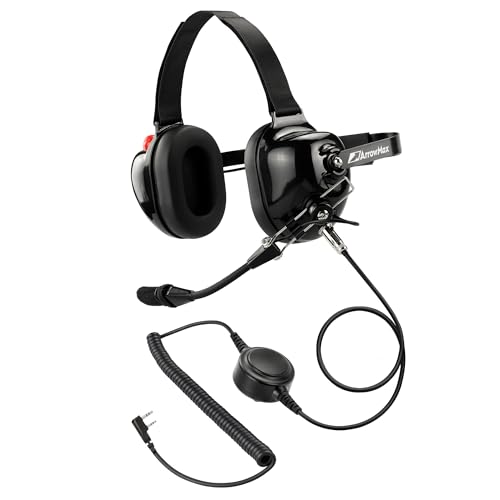
Arrowmax AHDH0032-BK-K2 PNR Noise Isolation Headphone

Hostena Open-Ear Bone Conduction Headphones

Yealink UH48 ANC Wired USB-C/A Headset

Yealink UH34 Lite Wired USB-A Headset
Meet The Standout Selections
The H41 sits in a different weight class than a typical office headset, and that’s exactly the point. Built around a wraparound steel headband with a 24 decibel NRR (Noise Reduction Rating) foam ear cup, it’s tuned for shop floors, off-road cabs, and racing pits where engine drone eats regular earbuds alive. Compared with the office picks further down this list, this one trades plush memory foam for firm, isolating cushions that clamp under a helmet without hot spots.
What makes it genuinely useful day-to-day is the adjustable dynamic noise canceling microphone, which trims engine and wind rumble before it hits the radio. A 3.5mm audio input sits on the cup for piping in music or GPS prompts from a phone or scanner. Most owners find the band pressure sits firmly without feeling painful on long shifts.
Notable Upsides
- 24 dB NRR rating trims shop noise so radio calls stay intelligible
- Adjustable dynamic mic cancels engine and wind rumble on transmit
- 3.5mm auxiliary jack accepts phone, GPS, or scanner audio input
- Wraparound band clears ponytails, hard hats, and most helmet straps
- Steel-core headband holds shape after years of rough handling
Things To Consider
- Bulkier than office headsets, so it’s overkill for desk work
- Firm ear cushions can feel clamp-heavy in summer heat, depending on your tolerance
Feature Snapshot
Who It Suits Best
Off-road drivers, pit crews, and industrial workers who need solid hearing protection and clear radio traffic in loud environments.
Consider Something Else When
You mostly work at a desk taking video calls. The Yealink UH48 ANC is the better fit for hybrid office workers.
This bundle takes the H41 platform from Item 1 and adds the missing piece for handheld radio fans: a coiled CC-Ken cable terminated in the standard Kenwood 2-pin layout. Where the bare H41 ships ready for a fixed-mount radio, this version stretches and recoils with you as you walk a property, climb a tower, or move around a race paddock. The cable memory tends to relax after a few uses, depending on how tightly it’s stored.
You still get the same 24 dB NRR ear cups, dynamic noise canceling mic, and a right-cup volume knob for quick adjustments between transmissions. It’s an attractive middle ground for anyone running a Baofeng or Kenwood handheld who doesn’t want a custom install.
Useful Strengths
- Coiled 2-pin Kenwood cable stretches for movement, recoils when still
- On-cup volume knob lets you adjust between transmissions without fumbling
- Same 24 dB NRR ear protection as the standalone H41 model
- Compatible with most Kenwood and Baofeng handheld radios on the market
Points To Note
- Coil cord adds bulk, so it’s less discreet than a straight cable for EDC carry
- Confirm your handheld’s pin spacing matches Kenwood 2-pin before ordering
Made For
Handheld radio operators who roam a site or event and need a flexible tether to their radio.
Look Elsewhere When
You run a fixed-mount racing radio instead. The standalone H41 from Item 1 pairs more cleanly with hardwired race comms.
Arrowmax goes wide on compatibility with this behind-the-head PNR (passive noise reduction) can. The 2-pin Kenwood-style plug covers a long list of amateur handhelds from BaoFeng, BTECH, and Kenwood’s NX-1000 and NEXEDGE series, which is why hobbyists tend to land here when they want one headset that follows them across radio upgrades. You may find the foam cups feel light next to the rugged H41 above, but for simplex repeater work that’s mostly a non-issue.
It’s a sensible pick for newer hams or preppers who don’t want to gamble on connector fit. The lighter frame also makes it less fatiguing during long listening sessions.
Useful Touches
- Wide Kenwood 2-pin compatibility across BaoFeng, BTECH, and Kenwood lines
- Lighter build than the rugged H41, easier on long listening sessions
- PNR foam cups reduce ambient noise without active battery drain
- Simple plug-and-play setup, no app or pairing required
Honest Caveats
- Some Kenwood NX-3000 models aren’t supported, so verify your specific radio first
- Passive foam isolation is quieter than the H41’s 24 dB NRR seal
- Mic quality is fine for casual QSOs but lighter than dedicated dynamic broadcast mics
Quick Facts
Best Suited To
Amateur radio operators who swap between BaoFeng, BTECH, or Kenwood handhelds and want one headset that tracks with them.
Skip It When
You’re working around loud industrial noise. The Rugged Radios H41 from Item 1 is the better fit, with its stronger 24 dB NRR rating.
Hostena’s entry leaves your ear canals completely open by routing sound through your cheekbones via bone conduction, a technology that bypasses the eardrum entirely. That’s a meaningful safety upgrade for runners, cyclists, and warehouse pickers who need to hear traffic, forklifts, or co-workers while staying on a call. The wraparound band also clears ponytails and helmet straps cleanly.
The mic uses noise canceling algorithms to suppress wind and traffic noise during calls, which is genuinely useful for outdoor jogs. For most commuters, the awareness tradeoff beats traditional in-ears in busy areas.
Positive Points
- Open-ear design keeps ears uncovered for traffic and conversations
- Bone conduction tech avoids ear canal fatigue during long runs
- Noise-canceling algorithms cut wind and traffic on outgoing calls
- Wraparound band fits glasses, hats, and ponytails comfortably
Trade Offs
- No passive or active isolation, so loud cafés still leak in
- Bass response is lighter than traditional dynamic drivers, depending on your music taste
- Bone conduction tickles at high volume for some listeners
Perfect Match For
Outdoor runners, cyclists, and warehouse staff who want situational awareness without giving up hands-free calls.
Not Your Match When
You’re outfitting a call center or shared office. The Yealink UH34 Lite from Item 6 isolates your calls better and ships with Teams-ready plug-and-play.
The UH48 is Yealink’s flagship hybrid office headset, and the spec sheet shows it: four hybrid ANC (active noise cancellation) mics in the ear cups, six AI-tuned mics on the boom, plus oval earcups wrapped in noise-isolating memory foam. It plugs in via USB-C with a USB-A adapter, so it covers modern laptops and legacy docking stations alike. Three selectable ANC modes let you tune the level of isolation for cafés, open offices, or commute trains.
Acoustic Shield 3.0 builds a sound bubble around your voice, which is a polite way of saying the person on the other end hears you and not the blender behind you. Compared with the simpler UH34 Lite below, this one trades simplicity for serious call clarity.
What It Does Well
- Four-mic hybrid ANC ear system actively cancels ambient room noise
- Six-mic AI array with Acoustic Shield 3.0 isolates your voice on outgoing calls
- Three ANC modes adapt to cafés, open offices, and travel environments
- Memory foam earcups with passive seal add a second layer of noise blocking
- USB-C cable ships with a USB-A adapter for older docks
Potential Drawbacks
- Heavier and pricier than the UH34 Lite, depending on your budget
- Wired only, so no Bluetooth option for phone-only trips
Feature Card
Who Should Grab It
Hybrid professionals and remote managers who hop between cafés, home offices, and shared workspaces and need call clarity in all three.
A Better Fit Elsewhere
You mostly take a few short calls a day. The Yealink UH34 Lite from Item 6 covers basics at a friendlier entry cost.
The UH34 Lite is the entry-level Yealink I keep coming back to for straightforward desk work. Plug it into a USB-A port and it auto-pairs with Microsoft Teams, which is the operating reality for most helpdesks and shared offices. A high signal-to-noise ratio speaker sits inside an independent acoustic cavity (a sealed inner chamber that lets the driver breathe without distortion), so calls and music both come through cleaner than you’d expect at this tier.
The noise canceling mic sits on a flexible boom, and inline controls handle volume, mute, and call pickup without alt-tabbing into a softphone. It’s lighter than the UH48 above, which makes a real difference during an eight-hour shift.
Points In Its Favor
- Plug-and-play Teams integration with auto-config on USB-A connection
- Independent cavity speaker delivers cleaner call and music audio
- Inline call, mute, and volume controls keep hands off the keyboard
- Lighter than the UH48, easier on full-day shifts
A Few Limitations
- No ANC, so loud offices still leak through the ear cups
- USB-A only, so newer USB-C laptops may need a dock or adapter
Whose Shelf It Belongs On
Helpdesk agents, reception staff, and call center reps who live in Teams and want a reliable wired headset.
Reach For A Different Pick When
You split time between noisy cafés and quiet home days. The Yealink UH48 from Item 5 adds active noise cancellation that actually helps in chaotic spaces.
Choosing A Behind The Head Headset That Actually Fits Your Day
Picking a behind the head headset comes down to three honest questions. What environment are you actually wearing it in, what device feeds it audio, and how long does it sit on your head each day. Start with the environment, because that determines whether you need hearing protection, open-air awareness, or call-center isolation.
Match The Headset To The Noise Floor
A racing pit, a machine shop, and a quiet office are three completely different acoustic worlds. Industrial users should anchor on the NRR rating, which measures how many decibels of noise a headset blocks. The H41’s 24 dB NRR is a strong floor for engine and tool noise. Office and call center users get more mileage from ANC microphones and a sealed ear cup than from raw passive attenuation. Outdoor runners and warehouse pickers benefit most from open-ear bone conduction, which trades isolation for situational awareness.
Check The Connector And Cable Before You Commit
Two-pin Kenwood, 3.5mm jack, USB-C, USB-A: each format locks you into a different ecosystem. Radio hobbyists running Baofeng or Kenwood handhelds want a 2-pin plug, ideally with a coiled cable for movement. Office workers should check whether their laptop or dock supplies USB-C or older USB-A, since the UH48 includes an adapter and the UH34 Lite does not. For most setups, the wrong connector means returning the headset before it ever makes a call.
Weight And Clamp Pressure Matter Over Time
A headset that feels fine for a 30 minute call becomes uncomfortable by hour four. Behind-the-head designs generally win here because they put pressure on the back of the skull rather than the crown, but foam density and clamp force still vary. Racing and industrial headsets tend to clamp firmer for noise sealing, while office headsets lean lighter for all-day comfort. Try to match the build to your average wear time, not the best-case scenario.
Key Considerations Across These Picks
Common Shopping Slip Ups
The biggest mistake I see is buying a headset on looks alone. Behind the head bands look similar at a glance, but the audio path, the connector, and the intended environment can be completely different. Another common trap is assuming every “noise canceling” label means the same thing. Some headsets cancel incoming noise for the wearer, others cancel outgoing noise for the person on the other end, and the better models do both. Pin down which side of the call you actually need to clean up before comparing.
Where The Extra Money Goes
Stepping up from the UH34 Lite to the UH48 isn’t just better foam. You’re paying for a six-mic AI array, hybrid ANC, and acoustic shielding that noticeably changes how you sound on calls. For racing and industrial users, premium tiers add firmer noise isolation, replaceable dynamic microphones, and steel-reinforced bands that survive drops. The upgrade pays off the moment your headset spends more time on your head than in a drawer. For occasional users, the lower tier still covers the basics without much real-world difference.
Frequently Asked Questions
Are Behind The Head Headsets Better Than Over Ear For Helmets?
They usually are. A wraparound band routes behind the skull, leaving the crown clear for helmet shells, hard hats, and ponytails. Over-ear bands tend to press against the helmet liner, which can create hot spots and shift fit.
Can I Use A Radio Headset For Office Calls?
Generally no. Two-pin Kenwood headsets don’t speak the same digital protocol that Teams, Zoom, or RingCentral use. You can sometimes adapt them with a sound card, but the mic gain and sidetone usually end up off. The Yealink UH34 Lite and UH48 are designed for that softphone workflow from the ground up.
What Is NRR And How Much Do I Need?
NRR stands for Noise Reduction Rating, a U.S. standard measuring how many decibels a hearing protector blocks. Shops and engine rooms benefit from a 24 dB NRR or higher. Lower ratings suffice for offices or outdoor recreation where the noise floor is moderate.
Do Bone Conduction Headphones Work With Glasses?
Most wraparound bone conduction bands fit over standard eyewear temples without pressure points. The Hostena design sits behind the ears, so most glasses don’t interfere. Wraparound sport frames with thick arms may sit a bit tight.
How Long Do Behind The Head Headset Bands Last?
For office headsets, expect three to five years of daily use before the headband padding or cable flex starts to fail. Industrial headsets with steel cores tend to last longer on the band, but the cable and ear pads usually wear first. Replacing pads and cords extends the usable life in most cases.
The Takeaway
A good behind the head headset fades into the background so you can focus on the work in front of you. Match the build to your environment, confirm the connector before you click buy, and don’t overspend on isolation you won’t use. The right pair just disappears, and that’s exactly what you want from something sitting on your head all day.




