

The first time I unboxed a 3D printer, I spent an entire Saturday just trying to get the bed level. That’s the experience that shaped this list. I’ve focused on machines that minimize that early friction, so a first-timer can go from box to finished object without wanting to throw the whole rig out the window. Whether the goal is a hobby upgrade, classroom use, or just curious tinkering, the picks below reflect what actually matters for someone starting from scratch: setup ease, calibration forgiveness, software that doesn’t fight back, and ongoing support when things go sideways.
A Quick View Of The Lineup

Magic Jimmy AI-Powered Kids 3D Printer

Creality Ender 3 V3 SE 3D Printer Bundle

ANYCUBIC Photon Mono 4 Resin Printer
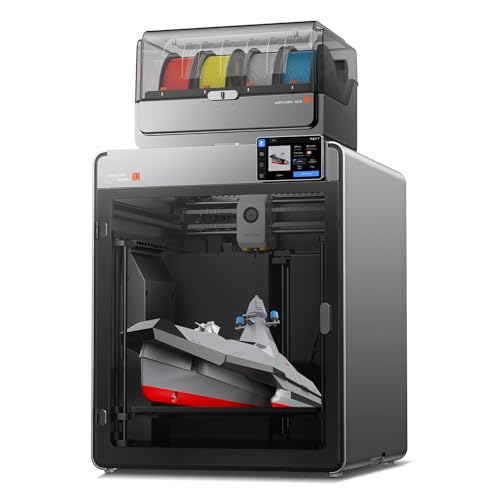
Anycubic Kobra S1 Max Combo 3D Printer

Bambu Lab A1 3D Printer for Beginners

Anycubic Kobra X Multicolor 3D Printer

Anycubic Kobra X 4-Color 3D Printer

Original Prusa CORE One 3D Printer Kit
The Picks, Examined More Closely
From the moment it comes out of the box, the Magic Jimmy unit feels like it was built for a different crowd than most machines on this list. The fully enclosed chamber is the headline feature, sealing away the hot nozzle and any moving belts from curious fingers, which matters a lot when the operator is under twelve.
It also leans hard into AI design tools, letting kids turn sketches or simple text into printable models without touching CAD software (CAD is computer-aided design, the standard 3D modeling approach). For a parent setting up a maker corner in the living room, that combination removes two of the biggest barriers at once: safety anxiety and the design learning curve.
Positive Points
- Fully enclosed chamber keeps children away from hot components during long prints.
- AI design tools let kids convert drawings or photos into printable models without learning CAD.
- Arrives fully assembled, so there’s no build-out frustration on day one.
- Compact footprint fits comfortably on a desk or craft table.
Honest Caveats
- Build volume is smaller than most hobbyist printers, limiting project size.
- Specialized AI tooling can feel limiting for adults or teens wanting traditional modeling.
Made For
Families introducing kids ages six to twelve to 3D printing through STEM projects or weekend crafts.
Skip It When
Adult hobbyists wanting standard PLA workflows should look at the Bambu Lab A1 instead, which offers far more flexibility.
Creality’s Ender line has earned its reputation by being approachable, and the V3 SE refines that formula with auto-leveling and a faster print head. The CR Touch sensor (a contact-based probe that measures bed height across multiple points) handles bed calibration automatically, while a strain gauge takes care of Z-offset, removing the two fiddliest manual steps a beginner usually faces.
The included four-pack of PLA filament (polylactic acid, the most common beginner-friendly 3D printing material) means a first print can happen within minutes of unboxing, which is a real psychological win when someone is still building confidence. For learners who want a hands-on machine without the premium-tier sticker shock, this is a sensible middle path.
The Upside
- Auto-leveling and auto Z-offset remove the most intimidating setup steps.
- Bundle ships with four PLA filament spools to start printing immediately.
- Dual Z-axis lead screws keep tall prints stable and accurate.
- Wide community support makes troubleshooting tutorials easy to find.
Points To Note
- No enclosure, so prints are exposed to drafts and curious pets.
- Open-frame design means nozzle and bed temperatures stay lower for some materials.
- Requires occasional belt tension checks after the first few months of use.
Feature Snapshot
Best Suited To
First-time hobbyists who want a learning machine without committing to premium pricing.
Not Your Match When
Parents printing alongside children should consider the Magic Jimmy for its enclosed safety design instead.
The Photon Mono 4 steps away from filament entirely, using UV-cured resin (a liquid plastic that hardens under ultraviolet light) cured by a 7-inch 10K mono LCD screen. That resolution number matters: each pixel measures roughly 17 micrometers, which translates into prints with crisp surface detail, clean miniature figures, and jewelry masters that capture features filament printers tend to blur.
The catch for beginners is that resin printing is a different workflow. Gloves, isopropyl alcohol, and a curing station become part of the routine. For someone drawn to tabletop gaming, dental modeling, or detailed miniatures, that extra effort pays off in print fidelity that no FDM (fused deposition modeling, the standard plastic-extrusion method) machine on this list can match.
The Value In It
- 10K resolution produces extremely fine surface detail in miniatures.
- Resin captures sharp edges and small text far better than filament machines.
- Compact footprint suits a hobby desk or studio shelf.
Trade Offs
- Resin handling requires gloves, ventilation, and careful disposal.
- Post-processing (washing and UV curing) adds steps compared to FDM printers.
- Build size is limited, so large pieces require splitting and assembly.
- Liquid resin and alcohol supplies are ongoing ownership costs.
Who Will Love This
Detail-oriented hobbyists focused on miniatures, models, or jewelry prototypes rather than functional parts.
A Better Fit Elsewhere
Anyone wanting simple, low-maintenance prints should look at the Bambu Lab A1 for a cleaner filament workflow.
When print size matters, the Kobra S1 Max Combo delivers a cubic work envelope of 350 mm on every side, which is roomy enough for large cosplay helmets, drone frames, or a single-piece enclosure. The enclosed CoreXY structure (a motion system where two motors drive both X and Y axes through a fixed frame, rather than a moving bed) holds the all-metal frame steady at high speed, reducing the vibration that often plagues larger machines.
For a beginner moving beyond small trinkets into real workshop projects, the enclosed chamber also helps with temperature-sensitive filaments like ABS (acrylonitrile butadiene styrene, a tougher but warp-prone plastic). The trade-off is footprint: this thing claims serious desk real estate.
A Favorable Mix
- Large 350 mm cubic build volume handles oversized prints in one piece.
- Enclosed CoreXY frame improves stability for engineering filaments.
- All-metal construction suits long-term workshop use.
Worth Bearing In Mind
- Footprint requires a dedicated table or workbench corner.
- Heavier than compact machines, so moving it between rooms takes effort.
The Right Fit
Makers tackling cosplay, robotics, or full-size prototypes who have space for a larger printer.
Look Elsewhere When
Anyone working on a small desk would do better with the Bambu Lab A1, which trades size for footprint.
The Bambu Lab A1 is the kind of printer I wish had existed during my first calibration marathon. It arrives fully assembled and tuned, with automatic calibration that handles bed leveling, vibration compensation, and flow rate without user input. For someone who wants to print on day one rather than after a weekend of tweaking, that matters more than raw speed specs.
The optional AMS lite add-on unlocks multi-color printing by feeding up to four filaments through a single nozzle, swapping colors mid-print. Compared to the Creality Ender 3 V3 SE, the A1 trades some tinkering depth for a noticeably smoother onboarding path. For most first-time users, that’s the right trade.
Key Advantages
- Auto-calibration removes virtually all manual bed tuning.
- High acceleration shortens print times dramatically compared to older beginner models.
- Optional AMS lite enables true multi-color prints without aftermarket mods.
- Quiet enough for a shared living space during evening use.
- Strong software ecosystem with built-in slicing presets.
Minor Gripes
- Multi-color AMS lite is sold separately and adds to total cost.
- Proprietary ecosystem limits some third-party flexibility.
Technical Highlights
Perfect Match For
First-time home users wanting a polished, low-friction entry into 3D printing without constant tuning.
Reach For A Different Pick When
Makers wanting a much larger build volume should consider the Anycubic Kobra S1 Max Combo instead.
The Kobra X takes the one-click printing idea seriously, handling bed leveling, input shaping (a feature that compensates for frame vibration at high speeds to keep prints clean), and flow calibration with minimal user input. For beginners intimidated by multi-material setups, that automated approach takes the dread out of switching filaments.
The adaptive extrusion force compensator handles a real range of materials, from rigid PLA to softer TPU (thermoplastic polyurethane, a flexible filament), which makes it versatile for both display prints and functional parts. Compared to the Bambu Lab A1, the Kobra X puts more emphasis on material flexibility than on absolute speed.
Positive Takeaways
- One-click setup removes the trial-and-error that frustrates new users.
- Adaptive extrusion handles both PLA and flexible TPU filaments.
- Compatible with expansion units for up to 19 colors with extras.
Where It Is Less Suited
- Full 19-color expansion requires additional accessory purchases.
- Multicolor prints take longer due to filament purging between colors.
Whose Shelf It Belongs On
Hobbyists wanting colorful prints without committing to a steep tuning curve.
Swap It Out When
Users who care more about raw speed and auto-calibration polish should consider the Bambu Lab A1 instead.
This sibling to the Kobra X ships with four colors built in, no expansion modules required. For someone drawn to creative projects, signage, or vivid prototypes, native four-color support eliminates the accessory-shopping step that often derails beginners researching upgrades.
Compared to the Kobra X reviewed above, this version trades expansion flexibility for a ready-to-print color experience. The same material versatility applies, so users can move between PLA and TPU without re-tuning, which matters for craft and small-business applications.
A Strong Showing
- Native four-color setup avoids extra accessory purchases.
- Adaptive extrusion supports both rigid and flexible filaments.
- Beginner-friendly calibration streamlines first prints.
Soft Spots
- Color purging between filament changes adds print time.
- Four-color limit may feel restrictive for ambitious multicolor designs.
Quick Technical Notes
Built With In Mind
Creators and craft hobbyists wanting vibrant multicolor prints without modular expansion.
Consider Something Else When
Shoppers wanting a larger build plate should look at the Anycubic Kobra S1 Max Combo for big single-piece projects.
The Prusa CORE One lands in a different category from the others on this list. It’s a kit, which means the build itself becomes the first lesson in how a 3D printer actually works. That hands-on assembly takes a few hours, but it pays dividends when something eventually needs troubleshooting.
The enclosed CoreXY chamber, automatic calibration, and removable print sheets give it workshop-grade practicality, with a print volume suitable for most functional parts. Compared to the Bambu Lab A1, the CORE One trades immediate gratification for longevity and repairability, which suits hobbyists planning to stick with the hobby for years.
What It Does Well
- Build process teaches core mechanics, helping long-term troubleshooting.
- Enclosed CoreXY chamber supports temperature-sensitive materials.
- Removable print sheets simplify part removal and surface maintenance.
- Filament sample included for immediate first-print testing.
- Automatic calibration reduces setup friction after assembly.
Room For Improvement
- Multi-hour assembly delays the first print compared to prebuilt units.
- Premium pricing puts it out of casual reach.
Who Should Grab It
Dedicated hobbyists wanting a machine that will still work reliably years from now.
Where A Sibling Pick Shines
Shoppers wanting zero assembly should choose the Bambu Lab A1 for an instant ready-to-print experience.
What To Weigh Before Buying A First 3D Printer
Print Type: Filament Or Resin
FDM printers extrude melted plastic through a nozzle, layer by layer, and tend to be the easiest entry point. Resin printers use UV light to harden liquid plastic, which captures finer detail but adds handling steps like washing and curing. For most first-time users, FDM is the lower-friction starting point, though anyone drawn to miniatures may want to weigh the extra workflow for the resolution gain.
Size And Workspace
Build volume matters more than newcomers expect. A printer that handles only small objects quickly becomes limiting, while a giant printer takes over the desk. Measure the space available and match the build plate to the projects actually planned, not the ones that sound appealing.
Calibration And Software
Auto-leveling and calibration routines remove the fiddliest setup steps, which makes a real difference for beginners. Slicer software (the program that converts a 3D model into printer instructions) varies in polish too, so a printer with well-supported presets shortens the learning curve significantly.
Enclosure And Safety
An enclosed chamber keeps drafts off prints, contains fumes from higher-temperature materials, and adds a layer of safety around children or pets. For households where the printer lives in shared space, that enclosure is often worth prioritizing.
Key Considerations Across These Picks
Where Shoppers Go Wrong
Jumping straight into a resin printer for the resolution is one of the more common first mistakes. Resin workflows demand gloves, ventilation, and post-processing, and many beginners abandon the hobby because the cleanup burden outweighs the print quality. Filament printers like the Creality Ender 3 V3 SE or Bambu Lab A1 offer a much gentler introduction.
Another slip-up is underestimating footprint. A printer that technically fits on a desk still needs room for filament spools, tools, and ventilation. Measure the actual space before committing.
When Paying More Pays Off
The jump from budget machines to mid-tier picks like the Bambu Lab A1 brings real quality-of-life gains: faster calibration, better noise profiles, and multi-color support. For most users, that extra cost translates directly into fewer frustrations and more time printing.
Premium kits like the Prusa CORE One justify their cost through longevity and repairability rather than speed. Shoppers planning to print for years, especially in a workshop environment, often recover the difference through years of reliable service.
Frequently Asked Questions
What Is The Easiest 3D Printer For A Complete Beginner?
The Bambu Lab A1 stands out for its automatic calibration and ready-to-use setup, letting most first-timers complete a successful print within an hour of unboxing.
Do I Need An Enclosed 3D Printer?
An enclosure helps with temperature-sensitive materials like ABS and adds safety around kids or pets, but isn’t required for basic PLA printing on machines like the Creality Ender 3 V3 SE.
Is Resin Printing Safe For Beginners?
Resin printing is manageable with proper ventilation, gloves, and post-processing equipment, though it demands more discipline than filament printers and may feel overwhelming for absolute beginners.
How Much Should I Spend On A First 3D Printer?
Budget-friendly FDM machines start at accessible price points, while mid-tier options like the Bambu Lab A1 add significant calibration polish for a moderate step up.
Can I Print Multiple Colors On A Beginner Printer?
Yes, machines like the Anycubic Kobra X offer four-color printing out of the box, and the Bambu Lab A1 supports it via the optional AMS lite add-on.
Closing Thoughts
For most people starting out, the sweet spot sits in the mid-tier FDM range where auto-calibration and helpful software remove the worst frustrations. Families with kids should weigh safety enclosures, while detail-focused hobbyists may accept resin’s workflow for the resolution. The right pick depends less on brand prestige and more on matching the machine to the projects and the patience level already on hand.




