

Walking into the world of 3D printing without guidance is the fastest way to waste a Saturday on a tangled mess of filament. I put together this list because most newcomers want the same thing: a machine that works out of the box, software that doesn’t fight them, and room to grow. These eight picks cover the FDM and resin sides of the hobby, plus the wash and cure gear that makes resin printing far less intimidating.
An Overview Of The Picks

UniFormation W230 Resin Wash Machine & Wash Station

Creality Ender 3 V3 SE 3D Printer Bundle

Semdon 1.75mm Metallic Gradient PLA Filament

Bambu Lab A1 FDM 3D Printer for Beginners
ELEGOO Mercury Plus 2.0 Wash and Cure Station

Uniformation GK3 Pro Resin 3D Printer Bundle
UniFormation Cure3 10.3-inch Resin Curing Station

Original Prusa CORE One 3D Printer Kit
Taking A Closer Look At The Options
Anyone starting in resin printing knows that washing prints by hand in IPA (isopropyl alcohol) gets old fast. The UniFormation W230 takes that chore off the bench by using 40kHz ultrasonic vibrations, meaning high-frequency sound waves moving through the bath, to shake uncured resin out of crevices without scrubbing.
With a generous 7L internal tank, it handles single miniatures and small batches with equal ease. It’s a sensible add-on once you’ve decided resin is your medium, and it pairs naturally with the Cure3 station covered later in this roundup.
What Makes Sense
- 40kHz ultrasonic cleaning reaches into fine details that brushing tends to miss.
- 7L capacity handles multiple prints in one cycle, saving IPA over time.
- Set-and-walk operation means a beginner can clean prints while studying curing settings.
- Sealed lid reduces alcohol fumes in a home workspace.
Points To Keep In Mind
- IPA still needs to be purchased and replaced periodically as it gets saturated with resin.
- Thin, wispy supports can occasionally detach in an ultrasonic bath, so delicate prints may need a gentler soak.
Right Fit For
First-time resin hobbyists who want a tidy, repeatable wash routine without scrubbing prints by hand.
Consider Something Else When
You’re sticking strictly to FDM printing, in which case the Creality Ender 3 V3 SE bundle covered next is a more relevant starting point.
The Ender 3 V3 SE bundle arrives with four PLA spools, the printer, and the calibration hardware already dialed in. PLA (polylactic acid) is the most forgiving filament for newcomers: it prints at lower temperatures, resists warping, and stays dimensionally stable on a cold bed.
Where earlier Ender models asked owners to level the bed with paper and patience, this one uses a CR Touch sensor to measure the surface and a strain gauge to set the nozzle height automatically. Most newcomers can go from unboxing to a finished print on day one.
Benefits That Matter
- Up to 250mm/s print speed with 2500mm/s² acceleration, fast for an entry-level machine.
- Dual Z-axis lead screws reduce the wobble that plagued older Ender designs.
- Steel linear shafts on the Y-axis hold up to long-term wear.
- Four PLA spools mean you can experiment with color from the first day.
Trade-Offs To Consider
- Open-frame design means drafty rooms can warp tall prints, a common beginner complaint.
- Direct extruder (the part that pushes filament into the hot end) handles PLA well but struggles with flexible filaments.
Feature Snapshot
Made For
First-time FDM hobbyists who want a working printer, filament, and auto-calibration in a single package.
Look Elsewhere When
You need a fully enclosed chamber for ABS or engineering filaments, where the Original Prusa CORE One kit is a smarter long-term pick.
Filament matters more than newcomers expect. Semdon’s dual-color silk PLA blends yellow and green within a single spool, so a vase-mode print naturally shifts hue from base to top without manual color swaps.
It runs on the standard 1.75mm format that every FDM printer in this roundup accepts. The glossy silk surface hides minor layer lines, which is forgiving for a printer that’s still being dialed in.
Real-World Strengths
- Dual-color gradient removes the need for a multi-material system to achieve visual variety.
- Silk PLA hides layer lines that beginners often struggle to sand smooth.
- Standard 1.75mm diameter fits most hobby printers including the Ender 3 V3 SE and Bambu Lab A1.
Small Caveats
- Specialty filaments cost more per spool than basic PLA, so it’s better as a finishing touch than a daily driver.
- Metallic silk blends sometimes need a slightly higher nozzle temperature, which means a small amount of tuning on each printer.
Best Suited To
Hobbyists printing gifts, cosplay props, and decorative pieces where color shift matters more than mechanical strength.
Reach For A Different Pick When
You’re printing functional brackets or tools, where plain PLA from the Creality bundle is the more practical choice.
The Bambu Lab A1 is the printer I point people toward when they say they want something “that just works.” Acceleration hits 10,000mm/s², which is roughly four times the Creality bundle’s spec, so a print that takes an hour on other machines finishes in well under that.
It’s positioned for beginners and kids but the engineering underneath is grown-up. The optional AMS lite accessory adds multi-color printing through a small four-slot material hub, a feature that older hobby printers only achieved with aftermarket mods.
What It Does Well
- 10,000mm/s² acceleration means significantly shorter print times on everyday objects.
- Multi-color printing via AMS lite without buying a full enclosed system.
- Out-of-box calibration removes the trial-and-error phase most newcomers dread.
A Few Limitations
- The AMS lite multi-color module is sold separately, so the base printer is single-color until you add it.
- Bambu Lab’s slicer software is more capable than basic Cura but takes longer to learn.
Spec Overview
Who Should Grab It
Households and hobbyists who value speed, multi-color output, and a polished software experience over the lowest possible cost.
Swap It Out When
You’re working within a tighter budget, where the Creality Ender 3 V3 SE bundle offers a complete starter package at a more accessible price.
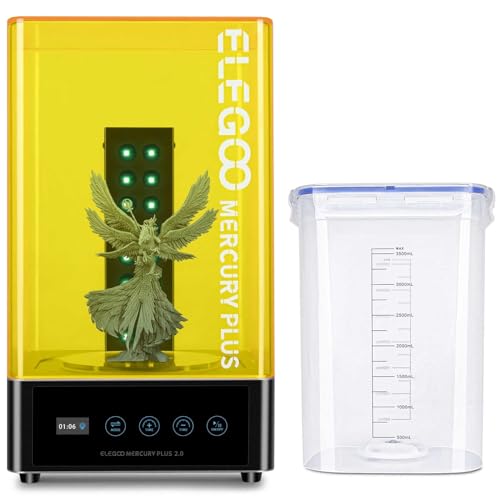
ELEGOO’s Mercury Plus 2.0 is a single combined unit that washes and cures resin prints in one footprint. The sealed wash bucket keeps IPA fumes contained, and a UV-blocking lid stops stray curing rays from leaking out while the unit runs.
A small TFT screen on the front shows the active cycle and remaining time, which is genuinely useful when you’re running back-to-back prints and don’t want to count minutes in your head.
What Pays Off
- Two-in-one design saves bench space compared to running separate wash and cure units.
- Sealed wash bucket contains alcohol vapor, which matters in a home office or bedroom corner.
- UV-blocking lid protects eyes during curing cycles.
Honest Caveats
- Smaller cure chamber than the UniFormation Cure3, so very large prints need to cure in stages.
- The curing side uses a fanless mode for quiet operation, but curing times run slightly longer as a result.
Built With In Mind
Resin newcomers who want wash and cure handled by a single box without buying two separate units.
Another Choice May Suit
You print minis or jewelry in larger batches, in which case the UniFormation Cure3’s bigger chamber handles volume better.
The GK3 Pro bundle ships with the printer, a wash station, and a curing machine in one package, so there’s no piecing together a starter ecosystem from three separate retailers. The 16K screen resolution refers to the pixel density of the LCD panel used to cure each layer; higher pixel counts translate directly to finer detail on miniature prints.
A 385nm COB UV light source (COB stands for “chip-on-board,” meaning many small UV emitters packed tightly together for even light distribution) and a reinforced Z-axis round out a kit aimed at hobbyists who want to skip the upgrade ladder.
Strong Points
- 16K screen resolution captures miniature details that 4K or 8K panels miss.
- 385nm COB light delivers even cure across the full build plate.
- Bundle includes wash and cure hardware, so the ecosystem is complete on day one.
- Reinforced Z-axis improves layer alignment on tall prints.
Where It May Fall Short
- Bundle price sits well above entry-level resin kits, which can be a hurdle for casual newcomers.
- The full ecosystem takes up more bench space than a printer alone, so apartment owners should measure first.
Feature Card
Whose Shelf It Belongs On
Detail-focused hobbyists, prop makers, and anyone who wants a full resin ecosystem without sourcing parts piecemeal.
A Better Fit Elsewhere
You’re curious about resin but want to test the waters cheaply first; the ELEGOO Mercury Plus 2.0 plus an entry-level printer is the more economical route.
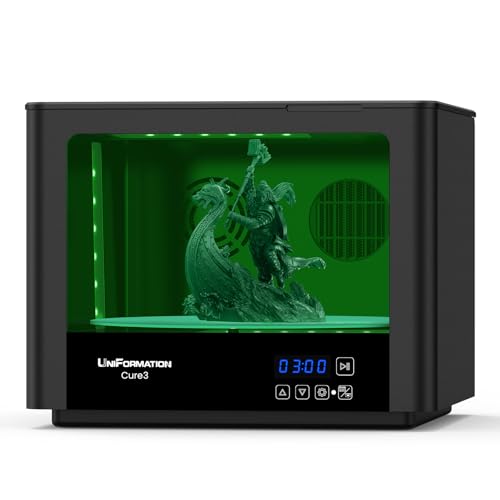
Curing is the step beginners underestimate. IPA left on a print before curing turns into white marks and micro-cracks once the UV hits it. The Cure3 handles that with a heated drying stage before the UV cycle, so prints come out smooth and uniform.
A 360° UV array (UV LEDs arranged to surround the print from all sides) hits every surface of the model simultaneously rather than relying on a rotating turntable. For batch work or larger prints, that matters.
Bright Spots
- Heated drying step prevents the white marks that come from curing over IPA residue.
- 360° UV array cures all sides at once, no manual flipping needed.
- 10.3-inch platform fits most standard resin prints.
Things To Weigh
- Cure3 handles only curing, so it pairs with a separate wash station like the W230 covered earlier.
- Heated drying adds a few minutes to each cycle compared to a passive dry.
Who It Suits Best
Resin hobbyists producing multiple prints in batches who want consistent, hands-off curing.
Where A Sibling Pick Shines
You’d rather have wash and cure in a single compact box; in that case, the ELEGOO Mercury Plus 2.0 is the simpler all-in-one alternative.
The CORE One arrives as a kit, which sounds intimidating but is part of the appeal. Owners spend an afternoon assembling it, learning every belt and board along the way. That familiarity pays off the first time something needs adjusting.
Its CoreXY motion system (a design where two motors cooperate on the X and Y axes through a belt loop, rather than each motor driving its own axis) keeps the print head light and fast, while the enclosed chamber holds temperature steady for engineering filaments like ABS and ASA.
Notable Upsides
- Enclosed chamber enables ABS and ASA prints that open-frame printers struggle with.
- CoreXY design balances speed with print quality across the full build volume.
- Automatic calibration reduces manual setup after the initial assembly.
- Removable print sheets simplify part removal and surface refresh.
Possible Compromises
- Kit assembly takes several hours, which is a hurdle for shoppers who want instant printing.
- Higher upfront cost than entry-level FDM printers, reflecting its enclosed design and component quality.
Quick Facts
Perfect Match For
Hobbyists who enjoy the build process and want a long-term machine that grows with their skills.
Skip It When
You’d rather print within an hour of unboxing; the Bambu Lab A1 is the ready-to-print counterpart in this roundup.
What Matters Most Before Choosing Beginner 3d Printers
FDM vs Resin: Pick A Lane First
FDM (Fused Deposition Modeling) printers push melted thermoplastic through a nozzle and work best for durable, functional parts. Resin printers use UV-cured liquid and excel at fine detail. Most newcomers start with FDM because it’s lower-maintenance and safer in shared spaces, but resin offers finer detail if you’re printing miniatures or jewelry.
Consider The Post-Processing You’ll Actually Do
Resin prints require washing and UV curing, which is why this roundup includes wash and cure stations alongside printers. FDM prints usually just need support removal. Pick the workflow you’ll realistically maintain, since unused gear collects dust.
Software And Community Matter More Than Specs
A printer is only as good as its slicer (the software that turns a 3D model into printer instructions) and the community around it. Bambu Lab and Creality both have large user bases and abundant troubleshooting guides, while smaller brands may offer better hardware but thinner support.
Build Volume Should Match Real Projects
A printer’s build volume (the maximum size object it can produce) is easy to overlook until you try printing a phone stand or a cosplay helmet. Measure your typical project size before committing, and consider that enclosed printers trade a bit of volume for chamber stability.
Key Considerations Across These Picks
Traps First Timers Fall Into
Newcomers often buy the cheapest printer and ignore the post-processing gear their first resin or engineering material requires. That leads to clogged nozzles, warped prints, or IPA-soaked desks within a week. Match the accessories to the printer up front.
Where The Extra Money Goes
Spending more usually buys better motion systems, automatic calibration, and enclosed chambers that hold temperature steady. Those features save hours of frustration per month, so the upgrade pays off once you’re printing weekly rather than occasionally.
Frequently Asked Questions
Do I really need a wash and cure station for resin printing?
Technically no, but washing prints in IPA and curing them in sunlight leads to inconsistent results. A dedicated station removes guesswork and keeps fumes contained.
Can I use any filament with the Ender 3 V3 SE?
It handles PLA and PETG (a tougher, slightly heat-resistant plastic) reliably, but flexible and high-temperature filaments need a different extruder. Check filament labels before buying.
Is a kit printer harder than a pre-assembled one?
Kits take an afternoon to assemble, but the learning helps with future maintenance. Pre-assembled printers get you printing faster with no upfront effort.
What’s the difference between 8K and 16K resin screens?
Higher resolution screens show finer detail in miniature prints. For most hobby projects, 8K is plenty, while 16K helps with figures and dental models.
Do enclosed printers really print better?
Enclosed chambers hold temperature steady, which improves ABS and ASA results. For PLA, the enclosure matters less since PLA tolerates cooler ambient air.
The Takeaway
The right beginner 3D printer is the one that matches your materials, your space, and your patience for setup. FDM newcomers should start with the Creality bundle or the Bambu Lab A1, while resin fans get the cleanest entry through the UniFormation GK3 Pro bundle. Either path is a satisfying one once the workflow clicks into place.




