

DLP 3D printing has quietly become the go-to choice for anyone chasing fine detail in a desktop-sized machine. Unlike filament-based FDM (Fused Deposition Modeling, which extrudes melted plastic line by line), DLP (Digital Light Processing) uses a projected UV image to cure liquid resin layer by layer, which is why miniature figures, jewelry masters, and dental prototypes look so crisp. The trick is matching the right machine or material to the kind of work you actually do, and that’s where this list comes in. Whether you’re a hobbyist printing minis, a workshop owner running prototypes, or a parent hunting a kid-safe STEM option, the nine picks below cover the most useful corners of the category.
A Side-By-Side Look

Snapmaker PLA Filament 1.75mm (1kg)

Snapmaker Matte PLA Filament 1.75mm
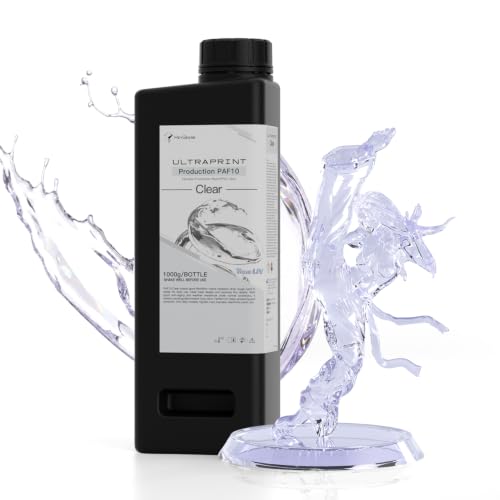
Heygears PAF10 Clear Resin

Magic Jimmy AI Kids 3D Printer

Snapmaker U1 Multi-Color Printer

Heygears Reflex RS Turbo Printer

ANYCUBIC Photon P1 Resin Printer
Reflex RS Turbo Printer + Curing Bundle

Creality K2 Plus Combo + CFS
The Details Behind The Selections
This 1kg spool of PLA (polylactic acid, a plant-based plastic that’s the easiest filament to print) is built around Snapmaker’s Snapspeed formula. The filament ships with embedded RFID chips that let a compatible Snapmaker U1 printer recognize each spool automatically, dialing in temperature and flow without manual tweaking. PLA is the standard filament for everyday FDM machines, and this version is tuned to print anywhere from a steady 50mm/s up to a brisk 300mm/s, so shorter jobs finish faster without obvious layer artifacts.
For anyone running a U1 or a comparable fast-extrusion machine, having a spool that keeps up with the rated speeds cuts a lot of trial-and-error. In a home workshop, that’s the difference between a print finishing during a lunch break versus bleeding into the evening.
Practical Pluses
- RFID auto-recognition on the Snapmaker U1 removes the guesswork of dialing in temperature and flow.
- Speed range of 50–300mm/s supports both careful prototyping and fast batch runs.
- 1kg spool size means fewer changeovers on long jobs like enclosures or cosplay parts.
- PLA base is forgiving, so beginners get clean results without a heated chamber.
Things To Consider
- RFID chip features only activate on the Snapmaker U1; other printers will read it as standard PLA.
- PLA softens above roughly 50°C, so prints left in a hot car or sunny window can warp.
Key Attributes
Whose Shelf It Belongs On
Owners of a Snapmaker U1 who want plug-and-play RFID convenience from their materials.
Look Elsewhere When
Shoppers running non-Snapmaker machines will get better value from a standard PLA like the Creality K2 Plus Combo ecosystem uses.
Snapmaker’s Matte PLA takes the same RFID-equipped spool design and trades the glossy standard finish for a low-sheen surface. The matte texture diffuses light across the model, which is how it visually softens the staircase look of each printed layer. For display pieces, props, or product mockups where you want the print to look refined straight off the bed, this material does a lot of the post-processing for you.
In a studio or maker space, matte finishes also photograph far more cleanly than glossy ones, with fewer harsh reflections under overhead lighting. Compared to the standard Snapspeed PLA covered above, the trade is almost entirely cosmetic.
Good Reasons To Consider
- Matte surface hides layer lines, useful for display models and presentation pieces.
- RFID compatibility carries over from the standard Snapspeed line for U1 owners.
- Same 50–300mm/s operating window keeps fast-print workflows viable.
Worth Noting
- Matte finish is purely a visual upgrade, not structural, so it’s not ideal for heavily stressed load-bearing parts.
- RFID smart features stay locked to the Snapmaker U1 platform.
Made For
Display builders and prop makers who want a finished look straight off the print bed without sanding or coating.
A Better Fit Elsewhere
Engineers needing functional strength will find the standard Snapspeed PLA in pick one more cost-effective for brackets and jigs.
The PAF10 is a clear UV-curing resin formulated specifically for Heygears Reflex RS printers. Where most clear resins turn amber within weeks of curing, this one is engineered to resist that yellowing shift, which matters if you’re printing lenses, light guides, or display casts that need to look genuinely transparent. It also reaches a fine 0.08mm minimum detail, so edges and tiny features come out sharp without mushy artifacts.
For jewelry designers and prototype engineers, this resin turns the Reflex RS into something closer to a casting workflow. A clear coat after curing pushes the transparency even further, and owners commonly report the final look reads like cast acrylic rather than 3D-printed plastic.
Key Advantages
- Yellowing-resistant formula keeps prints clear over months of light exposure.
- 0.08mm minimum detail captures fine features without softening edges.
- Drop-in compatibility with the entire Heygears Reflex RS resin printer family.
Minor Gripes
- Designed exclusively for Heygears Reflex RS machines, so it won’t fit standard LCD resin printers.
- Clear resins typically need post-cure cleaning with IPA (isopropyl alcohol), which adds a workflow step.
Feature Snapshot
Best Suited To
Jewelry designers and prototype engineers who need a cast-like transparent finish from a Reflex RS printer.
Consider Something Else When
Anyone without a Heygears Reflex RS machine should look at the ANYCUBIC Photon P1 in pick seven paired with a third-party clear resin.
Magic Jimmy’s kid-focused printer ships fully assembled and pairs with AI tools like AI Craft, AI Doodle, and AI MiniMe, which convert hand-drawn sketches, text prompts, or even photos into printable 3D models. The enclosure is the real safety story here: all hot and moving components sit behind a sealed chamber, so curious fingers stay away from the action. For a STEM classroom or family craft table, the closed design removes a lot of supervision overhead.
The AI tooling also lowers the barrier for kids who can’t yet drive CAD (computer-aided design) software. A child can sketch a creature, snap a photo of their face, or describe a toy in a sentence and end up with something on the build plate within minutes, depending on the queue.
Useful Strengths
- Fully enclosed chamber keeps hot ends and moving parts away from little hands.
- AI sketch-to-3D tools remove the need for kids to learn CAD before printing.
- Ships fully assembled, so there’s no first-day setup frustration.
Honest Caveats
- Build volume and material options are limited compared to adult-oriented printers like the Snapmaker U1.
- AI features depend on cloud connectivity, so offline use drops back to a more basic experience.
The Right Fit
Parents and teachers introducing STEM printing to children aged roughly 8 and up, especially in homes where supervision time is tight.
Reach For A Different Pick When
Teens ready for serious multi-material projects will outgrow this quickly and should consider the Creality K2 Plus Combo in pick nine.
The Snapmaker U1 is built around four independent toolheads that swap automatically in about five seconds, no manual filament changes or purging towers. Each head runs preloaded and preheated, so when the print needs a different color, the printer picks up the right tool and keeps going. For multi-color FDM jobs that used to mean hours of babysitting, this collapses the workflow down to a single start command.
It’s a serious machine aimed at small businesses and prosumers, but the toolhead logic is friendly enough that a determined hobbyist can get the hang of it. Pair it with the Snapspeed PLA from pick one, and you get a color workflow that feels closer to a desktop inkjet than a traditional 3D printer.
The Value In It
- Four-toolhead design removes manual color swaps during a print.
- Five-second tool changes cut multi-color print times dramatically.
- RFID material recognition auto-loads spool profiles when paired with Snapmaker PLA.
Small Caveats
- Higher upfront cost than single-color FDM machines, so it pays off mainly for frequent multi-color work.
- Four-toolhead mechanics add more service points over years of heavy use than a single-extruder design.
Feature Rundown
Who It Suits Best
Small studios and prosumers who routinely produce multi-color signs, toys, or product mockups.
Not Your Match When
Single-color hobbyists will see better value in a simpler machine, or even the Creality K2 Plus Combo in pick nine if they want broader color reach on a tighter budget.
The Reflex RS Turbo centers on a custom amber screen with a 566:1 contrast ratio, an order of magnitude higher than standard monochrome LCDs. That contrast is what lets the printer hit ±2μm Z-axis precision and 4.5-second layer times without losing edge definition. The C5 industrial-grade ball-screw Z-axis (a mechanism using threaded rods with recirculating ball bearings for smoother, more accurate vertical motion) holds that precision across long production runs, which is the difference between a workshop tool and a hobby toy.
For a small batch jewelry or dental lab, the speed-precision combination lets you turn around orders in a day rather than a week. Owners commonly report the auto-leveling routine takes most of the calibration headache off the table too.
Bright Spots
- 566:1 contrast amber screen drives both speed and detail simultaneously.
- C5 industrial ball-screw Z-axis keeps tolerance tight over thousands of cycles.
- 4.5-second layer times shorten batch production windows.
Things To Consider
- Resin workflow requires IPA washing and post-curing, which adds bench space and supplies.
- Best paired with Heygears’ own resin line (see pick three) to unlock full spec performance.
Who Should Grab It
Small-batch jewelry and dental studios running daily production where precision and turnaround time matter.
Swap It Out When
Casual hobbyists will find the ANYCUBIC Photon P1 in pick seven easier to live with at a lower entry cost.
ANYCUBIC’s Photon P1 brings a 14K monochrome screen to the resin category along with the LighTurbo 4.0 light source, which together push exceptionally crisp detail. Industrial-grade ball screws and precision guide rails hold repeat positioning to about ±0.01mm, so successive prints of the same model come out nearly identical. Auto-Leveling 3.0 handles bed setup with minimal manual tweaking.
For a serious hobbyist or part-time reseller, the P1 sits in a comfortable middle ground between the workshop-grade Reflex RS Turbo and beginner machines. It runs on standard third-party resins too, which keeps material costs flexible compared to locked ecosystems.
What Works In Its Favor
- 14K monochrome screen paired with LighTurbo 4.0 light source captures fine details cleanly.
- ±0.01mm repeatability suits batch production of identical parts.
- Auto-Leveling 3.0 shortens the path from unbox to first print.
Trade Offs
- Resin printing still demands IPA washing, gloves, and UV curing as routine maintenance.
- Build volume sits below larger workshop printers, so big parts need to be split and assembled.
Feature Overview
Who Will Love This
Detail-focused hobbyists and small-batch sellers who want workshop-level precision without a full industrial price tag.
Skip It When
Buyers running high-volume resin production should step up to the Reflex RS Turbo in pick six or the bundled option in pick eight.
This bundle pairs the Reflex RS Turbo printer from pick six with a dual-wavelength UV curing station, which means you get the print and the post-cure workflow in one box. The C5 ball-screw Z-axis keeps vertical motion under 2μm, and a COB (Chip-on-Board) lighting array divides the screen into 60 calibrated zones to hold light-intensity variation within roughly ±3%. The included curing machine handles the final hardening step without leaving you to rig up a DIY UV box.
For a buyer starting a resin business from scratch, the bundle trims weeks off the setup timeline. Force-monitoring sensors on the printer add a layer of safety by detecting residue as small as 0.2mm before it disrupts a job.
What Pays Off
- Printer and curing station ship together, so the full workflow arrives ready to run.
- 60-zone COB lighting holds consistent cure across the entire build plate.
- Force-monitoring sensors can auto-pause prints when contamination is detected.
Practical Considerations
- Bundle takes more bench space than a printer alone, so plan workshop layout first.
- Two-machine setup means two power outlets and more ventilation planning.
Perfect Match For
New resin workshops that want printer and post-cure gear matched from day one rather than pieced together over months.
Where Another Pick Suits Better
Hobbyists running an occasional print should start with just the Reflex RS Turbo in pick six and add a curing station later.
The Creality K2 Plus Combo pairs a full-size K2 Plus printer with a Creality Filament System (CFS), an external multi-spool feeder that lets you run up to 16 colors in a single print. The CFS intelligently manages filament handoffs so you don’t have to babysit color changes, which makes it useful for large cosplay builds, signage, or production runs where every job needs different branding colors.
Unlike the Snapmaker U1 in pick five, which uses four physical toolheads, the K2 Plus Combo relies on a single nozzle with the CFS feeding multiple spools, so the workflow is different but the multi-color payoff is similar. For someone who already owns a K1 or K2 and wants to add color without rebuilding the setup, the combo route is the practical path.
The Good Stuff
- CFS supports up to 16 colors in a single job, more than most desktop competitors.
- Single-nozzle design keeps maintenance simpler than multi-toolhead systems.
- Full-size build volume handles larger props and enclosures in one piece.
Trade-Offs To Consider
- Single-nozzle color changes still produce some purge waste at each transition.
- CFS adds external hardware that takes up additional desk space beside the printer.
Built With In Mind
Makers producing large multi-color prints who prefer single-nozzle simplicity over multi-toolhead mechanics.
Skip It When
Color-critical small jobs are a better fit for the Snapmaker U1’s four-toolhead system covered in pick five.
What Matters Most Before Choosing Dlp 3d Printers
Resin vs. Filament Printers
DLP and LCD resin printers cure liquid photopolymer (a light-reactive plastic) with UV light, which is how they hit such fine detail, but they require gloves, IPA washing, and post-curing as routine. Filament-based FDM machines melt and extrude plastic and trade some detail for a much gentler learning curve. The picks above include both worlds, and matching your tolerance for resin handling is the first real decision.
Detail and Resolution
For miniature figures, jewelry, or dental prototypes, screen resolution (measured in K, like 14K) and Z-axis precision (the vertical movement accuracy, often quoted in μm) drive print quality. For functional brackets, enclosures, or props, that level of detail is overkill and a larger build volume matters more.
Multi-Color Capability
Single-color prints stay simple and affordable, but multi-color changes the kind of projects you can take on. Toolhead-swap systems like the Snapmaker U1 avoid purge waste, while filament feeder systems like the Creality K2 Plus Combo trade some purge for easier maintenance.
Build Volume and Workshop Space
Resin printers tend to be smaller but demand ventilation. FDM multi-color setups with external feeders take up significant desk or floor space. Measure your intended spot before committing.
Safety and Enclosure
Resin workflow safety hinges on gloves, ventilation, and curing station discipline. For shared family or classroom spaces, enclosed kid-safe machines like the Magic Jimmy printer solve a different problem entirely.
Key Considerations Across These Picks
Pitfalls Shoppers Hit
The most common mistake is buying the highest-resolution printer without planning for the resin workflow it demands. IPA washing, curing, and ventilation add up in time and supplies. Another trap is choosing a multi-color system for jobs that never actually need more than two colors; a simpler machine will print those faster with less waste.
Where The Extra Money Goes
Premium resin printers buy industrial-grade Z-axis hardware and faster layer times, which matter for shops billing by the print. Higher filament tiers often go toward color management systems, RFID recognition, and enclosed chambers. The upgrade only pays off when the workflow matches the feature list, so map your real jobs before stepping up in price.
Frequently Asked Questions
What does DLP mean in 3D printing?
DLP stands for Digital Light Processing, a method that projects an entire UV image at once to cure a full resin layer. It differs from FDM filament printers by producing finer detail on small parts.
Are resin printers safe for home use?
Resin printers can run safely at home with proper ventilation, nitrile gloves, and a dedicated curing station. The enclosed kid-safe Magic Jimmy printer in pick four adds extra layers for family spaces.
How often do I need to replace resin?
Resin lasts in its bottle for many months when stored sealed and away from UV light. Cured prints are stable indefinitely, though clear resins like PAF10 may shift slightly over years of sunlight exposure.
Can I use third-party resin on these printers?
The ANYCUBIC Photon P1 and similar open-material machines accept standard third-party resins. Heygears Reflex RS printers run best with Heygears’ own resin line for guaranteed spec performance.
What maintenance do these printers need?
Resin printers need IPA cleaning of the build plate and vat after every session. FDM machines need occasional nozzle cleaning, belt tension checks, and firmware updates, far less hands-on overall.
The Takeaway
DLP 3D printing rewards matching the tool to the work, and the nine picks above cover everything from kid-safe learning machines to workshop-grade resin production. Start with the type of prints you actually want to make, then pick the machine that makes those jobs easiest to run day after day.




