

I keep more files than I’d like to admit, and finding the right place to put them has gotten harder. Laptops fill up, phones nag me about iCloud, and cloud subscriptions quietly add up. A solid external drive or flash stick still solves problems cloud storage can’t match, like speed, privacy, and ownership of the bits themselves. The list below rounds up six options that handle different storage jobs, from a tiny keychain stick to high-speed SSDs that travel well. I’ll explain what each one does, where it makes sense, and where it doesn’t, so you can match the right pick to your own situation.
A Fast Comparison Of The Options

OSCOO 1TB Touchscreen Encrypted External SSD
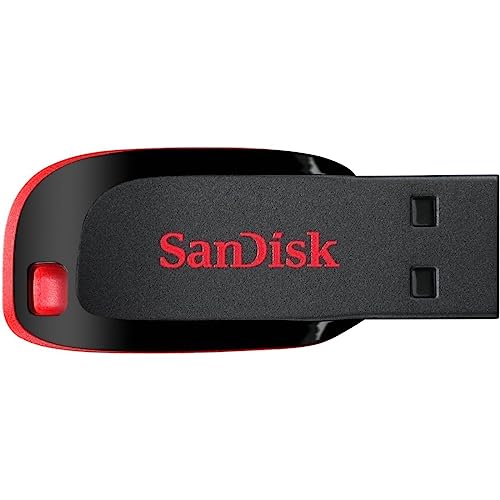
SanDisk 32GB Cruzer Blade USB 2.0 Flash Drive
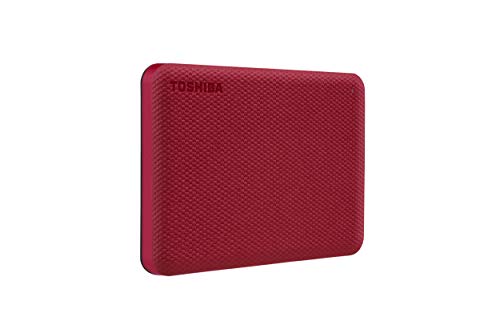
Toshiba Canvio Advance 2TB Portable External Hard Drive

Seagate Expansion Portable 1TB External Hard Drive HDD
OSCOO 1TB Magnetic External SSD

OSCOO 1TB External SSD USB 3.2 Gen 2
A Deeper Look At The Lineup
I want a drive that does more than hold files; I want one that protects them. The OSCOO 1TB Touchscreen Encrypted External SSD leans into that idea with built-in hardware encryption, which means the scrambling happens inside the drive chip itself, not in software that an attacker could bypass. A small touchscreen on the front lets me punch in a password and check real-time readouts for transfer speed, drive temperature, and how much space I have left.
That’s the kind of feedback I’d appreciate while editing video off the drive on a long shoot day. The advertised ceiling sits around 2000MB/s, so it’s clearly built for moving large files quickly rather than just parking them. Anyone carrying tax documents, unreleased footage, or client work between offices will find that touchscreen-plus-encryption combo reassuring.
What It Does Well
- Built-in hardware encryption keeps sensitive files locked without extra software
- Touchscreen interface surfaces live transfer speeds and drive temperature at a glance
- Real-time capacity readout helps avoid the “out of space mid-project” scramble
- Up to 2000MB/s throughput handles 4K footage and RAW photo libraries without bottlenecks
Things To Consider
- The touchscreen adds cost and complexity that casual users may not need
- Encryption features only protect data when the password is set up properly
- Runs warmer than basic SSD enclosures during long, sustained transfers
Feature Snapshot
Right Fit For
Freelancers, video editors, and small business owners who carry sensitive client files between locations and want password-locked storage without installing extra apps.
Consider Something Else When
The SanDisk 32GB Cruzer Blade USB 2.0 Flash Drive makes more sense for shoppers who just want a cheap stick to hand a friend a few documents at a coffee shop.
Some jobs don’t need a screaming-fast SSD; they need a small, dependable thing on a keychain. The SanDisk Cruzer Blade is exactly that, a 32GB stick shaped slim enough to live in a pocket or on a keyring. It’s a USB 2.0 drive, which means transfers aren’t quick by modern standards, but that’s the trade-off for the price.
For dragging a few PDFs to the printer, moving a resume between computers, or copying a folder of vacation photos to a parent’s laptop, it gets the job done without drama. People who mostly treat storage as a one-off hand-off rather than a daily workflow will appreciate how little it asks of them.
The Case For It
- Compact form factor disappears onto a keychain or in a wallet sleeve
- SanDisk’s reputation means the controller and memory tend to hold up to regular use
- USB 2.0 compatibility works on virtually any laptop or desktop without adapters
- Low price point makes it easy to keep spares around the house or office
Worth Noting
- USB 2.0 caps transfer speeds well below modern SSD performance
- 32GB fills up fast with video files, so it’s not a media library drive
- The plastic shell can wear around the cap with heavy keychain use
Whose Shelf It Belongs On
Students, casual home users, and anyone who occasionally needs to move a small batch of files between machines without paying for performance they won’t use.
Look Elsewhere When
Anyone regularly backing up a large photo library or working with video files will be better served by the Toshiba Canvio Advance 2TB, which trades pocketability for capacity.
Two terabytes sounds abstract until you do the math. That’s roughly 500,000 photos at phone resolution, or years of home videos in standard definition. The Toshiba Canvio Advance packages that kind of room in a slim, textured shell that slips into a backpack pocket without anyone noticing. It connects over USB 3.0, so moving folders happens at a respectable clip compared to older external drives.
This is the drive I’d hand to a parent who wants to back up a decade of family photos without learning anything technical. Compared to the Seagate Expansion Portable that follows, the Canvio leans into a more styled finish, and the higher capacity gives it room to grow with the library.
Where It Delivers
- 2TB capacity covers most personal backup needs without compression tricks
- USB 3.0 interface keeps large folder transfers reasonable for an HDD
- Compact, textured casing helps the drive resist fingerprints in daily handling
- Toshiba’s drive heritage means the internal mechanism tends to be a known quantity
Room For Improvement
- Mechanical HDD inside, so it won’t match SSD speeds for video editing
- Lacks the rugged drop protection some competing drives advertise
- Bulkier than SSD alternatives, especially for travel in tight bags
Spec Overview
Best Suited To
Home users with growing photo and document collections who want a single backup drive they can plug in once and forget about.
Swap It Out When
Editors who need to cut video straight from the drive should consider the OSCOO 1TB External SSD USB 3.2 Gen 2 instead, since HDDs tend to stutter on 4K timelines.
The Seagate Expansion Portable is the kind of drive I recommend when someone says they just want something that works. Plug it into a Windows laptop and the system recognizes it without installing any software, no menu diving, no companion app nag screen. The included 18-inch USB 3.0 cable is short enough to toss in a bag but long enough to reach a desktop tower tucked under a desk.
Compared to the Toshiba Canvio Advance from earlier in the list, this one trades a styled finish for a more straightforward, no-frills shell. It’s the right starting point for a first external backup drive, especially for someone who has never shopped for storage before and doesn’t want to decode spec sheets.
Good Reasons To Consider
- Plug-and-play recognition on Windows means zero setup time for most users
- 1TB capacity covers everyday document and photo backups without tipping into premium pricing
- Drag-and-drop workflow mirrors how people already manage files on their computer
- USB 3.0 cable is included in the box, so there’s no extra accessory to track down
Honest Caveats
- Mechanical HDD means slower seeks than SSD-based options in this list
- 1TB fills faster than people expect once video files enter the picture
- Plastic shell doesn’t inspire confidence if it gets bumped off a desk
Quick Facts
Made For
Beginners and casual home users who want their first backup drive to behave like a regular folder the moment they plug it in.
Reach For A Different Pick When
Anyone regularly editing video on the road should pick the OSCOO 1TB External SSD USB 3.2 Gen 2, which handles large file playback far more smoothly.
Phone creators have a unique problem: storage fills up mid-shoot, and offloading clips to a laptop kills the moment. The OSCOO 1TB Magnetic External SSD solves that by snapping onto the back of a compatible phone with a magnetic mount, turning the phone and drive into a single handheld rig. Once it’s paired, the drive can capture high-bitrate video directly, which matters for anyone shooting in formats that would choke onboard storage.
Up to 2000MB/s puts it in the same speed league as the OSCOO Touchscreen drive earlier in the list, but with a form factor built for mobile shooting rather than desktop backup. It’s a niche tool, and a useful one for the specific job it’s designed for.
Positive Takeaways
- Magnetic attachment keeps the drive aligned with a phone during handheld shooting
- Direct-recording support lets compatible phones offload bitrate pressure from internal storage
- Up to 2000MB/s transfer speed keeps 4K capture buffers moving smoothly
- Pocketable SSD form factor survives backpack travel better than spinning drives
Small Caveats
- Magnetic attachment only pairs cleanly with phones that support the right mount style
- Direct-recording features depend on supported apps and phone models
- SSD speed drops if the drive gets warm during long outdoor shoots
Who Should Grab It
Mobile videographers and travel vloggers shooting on compatible iPhone models who want their phone and storage to act like one rig.
Where Another Pick Suits Better
The SanDisk 32GB Cruzer Blade USB 2.0 Flash Drive is the better match for shoppers who only need to hand off a small folder at the office, not shoot hours of footage.
This is the drive I’d pick if I were editing video away from my desk. The OSCOO 1TB External SSD pushes up to 2100MB/s over USB 3.2 Gen 2, which is fast enough to scrub through 4K timelines without the drive becoming the bottleneck. The aluminum shell does double duty: it sheds heat during long transfers and shrugs off the kind of bumps that happen in a gear bag.
Direct-recording support from compatible USB-C phones and cameras means creators can shoot high-bitrate footage straight onto the drive, leaving internal storage untouched. Compared to the magnetic OSCOO model just above, this one skips the phone-mount gimmick in favor of raw speed and a sturdier build for studio or travel use.
A Few Strong Suits
- Up to 2100MB/s read and write speeds handle 4K and even 8K source files
- Aluminum housing pulls heat away from the controller during sustained transfers
- USB 3.2 Gen 2 works with modern laptops, tablets, and supported phones
- Direct 4K 120fps HDR recording support with compatible apps and devices
Some Limits To Know
- Full speed requires a USB 3.2 Gen 2 port, older ports will throttle it
- Aluminum body can feel cold in winter and warm under heavy use
- Premium pricing compared to HDD-based options like the Toshiba Canvio Advance
The Numbers That Matter
Who Will Love This
Video editors, photographers, and prosumers who need a fast, durable SSD that travels well and keeps up with large project files.
Not Your Match When
Shoppers who just need a cheap way to hand off a few files should look at the SanDisk 32GB Cruzer Blade USB 2.0 Flash Drive, which is far simpler and far cheaper.
Choosing Storage That Fits The Way You Work
Most people shop for storage the wrong way around, picking capacity first and then discovering speed, durability, or connectivity issues later. The smarter starting point is the actual job the drive has to do. A 4K editor needs sustained throughput more than raw terabytes, while a family photo archivist usually needs the opposite: as much room as possible for the least hassle.
Drive type matters more than people expect. A traditional HDD, the kind inside the Toshiba Canvio Advance and Seagate Expansion, gives lots of storage per dollar but moves data more slowly and contains moving parts that don’t love being knocked around. SSDs, like the three OSCOO options above, cost more per gigabyte but read and write dramatically faster, run silent, and survive rough handling better.
Connection standards are another trap. USB 2.0, USB 3.0, and USB 3.2 Gen 2 all use the same physical connector in some cases, but they cap transfer speed at very different levels. A USB 3.2 Gen 2 SSD plugged into an old USB 2.0 port will still work, just slowly. Anyone buying a fast SSD should confirm their computer actually supports the speed tier they’re paying for.
Capacity planning tends to undershoot reality. People often buy what they need today and run out within a year. For backup drives that hold photos and videos, I’d lean toward at least double what feels necessary right now, since libraries only grow. For working drives that hold current projects, matching the size of a typical laptop’s internal SSD is usually enough.
Picking A Drive You’ll Actually Use
Pitfalls Shoppers Hit
The most common mistake is buying a fast SSD and then plugging it into an old port that throttles it down to USB 2.0 speeds. Another is grabbing the cheapest 1TB drive without checking whether it’s an HDD or an SSD, since the experience of editing off the drive is wildly different between the two. A third trap is underestimating how fast video and photo libraries grow, leaving a drive full within months of purchase.
Where The Extra Money Goes
Premium drives like the OSCOO USB 3.2 Gen 2 model cost more because of the NAND flash quality, the controller chip, and the thermal design that keeps speeds high during long transfers. Aluminum shells, hardware encryption, and magnetic mounts add cost only when they solve a specific problem, so the question is whether those features match the way the drive will actually be used. For most people, a mid-tier SSD offers the best balance, while a pro workflow justifies paying up for sustained speed and durability.
Frequently Asked Questions
What’s the difference between an SSD and an HDD for external storage? An SSD uses flash memory with no moving parts, runs silent, and transfers files much faster, while an HDD uses a spinning disk that offers more storage per dollar but reads and writes more slowly.
How much storage do I actually need for photos and videos? For everyday phone photos and documents, 1TB usually covers a couple of years, but anyone shooting video regularly or archiving RAW photos benefits from 2TB or more to avoid running out mid-year.
Can I use one external drive for both Mac and Windows? Yes, most external drives work with both as long as the file format is compatible, though switching between the two sometimes requires reformatting depending on how the drive was set up at the factory.
Do faster SSDs really make a noticeable difference? For everyday file transfers and document backups, the difference feels modest, but for editing 4K video directly off the drive or moving large project folders, faster SSDs save real time.
Is hardware encryption worth it on an external drive? Hardware encryption is genuinely useful for anyone carrying sensitive client files, financial records, or unreleased creative work, since the protection lives on the drive itself even if the host computer is compromised.
Wrap Up
The right storage pick depends less on specs and more on the job. A casual user with a growing photo library leans toward the Toshiba Canvio Advance or Seagate Expansion for capacity and simplicity. A creator on the move gets more out of an SSD like the OSCOO USB 3.2 Gen 2, while anyone protecting sensitive files will appreciate the OSCOO Touchscreen Encrypted drive. Match the tool to the workflow, and the rest takes care of itself.




