
Long shifts on the phone, background chatter, and headsets that fight you instead of help you. I’ve been on enough calls to know that a contact center headset isn’t just a microphone on your head, it’s the tool that decides whether your voice lands clean or sounds like you’re calling from inside a blender. After digging through specs, comfort claims, and connection setups, I’ve narrowed down eight options that genuinely solve the problems agents and supervisors actually face. Some are wireless DECT systems built for desk phones, others are USB workhorses for softphones, and a couple are accessories that keep your existing gear from falling apart. Here’s what I found.
The Leading Options At A Glance
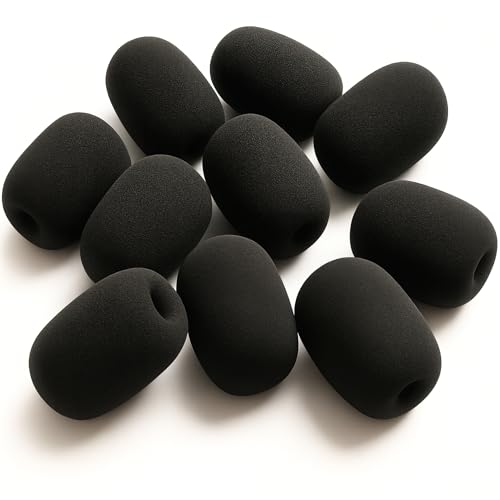
Universal Foam Microphone Windscreens 10-Pack by GTW

Leitner LH270 Wireless DECT Headset for Office Phones

Yealink UH46 Wired USB-C/A Headset with 3-Mic AI Noise Cancelling

Yealink UH34 Lite Wired USB-A Headset with Noise Canceling Mic

Yealink UH35 Wired USB-A On-Ear Headset with AI Noise Canceling Mic

Jabra Biz 1500 USB Duo Wired Headset

Yealink UH48 ANC Wired USB-C/A Headset with 6 AI Noise-Canceling Mics

Yealink UH34 Wired USB-A On-Ear Headset with Noise Canceling Mic
Taking A Closer Look At The Options
Shared headsets on a busy contact center floor are a hygiene question as much as an audio question. The GTW foam windscreen pack handles that second piece: ten thin foam sleeves that slide over the microphone boom and absorb the breath pops, spit, and close-talk rumble that drag down call quality. They fit common headsets from BlueParrot, Plantronics, Jabra, Logitech, Movo, VXI, and Telex, so most existing fleets can use them without swapping hardware.
For shift-based environments where agents rotate through workstations, the practical appeal is straightforward. Each agent gets a fresh cover, which is a small but visible step toward a cleaner setup, and replacements are cheap when a foam gets torn or lost. Unlike the Yealink options further down this list, this isn’t a headset itself, it’s the accessory that keeps whatever you’re already wearing working longer.
Points In Its Favor
- Ten-pack covers rotation across multiple agents or backup spares for a single heavy user
- Slim-fit foam grips the boom without sliding off mid-call, a common complaint with generic covers
- Breathable foam reduces plosives and popping consonants that confuse voice clarity on recordings
- Broad compatibility with BlueParrot, Plantronics, Jabra, Logitech, and Movo microphones means one SKU covers most fleets
Things To Consider
- Foam degrades with sweat and saliva over weeks, so expect to cycle replacements regularly in a high-volume environment
- Not a headset on its own, so this only helps teams that already own compatible gear
Made For
Contact center supervisors and team leads who want a low-cost hygiene upgrade across an existing shared-headset fleet.
Consider Something Else When
Callers who need a complete headset solution should look at the Jabra Biz 1500 USB Duo for a wired entry-level setup instead.
Some contact centers still run on physical desk phones, and wireless freedom on that setup is its own category of headache. The Leitner LH270 is built for exactly that world, using DECT (Digital Enhanced Cordless Telecommunications), a wireless protocol designed for voice, not the Bluetooth you’d pair with a phone. The key feature is dual-connectivity: a single button press moves audio between a desk phone and a computer softphone, which matters for agents handling both legacy and modern systems during a shift.
The honest read is that this is a niche pick. It isn’t a Bluetooth headset, so cell phone pairing won’t happen, and that trips up first-time users. For the office phone environment it’s designed around, though, the wireless range means an agent can grab a file, walk to a printer, and stay on the call without holding a handset against their shoulder. Compare that to the Yealink UH46 below, which stays wired and trades mobility for noise-fighting microphones.
Where It Helps
- Dual-connectivity switch between desk phone and computer without swapping gear
- DECT wireless range lets agents pace during long calls without losing audio
- Designed specifically for office phone environments, so compatibility headaches drop
Worth Noting
- Not Bluetooth, so it won’t pair with mobile phones, which is the most common return reason reported for this category
- Requires a compatible desk phone base or EHS (Electronic Hookswitch) cable for full call control, which may be an extra purchase
Feature Snapshot
Right Fit For
Office-based agents running on traditional desk phone systems who need wireless mobility for filing, copying, or supervisor check-ins mid-call.
Not Your Match When
Softphone-only teams should pick the Yealink UH34 instead for a simpler USB-A wired setup.
An open office floor is its own kind of audio test. The Yealink UH46 attacks the noise problem head-on with three noise-canceling microphones working together, plus what Yealink calls PNC (Passive Noise Cancellation) through the earcup seal. The headset is wired, which means no charging surprises mid-shift, and the dual USB-C/A connection broadens compatibility across newer laptops and older dock setups alike.
The inline control unit is a quiet win for agents. Volume, mute, and call answer sit on the cable, so there’s no hunting across the desk during a live customer interaction. Against the UH34 reviewed below, the UH46 leans into microphone density rather than platform polish, and that shows up where it matters most: when the person on the other end of the line shouldn’t hear your neighbor’s lunch order.
Reasons It Performs
- Three-mic array actively suppresses background voices and keyboard noise for clearer outbound audio
- Passive earcup seal adds a second noise barrier for the wearer’s own focus
- Inline call controls keep common actions within reach without breaking eye contact with the screen
- USB-C and USB-A compatibility covers modern laptops and aging docks on the same headset
Trade Offs
- Wired design limits walking distance, which can frustrate agents used to wireless setups
- On-ear fit depends on proper positioning, so a quick adjustment may be needed at shift start
Best Suited To
Agents working in loud shared spaces where outbound voice clarity matters more than wireless freedom.
Skip It When
Callers needing active noise cancellation for their own listening comfort should step up to the Yealink UH48 instead.
The Yealink UH34 Lite is the kind of headset that doesn’t try to do anything fancy, which is exactly why it ends up on so many contact center desks. It plugs into USB-A, gets recognized by Microsoft Teams automatically, and stays out of the way. The independent cavity speaker design and noise-canceling microphone work together to keep both sides of the call intelligible without overpromising on either end.
In-line controls handle the usual calls and volume work. For Teams-heavy shops especially, the auto-configure behavior means an agent can hot-swap a unit and the softphone picks it up without IT intervention. Stack it next to the Jabra Biz 1500 reviewed later, and the UH34 Lite leans into platform certification while Jabra leans into stereo coverage at a similar tier.
Good Reasons To Consider
- Certified for Microsoft Teams with auto-configure, so plug-and-play is the realistic default
- Lightweight build keeps fatigue down through full shifts for most agents
- Noise-canceling microphone reduces the rumble of HVAC (heating, ventilation, and air conditioning) and nearby chatter from reaching the caller
Minor Gripes
- USB-A only means newer USB-C laptops need an adapter or dock on the desk
- Single-ear fatigue may creep in for agents who prefer stereo separation on long calls
Quick Facts
Who It Suits Best
Teams running Microsoft Teams as their primary softphone who want a reliable, certified wired headset without overthinking the choice.
Where Another Pick Suits Better
Agents in louder environments with USB-C laptops should consider the Yealink UH46 for additional mic coverage and modern port support.
An eight-hour shift on a poorly padded headset is its own kind of punishment. The Yealink UH35 is built around that specific problem. Leather ear pads, an ergonomic shape, and on-ear pressure distribution all work toward the same goal: keeping the headset on without making the agent want to rip it off halfway through a queue.
The microphone side is no afterthought either. Two AI noise-canceling mics filter out the background sounds that typically bleed into calls, while call control buttons sit on the cable for fast mute and volume changes. Compared to the UH34 Lite just above, the UH35 trades some platform-certification polish for a noticeably more comfort-forward build, which is the right call for marathon shifts.
A Favorable Mix
- Leather ear pads reduce pressure points that build up over multi-hour shifts
- Dual AI noise-canceling microphones keep outbound voice clean in moderate-noise offices
- Inline call controls handle mute and volume without breaking focus from the screen
Points To Note
- On-ear fit may feel warm for agents in climate-controlled but crowded rooms
- USB-A only, so USB-C-native laptops need a dock or adapter at the workstation
Key Product Details
Whose Shelf It Belongs On
Shift workers and supervisors logging six-plus hours on the phone who prioritize comfort alongside clear outbound audio.
A Better Fit Elsewhere
Callers needing dual-ear focus and stereo immersion should consider the Jabra Biz 1500 USB Duo instead.
The Jabra Biz 1500 sits in the entry-level professional lane, and it’s a sensible pick for cost-conscious contact centers that still want a recognizable brand name. The duo (two-ear) design helps agents stay focused by sealing out the floor noise that single-ear headsets can’t block, while the noise-canceling microphone keeps outbound audio clean enough for most customer interactions.
Jabra built this for durability, which matters in high-turnover environments where headsets get bumped, dropped, and passed around. The inline control handles volume and mute without software fuss. Against the Yealink UH35 covered earlier, the Jabra leans into stereo immersion and brand familiarity, while the UH35 leans into leather comfort pads and AI microphone processing.
Key Advantages
- Duo ear cups block ambient noise from both sides for better focus on long calls
- Noise-canceling microphone is tuned for outbound voice clarity in typical office settings
- Inline volume and mute controls keep common actions off the keyboard
- USB connection simplifies deployment across most desktops and laptops
Room For Improvement
- Duo fit can feel warm in long shifts, depending on the office climate and the agent’s preference
- Entry-level materials may show wear faster in heavy-rotation environments
Built With In Mind
Contact centers equipping larger teams on a tight budget who need a recognizable, durable wired headset that just works.
Look Elsewhere When
Agents needing advanced noise suppression for their own listening should look at the Yealink UH48 with hybrid ANC (Active Noise Cancellation).
The Yealink UH48 is the heavyweight in this roundup, and the spec sheet explains why. Six AI noise-canceling microphones, four of which feed an active noise canceling system, work together with hybrid ANC algorithms and what Yealink calls Acoustic Shield 3.0. Three ANC modes adapt to different environments, and oval rotating earcups with memory foam deliver passive isolation on top of that.
The result is a headset that fights noise on both sides of the call: the agent hears less of the floor, and the caller hears less of the agent’s background. The dual USB-C/A connection keeps it flexible across modern and legacy workstations. For supervisors and senior agents handling escalations in busy rooms, the UH48 is the most aggressive noise-fighting pick here, though it comes at the cost of portability since it stays wired to the desk.
A Few Strong Suits
- Hybrid ANC with three selectable modes adapts the level of noise canceling to the room
- Six-microphone array plus Acoustic Shield technology significantly reduces background leakage to callers
- Memory foam earcups with rotating design support longer wear without the hot-spot pressure
- Dual USB-C and USB-A connectivity covers newer and older workstation hardware
Honest Caveats
- Premium feature set puts this at a higher price tier than most entry-level wired options
- Wired design keeps agents tethered to their desk during calls
Technical Highlights
Who Should Grab It
Supervisors, escalation specialists, and senior agents who work in the noisiest parts of a contact center and need both sides of the call to stay clean.
Reach For A Different Pick When
Budget-focused teams should consider the Jabra Biz 1500 for a solid entry-level alternative.
The Yealink UH34 rounds out the list as a versatile on-ear wired option that works across more platforms than its Lite sibling. It carries Microsoft Teams certification for auto-configuration, while remaining compatible with Zoom, Skype, WhatsApp, and other common voice apps, which makes it a sensible default for mixed-softphone environments where agents don’t all use the same calling platform.
Audio quality leans on a high signal-to-noise ratio speaker (meaning the intended voice comes through louder relative to the static hiss) and an independent cavity design that aims to keep call clarity consistent across a shift. The noise-canceling microphone handles outbound cleanup. For shops that want one headset SKU that flexes across multiple platforms, the UH34 covers that ground more broadly than most competitors in this price lane.
Bright Spots
- Broad softphone compatibility across Teams, Zoom, Skype, and WhatsApp reduces platform-specific buying
- High signal-to-noise speaker design delivers cleaner inbound audio for the agent
- Noise-canceling microphone reduces background chatter from reaching the caller
- Inline controls keep call management within easy reach during live conversations
Some Limits To Know
- USB-A only limits direct connection on newer USB-C laptops without an adapter
- On-ear fit may press harder than over-ear alternatives during extended wear
Perfect Match For
Contact centers running multiple softphone platforms who want one wired headset SKU that adapts without manual configuration per agent.
Swap It Out When
Agents needing leather-padded comfort for marathon shifts should pick the Yealink UH35 instead.
Choosing Headsets That Hold Up To Real Shifts
The right contact center headset depends on what your day actually sounds like, not just the spec sheet. Wired or wireless is the first fork in the road. Wired USB headsets like the Yealink UH34 and UH35 are reliable, never run out of battery, and are easy to deploy in fleets, but they tether agents to a desk. Wireless DECT systems like the Leitner LH270 trade that tether for office-phone compatibility and freedom to pace during calls, at the cost of charging and pairing complexity.
Microphone quality matters more than most shoppers expect. A noise-canceling microphone filters out the keyboard clatter, side conversations, and HVAC hum that bleed into customer calls. More microphones usually mean better suppression, which is why models like the Yealink UH46 (three mics) and UH48 (six mics) outperform basic single-mic designs in noisy rooms.
Comfort is the long-tail decision. Leather pads, memory foam, and adjustable headbands all reduce the pressure buildup that ends shifts early. Duo ear cups block more external noise but run warmer, while on-ear designs stay cooler but press harder over time. Matching the fit to the shift length and climate in your specific room is worth the few extra minutes of research.
Connection type is the silent dealbreaker. USB-A still rules most desktops, but newer laptops trend toward USB-C only. Choosing a dual-connection headset like the Yealink UH46 or UH48 covers both worlds, while USB-A-only units require docks or adapters on modern hardware.
Picking Through The Noise Before You Buy
Common Shopping Slip Ups
The biggest trap in this category is buying a Bluetooth headset when the office runs on desk phones, or vice versa. They’re not interchangeable. Another frequent miss is underestimating microphone count. A single noise-canceling mic works in quiet rooms but falls apart on a busy floor, so noisy environments benefit from three or more. Skipping a comfort check is the third common mistake: a headset that feels fine in a five-minute test can become uncomfortable by hour four.
Where The Extra Money Goes
Higher-tier headsets like the Yealink UH48 spend the budget on more microphones, hybrid ANC, and better materials. The result is cleaner outbound audio, quieter inbound audio, and longer-wearing comfort. For supervisors, escalation agents, and anyone in a noisy room, the upgrade tends to pay for itself in fewer call escalations and less shift fatigue. For quieter back-office roles, a basic Yealink UH34 or Jabra Biz 1500 covers the essentials without the premium overhead.
Frequently Asked Questions
What is the difference between a DECT and Bluetooth headset for contact center use? DECT headsets like the Leitner LH270 are designed for office phones and offer longer wireless range, while Bluetooth headsets are designed for mobile phones and have shorter range with broader consumer compatibility.
How many microphones do I actually need in a contact center headset? A single noise-canceling microphone works for quiet rooms, but noisy contact center floors benefit from three or more microphones for better outbound voice clarity.
Are wireless contact center headsets reliable enough for full shifts? Modern DECT wireless headsets offer all-day battery life, but they require charging infrastructure and pairing management that wired headsets avoid entirely.
What does active noise canceling do on a contact center headset? ANC reduces background sound reaching the agent’s ears, which helps focus during long calls in shared environments where ambient noise is constant.
Can I use one contact center headset across multiple softphone platforms? Yes, especially models like the Yealink UH34 that carry Microsoft Teams certification and remain compatible with Zoom, Skype, and other common calling apps.
Closing Thoughts
The right headset comes down to matching your environment, your platform, and your shift length to the right mix of microphone power, comfort, and connection type. Start with where your calls actually happen, desk phone or softphone, and narrow from there. A well-chosen headset fades into the background of a shift, and that’s exactly what you want.