

Remote meetings have quietly become the heartbeat of how teams talk to each other. I’ve spent enough hours on muddy calls and echoing huddle rooms to know that the difference between a productive meeting and a frustrating one often comes down to the speaker sitting in the middle of the table. The picks below cover everything from a tiny USB puck for solo calls to multi-piece setups built for boardrooms, with choices that suit home offices, small huddle rooms, and larger shared spaces.
The Shortlist At A Glance

Jabra Speak 410 Corded Speakerphone for Softphones
Jabra Speak 410 Corded Speakerphone, MS-Optimized
Jabra Speak 410 UC Speakerphone for PC

Synbit Bluetooth Conference Speakerphone with Daisy Chain

TONGVEO Bluetooth Speakerphone with 4 AI Noise Cancellation Mics

COOLPO 360 Conference Room Camera, Microphone, and Speaker (PANA)

COOLPO Video Conference Camera 4K Webcam

COOLPO Camera 360 Smart Video Conference Camera and Microphone (Pana)

EMEET Luna Plus Kit Conference Speaker with 8+1 Mics
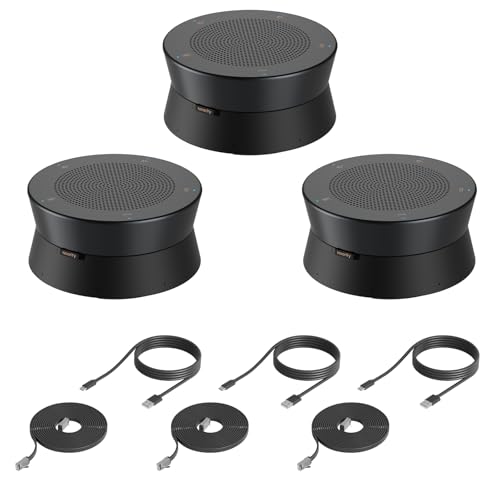
Nearity A20S 3-Pack Conference Speaker with 8 MEMS Mics
More On The Choices That Made The List
For anyone working solo from a small desk or a hotel room on the road, the Speak 410 shrinks the conference room into something that fits in a coat pocket. The unit is a small puck with a built-in USB cable, and that single cable does the heavy lifting, since it carries both audio and power to the speakerphone. Set it in the middle of the table and the 360-degree microphone pulls in voices from every direction without forcing anyone to lean in.
The build feels solid for daily commuter use, and the soft-touch base keeps it planted on slick surfaces. There’s no Bluetooth pairing or battery to fuss with, which is honestly the appeal for people who’d rather not troubleshoot before a call. In my experience with similar travel-friendly speakerphones, this kind of simplicity tends to matter more than headline features.
Strengths Worth Knowing
- True plug-and-play setup with the integrated USB cable
- Omnidirectional pickup (a microphone that hears equally from every direction) suits round-table seating
- Compact footprint fits easily into a laptop bag or carry-on
- Wideband audio keeps voices natural instead of tinny
Things To Consider
- Corded design limits where you can place it relative to your laptop
- Single unit is best for four or fewer participants, depending on room noise
- No wireless option for phone-only attendees who can’t join by USB
Feature Snapshot
Built With In Mind
Solo professionals and small teams running one-on-one or four-person calls from a desk, kitchen table, or hotel room.
Swap It Out When
Rooms with more than six active talkers should consider the EMEET Luna Plus Kit, which spreads coverage with a satellite microphone.
If your team lives inside Microsoft Teams, this MS-optimized variant of the Speak 410 takes the same travel-friendly puck and tunes it for native call controls. The 360-degree microphone behavior is identical to the standard 410 above, so the audio experience stays familiar, but the integration with Teams shows up in smoother answer, hangup, and mute buttons right on the unit.
For IT-managed environments where every device needs to behave predictably with the chosen platform, that kind of plug-and-compatibility removes a layer of friction. You may find the corded form factor limiting in larger rooms, but at desk or small huddle scale, the experience is refreshingly uncomplicated.
What Pays Off
- Native Microsoft Teams call controls on the device itself
- Reliable USB connectivity eliminates pairing risk
- Wideband audio with DSP keeps voices intelligible across the table
- Compact enough for hot-desking and shared offices
Worth Noting
- Hardwired cable means placement is tied to your laptop’s reach
- Optimized for Teams; multi-platform flexibility is more limited than the UC variant
Whose Shelf It Belongs On
Organizations standardized on Microsoft Teams who want a no-fuss speakerphone for personal desks and small huddle rooms.
Where Another Pick Suits Better
Teams running a mix of Zoom, Webex, and Google Meet will get more mileage from the Jabra Speak 410 UC Speakerphone, which targets broader softphone compatibility.
This third Speak 410 variant goes after the softphone-agnostic crowd, with UC firmware that recognizes whichever calling platform your laptop is running. For shops that bounce between Zoom, Teams, Webex, and a dozen other clients, that flexibility is genuinely useful. The physical hardware is otherwise identical to the two siblings above: same puck shape, same integrated cable, same omnidirectional pickup.
Setup is the kind that takes longer to describe than to actually perform. Plug the cable in, wait for your conferencing app to recognize the device, and you’re in business. Where this one earns its place over the MS-optimized version is for hybrid IT estates that don’t want to lock call behavior to a single vendor.
The Upside
- UC firmware works across the major softphone platforms
- True plug-and-play, no drivers required on most modern operating systems
- Travel-friendly form factor with no loose cables to lose
- Wideband DSP audio handles small group calls cleanly
Trade Offs
- Lacks the platform-specific button shortcuts of the MS variant
- Corded reach restricts placement in larger rooms
Made For
Mixed-platform teams and freelancers who want one speakerphone that plays nicely with whatever conferencing app their next client uses.
Not Your Match When
For dedicated Teams shops with strict device compliance, the MS-optimized Speak 410 delivers smoother native call handling.
The Synbit SPK400 steps up from the single-unit travel pucks into proper meeting-room territory. Its 360-degree voice pickup, echo cancellation (the process of removing the speaker’s own sound from the microphone input), and noise suppression are designed for rooms with eight to twelve participants, and the daisy-chain capability means two units can be linked together when the table is bigger than one speaker can cover.
Compared with the Speak 410 above, this is a different category of hardware. You get wireless dongle support alongside Bluetooth and USB, so laptops without reliable Bluetooth can still join through the included wireless adapter. DSP tuning is the kind of feature you don’t notice until you switch back to a laptop’s built-in microphone and immediately hear the difference.
What It Does Well
- Daisy-chain expansion handles longer tables without losing pickup at the ends
- Tri-mode connectivity: Bluetooth, USB, and wireless dongle
- Real-time echo and noise cancellation suited to glass-walled rooms
- Full-duplex audio (both sides can speak at the same time without cutting out) keeps conversations natural
Points To Note
- Larger footprint than travel-friendly puck designs
- Best results depend on proper placement away from direct speaker output to avoid feedback
Quick Facts
Best Suited To
Small to mid-size meeting rooms of eight to twelve people, especially those with glass walls or open layouts that challenge built-in laptop audio.
Look Elsewhere When
Very large boardrooms with more than a dozen participants will scale better with the Nearity A20S 3-Pack, which spreads microphones further across the table.
TONGVEO’s speakerphone leans into wireless freedom, with Bluetooth, USB, and dongle connections that let the unit sit anywhere on the table without trailing a cable back to the host laptop. The four AI-tuned microphones and 360-degree pickup are aimed at groups of eight to twelve, and the full-duplex design keeps natural back-and-forth conversations flowing without the clipped audio you sometimes hear on cheaper units.
Battery life lands in the eight-hour range, which comfortably covers a full workday of back-to-back meetings. In shared rooms where people walk in and out frequently, having no cable to unplug is one of those small quality-of-life wins that adds up over a week.
What Makes Sense
- Tri-mode wireless and wired connectivity
- Eight-hour battery supports a full meeting day
- Four AI-tuned mics handle moderate group sizes
- Full-duplex operation preserves natural dialogue
Small Caveats
- Battery will need regular charging on heavy use days
- Wireless link can be affected by crowded Wi-Fi environments
Who It Suits Best
Mid-size meeting rooms where users want cable-free placement and the flexibility to switch between laptop, phone, and dongle connections.
Reach For A Different Pick When
Rooms needing scalable daisy-chain coverage should look at the Synbit SPK400 or the Nearity A20S 3-Pack.
The COOLPO PANA trades pure audio fidelity for video plus audio in a single tabletop unit. The 360-degree camera captures the whole room in split-screen or panoramic framing, while built-in microphones and a speaker handle the audio side without needing a separate speakerphone. For huddle rooms where running multiple cables and devices is a hassle, consolidating into one plug-in unit is appealing.
The 10-foot USB cable gives some placement freedom relative to the host computer. Compared with audio-only options earlier on this list, the PANA makes most sense when the room also needs to be seen, not just heard. In my experience with similar all-in-ones, that consolidation comes with tradeoffs in any single dimension, and the audio here is functional rather than specialized.
Advantages To Know
- Combines 360-degree video, microphone, and speaker in one unit
- Split-screen framing helps remote attendees track who’s speaking
- USB plug-and-play reduces setup complexity
- Reasonable cable length for flexible table placement
Honest Caveats
- Audio pickup and speaker quality are functional, not specialized
- Video resolution is lower than dedicated 4K cameras
Spec Overview
Right Fit For
Small huddle rooms that need video and audio in one device, without running a stack of separate peripherals.
Where A Sibling Pick Shines
Pure-audio meeting rooms will get better voice clarity from the EMEET Luna Plus Kit, which devotes its hardware entirely to sound.
This 4K COOLPO webcam leans hard into video quality rather than trying to do everything at once. The 110-degree ultra-wide lens and gesture-activated focus make it easy for a presenter to step in front of the camera and have the framing follow them without touching a button. For sales pitches, training sessions, or any meeting where one person is driving the conversation, that gesture control is genuinely handy.
Audio is handled by integrated microphones, which keeps the device footprint compact but won’t match a dedicated speakerphone for larger rooms. Compared with the PANA above, this is a better fit when image quality matters more than capturing the entire room.
The Good Stuff
- 4K resolution delivers noticeably sharper video than 1080p webcams
- Gesture-activated focusing eliminates manual camera adjustment
- 110-degree field of view fits small group framing
- Compact form factor suits laptops and small monitors
Some Limits To Know
- Integrated microphones are not designed for large group pickup
- No dedicated speaker, so a separate audio output is needed for room-filling sound
Perfect Match For
Presenters, trainers, and content creators running video-led meetings where sharp, well-framed visuals take priority over wide room coverage.
Consider Something Else When
Round-table team meetings need the 360-degree panoramic framing of the COOLPO Camera 360, which captures every participant.
The original COOLPO AI Huddle Pana leans into a 360-degree panoramic view that captures every seat around a small conference table without stitching together multiple video feeds. It’s the predecessor to the newer PANA covered above, and the core idea is the same: drop one device in the center of the table and let the room be the room rather than a single talking head.
For round-table meetings where multiple people contribute, the panoramic framing keeps remote attendees from guessing who just spoke. Owners commonly report that placing the unit close to the table’s center is the difference between good framing and people getting cut off at the edges.
Features That Help
- 360-degree capture with no manual camera panning
- All-in-one design keeps meeting rooms tidy
- Built-in microphones for small group pickup
- Useful for hybrid meetings where remote attendees need full-room context
Factors To Consider
- Older generation than the newer PANA; check for feature overlap before deciding
- Audio performance is competent for small rooms but not a substitute for a dedicated speakerphone in larger spaces
Feature Card
Who Should Grab It
Round-table teams in small rooms who want a single device to replace separate camera, microphone, and speaker hardware.
A Better Fit Elsewhere
Larger boardrooms should pair the COOLPO 4K webcam with a dedicated speakerphone like the Synbit SPK400 instead.
EMEET’s Luna Plus Kit is built for rooms where a single speakerphone just won’t reach the far end of the table. The main unit carries an eight-mic array for up to ten people, and the included satellite microphone extends pickup to fourteen participants in a 360-degree configuration. That scalability is the headline feature for growing teams.
Bluetooth, USB, and dongle connectivity keep it flexible across laptop platforms. Compared with the Synbit SPK400 above, the Luna Plus Kit’s selling point is that dedicated satellite mic, which spreads coverage without daisy-chaining two full units.
Strong Points
- Satellite microphone extends voice pickup across longer tables
- Eight-mic main array handles up to ten participants comfortably
- Tri-mode connectivity (Bluetooth, USB, dongle) for varied laptop setups
- Scales to fourteen participants without daisy-chaining full units
A Few Limitations
- Larger combined footprint than single-unit speakerphones
- Requires placement planning to get full benefit from the satellite mic
At A Glance
Built With In Mind
Mid-to-large conference tables seating ten to fourteen people, especially when one speakerphone alone can’t reach the far end.
Skip It When
Smaller rooms of four to six people will get simpler, cleaner results from the Jabra Speak 410 series at a lower cost.
The Nearity A20S 3-Pack is built for the largest rooms on this list. Three linked speakerphones, each carrying eight MEMS microphones (miniature silicon-based mics that handle noise and echo well), spread coverage across long boardroom tables without leaving dead zones where voices fade out. Daisy-chain connectivity ties the units into a single audio source, so remote attendees hear everyone as if they were sitting together.
AI-driven echo, reverberation, and noise cancellation handle glass-walled conference rooms where untreated acoustics would otherwise make calls muddier. The honest read is that this is overkill for small huddle rooms, but for actual boardrooms it solves a problem most single-unit speakerphones can’t touch.
Why It Works Well
- Three linked units scale across long tables
- Eight MEMS microphones per unit handle noisy environments
- AI 2.0 echo and reverberation cancellation tuned for glass rooms
- Daisy-chain design keeps cabling tidy between units
Practical Considerations
- Three-unit footprint demands real estate and cable management
- Overkill for huddle rooms and personal desks
Right Fit For
Large boardrooms with long tables and glass-walled layouts where single-unit speakerphones leave coverage gaps.
Not Your Match When
Smaller groups should consider the Synbit SPK400 or the EMEET Luna Plus Kit, which scale coverage with simpler hardware.
What Matters Most Before Choosing Conference Speakers
Match The Pick To Room Size
Solo callers and one-on-ones get plenty from a compact USB puck like the Jabra Speak 410 family. Huddle rooms of four to six people usually want a single omnidirectional speakerphone with strong DSP. Mid-size meeting rooms of eight to twelve benefit from daisy-chainable units, and large boardrooms genuinely need multi-unit setups like the Nearity A20S 3-Pack.
Wired Or Wireless, And Why It Matters
Corded USB speakerphones remove pairing risk and battery anxiety, which matters in hotel rooms and IT-managed offices. Bluetooth and dongle options trade a little reliability for placement freedom, useful when the table is large or the host laptop is pinned to a wall outlet. For most offices I work with, picking one mode and sticking with it simplifies training and reduces troubleshooting.
Microphone Coverage And Audio Processing
Omnidirectional microphones pick up voices equally from every direction, which fits round-table seating. DSP, echo cancellation, and noise suppression are what separate a conference speaker from a regular Bluetooth speaker; without them, glass-walled rooms turn calls into echo chambers. When comparing models, look at how many microphones each unit carries and what kind of room the cancellation is tuned for.
Connectivity And Compatibility
UC firmware (universal compatibility across multiple softphone apps) tends to work across the major conferencing platforms, while MS-optimized firmware gives smoother native call control inside Microsoft Teams. USB remains the most reliable fallback, and a wireless dongle helps laptops with flaky Bluetooth. Match the connectivity to your existing hardware rather than chasing the longest feature list.
Picking The Right Conference Speaker Setup
Common Shopping Slip Ups
A frequent mistake is buying a single puck-style speakerphone and dropping it into a ten-person room, then wondering why the far end sounds distant. Match the device to the room first, not the budget. Another trap is prioritizing video quality when the actual problem is audio clarity, which is why all-in-one camera-plus-mic devices often disappoint in noisy offices. Finally, ignoring platform compatibility can leave call-control buttons half-functional; check whether UC or MS-optimized firmware fits your conferencing stack before committing.
Where The Extra Money Goes
Premium models buy you more microphones, better DSP, and scalability through daisy-chaining or satellite mics. That extra processing power matters most in glass-walled or open-plan rooms where untreated acoustics would otherwise muddy calls. Higher-tier picks also tend to support multiple connection modes, which reduces the friction of mixed-platform offices. For a small home office, the extra capability often goes unused, but for any room with more than six active talkers, the upgrade tends to pay for itself in fewer repeated sentences and clearer decisions on the call.
Frequently Asked Questions
What Size Room Needs A Dedicated Conference Speaker?
A dedicated conference speaker becomes worth it once a call involves more than two people speaking regularly or any room with poor acoustics. Built-in laptop microphones work for solo calls, but they struggle when voices come from different directions across a table.
Wired USB Or Bluetooth, Which Is Better For Office Calls?
Wired USB removes pairing risk and battery concerns, which suits IT-managed offices and travel. Bluetooth adds placement freedom and works well in rooms where the host laptop is far from the table. For mixed environments, a unit offering both is the most flexible path.
Do These Speakers Work With Microsoft Teams And Zoom?
Most modern conference speakers work with both, but call-control buttons on the device may only function fully with the platform they are optimized for. UC firmware offers the broadest compatibility, while MS-optimized firmware delivers tighter Teams integration.
How Many Microphones Does A Conference Speaker Need?
A single omnidirectional microphone handles four to six people in a small room. Larger rooms benefit from four or more microphones per unit, and very large rooms need multiple units daisy-chained together to avoid dead zones across the table.
Can A Conference Speaker Replace A Room’s Existing Audio Setup?
A dedicated conference speaker can absolutely replace a laptop’s built-in microphone and speakers for most meetings. Larger rooms with installed AV systems may still benefit from permanent ceiling microphones, but for the bulk of everyday calls, a modern conference speaker covers the gap.
Closing Remarks
The right conference speaker really comes down to matching the device to your room and your platform. Solo callers and small teams do well with a simple puck-style unit, while growing teams and larger rooms quickly outgrow anything that can’t scale. Pick the smallest device that handles your current room, and leave room to grow with daisy-chain or satellite options when the team expands.




