

A meeting that starts with “can everyone see the screen?” usually ends with someone squinting at a washed-out slide. The right projector fixes that in one move: a clear, bright image that holds attention even with the blinds open. I put this list together for office managers, AV integrators, and anyone who wants meetings to look more polished without overthinking the gear.
A Side-By-Side Look

VOPLLS 4600 ANSI Smart 4K Projector

Hisense XR10 Triple Laser 4K Projector

Hisense C3 Triple Color RGB Smart Laser Projector

Hisense C2 Ultra Triple Laser Portable Projector

Hisense PX4-Pro Ultra Short Throw Laser Cinema
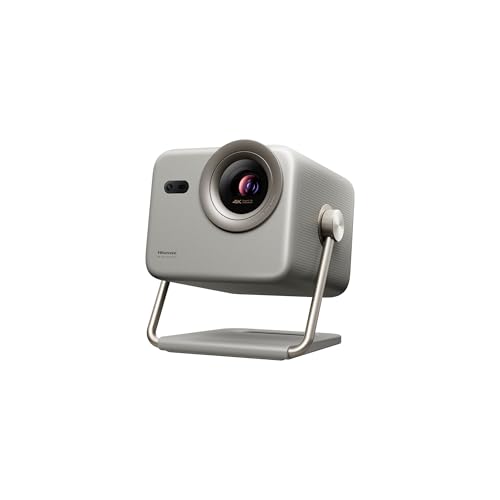
Hisense M2 Pro Triple Laser Lifestyle Projector

Hisense PX3-PRO Ultra Short Throw Laser Projector

TOPTRO Portable Smart Projector with Google TV

Hisense C2 Pro Triple Laser Portable Projector

Hisense L9Q Ultra Short Throw Triple Laser Projector
A Deeper Look At The Lineup
The VOPLLS 4600 ANSI Smart 4K Projector earns the top spot here because raw brightness matters most in conference rooms, where lights stay on and windows stay open. Its 4600 ANSI lumen rating pushes through ambient light better than most home-class units, so slides remain readable from the back row. Built-in WiFi and Bluetooth cut down on the cable clutter that usually snakes across the table during meetings.
For offices that host weekly all-hands, training sessions, or client pitches, this pick keeps setup simple. The smart platform handles streaming apps natively, so a presenter can walk in with a phone and start without dongles. Owners of bright, glass-walled spaces will appreciate that color stays saturated even when the projector fights daylight.
Bright Spots
- 4600 ANSI lumens keeps slides readable under fluorescent office lighting
- Autofocus removes the manual tweaking that usually eats into meeting time
- Native 4K with HDR10+ support renders charts and product photos cleanly
- Integrated WiFi and Bluetooth reduce cable mess in shared spaces
Things To Consider
- High brightness output generates noticeable fan noise during long sessions
- At its lumen rating, expect a heavier unit that prefers a fixed mount over frequent relocation
Best Suited To
Mid-to-large conference rooms with strong overhead lighting and presenters who need plug-and-play simplicity.
A Better Fit Elsewhere
For tiny huddle rooms where an ultra-short throw matters more than raw brightness, the Hisense PX4-Pro Ultra Short Throw Laser Cinema is a stronger match.
The Hisense XR10 is the kind of projector that turns a quarterly review into something that feels closer to a cinema. A triple-laser light source pumps out 6000 ANSI lumens with a 6000:1 contrast ratio, so deep colors stay rich rather than crushed. IMAX Enhanced and Dolby Vision processing add a polish that matters most when client-facing decks include high-res photography or product renders.
Executive boardrooms benefit most from the motorized optical zoom (0.84-2.0:1) and lens shift, which let installers dial in the geometry without physically moving the unit. Devialet-tuned audio means a small room doesn’t need a separate soundbar to hear the presenter clearly. For companies that treat their conference room like a brand statement, this projector brings serious visual weight.
Well-Handled Touches
- Triple-laser engine produces broad color volume for client-facing visuals
- Optical zoom and lens shift give installers flexible placement options
- Dolby Vision and IMAX Enhanced support elevate media presentations
- Devialet audio delivers room-filling sound without extra speakers
Honest Caveats
- Larger chassis demands ceiling mounting or a sturdy credenza
- Premium feature set comes with a heavier footprint than portable picks
- Vidaa OS app selection trails Google TV for niche business apps
Right Fit For
C-Suite boardrooms and high-end client spaces where image fidelity shapes how a brand is perceived.
Look Elsewhere When
Teams needing a lighter portable unit for travel should reach for the Hisense M2 Pro Triple Laser Lifestyle Projector instead.
The Hisense C3 brings triple-laser color to mid-tier conference rooms without the bulk of an installation-grade unit. At 2500 ANSI lumens, it handles moderately lit spaces better than entry-level portables, and the 65-300 inch throw range adapts to almost any wall layout. JBL-tuned speakers cover the audio side without requiring external gear.
What sets the C3 apart for office use is the Vidaa smart platform with Netflix and other streaming apps baked in. Hybrid teams that join meetings from home can cast directly from the projector. Intelligent screen adjustments auto-correct geometry and focus, so even non-technical staff can set it up before a meeting. Compared to the brighter Hisense XR10 earlier, this is the lighter, friendlier version for shared workspaces.
What Works In Its Favor
- Triple-laser light source produces accurate color across long viewing distances
- Built-in streaming apps reduce the need for external devices
- Auto screen adjustments make setup accessible for non-technical staff
- JBL audio covers typical conference room volumes without extra speakers
Worth Bearing In Mind
- 2500 ANSI lumens falls short in very bright glass-walled rooms
- Vidaa OS has fewer business-specific apps than Google TV
Made For
Hybrid teams that need a versatile projector doubling as a streaming display for after-hours content.
Where A Sibling Pick Shines
For daylight-heavy rooms, the VOPLLS 4600 ANSI Smart 4K Projector offers considerably more brightness headroom.
The Hisense C2 Ultra balances portability with serious image chops. At 3000 lumens with 4K UHD resolution and a 65-300 inch throw, it scales from a small huddle room to a larger training space without swapping gear. Dolby Vision and IMAX Enhanced modes give it credibility for design and media teams that need accurate color reproduction.
The Xbox optimization hints at low-latency performance, which benefits fast-moving video content during presentations. JBL-tuned audio keeps the package self-contained. Compared to the smaller Hisense C3 earlier, this Ultra steps up brightness and adds the gaming-grade latency tuning that some teams find useful for live demos.
Advantages To Know
- 3000 lumens handles mixed-lighting environments better than entry portables
- Dolby Vision processing benefits color-sensitive design decks
- Low-latency mode supports smooth video playback during demos
- Optical zoom lets installers match screen size without moving the unit
Trade Offs To Consider
- Larger than a grab-and-go portable, so it suits a semi-permanent setup
Perfect Match For
Multi-purpose rooms used for both presentations and media review sessions.
Skip It When
A team that travels between offices will find the lighter Hisense M2 Pro Triple Laser Lifestyle Projector easier to carry.
The Hisense PX4-Pro is an ultra-short throw unit that lives a few inches from the wall and still throws an 80-200 inch image. That placement matters in tight huddle rooms where a ceiling mount isn’t practical and shadows from presenters can ruin a slide. With 3500 ANSI lumens and a 6500:1 contrast ratio, it punches above most UST competitors in raw light output.
The Iris lens system, combined with Dolby Vision and IMAX Enhanced support, gives it cinema-grade color depth for client-facing rooms. Devialet audio and Dolby Atmos handle the sound end without needing a soundbar. FreeSync Premium certification and 1ms low latency make it a versatile choice when the room doubles for product demos with motion content. Compared to the more portable C-series Hisense models, this one anchors the room rather than roaming it.
Positive Takeaways
- Ultra-short throw eliminates shadows and ceiling-mount installation
- 3500 ANSI lumens outclasses most UST units in bright conditions
- Devialet and Dolby Atmos audio removes the need for external speakers
- FreeSync Premium support enables smooth motion demos
Practical Considerations
- Requires a flat wall or an ambient-light-rejecting screen for best results
- Larger base footprint compared to ceiling-mounted traditional projectors
- Fixed installation makes relocation between rooms impractical
Feature Snapshot
Who It Suits Best
Conference rooms with limited ceiling-mount access and teams needing a fixed, low-maintenance centerpiece.
Consider Something Else When
Offices that move projectors between rooms will find the Hisense L9Q Ultra Short Throw Triple Laser Projector easier to integrate into mixed-use spaces.
The Hisense M2 Pro is built for teams that don’t have a dedicated AV closet. At 1300 ANSI lumens with a 65-200 inch throw, it leans toward smaller meeting rooms and coworking spaces where lighting can be controlled. The triple-laser engine keeps color faithful even when the room isn’t pitch dark.
Vidaa OS with built-in Netflix and intelligent screen adjustments give the M2 Pro a friendly setup experience. It’s noticeably lighter than the Hisense C2 Ultra earlier, making it easier to toss in a bag between offices. For traveling consultants or small-team huddle rooms, the trade-off in brightness is usually worth the portability.
Where It Delivers
- Lightweight chassis fits in a carry bag for travel between offices
- Intelligent screen adjustments auto-correct geometry on the fly
- Dolby Vision support improves video playback for media-heavy decks
- Optical zoom adds placement flexibility in tight spaces
A Few Limitations
- 1300 lumens struggles in sunlit rooms with uncovered windows
Right Fit For
Remote teams, traveling consultants, and small huddle rooms with controllable lighting.
Reach For A Different Pick When
Rooms with strong daylight will need the higher-lumen VOPLLS 4600 ANSI Smart 4K Projector to stay readable.
The Hisense PX3-PRO sits in the sweet spot for offices that want ultra-short throw without going all-in on flagship pricing. At 3000 lumens with a 3000:1 contrast ratio and an 80-150 inch screen range, it covers most conference room sizes without a ceiling mount. The 240Hz high refresh rate is unusually high for this category, which makes it appealing for live product demos with motion-heavy content.
Google TV gives the PX3-PRO a richer app ecosystem than Hisense’s own Vidaa platform. Dolby Vision and IMAX Enhanced support mean color-critical presentations don’t look flat. Compared to the brighter PX4-Pro earlier, this one trades some lumen output for a slimmer profile and a familiar smart TV interface.
What Helps Most
- 240Hz refresh rate benefits fast-motion content during demos
- Google TV brings a familiar, app-rich smart interface
- Ultra-short throw design suits rooms without ceiling wiring
- Dolby Vision and Atmos support enrich video playback quality
Points To Keep In Mind
- 3000:1 contrast trails the higher-end PX4-Pro’s 6500:1 ratio
- UST placement requires a flat surface for accurate geometry
Best Suited To
Mid-size meeting rooms where presenters want a console-style setup with a familiar smart interface.
Swap It Out When
Color-critical design reviews will benefit from the Pantone-validated Hisense L9Q Ultra Short Throw Triple Laser Projector.
The TOPTRO Portable Smart Projector brings Google TV 14.0 to small teams that don’t want to budget for a flagship laser unit. Built-in apps cover Netflix, YouTube, and the streaming services most meeting rooms already use, so a separate streaming stick isn’t required. HDR10 support and 4K input handling keep images sharp for typical presentation graphics.
Short-throw capability and auto focus mean it works in tight rooms where a back-table placement is the only option. WiFi and Bluetooth round out the wireless connectivity, useful for ad-hoc meetings. For small offices prioritizing cost over lumen output, this projector covers the basics without major compromises.
Notable Upsides
- Google TV 14.0 includes streaming apps without extra hardware
- Short-throw design fits small rooms and standing desks
- Auto focus and keystone reduce setup time for non-technical users
- Lower cost makes it accessible for startups and small teams
Less Ideal Details
- Lower lumen output limits use in bright daytime rooms
- Smaller internal storage may require external casting for large files
- Audio quality benefits from pairing with a separate Bluetooth speaker in larger rooms
Whose Shelf It Belongs On
Small offices, startups, and education setups that prioritize app access and price over peak brightness.
Not Your Match When
Rooms with strong daylight and a need for vivid color should look at the Hisense C2 Pro Triple Laser Portable Projector.
The Hisense C2 Pro solves a real-world headache: awkward room layouts. A 360-degree horizontal rotation with 90 degrees of upward tilt and 45 degrees of downward tilt gives 135 degrees of vertical adjustment, so the image lands where it should even in rooms without a centered wall. The all-metal body holds adjustments without drifting mid-meeting.
Triple-laser color, 2600 lumens, and a 65-300 inch throw range make it flexible for both small huddles and larger training spaces. Auto keystone correction handles off-axis placement, and optical zoom keeps the image sharp without digital scaling. JBL-tuned audio and a VIDAA smart platform round out the package. Compared to the larger Hisense C2 Ultra earlier, this Pro leans harder into mounting flexibility.
Everyday Perks
- Multi-axis adjustment suits rooms without centered projection walls
- Optical zoom maintains sharpness across room sizes
- Auto keystone correction simplifies setup in awkward spaces
- Triple-laser color output stays consistent across long sessions
Things That May Matter
- Adjustable joints need occasional re-tightening over years of use
Who Should Grab It
Offices with non-traditional layouts, exposed brick walls, or angled ceilings where standard placement fails.
A Better Fit Elsewhere
For fixed-room installations, the Hisense PX3-PRO Ultra Short Throw Laser Projector offers a cleaner console-style mount.
The Hisense L9Q is the pick for rooms where color accuracy shapes the outcome. Pantone validation means colors render close to a known standard, which matters for design studios, fashion brands, and any agency showing client-facing color decks. At 5000 ANSI lumens and a 5000:1 contrast ratio, it pushes enough light for a sunlit boardroom without losing detail.
The ultra-short throw design places the unit inches from the wall, freeing the room from ceiling hardware. Dolby Vision, IMAX Enhanced, and Devialet-tuned audio combine into a polished system for media presentations. Google TV brings a familiar smart interface for streaming and casting. Compared to the PX4-Pro earlier, this model trades some maximum throw size for richer color management.
What Makes Sense
- Pantone validation supports color-critical design and brand work
- 5000 lumens holds up in brightly lit executive spaces
- Ultra-short throw eliminates ceiling-mount installation
- Google TV offers a familiar smart platform with broad app support
Details To Watch
- Larger cabinet footprint demands dedicated credenza space
- Requires an ambient-light-rejecting screen for peak image quality in daylight
Feature Snapshot
Built With In Mind
Creative agencies, design studios, and brand-focused boardrooms where color fidelity influences decisions.
Another Choice May Suit
For general business meetings without color-critical decks, the Hisense PX3-PRO Ultra Short Throw Laser Projector delivers similar UST convenience at a more accessible tier.
Matching Projectors To Real Meeting Rooms
Choosing the right projector comes down to three honest questions: how bright is the room, how big does the image need to be, and how often does the gear move between spaces.
Brightness above all else. ANSI lumens measure how much light the projector throws at the screen. For sunlit boardrooms with uncovered windows, anything below 3000 ANSI lumens tends to wash out. For rooms with dimmable lighting or curtains, 1500 to 2500 lumens usually holds up. ANSI lumens matter more than raw resolution when ambient light is the main obstacle.
Throw distance changes everything. Ultra-short throw units sit inches from the wall and avoid shadows when someone walks in front of the screen. Standard throw projectors need several feet of distance, which works better in deep rooms with ceiling mounts. Short throw splits the difference and fits most mid-size spaces without rewiring.
Smart platforms save meeting time. A built-in smart OS like Google TV or Vidaa cuts the dongle clutter and lets a presenter walk in and start. For teams that already rely on Zoom, Slack, or streaming services, native apps remove one more thing that can break before a meeting starts.
Key Considerations Across These Picks
Pitfalls Shoppers Hit
Brightness numbers can mislead when rooms have glossy walls or uncovered windows, so a darker surface or an ambient-light-rejecting screen often matters more than chasing another thousand lumens. Picking a projector without checking the throw ratio leaves people with an image that’s too small or too large for the wall.
Where The Extra Money Goes
Higher-tier laser projectors add longer light-source lifespans, broader color gamuts, and ultra-short throw designs that simply aren’t possible at lower tiers. The trade-off is cost, weight, and a fixed installation footprint. For rooms used a few times a week, a mid-tier unit usually pays off. For daily all-hands in bright spaces, the premium for flagship brightness tends to earn its keep.
Frequently Asked Questions
How many lumens do I need for a conference room? Rooms with controllable lighting work well around 2000 to 3000 ANSI lumens. Sunlit or glass-walled spaces benefit from 3500 ANSI lumens or more.
What is ultra-short throw and why does it matter? Ultra-short throw projectors sit a few inches from the wall and still produce a large image, which eliminates shadows from presenters and removes the need for ceiling mounts.
Do I need 4K resolution for business presentations? 4K helps with detailed charts, design decks, and high-res photography. For text-heavy slides in smaller rooms, 1080p often looks fine from typical viewing distances.
Can a smart projector replace a streaming stick? Most modern projectors with Google TV or Vidaa OS include the major streaming apps natively, which reduces cable clutter and removes one device from the meeting setup.
How long do laser projector light sources last? Laser light sources commonly last well beyond traditional lamp-based projectors, reducing the maintenance cycle for offices that run projectors daily.
The Takeaway
A good conference room projector fades into the background: it just works, the image looks right, and nobody talks about the gear. Match the brightness to your lighting conditions, the throw distance to your room shape, and the smart platform to the apps your team already uses. The rest is just preference and budget.




