

Conference calls used to mean huddling around a laptop mic and hoping for the best. Now, with hybrid work sticking around, I’ve watched teams invest in real audio gear and finally sound professional on the other end. The right conference room speaker and microphones combo turns muddled side conversations into clear, productive meetings, whether you’re running a four-person standup or a twelve-person client pitch.
I put together this list for office managers, remote workers, and small business owners who need dependable audio without overspending. Some picks here are pure speakerphones for travel and huddle rooms, while others bundle a 360-degree camera for full video conferencing setups. Every entry below is grounded in real specs and use cases I think through carefully, with honest trade-offs called out where they matter.
The Shortlist At A Glance

Jabra Speak 410 Corded Speakerphone for Softphones
Jabra Speak 410 Corded Speakerphone, MS-Optimized
Jabra Speak 410 UC Speakerphone for PC

Synbit Conference Speaker and Microphone with Daisy Chain

TONGVEO Bluetooth Speakerphone Conference Microphones

COOLPO 360 Conference Room Camera with Speakerphone

COOLPO Video Conference Camera 4K Webcam

COOLPO Camera 360 Pana Conference System

EMEET Luna Plus Kit Speakerphone with Satellite Mic
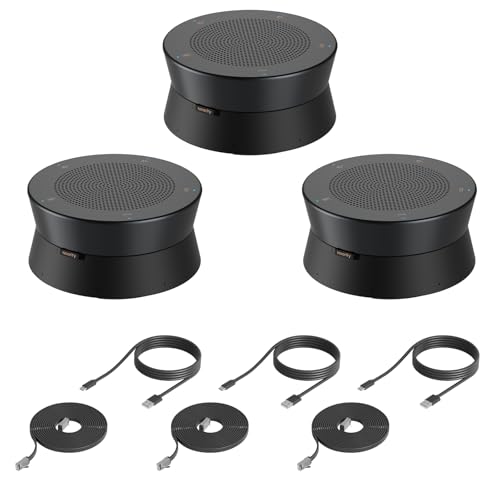
Nearity A20S 3-Pack Conference Speaker System
More Details On Our Top Picks
The Jabra Speak 410 is one of those devices that disappears into your routine once you start using it. It plugs straight into a laptop via USB, no drivers or pairing dance required, which makes it a go-to when a meeting room suddenly needs an audio upgrade. The 360-degree omnidirectional microphone, meaning it picks up sound equally from every direction, handles a small table of four to five people without straining.
I’ve seen this model work best for solo professionals or small teams that move between hotel rooms, cafés, and client offices. The integrated cable means you never forget the dongle, and the compact footprint slides into a laptop bag sleeve. Sound quality is clean enough for executive check-ins, though large rooms will stretch its limits.
Why It Works Well
- True plug-and-play USB connectivity, no software installation needed
- Omnidirectional microphone captures voices from every seat at a small table
- Compact, travel-friendly design with attached cable for grab-and-go use
- Wideband audio processing keeps voices clear on both ends of the call
Things To Consider
- The corded USB design means no wireless flexibility once plugged in
- Microphone range tops out for rooms beyond six to eight participants, depending on acoustics
Whose Bag It Belongs In
Remote workers and traveling professionals who carry meetings between locations.
Consider Something Else When
The Synbit Conference Speaker with Daisy Chain suits medium conference rooms needing wider coverage.
This MS-Optimized variant of the Speak 410 is built for organizations running Microsoft Teams or Skype for Business as their primary platform. The firmware tweaks make call controls like answer, end, and mute integrate directly with those apps. If your office IT department has standardized on Microsoft tools, this version saves the small frustration of buttons not behaving as expected.
The hardware footprint is identical to the standard Speak 410 above, so you get the same portable USB form factor and 360-degree pickup. The difference lives in how it talks to your softphone. For Teams-heavy environments, that native integration is genuinely useful rather than a marketing afterthought.
Where It Delivers
- Native Microsoft Teams and Skype for Business button integration
- Identical compact form factor with attached USB cable
- Wideband audio quality that handles executive-level calls cleanly
- Driverless setup on most modern Windows machines
Worth Noting
- Less flexible for offices standardized on Zoom, Google Meet, or Webex
- Corded design limits placement around larger tables
- Microphone pickup range suits small rooms, not boardrooms
Quick Facts
Made For
Microsoft Teams-based offices that need a reliable, certified speakerphone for huddle spaces.
A Better Fit Elsewhere
The Jabra Speak 410 UC Speakerphone for PC is the better match for mixed-platform environments.
The UC (Unified Communications) version of the Speak 410 targets teams that jump between multiple conferencing platforms. UC standards mean the device is tested to work cleanly with Cisco, Avaya, Alcatel-Lucent, and similar enterprise systems, not just Microsoft. For mixed environments where the platform changes by project, this flexibility pays off.
Like its siblings, it relies on a fixed USB cable and an omnidirectional microphone, so the core audio experience stays consistent. The real value is in the broader compatibility: fewer surprises when someone joins from a Zoom room while another caller is on a Cisco bridge.
Reasons It Performs
- Certified Unified Communications compatibility across major platforms
- Same dependable 360-degree microphone pickup as the Speak 410 family
- Compact size makes it easy to relocate between desks and meeting spaces
- Wideband audio handles clear voice reproduction without harshness
Trade Offs
- Lacks the deeper Teams-specific button mapping of the MS-Optimized variant
- Corded USB only, so no Bluetooth pairing with mobile devices
Right Fit For
Teams running multiple UC platforms who want one speakerphone that handles them all.
Skip It When
Your shop is Teams-only, where the MS-Optimized Speak 410 offers tighter integration.
The Synbit SPK400 steps things up with three connection options: Bluetooth for cable-free use, USB for stable laptop hookups, and a wireless dongle for machines without reliable Bluetooth. That flexibility matters in offices where people dock at different workstations or join from personal laptops. The DSP (Digital Signal Processing) audio algorithms help suppress background noise and tame echo.
Daisy chaining (linking multiple speakerphones together by cable so they act as one extended system) is the standout feature here. Two Synbit units can link up to cover a long boardroom table, expanding pickup well beyond what a single speakerphone handles. For offices growing into medium-sized meeting spaces, that scalability is genuinely valuable.
Useful Strengths
- Triple connectivity: Bluetooth, USB, and wireless dongle for varied setups
- Daisy chain support extends coverage across larger tables
- Built-in echo and noise cancellation for clearer call quality
- 360-degree omnidirectional microphone pickup covers the whole room
Points To Note
- Battery life on wireless mode is shorter than full-day conference use
- Daisy chain requires a second unit for the extended coverage benefit
Feature Snapshot
Best Suited To
Medium meeting rooms with long tables that need scalable microphone coverage.
Look Elsewhere When
The TONGVEO Bluetooth Speakerphone offers wireless operation with four AI-tuned microphones for larger groups.
TONGVEO packs four AI-tuned microphones into a wireless speakerphone designed for groups of eight to twelve people. Full-duplex audio (the ability to speak and be heard simultaneously without clipping) means conversations flow naturally without that awkward walkie-talkie choppiness. The triple connectivity covers USB, Bluetooth, and a dongle, so setup headaches stay minimal.
The 8-hour call time rating covers a full workday of meetings without recharging. For larger conference tables where people spread out, four mics deliver more consistent pickup than the two-mic setups common at this size. The trade-off is a slightly larger chassis than the Jabra 410 family, though still portable.
Notable Gains
- Four AI noise-cancellation microphones for cleaner voice capture
- Full-duplex audio supports natural back-and-forth conversation
- 8-hour rated call time covers a full meeting-heavy day
- USB, Bluetooth, and dongle options cover varied connection needs
Room For Improvement
- Larger footprint than pocket-friendly options like the Jabra 410
- Microphone array is overkill for two- or three-person huddle calls
Who Should Grab It
Mid-sized teams of eight to twelve who run long meetings throughout the workday.
Swap It Out When
The EMEET Luna Plus Kit suits rooms that need an extra satellite mic for hard-to-reach seats.
The COOLPO AI Huddle PANA bundles a 360-degree camera, microphone array, and speaker into a single tabletop unit. That integration is the real appeal: one device replaces a webcam, external mic, and conference speaker on your meeting room table. The 10-foot USB cable gives flexible placement without crowding the connection point.
The split-screen view stitches together faces from around the table so remote attendees see everyone, not just whoever is talking. For hybrid teams where half the room is in person and half is remote, that visibility reduces the “who just spoke?” confusion that frustrates distributed colleagues.
Useful Highlights
- All-in-one design replaces separate webcam, mic, and speaker
- 360-degree video with split-screen shows all participants to remote callers
- 10-foot USB cable allows flexible tabletop placement
- Compact form factor fits standard meeting room tables
Softer Spots
- Single USB connection means no wireless flexibility for mobile use
- Video resolution is solid but not 4K, unlike the COOLPO 4K model below
At A Glance
Perfect Match For
Hybrid meeting rooms where both in-room and remote participants need equal visibility.
Another Choice May Suit
The COOLPO 4K Webcam better serves presentation-led meetings that demand higher video fidelity.
The COOLPO 4K webcam focuses on video quality where it matters most: client-facing presentations, recorded training sessions, and high-stakes pitches. The 110-degree ultra-wide field of view fits several people in frame without the fisheye distortion common to wide-angle lenses. Gesture-activated focus responds to a raised hand by zooming onto the speaker, a small touch that makes handoffs feel natural.
This is a video-first device rather than an all-in-one. It pairs well with a separate speakerphone like the EMEET Luna Plus if your room needs both 4K video and full conference audio. Think of it as the camera upgrade for a room that already has decent audio handled.
Well-Handled Touches
- 4K resolution delivers crisp detail for recorded and live meetings
- 110-degree field of view fits multi-person frames naturally
- Gesture-activated focus responds to a raised hand for smooth handoffs
- Single-unit video design keeps meeting room tables uncluttered
Honest Caveats
- Audio is supplemental; pairing with a dedicated speakerphone helps in larger rooms
- 4K streaming demands stronger network bandwidth than 1080p calls
Built With In Mind
Organizations running client presentations, webinars, and recorded training sessions.
Reach For A Different Pick When
The Synbit Conference Speaker suits rooms that prioritize audio quality over video resolution.
This earlier COOLPO Pana unit delivers 360-degree video and audio in a more compact package than its 4K sibling. The all-in-one form factor suits small huddle rooms where a single device replaces a tangle of peripherals. No stitching software required, since the 360-degree capture happens at the lens level.
For offices outfitting a small meeting room on a budget, this Pana gives you the immersive 360-degree experience at a lower tier than the newer COOLPO models. The trade-off is in video resolution and AI features, which the more recent 4K version handles better. If you prioritize clean video and decent audio in one box, this remains a sensible pick.
Everyday Wins
- Compact 360-degree all-in-one saves table space in small rooms
- No software stitching required for the panoramic view
- Single-cable setup simplifies installation and reduces clutter
- Integrated microphone captures voices from around the table
Less Ideal Details
- Lower video resolution than the newer 4K COOLPO model
- Less advanced AI features compared to updated COOLPO releases
Who It Suits Best
Small huddle rooms that want 360-degree video without a complex setup.
Where A Sibling Pick Shines
The COOLPO 4K Webcam is the smarter call for rooms needing sharper video output.
The EMEET Luna Plus Kit ships with the main speakerphone plus a dedicated satellite microphone, giving you nine total mics across the room. The main unit’s eight-mic array already covers a ten-person conference, and the satellite extends that reach into rooms of up to fourteen. For longer tables or L-shaped layouts, that extra mic solves real coverage gaps.
Bluetooth connectivity means cable-free placement, while USB covers wired hookups. The kit approach makes sense for offices that have outgrown a single-speakerphone setup but don’t want a full installed conference system. If your main pain point is dropped voices from the far end of the table, the satellite mic directly addresses it.
Bright Spots
- 8+1 microphone array covers rooms of up to fourteen people
- Satellite mic fills in coverage gaps on long or L-shaped tables
- Bluetooth and USB dual connectivity for flexible placement
- Omnidirectional pickup ensures every seat gets heard
Some Limits To Know
- Two units to place and manage instead of a single device
- More microphones than needed for small four-person huddle rooms
Feature Rundown
Right Fit For
Mid-to-large conference rooms with fourteen or fewer participants in awkward layouts.
Not Your Match When
The Nearity A20S 3-Pack serves enterprise spaces needing coverage in multiple rooms at once.
The Nearity A20S 3-Pack bundles three speakerphones designed to daisy chain across large spaces. Each unit carries eight MEMS (Micro-Electro-Mechanical Systems) microphones, which are tiny solid-state mics with strong noise rejection and consistent sensitivity. AI 2.0 algorithms handle echo, reverberation, and background noise, which is especially helpful in glass-walled conference rooms where reflections get tricky.
This is the heavy-duty option for enterprise-scale deployments: multiple linked units, scalable coverage, and clean audio in acoustically challenging spaces. If you’re outfitting a boardroom floor or distributed meeting spaces, the three-unit approach gives you placement flexibility that single units can’t match.
The Case For It
- Three-unit daisy chain extends coverage across large or multi-room spaces
- AI-driven echo and reverberation cancellation handles glass-walled rooms
- MEMS microphone technology delivers consistent voice pickup
- Scalable design grows with your organization’s meeting space needs
Practical Considerations
- Three units require more setup time and cable management than a single device
- Overkill for small offices that only host four-person meetings
Made For
Large enterprises outfitting multiple rooms or expansive boardroom floors.
Where Another Pick Suits Better
The TONGVEO Speakerphone handles single-room setups for eight to twelve people more simply.
What Matters Most When Choosing Conference Room Speaker And Microphones
Room Size and Pickup Range
Microphone pickup range is the first thing I look at. A small huddle room with four people gets perfectly clear audio from a compact omnidirectional speakerphone like the Jabra Speak 410 family. A twelve-person boardroom needs more coverage, either from a multi-mic array like the TONGVEO or a daisy-chained setup like the Nearity A20S. Mismatching room size to pickup range is the most common cause of “I can hear some people but not others” complaints.
Connectivity and Platform Compatibility
USB-only devices keep things simple, but Bluetooth adds placement flexibility that matters in real offices. Platform certification, such as Microsoft Teams optimization or UC standard compatibility, dictates whether call-control buttons behave as expected. Teams-heavy offices gain real workflow benefits from MS-optimized firmware; mixed-platform shops lean toward UC-certified units.
Audio Processing Features
Echo cancellation, noise suppression, and full-duplex audio separate adequate speakerphones from genuinely good ones. Full-duplex means both sides can speak simultaneously without audio cutting out, which sounds obvious but isn’t universal. Glass-walled rooms and open-plan offices especially benefit from advanced DSP processing to keep voices intelligible.
Video Bundling Considerations
Some products, like the COOLPO Pana family, bundle 360-degree cameras with the speakerphone. That’s a smart move for hybrid rooms, but only if video matters to your use case. Pure audio rooms get better value from dedicated speakerphones that put all the engineering budget into microphones and speakers rather than splitting it across a camera lens too.
Key Considerations Across These Picks
Where Shoppers Go Wrong
A common mistake is buying a single compact speakerphone for a boardroom that seats twelve. Even the best omnidirectional mic on a small unit can’t reach every seat with equal clarity. The fix is matching pickup range to room size: scale up to multi-mic arrays or daisy-chained systems when your room grows beyond six to eight participants. Another slip is ignoring platform certification; a Teams-optimized device in a Zoom shop delivers half-familiar button behavior that frustrates daily use.
What The Higher Tier Buys
Premium conference audio gear typically adds more microphones, stronger AI-driven noise cancellation, and scalability through daisy chaining. The Nearity A20S 3-Pack, for instance, trades the simplicity of a single unit for enterprise-grade coverage that grows with your office footprint. The honest read is that mid-tier speakerphones handle most small and medium rooms well, while the higher tier earns its keep in glass-walled rooms, large tables, and multi-room deployments where acoustic challenges and scale demand more from the hardware.
Frequently Asked Questions
How many people can a single conference speakerphone handle?
Most compact speakerphones cover four to six participants comfortably, while larger units with multi-mic arrays handle eight to twelve. Beyond that, daisy-chained systems like the Nearity A20S extend coverage further.
What’s the difference between omnidirectional and directional microphones?
Omnidirectional mics pick up sound equally from every direction, ideal for round table discussions. Directional mics focus on a specific area, which works better for single presenters but misses side conversations.
Do I need Bluetooth connectivity on a conference speakerphone?
Bluetooth lets you place the unit cable-free, useful when your meeting room table is far from a USB port. Wired USB connections stay simpler and avoid battery concerns for permanent installations.
What is full-duplex audio and why does it matter?
Full-duplex audio allows both parties to speak and be heard at the same time without cutting out. Without it, conversations feel choppy and turn-taking becomes awkward, especially during fast-paced debates.
Can I use a conference speakerphone for music playback?
Most conference speakerphones handle voice well but lack the bass response and stereo separation of dedicated music speakers. For background music in a meeting room, they’re fine; for critical listening, use a proper audio system.
Closing Remarks
The right conference audio gear depends almost entirely on your room and your team. Small huddle spaces get plenty from a portable unit like the Jabra Speak 410 family, while hybrid rooms benefit from the all-in-one convenience of a COOLPO Pana system. Large enterprises should think in terms of scalability and daisy-chained coverage. Take an honest look at how many people sit at your table, what platform you actually use, and whether your room’s acoustics are friendly or hostile to clear audio. That grounding makes the rest of the decision straightforward.




