

Cloud printing used to feel like a luxury reserved for office IT departments. Now it’s the default expectation, and shoppers want hardware that actually plays nicely with phones, laptops, and shared cloud accounts without a stack of driver CDs.
I pulled together eight options that span home offices, road warriors, photo creators, and small teams. Each one connects to the cloud differently, and the right match depends on how you work, what you print, and how often you want to think about ink.
The Choices Worth Comparing

Canon CLI-251 Ink 4-Pack with PIXMA iX6820 Wireless Printer

HP Sprocket Select Portable Photo Printer (2.3×3.4)

Canon Ivy 2 Mini Photo Printer (Pure White)
HP Sprocket Select Photo Printer (Eclipse)

Brother MFC-L2820DW XL Monochrome Laser All-in-One

co2CREA Hard Travel Case for Canon PIXMA TR150/TR160/iP110

Epson EcoTank ET-2980 Wireless Supertank All-in-One
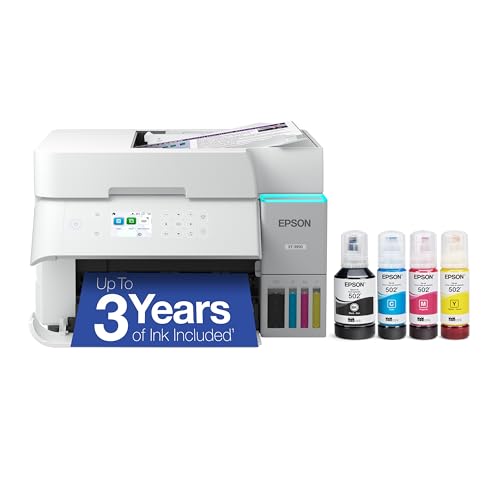
Epson EcoTank ET-3950 Wireless Supertank All-in-One
More On The Choices That Made The List
This bundle pairs Canon’s PIXMA iX6820 wireless inkjet with a CLI-251 four-color cartridge set, giving shoppers a printer plus a starter ink supply in one shot. The iX6820 supports AirPrint for iOS devices and cloud-based printing workflows, which makes it a sensible choice for a home office that bounces between laptops, tablets, and phones.
ChromaLife100+ is Canon’s name for the ink-and-paper system designed to deliver long-lasting photo output, and the iX6820 uses a full-photolithography inkjet nozzle (a microscopic nozzle array that lays down fine ink droplets) for detailed photo prints. For anyone running a small studio or working from home with mixed document and photo needs, this pairing tends to slot in cleanly.
Strong Points
- Wireless AirPrint and cloud printing support straight out of the box
- Four-color CLI-251 cartridge pack means the first color project is covered
- Handles documents and photo prints in a single compact body
- ChromaLife100+ ink-and-paper pairing aims for lasting photo color
Things To Consider
- Standard CLI-251 cartridges run out faster than tank-based systems like the Epson EcoTank models later in this list
- No built-in scanner or copier, so it’s print-only for the office workflow
Feature Snapshot
Who Should Grab It
Small-business operators who need wireless prints from multiple devices and want photo-quality color on the same machine.
Look Elsewhere When
Heavy-volume document printers should consider the Brother MFC-L2820DW XL further down for its larger toner reservoir.
The HP Sprocket Select takes the original Sprocket formula and bumps the output size up by about 30%, landing on 2.3×3.4-inch prints. It uses Zink (Zero Ink) technology, meaning the color crystals sit inside the paper itself, so there’s no toner or ribbon cartridge to swap. Pair it with the bundled soft case and the printer becomes a genuinely portable travel companion.
The Bluetooth connection to the HP Sprocket app unlocks filters, frames, and stickers, which makes this a social-friendly pick rather than a serious archival printer. For travelers, party planners, and anyone building a physical scrapbook from phone photos, the bundle offers a complete package.
A Few Highlights
- Bundled soft case and Zink sticky-back paper mean prints can go straight into a journal
- Zink paper is water- and smudge-resistant for everyday handling
- App-based editing adds creative framing without needing a separate editor
- No ink cartridges to track on the road
Trade Offs
- Print quality leans casual; archival photo sharpness isn’t the goal here
- Zink paper packs add up over time for heavy use
- Battery life drains faster with continuous Bluetooth streaming
Made For
Travelers and party hosts who want quick physical prints straight from their phone without dealing with ink.
Consider Something Else When
Shops needing even smaller pocketable prints should look at the Canon Ivy 2 Mini Photo Printer covered next.
Canon’s Ivy 2 Mini is small enough to drop into a jacket pocket, which is the whole point. It runs over Bluetooth and pairs with the Canon Mini Print app on iOS and Android, then spits out 2×3-inch sticky-backed prints. The peel-and-stick back is what separates it from a typical phone print and turns each shot into a label, journal decoration, or fridge magnet.
Compared to the larger Sprocket Select just above, this one trades print size for true pocket portability. Kids’ projects, bullet journals, and quick party favors all sit comfortably inside its use case.
The Case For It
- Genuinely pocket-friendly footprint for travel and events
- Sticky-back Zink paper doubles as label or decoration
- Cross-platform app with iOS and Android support
- No ink cartridges means a single consumable stream
Minor Gripes
- Print resolution favors fun over fine detail
- Battery and paper capacity are limited per charge
Right Fit For
Creatives, parents, and journalers who want quick sticker prints from a phone without hauling a bigger device.
A Better Fit Elsewhere
Users wanting larger instant photos should consider the HP Sprocket Select (Eclipse) reviewed in the next slot.
The Eclipse edition of the Sprocket Select keeps the same 2.3×3.4-inch Zink output but leans into social content creation through the HP Sprocket app. Augmented reality features unlock content tied to hashtagged photos, and the app’s doodle tools let users mark up images before they hit the paper. It pairs with iOS and Android over Bluetooth.
For anyone already active on social platforms, the integration makes this printer feel less like an accessory and more like a content pipeline. The Eclipse colorway reads as a refined alternative to brighter portable printers.
Notable Upsides
- App-driven doodle and AR features beyond simple prints
- Hashtag search pulls in social media photos for fast printing
- Sticky-backed Zink paper skips the ink cartridge mess
- Sleek Eclipse finish looks at home on a desk or shelf
Points To Note
- Smaller prints than traditional photo formats limit display use
- App reliance means the printer is less useful without a phone
Feature Snapshot
Who Will Love This
Social-first creators and event hosts who want a stylized keepsake tied to their digital content.
Reach For A Different Pick When
Anyone needing office documents should skip straight to the Brother MFC-L2820DW XL or an EcoTank model below.
The Brother MFC-L2820DW XL is a compact monochrome laser all-in-one built for shops that burn through reams of paper. It ships with enough toner in the box to print up to 4,200 pages, which is roughly six times the in-box supply of the standard MFC-L2820DW. Add duplex (two-sided) printing plus copy, scan, and fax, and the unit fills a small office role without dominating the desk.
Compared to the photo-focused picks earlier in this list, this one is unapologetically a document machine. Cloud-connected workflows still matter here, just for invoices, contracts, and shared team drives rather than travel journals.
Everyday Wins
- Up to 4,200 pages of in-box toner cuts the first refill window way down
- All-in-one footprint covers print, copy, scan, and fax in one device
- Automatic duplex printing saves paper on long jobs
- Monochrome laser output stays sharp on text-heavy pages
Potential Drawbacks
- Black-and-white only; color jobs require a separate machine
- Bigger and heavier than inkjet alternatives
Feature Snapshot
Best Suited To
Busy home offices and small teams that print mostly text and want a long first-run toner supply.
Swap It Out When
Color printing matters, since the Epson EcoTank ET-2980 reviewed next handles both ink tank color and document output.
This isn’t a printer on its own; it’s the protective shell that keeps Canon’s PIXMA TR160, TR150, or iP110 mobile printer safe between jobs. The hard EVA (ethylene-vinyl acetate, a dense foam-like material) exterior is built to absorb drops, resist splashes, and block dust from sneaking into the printer’s moving parts. For field workers who carry their printer into a car, a hotel room, or a client site, the case is the missing piece.
It complements the wireless cloud workflow rather than competing with it. Since the PIXMA TR-series supports AirPrint and cloud printing, pairing it with this case essentially turns it into a road-ready print station.
Where It Excels
- Hard-shell EVA build shields against drops, dust, and splashes
- Tailored fit for TR160, TR150, and iP110 mobile printers
- Compact form factor for backpack or carry-on storage
Some Limits To Know
- Only fits specific Canon PIXMA mobile printer models
- Doesn’t include the printer itself; case purchase only
Whose Shelf It Belongs On
Mobile professionals who already own a compatible Canon PIXMA and need to protect it on the road.
Where A Sibling Pick Shines
Shoppers who want a complete printing solution, not just a case, should pick the HP Sprocket Select or a full EcoTank model.
The EcoTank ET-2980 is a wireless color all-in-one built around refillable ink tanks rather than cartridges. PrecisionCore Heat-Free technology (Epson’s printhead design that runs without heat buildup) drives output faster than the previous generation while keeping the unit compact enough for a kitchen counter or family desk. Cloud printing over Wi-Fi means phones and laptops can push jobs without a hardwired connection.
Families running a mix of homework, craft sheets, and the occasional photo get a single machine that handles all three. Versus the cartridge-based Canon bundle in slot one, the ink tank design aims to cut the long-term cost of ownership considerably.
Well-Handled Touches
- Refillable ink tanks reduce cartridge waste and ongoing supply costs
- Color all-in-one handles print, scan, and copy in one footprint
- Wireless connectivity covers phones, tablets, and laptops via the cloud
- Faster print speeds than the previous EcoTank generation
Practical Considerations
- Bottle-based refills require a steady hand during the fill process
- Color output favors documents over premium photo prints
Feature Snapshot
The Right Fit
Families and home offices that print often across mixed paper types and want to dodge cartridge costs.
Skip It When
Printers running closer to small-business volume should look at the EcoTank ET-3950 reviewed next.
The ET-3950 sits a step above the ET-2980 in Epson’s EcoTank lineup, aimed at hybrid home offices that lean toward small-business output. It keeps the refillable ink tank design and the wireless cloud printing features, then layers on more robust paper handling for users who routinely print longer jobs.
For anyone stepping up from the entry-level EcoTank, the 3950 offers more headroom without losing the cartridge-free simplicity that defines the line.
What Makes Sense
- Larger paper capacity fits mixed home and office workloads
- Refillable ink tanks keep running costs predictable
- Wireless cloud printing covers phones, tablets, and laptops
- Color all-in-one consolidates print, scan, and copy in one unit
Honest Caveats
- Footprint grows compared to the smaller ET-2980
- Premium over the entry EcoTank may not pay off for light users
Feature Snapshot
Built With In Mind
Hybrid home office operators who want EcoTank savings with extra paper capacity for heavier weeks.
Not Your Match When
Casual home printers who only run a few pages a week should save with the smaller ET-2980 instead.
Choosing Cloud Print Printers That Fit How You Work
Cloud-connected printers split into a handful of real-world categories, and the right pick depends on the kind of work flowing through your week. Knowing the category narrows the field fast.
Match The Printer To The Job, Not The Spec Sheet
Photo creators usually want Zink-based portables like the Sprocket Select or Canon Ivy 2, while small offices usually lean toward EcoTank or laser all-in-ones. Document-heavy workflows favor monochrome speed; mixed households benefit from refillable ink tanks. Buyers who already own a Canon PIXMA mobile printer should look at protective accessories before adding new hardware.
Decide Between Cartridge And Tank Systems
Cartridge printers like the Canon CLI-251 bundle ship ready to print but cycle through consumables quickly. Tank printers like the ET-2980 and ET-3950 trade a higher upfront setup for a much lower per-page cost. Frequent printers usually come out ahead with tanks; occasional printers often prefer cartridges for simplicity.
Look At Real Connectivity, Not Just Wireless Labels
Cloud printing means the printer can pull jobs from email, apps, or remote services without a direct cable. AirPrint and the manufacturer’s own app are the two most common paths. Phones that live inside a specific ecosystem pair faster with printers built for that same ecosystem.
Portability Versus Output Size
Pocket printers like the Canon Ivy 2 fit anywhere but limit print size to 2×3 inches. Mid-size options like the Sprocket Select give bigger prints at the cost of pocketability. Road warriors should also factor in a hard case like the co2CREA shell covered above.
Things Worth Knowing Before You Buy
Pitfalls Shoppers Hit
A common mistake is buying a wireless printer and assuming it does cloud printing out of the box. Cloud printing usually requires an account setup or app pairing step that many shoppers skip on the first try. Another trap is overbuying for occasional use; the higher-volume Brother and EcoTank machines reward frequent printing, not sporadic jobs.
When Paying More Pays Off
Higher-tier models like the ET-3950 or the Brother MFC-L2820DW XL earn their premium through long-run cost savings and sturdier duty cycles. The upgrade makes sense for printers running several hundred pages a month, but casual users often pay for capacity they never touch. Buyers should match the upgrade to the workload rather than the headline feature list.
Frequently Asked Questions
What Is Cloud Printing, Exactly?
Cloud printing lets a printer receive jobs over the internet from email, apps, or remote services, without a direct cable between the device and the printer. It’s the technology behind printing from a phone in a different room or sending a file to the home printer from a laptop on the road.
Do All Wireless Printers Support Cloud Printing?
Not necessarily. Wireless means the printer connects to a local network, while cloud printing adds the ability to reach the printer over the internet. Confirm the specific cloud feature on the product page before assuming it works for remote printing.
Are Ink Tank Printers Better Than Cartridge Models?
Ink tank printers like the EcoTank ET-2980 and ET-3950 typically cost less per page because users refill tanks from bottles instead of swapping small cartridges. Cartridge printers are simpler to maintain but more expensive to keep fed over time.
Can Portable Photo Printers Handle Real Photo Quality?
Portable Zink printers like the Sprocket Select and Canon Ivy 2 lean toward fun, social prints rather than archival photo quality. For serious color work, a desktop inkjet with ChromaLife100+ ink or an EcoTank gives sharper, longer-lasting output.
Do I Need A Special Case For A Mobile Printer?
Hard cases like the co2CREA shell protect the printer body, buttons, and ink system during travel. For anyone regularly transporting a mobile printer, a case is a worthwhile add-on rather than a luxury.
Final Verdict
The right cloud print printer depends less on chasing features and more on matching the machine to the kind of work that crosses the desk. Photo creators, road warriors, document-heavy offices, and casual households each land on a different pick from this list, and the trade-offs are worth weighing honestly. Pick the one that fits the workload, then enjoy the part where printing just works from any device in the room.




