

I lose patience fast when three cables drape across my nightstand, and most of my friends feel the same way about the mess behind their monitors. A good charging stand solves more than cables; it clears the surface, signals where everything lives, and stops the nightly hunt for a free outlet. I put this list together for anyone tired of that small daily friction, from Apple-only households to mixed-device families who just want one tidy hub.
The Picks In Brief

Philips Desktop Charging Station with 2 AC, 2 USB-A, 1 USB-C

Dirose Charging Stand for Echo Spot with USB-C and USB-A Ports

JuncaiTech Nightstand Organizer with Drawer and 4 USB Ports

CYFIBYNO 3-in-1 Foldable Wireless Charging Station (Golden)

CYFIBYNO 3-in-1 Foldable Wireless Charging Station (White)

CYFIBYNO 3-in-1 Foldable Wireless Charging Station (Grey)

KEEPRO 3-in-1 Wireless Charging Station (Black)

KEEPRO 3-in-1 Wireless Charging Station (White)

KEEPRO 3-in-1 Wireless Charging Station (Blue)
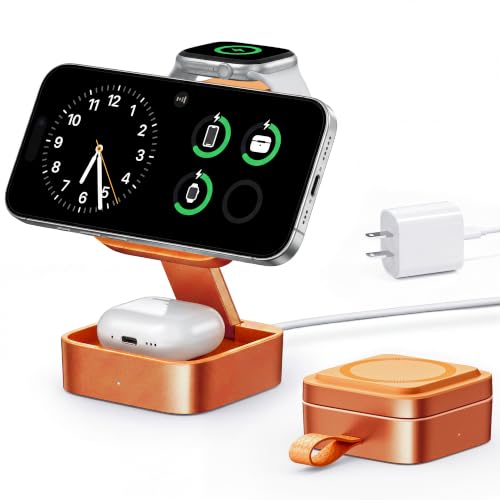
KEEPRO 3-in-1 Wireless Charging Station (Orange)
More Details On Our Top Picks
This is the pick I think of first when someone asks for a single hub to handle a laptop, a phone, and a lamp at the same desk. Two grounded three-prong outlets sit alongside one USB-C and two USB-A ports, so a MacBook charger, a desk lamp, and a pair of phones can all share one wall socket behind the monitor.
It runs at 125VAC and 1250W total, which in plain terms covers most home-office gear without complaint. The USB-C port pushes up to 20W on supported phones, and the older USB-A ports each handle 2.4A, which is plenty for an overnight top-up on earbuds or a smartwatch.
Why It Works Well
- Five ports in one block, so a laptop charger and three small devices share a single outlet.
- Grounded AC outlets accept standard three-prong plugs, not just two-prong adapters.
- Compact desktop form factor keeps cables routed near the back of the desk.
- Familiar Philips branding suggests a focus on basic electrical safety in everyday use.
Things To Consider
- It is a wired hub, not wireless, so phones still need their own charging cables.
- Owners commonly report that cable organization matters since five ports in one block can still look busy.
- No fast-charge protocol is listed beyond basic USB-C power delivery, so laptop fast-charging may be limited.
Key Specs
Who It Suits Best
Anyone running a laptop-and-monitor desk who wants fewer wall adapters and one tidy hub for phones, watches, and accessories.
Where Another Pick Suits Better
Apple-only households who prefer a cable-free nightstand should look at the KEEPRO 3-in-1 Wireless Charging Station instead.
This stand is for anyone whose Echo Spot keeps sliding around the counter or feels like it floats awkwardly on the surface. The dock holds the Spot at a fixed viewing angle while feeding it power, which clears a second wall outlet for something else. It also adds a USB-C and a USB-A port on the base, so the same dock charges a phone and a pair of earbuds at the same time.
It does not include a power adapter, so I would plan on reusing an existing wall brick or buying one separately. The adjustable arm is a thoughtful touch because it accepts the Spot’s footprint without forcing it into a tight cradle.
Strong Points
- Combines a Spot dock with two extra charging ports, which is unusual in this category.
- Adjustable stand angle keeps the screen readable at counter height.
- USB-C and USB-A ports cover both older and newer phone cables.
Worth Noting
- No power adapter ships in the box, which is easy to miss at checkout.
- The stand is built around one specific smart display, so it has limited use without that device.
Built With In Mind
Echo Spot owners who also want a small daily charger for their phone and earbuds on the same counter.
Look Elsewhere When
Anyone without an Echo Spot should skip this pick and head straight to the Philips Desktop Charging Station for a more universal hub.
This is the pick I lean toward when a nightstand has become a junk drawer in disguise. The unit is real solid wood with a soft valet tray along the bottom and a full drawer above, so a wallet, glasses, and a watch finally have a home. Four USB ports run along the back, which in practice is enough for two phones, a Kindle, and a pair of earbuds without swapping cables.
Dual phone docks sit on top, so a household where two people share one nightstand can drop both phones down at once. The warm wood finish feels more like furniture than plastic, which is a nice change of pace from the typical tech-on-the-bedside look.
The Case For It
- Real solid wood construction reads like furniture, not a plastic gadget.
- Four USB ports handle the typical overnight charging load for two adults.
- Dual phone docks above the drawer keep devices visible while charging.
- Built-in drawer replaces a small bedside tray and removes visual clutter.
Trade Offs
- Wood needs a little care: occasional dusting and avoiding wet spills keeps the finish looking clean.
- No wireless charging pads, so phones still need cables each night.
- Larger footprint than a simple dock, which may not fit narrow nightstands.
Feature Card
Made For
Couples or roommates sharing one nightstand who want charging, storage, and a warmer look than plastic docks offer.
Reach For A Different Pick When
Solo Apple users who only need one wireless pad should pick the KEEPRO 3-in-1 Wireless Charging Station for a smaller footprint.
This is one of three color versions of the same foldable design from CYFIBYNO, and the golden finish stands out on a dark wood nightstand. It charges an iPhone, an Apple Watch, and AirPods at the same time from a single unit, so the typical Apple overnight bundle gets one home base. The folding hinge lets it collapse to roughly pocket size, which matters more than it sounds in a hotel room or a carry-on.
I would note that wireless speeds depend on the brick you pair with it, so reusing a 20W USB-C adapter from an iPad or recent laptop keeps the dock happy. For anyone who travels with the full Apple trio, that single change removes three chargers from the bag.
A Few Strong Suits
- One dock handles iPhone, Apple Watch, and AirPods at once.
- Folding hinge reduces bulk in a backpack or carry-on.
- Golden finish adds warmth to neutral tech setups.
- Charging area for AirPods keeps the earbuds case aligned without guesswork.
Honest Caveats
- Owners commonly report that a strong 20W adapter is needed to hit advertised speeds.
- Foldable hinges collect pocket lint and dust on the road, which can scratch the surface over time.
Right Fit For
Travelers with the full Apple bundle who want one charger instead of three in their overnight bag.
Skip It When
Households with Android phones or mixed ecosystems should consider the Philips Desktop Charging Station for broader compatibility.
The white version is the same foldable hardware as the golden unit, just with a finish that blends into light-colored bedrooms or modern desks. It is a quiet design that disappears into the background, which a lot of people prefer over a gadget that pulls the eye.
Functionally, the white dock behaves the same way as its siblings, so the choice here really is about visual fit. If your nightstand or desk leans bright and minimal, the white finish will feel intentional rather than loud.
Benefits That Matter
- Same triple-device charging in a cleaner, brighter finish.
- Folding design keeps it small in a drawer between trips.
- White surface makes the alignment magnets easier to spot in low light.
Small Caveats
- White plastic shows scuffs and pocket marks more easily than darker finishes.
- Still requires a capable USB-C adapter to feed it properly.
Best Suited To
Apple households with light or minimalist interiors who want the charger to blend in instead of standing out.
Swap It Out When
Anyone who wants a statement color on the desk should look at the KEEPRO 3-in-1 Wireless Charging Station in Orange.
Grey sits in the middle of the CYFIBYNO color range, which makes it the easiest match for a mixed desk with wood, metal, and dark accessories. I think of it as the safe choice when nobody in the household wants to commit to a bright color but a black finish feels too heavy.
The hardware and folding behavior are identical to the golden and white versions, so this is really a finish decision. Anyone choosing between CYFIBYNO colors can focus on the room rather than the spec sheet.
Good Reasons To Consider
- Neutral grey finish fits a wider range of desk themes than bolder colors.
- Same foldable triple-charge design as the other CYFIBYNO picks.
- Forgiving on smudges compared to glossy white or black finishes.
Points To Note
- Color choice adds nothing to performance, so it really is a finish-only upgrade.
- Fold hinge still demands a strong USB-C adapter for full wireless speeds.
Who Should Grab It
Apple users who want a flexible travel dock without committing to a bold color choice.
Consider Something Else When
A larger bedside with storage in mind points toward the JuncaiTech Nightstand Organizer with Drawer and 4 USB Ports.
This is the black KEEPRO dock, and in my view it earns the headline spot for serious Apple households. It pushes 15W MagSafe-style magnetic charging on the iPhone, which is meaningfully faster than older 7.5W pads, while the Apple Watch puck and an AirPods pad fill in below. The included 20W USB-C PD adapter and cable matter: many wireless docks ship without them, which leaves performance on the table.
The foldable hinge keeps the unit travel-friendly, so a hotel nightstand gets the same tidy setup as a home desk. Compatibility stretches across iPhone 12 through 17 Air, current Apple Watch models, and AirPods Pro plus recent AirPods cases.
Features That Help
- 15W magnetic iPhone charging on MagSafe-supported iPhones.
- Included 20W USB-C PD adapter and cable for full-speed performance out of the box.
- Foldable design fits easily in a laptop sleeve for travel.
- Dedicated AirPods pad keeps the case aligned without guesswork.
Trade-Offs To Consider
- Only AirPods 4 with Active Noise Cancellation are supported in that case range.
- Owners commonly report that the hinge mechanism needs a gentle hand; rough folding can loosen alignment over time.
Key Specs
Whose Shelf It Belongs On
Apple-only households that want the fastest wireless speeds and a single travel-ready dock for the whole kit.
A Better Fit Elsewhere
Mixed-device families who need USB-A and AC outlets should pick the Philips Desktop Charging Station instead.
The white KEEPRO dock delivers the same 15W MagSafe behavior as the black version, but the bright finish pairs naturally with white AirPods Max or a light wood desk. The included 20W adapter and USB-C cable remove the usual speed compromise that ships with wireless docks.
It is the right pick for someone who already chose the bright KEEPRO color story and wants the dock to look like part of the room rather than an accessory.
What Makes Sense
- Same 15W MagSafe performance as the top KEEPRO unit.
- Crisp white finish complements light-colored Apple gear.
- Adapter included so charging speeds match the spec sheet.
Things That May Matter
- White plastic shows scuffs and dust more visibly than darker finishes.
- AirPods 4 support requires the Active Noise Cancellation version.
Perfect Match For
Apple users with light-themed setups who want the dock to match the rest of the gear on the desk.
Another Choice May Suit
Anyone who needs bedside storage along with charging should consider the JuncaiTech Nightstand Organizer with Drawer and 4 USB Ports.
The blue KEEPRO version keeps the same 15W MagSafe charging speed and included adapter as its siblings, just dressed in a confident blue finish. It works well on a desk that already has a color accent, like a blue mousepad or a fabric organizer, where a neutral dock would look out of place.
Performance does not change with the color, so the choice comes down to how loud you want the dock to feel. It still folds for travel and still supports the same broad Apple lineup.
Points In Its Favor
- 15W MagSafe charging and the included adapter match the rest of the KEEPRO line.
- Blue finish stands out on a neutral desk without going garish.
- Folding hinge supports a tidy travel kit.
Worth Bearing In Mind
- Color is a finish-only difference, so no extra speed or capacity comes with the blue.
- AirPods 4 support still hinges on having the Active Noise Cancellation model.
The Right Fit
Anyone building a colorful desk setup who still wants the wireless speed of the KEEPRO line.
Not Your Match When
Solo travelers looking for the smallest possible travel rig should look at the CYFIBYNO Foldable in Grey for a more discreet finish.
Orange is the loudest finish in the KEEPRO lineup, and it suits a desk where the dock is meant to be part of the visual story. The charging hardware is unchanged, so users still get 15W MagSafe, an Apple Watch puck, and an AirPods pad on one foldable frame.
This is the pick I would suggest only if the room is ready for the color. A bright dock in a muted bedroom can feel like a piece of fruit on a hotel nightstand, which is not the look most people want.
What Pays Off
- 15W MagSafe speed plus Apple Watch and AirPods charging in one unit.
- Vivid orange finish makes the dock easy to spot in a cluttered bag.
- Included 20W adapter supports full wireless speeds.
Practical Considerations
- Bold finish is harder to blend into a calm interior, depending on the room.
- AirPods 4 support is limited to the Active Noise Cancellation version.
Built With In Mind
Apple households that enjoy color in their workspace and want the dock to be part of the room’s personality.
Where Another Pick Suits Better
Minimalist Apple users who want the same charging behavior in a quieter finish should pick the CYFIBYNO Foldable Wireless Charging Station in Grey.
What To Weigh Before Picking a Charging Stand
The first question I always ask is whether the dock needs to handle wired and wireless devices at the same time. A pure wireless pad works for a tidy nightstand, but a mixed household with a laptop, a smartwatch, and a pair of earbuds usually needs USB-A or AC outlets to cover everything. Wired hubs like the Philips Desktop Charging Station trade the elegance of magnetic alignment for raw flexibility across device types.
Build quality and footprint matter more than people expect. A solid wood organizer adds furniture-grade weight to a bedside, while a foldable wireless dock is built for travel. Decide which scenario matters more, then pick the format that fits it.
Power delivery deserves attention too. Wireless speeds depend on the adapter feeding the dock, so a 20W USB-C PD brick keeps a 15W MagSafe stand honest. Cheap 5W adapters leave performance on the table and slow down overnight charging in ways that matter before a workday.
Finally, ecosystem fit narrows the choice quickly. Apple-only households benefit from MagSafe-compatible stands, while mixed families with Android phones, older iPads, and gaming handhelds need USB ports or AC outlets instead. Match the dock to the devices, not the other way around.
Key Considerations Across These Picks
Where Shoppers Go Wrong
A common slip is buying a wireless dock without checking the included adapter. Many pads ship without a power brick, so the advertised 15W speed becomes 5W in real use. Another trap is ignoring cable length; a dock that sits far from the nearest outlet may need an extension cable tucked along the baseboard.
Where The Extra Money Goes
Higher-tier wireless stands typically add faster MagSafe speeds, an included 20W adapter, and stronger hinges for daily folding. The premium also covers better internal cooling, which matters when three devices charge at the same time. For most households the upgrade is worth it once the dock lives on a desk year-round.
Frequently Asked Questions
How many devices can a typical charging stand handle at once?
Most three-in-one stands cover an iPhone, an Apple Watch, and a pair of AirPods at the same time. Wired hubs with USB and AC outlets can support more, depending on the port count and total watt load.
Do wireless charging stands charge as quickly as a wired cable?
On 15W MagSafe-compatible stands the difference is small for everyday top-ups. On cheaper 5W or 7.5W pads the gap widens, especially for a quick boost before leaving the house.
Will a wireless stand work with a phone case?
Most thin cases under about 3mm pass charging without issue. Thick wallet cases, metal plates, or PopSocket-style grips usually block the magnetic alignment and slow or stop charging.
Can a charging stand replace a laptop charger?
Only if the dock includes a USB-C or AC port rated for laptop power delivery. A pure wireless pad cannot replace a laptop brick.
Are foldable stands durable enough for daily packing?
Most foldable hinges handle normal daily folding, though rough handling can loosen the alignment over time. Keeping the dock in a sleeve when traveling extends its life.
Wrap Up
The right charging stand depends on what lives on your nightstand or desk, how many devices pile up overnight, and whether you travel with the full kit. A flexible hub like the Philips Desktop Charging Station covers the broadest range of devices, while the KEEPRO and CYFIBYNO docks give Apple-only households a clean wireless setup. Pick the dock that matches your daily routine, and the cables will largely take care of themselves.




