

The right charging brick quietly reshapes how a phone, tablet, or laptop gets through the day. I’ve watched friends hunt for outlets at airports and coffee shops, and the difference between a five-watt relic and a modern compact fast charger is enormous. This list rounds up the seven picks that cover nearly every scenario, from a single overnight phone charge to a multi-device workstation. The goal is simple: match the brick to the gear you already own, and stop guessing at wattage.
The Lineup, Simplified

Anker PowerPort III 20W USB-C Wall Charger

Anker Nano Smart Display Charger 45W
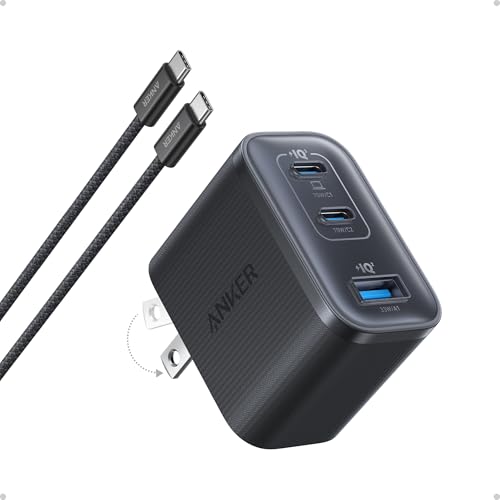
Anker Nano 70W Max 3-Port Fast Charger

Anker 140W Max 4-Port GaN Charging Block

Odonm 5V USB Wall Power Adapter for Roku

Anker Prime 160W Max 3-Port GaN Charger
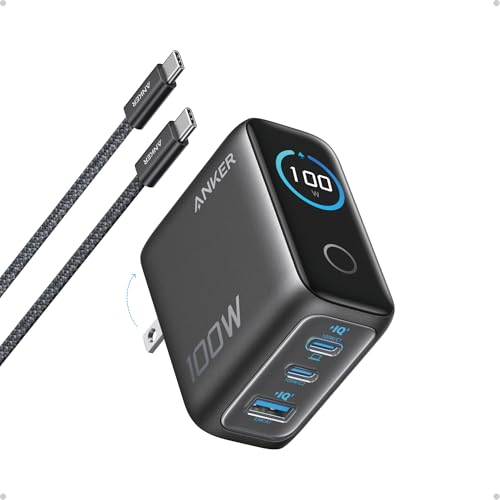
Anker 100W Max USB C 3-Port GaN Charger
The Picks, Examined More Closely
For anyone who charges one phone overnight and nothing else, the Anker PowerPort III hits the sweet spot. Its 20-watt USB-C output (a wattage rating that simply tells you how much power the brick can push per hour) is enough to bring an iPhone 16 to roughly half capacity in under half an hour, comfortably faster than the old five-watt cubes most people still own. The folding prongs tuck flat into the body, so it slips into a jeans pocket or a jacket pouch without snagging.
Compared with the larger Anker options further down this list, this one is stripped down on purpose: a single port, no display, no extras. That’s a feature for the right shopper. Travelers on day trips and minimalists with a single device will appreciate the low weight and the fact that it disappears into a carry-on.
Useful Strengths
- 20W USB-C output handles recent iPhone and Galaxy fast-charge protocols, so a quick top-up before heading out actually moves the needle.
- Foldable plug protects against bent prongs in a packed bag, which matters more than it sounds for commuter use.
- Tiny footprint leaves the second outlet on a wall plate free for something else, a small convenience in older hotel rooms.
- No cable in the box lets you reuse whatever USB-C cord you already have lying around.
Things To Consider
- Single port only means swapping cables when a partner needs power.
- 20W is light work for an iPad or a laptop, so this is firmly a phone-first brick.
Made For
Someone who carries one phone, values a small brick, and charges overnight from a nightstand or kitchen counter.
Not Your Match When
If you want to top up a MacBook alongside a phone, the Anker Nano 70W Max 3-Port Fast Charger is the better sibling to grab.
The Nano Smart Display leans into the idea that a charger can tell you what it is doing. Built-in recognition for recent iPhone models lets the brick adjust output automatically through its Care Mode, so a 16 or 17 series phone pulls what it actually needs rather than a flat maximum. For an iPad Pro owner, the same charger steps up cleanly, since 45W is right in the comfort zone for those tablets.
While the 20W PowerPort above is aimed at the overnight crowd, this brick targets someone who tops up during the day and wants that half-hour gain before walking out the door. The compact body still fits in a small pocket, but the wattage ceiling sits much higher.
Bright Spots
- Up to 45W output covers the iPhone 17 series plus 11-inch and 12.9-inch iPad Pro models, removing the need for separate bricks.
- Automatic device recognition reduces heat and battery stress by throttling to a sensible rate for older iPhones.
- Display feedback reassures users that the brick is actually delivering fast charge, a small but meaningful peace of mind.
- USB-C input standard means any modern cable works.
Worth Noting
- The iPhone 17e is excluded from Care Mode, which is a footnote worth checking if that model is your daily driver.
- One port keeps things simple but limits multi-device use.
Right Fit For
iPhone 15, 16, and 17 owners who want a mid-wattage brick that talks nicely to Apple’s charging handshake.
Look Elsewhere When
If you regularly plug in a MacBook alongside an iPhone, the Anker Prime 160W Max 3-Port GaN Charger handles both without breaking a sweat.
The Nano 70W arrives as the most balanced pick on this list. Each USB-C port can deliver up to 70W on its own, which is enough to take a 14-inch MacBook Pro from empty to roughly half capacity in about 35 minutes. The body itself measures just 2.09 by 1.68 by 1.24 inches, noticeably smaller than older 70W bricks, so it travels well despite the higher output. GaN (gallium nitride) components let the charger run cooler and smaller than traditional silicon designs at the same wattage.
Versus the smart-display model above, this one trades the readout for three ports and a higher per-port ceiling. That makes it a natural fit for someone who flies with a phone and a laptop and wants one brick for both.
A Favorable Mix
- True 70W per port means genuine laptop charging, not the throttled 30W you get from many travel bricks.
- Three USB-C ports let a phone, earbuds, and laptop share one outlet, which simplifies hotel rooms.
- Compact GaN build stays cooler in a backpack pocket, based on how this technology class typically behaves.
- Compatible with current M4 MacBook charging standards, so nothing feels under-specced.
Trade Offs
- When all three ports are in use, the per-port wattage drops to share the budget.
- No display means no live readout if you like to confirm what’s flowing.
Best Suited To
Frequent flyers and hybrid workers who run a laptop plus a phone from a single brick.
Consider Something Else When
Households charging four devices at once are better served by the Anker 140W Max 4-Port GaN Charging Block.
Four ports and 140 watts of total output make this the brick for a desk that doubles as a charging station. It pairs naturally with a MacBook setup, since one port can hand over laptop-class wattage while the other three handle phones, earbuds, and a tablet simultaneously. The built-in smart display keeps you posted on how power is being allocated across the ports, which matters more when four devices are negotiating at once.
Where the Nano 70W above targets the traveler, this one anchors a workstation. GaN internals keep the brick from running too hot under sustained load, though the body is larger and heavier than the single-port options earlier in the roundup.
Reasons It Performs
- Four ports eliminate the power-strip daisy chain many home offices still rely on.
- 140W total budget covers a demanding laptop plus three accessories without anyone waiting.
- Smart display makes it easy to see which port is delivering what, useful when troubleshooting a slow-charging cable.
- GaN design (gallium nitride, a semiconductor that runs cooler than older silicon) helps the brick manage heat during long workdays.
Room For Improvement
- Heavier and bulkier than travel-focused bricks, so it lives on a desk rather than in a carry-on.
- Higher total wattage is wasted if you typically charge only one phone overnight.
Who It Suits Best
A household or small office that needs to charge a laptop and several smaller devices from one outlet.
A Better Fit Elsewhere
If your setup is one laptop and one phone on the road, the Anker Nano 70W Max 3-Port Fast Charger is a leaner travel companion.
Streaming sticks tend to ship with a tiny wall adapter that vanishes into a couch cushion and never comes back. This Odonm replacement brick exists for exactly that scenario. It outputs 5V at 2A, a 10W DC profile sized for Roku and Fire TV sticks rather than phones, and the connection stays stable during long movie sessions. Compatibility spans Roku Express, Premiere, Voice Remote Pro, current Ultra models, and Amazon’s Fire TV Stick family.
The Anker options earlier in this list run at much higher wattage and address entirely different gear. Think of this brick as a specialty replacement, not a phone charger.
Positive Takeaways
- 5V/2A output matches the power profile streaming sticks actually require, avoiding underpowered quirks.
- Broad Roku and Fire TV compatibility covers the models most people still have plugged in behind a TV.
- Compact wall-hugging form factor keeps the second outlet free on a power strip.
- Stable DC delivery suits always-on living-room use.
Minor Gripes
- Not suitable for phones, tablets, or laptops given the low 10W ceiling.
- Specialty focus means it earns its keep only if a streaming-stick brick has gone missing.
Who Will Love This
Anyone replacing a lost Roku or Fire TV Stick adapter and wanting a drop-in 5V/2A match.
Skip It When
If the missing brick powers a phone, the Anker PowerPort III 20W USB-C Wall Charger is the right starting point instead.
The Prime is the brick for someone who pushes a Pro-grade laptop hard. Total output reaches 160W, and a single port can hold 140W without derating (dropping back to a lower speed mid-charge), so a MacBook Pro stays at full charging speed during long renders or compile sessions. The body sits at roughly AirPods Pro case size, an honest surprise given the wattage inside.
Compared with the 140W four-port Anker above, this one trades a port for sustained single-port speed and a noticeably smaller shell. That’s the meaningful trade to weigh.
The Upside
- 140W sustained single-port output keeps pro laptops at full speed during heavy workloads.
- AirPods-class footprint is rare at this wattage, so it stays portable.
- Power density of 1.35W per cubic centimeter reflects dense GaN engineering.
- Three ports still cover phone and accessory charging alongside a laptop.
Soft Spots
- Premium positioning pushes it beyond what most casual users need.
- Fewer ports than the four-port Anker in this list, so device count still matters.
Whose Shelf It Belongs On
Power users running a MacBook Pro, a tablet, and a phone who want the smallest brick that won’t throttle under load.
Another Choice May Suit
Households charging four devices at once will find the Anker 140W Max 4-Port GaN Charging Block more flexible.
The 100W Anker rounds out the list as the data-friendly option. A built-in smart display reports real-time charging status, port performance, and internal temperature, the kind of detail that helps when a phone mysteriously refuses to fast-charge. Each USB-C port delivers up to 100W, and GaN internals sustain peak performance roughly twice as long as the average 100W brick on the market.
Where the Prime above aims at raw wattage, this one trades some peak output for a clearer picture of what the brick is doing moment to moment.
Benefits That Matter
- High-definition smart display surfaces real-time wattage, temperature, and port behavior, useful for diagnosing a slow cable.
- 100W per port covers most thin-and-light laptops and Chromebooks without compromise.
- GaN efficiency extends peak performance during long charging sessions.
- Travel-friendly footprint keeps it realistic for daily carry.
A Few Limitations
- Display adds cost that a casual single-phone user may not feel is justified.
- Three ports are fewer than the four-port Anker elsewhere on this list.
Built With In Mind
Tinkerers and data-curious users who want visible confirmation that a fast-charge handshake actually happened.
Reach For A Different Pick When
Anyone prioritizing raw sustained output should pick the Anker Prime 160W Max 3-Port GaN Charger instead.
What To Weigh Before Choosing A Charging Brick
Wattage sets the ceiling for how fast a brick can fill a battery, but the device on the other end dictates the real-world speed. A 45W iPhone draws only what its charging protocol allows, so paying for 100W of headroom helps only when the gear actually requests it. Match the brick to the largest device in your daily carry, then check that the remaining ports cover the smaller items.
Port count matters more than raw wattage once you own two or three devices. A 70W three-port brick often serves a household better than a 160W single-port brick, since the family phone and earbuds still need somewhere to plug in. Travel-friendly shoppers should also weigh size and weight, because GaN designs vary more in footprint than in raw capability.
Cable quality is the silent partner. A high-wattage USB-C cable rated for 5A current is what unlocks the top speeds on any brick above 60W. Using the cable that shipped with an old phone can quietly throttle even the best hardware.
Key Considerations Across These Picks
Mistakes Worth Dodging
A common slip is grabbing a brick with enough total wattage but too little per-port output. A 100W four-port charger that drops to 15W per port when fully loaded charges phones slower than a small dedicated 20W adapter. Reading the per-port rating, not just the headline number, prevents that frustration.
Another trap is assuming all USB-C cables carry the same current. Cables rated for older 3A standards can quietly cap a 100W-capable brick at 60W or lower, which makes the brick look slow when the cable is the real culprit.
Where The Extra Money Goes
Premium bricks in this category spend the budget on GaN efficiency, sustained output without derating, and better thermal design. That translates into a brick that stays smaller, runs cooler, and holds peak speed through a long laptop charge rather than tapering off after twenty minutes. For a one-device household the premium rarely pays off, but for anyone running a MacBook alongside accessories it earns its keep quickly.
Frequently Asked Questions
How many watts do I really need?
For a single modern phone overnight, 20W is plenty. Laptops usually need 60W to 100W to charge at full speed, and demanding pro laptops benefit from 140W or more.
Is GaN worth the premium?
GaN (gallium nitride) lets a brick run cooler and smaller than older silicon designs at the same wattage. Travelers and anyone running multi-port setups notice the difference in size and heat.
Can one brick charge a laptop and a phone?
Yes, as long as the brick has at least 60W per port and a USB-C cable rated for the current. Most bricks on this list handle both simultaneously, with power shared across ports.
Will a faster brick damage my phone battery?
Modern phones negotiate the actual current they pull, so a 100W brick delivers only what the phone requests. Using a reputable brick is safe for battery health.
Why does my new brick feel slow sometimes?
The cable is the usual suspect. An older or low-current USB-C cable quietly limits charging speed, even when the brick itself is rated for high wattage.
Wrap Up
The right charging brick comes down to the gear you already carry and the outlets you actually use. For a single phone overnight, a compact 20W cube does the job without bulk. Laptops and multi-device households benefit from a 70W or higher brick with several ports and GaN efficiency. Streaming-stick owners have a separate, simpler replacement to consider, and power users with pro laptops will appreciate a sustained 140W-plus output. Match the wattage to the largest device in your bag, count the ports you genuinely need, and the choice narrows quickly.




