

Most people buy a big TV, set it on the included stand, and then spend years wishing they’d actually hung it on the wall. An articulated mount fixes that: it pulls the screen out, tilts it away from window glare, swivels toward the kitchen during dinner, and folds flat when nobody’s watching. The trick is finding one that fits your TV’s size, weight, and VESA pattern, and that holds up after a few thousand adjustments. I pulled together ten solid options covering small screens, huge screens, tight corners, and people who just want something simple and flush against the wall.
A Closer Look At The Lineup

USX Mount Full Motion TV Wall Mount 42″-84″, Fits 16″/18″/24″ Studs, Dual Articulating Arms

USX MOUNT Full Motion TV Wall Mount for Large TVs 42-97″ up to 150 lbs

USX MOUNT Heavy Duty Full Motion TV Wall Mount for 42-100″ TVs up to 170 lbs
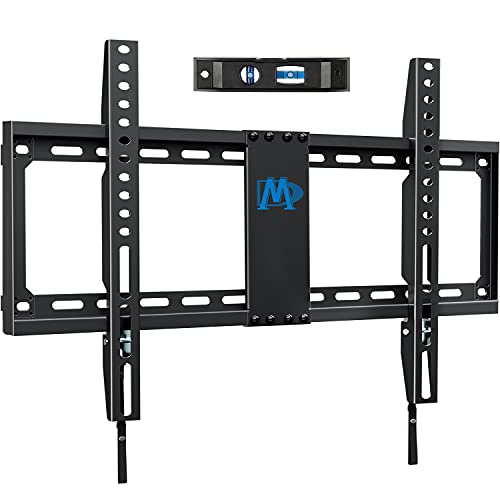
Mounting Dream TV Mount Fixed for Most 42-84″ Flat Screen TV UL Listed

Mounting Dream TV Wall Mount UL Listed for 42-84″ Flat Screen TV

MOUNTUP Long Arm TV Wall Mount with 40″ Extension, Full Motion for 42-90″ TVs

Mounting Dream Full Motion TV Wall Mount for 32-70″ TVs up to 99 lbs

Perlegear UL Listed Full Motion TV Wall Mount for 42-90″ TVs up to 132 lbs
USX MOUNT Full Motion TV Wall Mount for 42-97″ TVs up to 150 lbs

Mounting Dream Tilting TV Wall Mount for Most 37-90″ TVs up to 132 lbs
The Strengths Of Each Pick
Most homes I’ve seen don’t have perfectly spaced 16-inch studs, which is where this USX Mount earns its place. It accepts 16″, 18″, or 24″ wood stud spacing and also handles concrete walls with the right anchors, which removes a common installation headache. Dual articulating arms give you the full pull-out, swivel, and tilt range that defines an articulated mount in the first place.
Compared to the heavier-duty USX options later in the lineup, this one caps out at 110 lbs and 84 inches, so it’s a better match for typical living-room TVs than for the biggest screens on the market.
The Case For It
- Flexible stud spacing (16″, 18″, or 24″) suits older homes where studs don’t line up neatly.
- Dual articulating arms deliver smooth extension and retraction for everyday viewing angles.
- Up to ±45° swivel and +5°/-15° tilt handle glare from windows and overhead lights.
- Works on concrete and brick with appropriate anchors, not just wood studs.
Things To Consider
- The 110 lb weight ceiling rules out the heaviest 85″+ flagship TVs.
- Max VESA tops out at 600x400mm, so unusual mounting-hole patterns won’t fit.
Who It Suits Best
Homeowners with mid-size TVs between 55 and 75 inches who need flexibility for irregular stud layouts.
Where Another Pick Suits Better
Shoppers with 85″ or larger screens should look at the USX MOUNT Heavy Duty option later in this roundup.
When the screen gets past 75 inches, ordinary mounts start to feel sketchy. This USX MOUNT stretches up to 97 inches and carries 150 lbs, which covers most flagship TVs sold in the last few years. VESA support runs from 200x100mm to 600x400mm, and the same +5°/-15° tilt and ±45° swivel geometry as the smaller USX model applies here.
Against the heavier 170 lb option further down the list, this one is more approachable for typical living rooms while still leaving headroom for big screens.
What Makes Sense
- 150 lb capacity covers most 75″ to 90″ TVs without worry.
- Up to ±45° swivel makes it easy to angle the screen toward seating areas in open layouts.
- Universal VESA compatibility (200x100mm to 600x400mm) fits mainstream TV brands.
Trade Offs
- The 600x400mm VESA ceiling won’t match the 800x600mm patterns on some 100″+ displays.
- At full extension on a heavy screen, you’ll want to check that the wall anchors are properly torqued.
Made For
Anyone upgrading to a 75″ or 85″ main TV who still wants full articulation without buying the heaviest-duty bracket on the market.
Skip It When
Mounting a 100″ commercial-style display, where the USX 170 lb model has the VESA range you need.
The bracket you want when a normal mount feels underbuilt. USX MOUNT’s heavy-duty version pushes to 100 inches, 170 lbs, and a maximum VESA of 800x600mm. It mounts on 16, 18, or 24-inch wood studs and accepts concrete and brick with appropriate hardware, so you can use it on most residential wall types.
Compared to the 150 lb USX model above, this is the one to reach for when your TV’s VESA pattern exceeds 600x400mm or the panel itself crosses 90 inches.
Why It Works Well
- 170 lb capacity and 800x600mm VESA cover massive screens and unusual mounting patterns.
- Accepts 16″, 18″, and 24″ wood stud spacing, which is rare at this weight class.
- Swivel, tilt, and leveling adjustments let you dial in the screen after the TV is already attached.
Points To Note
- The bulkier arm assembly means a deeper resting profile against the wall than smaller mounts.
- Not suited for drywall-only installations without hitting a stud, so older plaster walls may require extra blocking.
Best Suited To
Owners of 85″ to 100″ TVs in dedicated media rooms where weight and VESA compatibility are non-negotiable.
Reach For A Different Pick When
You’re mounting a smaller bedroom TV, where the Mounting Dream 32-70″ option is sized more appropriately.
Sometimes “articulated” really means “I want it flush against the wall and I don’t want to see the bracket.” This Mounting Dream fixed-position mount does exactly that. It supports 42″ to 84″ TVs up to 132 lbs, and VESA compatibility stretches from 100x100mm all the way up to 600x400mm, so it pairs with most flat and curved panels.
It’s the simplest mount in the lineup, no swinging arms, no extend. For shoppers who care about a clean wall and never need to angle the screen, that trade-off is the whole point.
Strong Points
- Low-profile design keeps the TV close to the wall for a tidy, picture-frame look.
- 132 lb capacity comfortably handles mainstream 65″ and 75″ TVs.
- UL listing adds a layer of third-party safety verification.
Honest Caveats
- No tilt, swivel, or extension means glare from side windows or overhead lights can be a problem.
- Cable management is harder than on articulating models because there’s no room to swing the TV out for access.
Feature Snapshot
Right Fit For
Anyone setting up a TV that lives in one viewing position and wants the cleanest possible wall appearance.
A Better Fit Elsewhere
Rooms where the screen needs to swivel toward a kitchen or seating area call for the Mounting Dream full-motion mount reviewed next.
The middle ground in the Mounting Dream family, this full-motion mount handles 42″ to 84″ TVs at up to 100 lbs, with dual articulating arms that deliver the pull, swivel, and tilt most people actually want. VESA support tops out at 600x400mm, which covers almost every mainstream TV in this size range.
Compared to the fixed Mounting Dream option above, this one adds motion at the cost of a slightly larger wall footprint, an easy trade for most living rooms.
Useful Strengths
- Dual articulating arms hold position reliably even after repeated adjustments.
- UL listing backs the bracket with a recognized safety standard.
- Max VESA of 600x400mm fits most TVs up to 84 inches.
Small Caveats
- 100 lb capacity falls short for some 85″ models, so check your TV’s weight before buying.
- Designed for 16″ stud spacing, which limits use in homes with wider stud layouts.
Feature Snapshot
Who Should Grab It
Shoppers with mainstream 55″ to 75″ TVs in newer homes with standard stud spacing who want a no-fuss articulating mount.
Consider Something Else When
Your wall studs are spaced wider than 16 inches, in which case the first USX Mount or the Perlegear mount handles non-standard layouts.
Most articulating mounts extend a foot or so from the wall. The MOUNTUP long-arm model stretches out to 40 inches, which sounds excessive until you try to mount a TV in a corner or pull it past a deep shelving unit. It supports 42″ to 90″ TVs up to 150 lbs, with VESA compatibility up to 800x400mm and 16/18/24″ stud spacing.
Where the USX models emphasize weight capacity, this one prioritizes reach, which matters more in awkward room layouts than raw TV size.
Practical Advantages
- 40-inch extension pulls the TV far enough to clear deep obstacles or corner-mount cleanly.
- Retracts close to the wall when not in use, saving room in tight spaces.
- 150 lb capacity handles most 80″ and 85″ TVs.
- VESA range up to 800x400mm covers many larger-format displays.
A Few Limitations
- The long arm creates more leverage, so the wall anchors matter more than usual for safety.
- At full extension, the mount sags slightly more than shorter-arm designs; leveling after each pull helps.
Whose Shelf It Belongs On
Anyone with a corner setup, deep built-ins, or an open-plan room where the TV needs to angle dramatically toward different seating zones.
Swap It Out When
Your TV sits flat against a regular wall and you don’t need the extra reach, where the Mounting Dream full-motion mount is a simpler choice.
The little sibling of the Mounting Dream full-motion lineup, this one fits 32″ to 70″ TVs up to 99 lbs, which puts it squarely in the bedroom, office, and small-living-room zone. Max VESA sits at 400x400mm, and it’s designed for standard 16″ stud spacing. The same +5°/-15° tilt range applies, so glare control still works.
Where most other mounts on this list start at 42″, this one opens up the smaller end of the market for people who still want full articulation.
A Favorable Mix
- Covers 32″ TVs that most articulating brackets skip.
- 99 lb capacity matches the typical weight of a 55″ to 65″ panel.
- Compact arm geometry doesn’t dominate small rooms visually.
Soft Spots
- The 400x400mm VESA ceiling rules out larger TVs with wider mounting-hole patterns.
- Stud spacing is locked to 16″, which excludes some older homes with 24″ framing.
Feature Snapshot
Perfect Match For
Anyone mounting a bedroom or office TV between 32 and 55 inches who still wants to tilt the screen for glare-free viewing.
Not Your Match When
You’re hanging a 75″ or larger panel, where the USX MOUNT large-screen mount has the capacity and VESA range.
Perlegear’s full-motion mount sits in a sweet spot for many homes: 42″ to 90″ TVs, 132 lb capacity, VESA from 200x100mm to 600x400mm, and UL certification on the bracket itself. It installs on 8″, 12″, or 16″ wood studs plus concrete and brick, so it works across most wall types without special blocking.
Compared to the Mounting Dream full-motion mount above, it adds wider stud spacing tolerance and slightly higher weight capacity at a similar feature set.
Features That Help
- UL listing confirms third-party testing of the bracket’s load rating.
- 132 lb capacity covers mainstream 75″ and 80″ TVs comfortably.
- Accepts 8″, 12″, and 16″ stud spacing, which suits older homes and remodels.
- VESA range from 200x100mm to 600x400mm fits nearly every mainstream TV.
Things To Weigh
- For 24″ stud spacing, you’ll need an extension bracket from the manufacturer.
- At full extension the longer arm can flex slightly under heavier loads, so tightening the articulating joints periodically helps.
Who Will Love This
Homeowners who want the peace of mind of a UL-tested mount in a non-standard stud layout, especially in older houses.
Look Elsewhere When
You need to span 24″ studs out of the box, where the first USX Mount handles that spacing natively.
Functionally similar to the earlier 150 lb USX MOUNT, this version leans harder on the steel-frame construction and supports the same 42″ to 97″ TV range with up to 150 lbs. VESA compatibility runs 200x100mm to 600x400mm, and installation works on 8″, 12″, or 16″ wood studs along with concrete and brick walls.
Versus the heavier-duty 170 lb model above, this one is the right size for typical living-room TVs, while still leaving room for an 85″ or 90″ panel.
Everyday Wins
- Steel frame construction feels solid during arm adjustments.
- Accepts three stud spacings (8″, 12″, 16″), which covers most remodels and additions.
- 150 lb capacity leaves comfortable headroom for 75″ to 85″ panels.
Some Limits To Know
- VESA range stops at 600x400mm, so 800x600mm patterns on the largest displays won’t fit.
- The arm design won’t span 18″ or 24″ stud layouts without supplemental hardware.
Built With In Mind
Shoppers upgrading to a 75″ or 85″ living-room TV who want a sturdy steel frame and standard-stud installation.
Where A Sibling Pick Shines
The Perlegear mount is a stronger fit for older homes with 8″ or 12″ studs that this USX model also accepts.
The tilting mount sits between the fixed and full-motion options. It angles the screen up or down to kill glare from overhead lights or a fireplace mantel, but it doesn’t swivel or extend. This Mounting Dream version supports 37″ to 90″ TVs at up to 132 lbs, with max VESA at 600x400mm and up to 24″ wood stud spacing.
For above-fireplace installations where you only need a downward angle, this mount is a cleaner choice than a full articulating arm.
A Few Strong Suits
- Low-profile design keeps the TV close to the wall when not tilted.
- 132 lb capacity handles large panels without strain.
- 24″ stud spacing support makes it friendly to older framing layouts.
Worth Bearing In Mind
- No swivel or extension means you can’t angle the screen toward side seating.
- Mounting height matters more on tilt-only brackets since the angle range is limited.
Feature Snapshot
The Right Fit
Anyone mounting a TV above a fireplace or high on a wall where a downward tilt solves glare without adding swing-arm complexity.
Another Choice May Suit
Rooms where the screen needs to turn toward the kitchen or dining area call for the Mounting Dream full-motion mount reviewed earlier.
Getting The Right Mount Before You Drill
Three numbers decide most of this purchase: your TV’s screen size, its weight, and its VESA pattern (the four-hole pattern on the back where the bracket attaches, measured in millimeters). VESA gets written as width x height, like 400x300mm or 600x400mm, and the mount’s listed VESA range needs to include your TV’s exact pattern.
Weight is the easy one to forget. Mounts list a maximum weight capacity, and that number needs to comfortably exceed your TV’s actual weight, not just match it. Hitting 90% of the rated capacity leaves no margin for stress over time, so staying under 75% is the safer rule of thumb.
Wall type matters as much as TV type. Wood studs are the easiest case: you drive lag bolts straight into the stud. Concrete and brick need sleeve anchors or wedge anchors, which usually come with the mount. Plaster walls and drywall-only installations are a different problem entirely, and most articulating mounts warn against them because the cantilevered weight pulls the anchors out over time.
VESA, by the way, is just the universal standard for where the mounting holes sit on the back of TVs. Check your TV’s manual or measure the pattern yourself before ordering.
Stud spacing is the silent variable. Newer homes in North America almost always use 16″ centers, but older homes and additions can use 18″, 24″, or even 12″ in remodels. Pick a mount that lists your actual spacing on the box.
Key Considerations Across These Picks
Common Buying Traps
The most common mistake is choosing a mount by screen size alone and ignoring VESA. A 65″ Sony and a 65″ LG might share screen size but use different VESA patterns, and the wrong mount simply won’t bolt up. The second mistake is underestimating weight, especially with older plasmas or newer mini-LED flagships that tip past 90 lbs. The third is trusting drywall anchors for an articulating mount; the cantilevered arm multiplies the pull-out force and pulls plastic anchors out of the wall within months.
Where The Extra Money Goes
Stepping up to a heavier-duty mount usually buys you a higher weight capacity, a wider VESA range, and more flexible stud spacing, all three of which matter when you own a big flagship TV or an older home. Premium frames also tend to hold their tilt and swivel position better over time, since the articulating joints use tighter tolerances and better bushings. For a 32″ bedroom TV, that upgrade is overkill; for an 85″ living-room centerpiece, it pays for itself the first time you adjust the screen.
Frequently Asked Questions
What does “full motion” mean on a TV mount?
Full motion means the mount has one or more articulating arms that extend, swivel, and tilt the TV away from the wall. Fixed and tilting mounts stay close to the wall and only angle up or down, while full-motion mounts let you pull the screen out and turn it toward different seating positions.
How do I find my TV’s VESA pattern?
Measure the horizontal and vertical distance between the four mounting holes on the back of your TV in millimeters. Most TVs list it in the specs as something like “VESA 400x300mm.” If you can’t find it in the manual, a quick ruler measurement across the four holes does the job.
Can I mount a TV above a fireplace?
Yes, but heat from the fireplace can shorten the TV’s lifespan over time, and the higher mounting position usually calls for a tilting mount rather than a fixed one. A tilting bracket angles the screen downward so the viewing position from the couch stays comfortable.
What’s the difference between a tilting mount and a full-motion mount?
A tilting mount only angles the screen up or down, useful above fireplaces or high on a wall. A full-motion mount adds extension and swivel so the TV can be pulled away from the wall and turned toward different rooms.
How much weight can an articulating TV mount hold?
Most articulating mounts in this lineup range from about 99 lbs up to 170 lbs. Always check the mount’s rated capacity against your TV’s actual weight, and leave a margin rather than running right at the limit.
Bottom Line
An articulated mount turns a wall-mounted TV from a static decoration into a flexible part of the room. Match the VESA range and weight capacity to your TV, confirm the stud spacing matches your wall, and pick the arm geometry (long reach, tilting, or full extension) that fits how you actually watch. The ten options above cover everything from a 32″ bedroom screen to a 100″ media-room centerpiece, and the right one mostly depends on the room and the TV you already own.




