

A good charger block quietly earns its place on every nightstand, kitchen counter, and travel pouch I pack. The wrong one either drags out a full charge or hogs the only wall outlet behind the couch. I pulled together seven solid options that cover a daily phone top-up, a hungry laptop, a multi-device household, and even the stubborn little streaming sticks that need a steady 5V feed.
The Choices Worth Comparing

Anker PowerPort III 20W USB-C Wall Charger

Anker Nano Smart Display Charger 45W
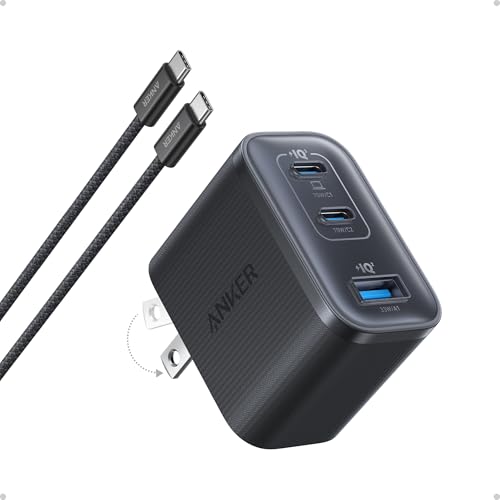
Anker Nano 70W Max 3-Port Charger

Anker 140W Max 4-Port GaN Charging Blocks

Odonm 5V USB Block for Roku & Fire TV

Anker Prime 160W Max 3-Port GaN Charger
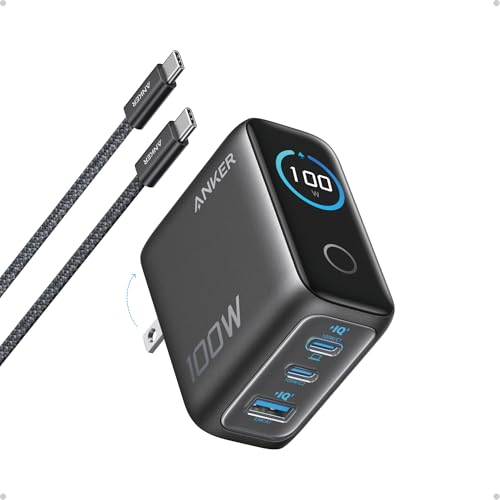
Anker 100W Max 3-Port GaN Charger
A Deeper Look At The Lineup
The PowerPort III is the kind of charger that disappears into a drawer and quietly does its job. It weighs almost nothing, the plug folds flat so it won’t stab anything in a travel pouch, and a single USB-C port pushes out 20W. That is enough headroom to fast-charge an iPhone 16 series handset, a current Pixel, or an iPad in a sensible window.
For most households, a single-port 20W brick covers the bedtime routine without hogging the outlet behind the nightstand. Anker’s GaN-based design keeps it cool during long top-ups, and the foldable pins make airport security checks less of a hassle. Where it sits naturally is the secondary charger: one for the kitchen, one for the office, one for the suitcase.
What Earns Its Place
- 20W output charges an iPhone 16 to roughly half capacity in well under thirty minutes, a meaningful upgrade over legacy 5W bricks.
- Compact body and folding prongs suit tight outlets behind furniture, hotel rooms, and carry-on bags.
- Single-port design keeps things simple: no protocol negotiation, no surprise power splits.
- Broad device compatibility covers iPhone 16, Galaxy handsets, Pixel phones, and recent iPad models.
Things To Consider
- Cable ships separately, so you will need to supply your own USB-C lead.
- One port only, which can frustrate households charging a watch or earbuds alongside the phone.
- Charging block feels warm during a sustained top-up, though that is typical for GaN (gallium nitride) units at full tilt.
Who It Suits Best
A commuter or frequent traveler who wants one trustworthy single-port brick for a phone and occasional tablet top-up.
Consider Something Else When
Anyone running a laptop or multiple devices should step up to the Anker Nano 70W Max 3-Port Charger instead.
The Nano Smart Display Charger turns an otherwise dull black brick into something I actually want to glance at. A small readout shows real-time wattage, port status, and a little smiley face when an iPhone is recognized. Up to 45W flows from a single USB-C port, enough to fast-charge an iPhone 17 or a smaller iPad Pro at full tilt.
Apple-leaning households will appreciate Care Mode, which recognizes supported iPhone models and dials in a tailored charging curve. Compared to the PowerPort III above, this block trades a folding plug for a screen and noticeably more output. It is a tidy bedside companion for anyone who likes seeing what their gear is actually doing.
Key Advantages
- 45W max output covers iPhone 17 series fast charging and most 11-inch iPad Pro models without breaking a sweat.
- Built-in display surfaces wattage and port activity, removing the guesswork from overnight top-ups.
- Care Mode automatically identifies supported iPhones and adjusts power delivery for safer overnight sessions.
- Compact Nano form factor fits behind sofas and on crowded power strips where larger bricks get pushed out.
Points To Note
- Single-port design means no room for a second cable, which may frustrate multi-device owners.
- Compatibility is intentionally narrow: only iPhone 17, 16, and 15 series plus specific iPad Pro models, and iPhone 17e is excluded.
- Screen adds a touch of cost over a plain 45W brick, so value-focused shoppers may not feel the pull.
Made For
Apple-centric users who want a single bedside brick with a friendly display and iPhone-aware charging behavior.
A Better Fit Elsewhere
Households juggling Android phones, laptops, and accessories should consider the Anker 140W Max 4-Port GaN Charging Blocks instead.
The Nano 70W is the smallest brick in this lineup that can genuinely power a laptop. Each USB-C port delivers up to 70W, which is enough to refill a 14-inch MacBook Pro (2024) from empty to roughly half in around 35 minutes. The body measures just 2.09 × 1.68 × 1.24 inches, putting it roughly 41% smaller than a typical 70W brick.
Three ports open up real multi-device workflows: a laptop on one, a phone on another, earbuds on the third. The trade-off shows up when all three ports are loaded, since the 70W headline figure is the per-port ceiling rather than the simultaneous total. Still, for travel days when the laptop is the priority, this charger block earns its spot in the bag.
Where It Delivers
- 70W per-port output drives modern MacBook Air and 14-inch MacBook Pro models at full speed.
- Three USB-C ports let a laptop, phone, and accessories share one outlet, useful in hotel rooms and coworking spaces.
- GaN internals keep the body compact and noticeably cooler than older silicon-based laptop bricks.
Worth Noting
- Total output drops when all three ports are in use, so a hungry laptop may charge more slowly alongside two phones.
- No USB-A port, which can be a snag for older cables still floating around the house.
- Plug does not fold, so it takes a little extra care when packing alongside a laptop sleeve.
Best Suited To
Remote workers, students, and frequent flyers who want laptop-class power without the brick-and-cable weight.
Skip It When
Anyone who routinely charges a MacBook Pro and several accessories at once should look at the Anker 140W Max 4-Port GaN Charging Blocks.
Four ports and 140W of total headroom make this the household command center. Where the 70W Nano handles one laptop at speed, this block comfortably runs a MacBook alongside a phone, a tablet, and a pair of earbuds without anyone waiting their turn. The integrated smart display keeps the charging picture visible at a glance.
GaN (gallium nitride) circuitry is what allows this much wattage to live in a body that still feels reasonable on a desk. The honest read is that this is the right pick for a family charging station or a home office that doubles as the device hub. Where the 70W Nano above is a great travel companion, this one stays home on the power strip.
Reasons It Performs
- Four USB-C ports let a household run a laptop, phone, tablet, and accessories from a single wall outlet.
- 140W total output sustains a MacBook at high speed while still feeding three other devices.
- Smart display surfaces charging status and port activity, removing the guesswork during busy mornings.
- GaN design tames the heat output that older multi-port bricks are known for.
Small Caveats
- Body is larger than the 20W or 70W picks, so it may spill over onto a second outlet on tight power strips.
- Higher internal complexity means owners commonly pay more than they would for a single-port brick.
- Display adds a small power draw of its own, though it is negligible in real-world use.
Who Should Grab It
Multi-device households and home-office power users who want one block to rule the entire charging pile.
Look Elsewhere When
Light travelers packing a single phone and laptop should pick the Anker Nano 70W Max 3-Port Charger for the carry-on.
Streaming sticks are picky eaters. They want a steady 5V feed, and a too-hungry phone brick can confuse them into behaving oddly or refusing to charge at all. This Odonm adapter is purpose-built for that exact scenario, with a 5V/2A (10W) DC output shaped for Roku and Fire TV hardware.
It covers a long list of devices: Roku Streaming Stick, Roku Express and Express 4K variants, Roku Premiere, Roku Voice Remote Pro, Roku Ultra through recent models, Roku Plus, and the Fire TV Stick family. Where every other charger in this roundup is a generalist, this one is the spare-part drawer specialist. Households that have replaced a lost stick charger will recognize the relief.
A Favorable Mix
- 5V/2A output matches the power profile that streaming sticks actually expect from the wall.
- Broad compatibility across recent Roku and Fire TV generations, including 2024 and 2025 Ultra hardware.
- Compact body tucks behind a TV without pushing the screen forward.
- Useful as a dedicated replacement brick when the original stick charger has gone missing or failed.
Honest Caveats
- 10W ceiling is far too low for phones, tablets, or laptops, so it is a single-purpose pick.
- No fast-charge protocols, which is fine for a streaming stick but limiting elsewhere.
- Cable is not included, so shoppers may need to source a USB cable that fits their specific stick.
The Right Fit
Anyone replacing a lost or failed Roku or Fire TV power adapter and wanting a reliable drop-in brick.
Reach For A Different Pick When
Phone-and-laptop households should grab the Anker Nano 70W Max 3-Port Charger for everyday versatility.
The Prime is the overachiever of the lineup. Roughly the size of an AirPods Pro case, it pushes 160W of total output and holds 140W on a single port without derating, so a MacBook Pro stays at full speed during long work sessions. That sustained high-watt behavior is what separates it from chargers that briefly hit a number and then taper off.
Three ports handle the typical creative or engineering desk: laptop, phone, and either a tablet or a second laptop. Where the 140W four-port pick above spreads the love across more devices, this one concentrates it. For pros running demanding laptops through a busy workday, the case for spending up is straightforward.
Standout Benefits
- 160W total output with 140W sustained on a single port keeps power-hungry laptops at full speed.
- AirPods-Pro-sized body delivers laptop-class wattage without a laptop-sized brick.
- Three-port layout suits a one-person workstation with laptop, phone, and tablet.
- GaN design keeps the chassis cool enough to live on a desk full-time.
Trade Offs
- Costs more than the 70W or 100W picks, so the value math only works for sustained heavy workloads.
- Three ports, not four, which limits shared charging across a busy household.
- Plug does not fold, so it consumes a slightly larger footprint on a power strip.
Whose Shelf It Belongs On
Creative pros, developers, and engineers running a MacBook Pro through long, demanding workdays.
Swap It Out When
Family-style multi-device charging fits the Anker 140W Max 4-Port GaN Charging Blocks more naturally.
The 100W three-port sits in the comfortable middle of this lineup. It is faster than the 70W Nano above, gentler on the wallet than the 160W Prime, and packs a high-definition smart display that shows charging status, temperature, and port performance in real time. Three USB-C ports cover a typical mix of laptop, phone, and earbuds.
For mixed-device households that want one block to do most of the work, this is a sensible daily driver. Where the Prime concentrates power on a single workstation, this one balances. The screen is genuinely useful: it shows whether a cable is the bottleneck or whether a device has topped up and is now sipping.
What Stands Out
- 100W sustained output keeps a 13-inch or 14-inch laptop at high speed while sharing two ports with phones or tablets.
- High-definition smart display surfaces wattage, temperature, and port activity at a glance.
- Three-port layout covers the typical laptop-plus-phone-plus-accessories mix without crowding.
- Compact travel-friendly body slips into a backpack pocket next to a laptop sleeve.
Points To Keep In Mind
- 100W ceiling may feel modest for 16-inch MacBook Pro owners under heavy loads.
- No USB-A port, which can be a snag for older accessories still in rotation.
- Display is small and best read at eye level on a desk rather than from across the room.
Built With In Mind
Mixed-device households that want one versatile 100W block for laptops, phones, and accessories at the same time.
Where Another Pick Suits Better
Hardcore MacBook Pro users running sustained creative workloads should consider the Anker Prime 160W Max 3-Port GaN Charger.
Picking The Right Charger Blocks For Real Devices
Match Wattage To Your Hungriest Device
Wattage is the headline number for a reason: a 20W block simply cannot feed a hungry laptop, and a 100W brick is overkill for an overnight phone top-up. I always start by naming the most power-hungry device on the desk, then working backward from there. Phones and small tablets are happy at 20 to 45W, ultrabooks want at least 65W, and a 16-inch MacBook Pro really wants 100W or more for sustained loads.
Count The Ports You Will Actually Use
Ports matter as much as watts in a shared household. A single-port 20W brick is great for travel but annoying on a kitchen counter where three people drop their phones at the same time. Multi-port blocks split power dynamically, so a 70W three-port charger behaves differently when one device is plugged in versus three. Picking one extra port beyond what feels necessary usually ages well.
Pay Attention To Protocol And Cable
USB-C Power Delivery (PD) is the standard that lets one charger talk to phones, tablets, and laptops intelligently. A cable rated for the wattage you expect is just as important as the brick itself, since a 60W cable silently bottlenecks a 100W charger. For most households, a USB-C to USB-C cable marked for 100W or higher covers everything in this roundup.
Decide Between A Travel Brick And A Station Block
Travel chargers earn their keep by being small, light, and outlet-friendly. Home station blocks earn theirs by feeding many devices from one outlet without breaking a sweat. Many households end up with one of each: a 20W or 45W pocketable brick for the bag, and a 100W or 140W multi-port charger for the desk.
Smart Choices Across These Picks
Mistakes Worth Dodging
The classic slip is buying a charger based on the headline wattage without checking whether that wattage holds under load. Some bricks advertise a peak number that drops sharply once a second port is in use. Reading the per-port behavior, not just the total, prevents that surprise.
Another trap is underestimating cable quality. A bargain-bin cable can throttle even a serious charger block and make a 100W brick behave like a 30W brick. Sticking with cables rated for the wattage you actually need is the easiest fix.
What The Higher Tier Buys
Stepping up to a higher-tier charger block usually buys three things: more ports, sustained high-watt output without derating, and a screen that shows what the device is doing. For households running laptops alongside phones and tablets, that combination saves time and outlet space. For single-phone users, the lower tiers already cover the job without the extra cost.




