

Hanging a projector properly changes the whole room. A shaky table setup wobbles during movie night, throws off focus, and makes a good projector look worse than it really is. The right ceiling mount keeps the lens aligned, hides ugly cables, and frees up the space below for seating, a screen, or a kid’s fort. After sorting through dozens of options, I landed on eight solid choices that cover everything from tiny portable projectors to heavy full-size units.
A Quick View Of The Lineup
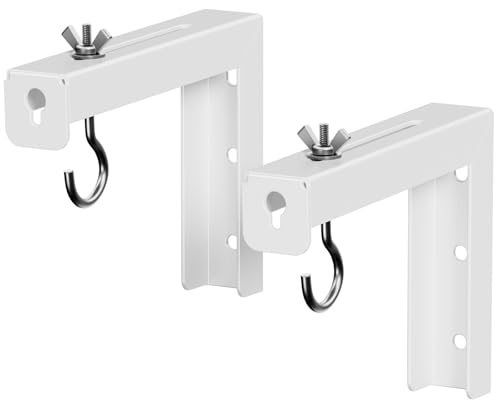
PUTORSEN Universal Projector Screen Ceiling Mount L-Brackets, 6-inch White

Amer Mounts AMRDCP100KIT Universal Adjustable 2 x 2 feet Drop Ceiling Projector Mount

Salange Mini Projector Stand Table, Desktop Foldable Stand

Salange 3-in-1 Mini Projector Stand Table, Wall and Ceiling Mount
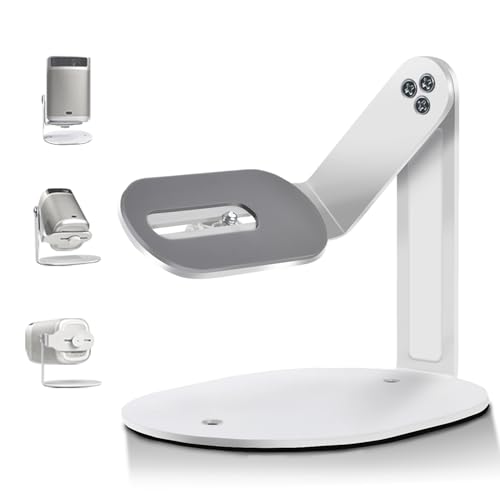
Salange Projector Stand Table for Nebula Capsule and XGI MoGo Series

SCREEN PRO Projector Mount, 55″-79″ Height, Universal Ceiling Bracket

SCREEN PRO Projector Mount, 42″-59″ Height, Universal Ceiling Bracket

Amer Universal Projector Mount Kit for Large Format Ceiling Projectors
Inside Each Recommended Option
The PUTORSEN Universal Projector Screen Ceiling Mount L-Brackets solve a different problem than most picks on this list. Instead of holding the projector itself, these brackets hold a pull-down or fixed screen flush to the ceiling. People mounting a manual or spectrum projector screen in a living room, classroom, or garage theater will find this bracket useful.
The 6-inch L-shape keeps the screen a bit away from the wall, which gives the screen room to swing down without scraping the paint. Owners commonly report the steel build feels sturdier than the price suggests, and the white finish disappears into most ceilings.
Reasons It Performs
- Universal fit covers most manual and spectrum projector screens on the market today
- Steel construction supports up to 66 lbs (30 kg) without flexing under the weight
- Adjustable hang distance from 1.5 to 5 inches lets you tune how close the screen sits to the wall
- White finish blends with most ceiling paint, so the brackets stay out of sight
- L-shape keeps the screen angled cleanly away from the wall surface
Things To Consider
- Hardware for attaching to the ceiling (wood screws, anchors) is not always included, so plan a trip to the hardware store
- These brackets only hold the screen, not the projector itself, so you still need a separate projector mount
Who It Suits Best
Homeowners with a pull-down or fixed-frame screen who want a clean ceiling mount without paying for a full motorized screen system.
Consider Something Else When
People who need to hang the projector itself should look at the SCREEN PRO Projector Mount, 42″-59″ Height, which actually cradles a projector body.
The Amer Mounts AMRDCP100KIT is built for a very specific kind of ceiling. Drop ceilings (the kind with 2×2 ceiling tiles you see in offices and basement rec rooms) need a different mounting approach than drywall. This kit drops a projector down through a replaced tile, with a reinforced steel plate hidden above to carry the weight.
The mounting plate includes multiple holes for alignment, so finding the right spot for the projector’s bracket is easier than with single-hole designs. For anyone setting up a conference room or basement theater with a suspended ceiling, this kit removes the usual guesswork.
Points In Its Favor
- Replaces a standard 2×2 ceiling tile, so the mount hides cleanly above the grid
- Reinforced steel plate carries the projector weight without bowing the tile grid
- Multiple mounting holes give you flexibility to match most projector base patterns
- Heat-dissipating surface helps keep the projector cooler during long sessions
Trade Offs
- Only works in drop-ceiling setups, not standard drywall ceilings
- Installation requires lifting ceiling tiles and working above the grid, which can be awkward in tight spaces
Quick Facts
Made For
Conference rooms, classrooms, and finished basements with 2×2 suspended ceiling tile systems.
Where Another Pick Suits Better
People with standard drywall ceilings should pick the SCREEN PRO Projector Mount instead, since drop-ceiling hardware does not translate to solid construction.
Some people do not actually want to drill into their ceiling. Renters, dorm residents, and anyone who moves often need a stand that can play the role of a ceiling mount without leaving holes behind. The Salange Mini Projector Stand Table is built for that scenario. It folds flat, weighs next to nothing, and props a mini projector up where it needs to go.
Unlike the PUTORSEN brackets from earlier in this list, the Salange does not need any wall anchors. It is a tabletop stand with 180-degree adjustment, which means renters can throw movie nights anywhere there is a flat surface.
What Pays Off
- Standard 1/4-inch (6.35mm) mounting thread fits most mini projectors on the market
- Folds down small enough to toss in a backpack or carry-on
- 180-degree angle adjustment lets you tilt the projector toward the ceiling for an upside-down image
Points To Keep In Mind
- Load capacity tops out around 11 lbs (5 kg), so larger projectors are out of bounds
- As a tabletop stand, it sits at table height rather than mounting overhead, which limits screen placement
Best Suited To
Frequent travelers, renters, and casual movie-night hosts who want projector support without modifying their space.
Look Elsewhere When
Anyone who needs a permanent overhead install for a full-size home theater should choose the Amer Universal Projector Mount Kit with its adjustable pole.
The Salange 3-in-1 Mini Projector Stand Table solves a real problem. Most mini-projector mounts assume you know exactly where you want the projector to live. This one lets you try tabletop, wall, or ceiling positions with the same hardware. The triangular base structure is the standout detail, since it addresses the wobbly feel that cheaper mini-stands tend to have.
For a renter who is not sure whether they want a shelf, wall, or ceiling mount, this hybrid approach is genuinely useful. You can fold it for storage and try a different configuration next month.
Real Benefits
- Three mounting modes (tabletop, wall, ceiling) in one piece of hardware
- Triangular base design resists tipping better than flat round feet
- 11 lbs (5 kg) load capacity handles most mini projectors without strain
- Folds flat for storage or transport between rooms
Honest Caveats
- Wall and ceiling modes still require drilling holes, which is a drawback for strict renters
- At 5 kg capacity, it will not hold mid-size projectors, so heavy units need a dedicated mount
Perfect Match For
Mini-projector owners who like to experiment with placement or move the setup between rooms.
Skip It When
Anyone committed to a permanent ceiling install for a heavier projector should reach for the SCREEN PRO 42″-59″ Height mount instead.
The Salange Projector Stand Table for Nebula Capsule and XGI MoGo Series targets a specific niche. Pocket-sized and capsule projectors like the Nebula Capsule 3 and XGI MoGo are popular for travel, but their small footprint makes them tippy on regular stands. This Salange mount is sized for that exact use case.
Where the previous Salange picks handle multi-mode versatility, this one is optimized for compact stability. The 1.4-pound weight keeps it portable, and the 1/4-inch thread works across most LCD and DLP mini-projector brands.
Where It Excels
- Compact 6.1 x 5.5-inch footprint takes up almost no desk space
- Universal 1/4-inch screw works with Nebula, XGI MoGo, and most LCD/DLP mini-projectors
- 1.4 lb total weight means it does not add bulk to a travel bag
- Handles projectors up to 4.4 lbs (2 kg) without wobble
Small Caveats
- The 4.4 lb load limit excludes anything beyond the smallest projectors
- Multi-angle rotation features vary, so check the spec sheet if you need overhead projection specifically
Quick Facts
Who Will Love This
Travelers with a Nebula Capsule, XGI MoGo, or similar pocket projector who need a stable base that fits in a carry-on.
A Better Fit Elsewhere
People with standard home theater projectors should look at the SCREEN PRO Projector Mount, which handles much heavier loads.
The SCREEN PRO Projector Mount with 55″ to 79″ drop length exists for rooms with very tall ceilings. Standard 8-foot ceilings need a short drop, but vaulted ceilings, foyers, and commercial spaces need more length to bring the projector down to the right image height.
The white powder-coated finish blends into most ceilings, and the adjustable base arms extend from 3.7 to 19 inches to fit various projector mounting patterns. Compare this to the smaller 42″-59″ version covered later, which is a better match for normal ceilings.
Bright Spots
- Drop length range of 55 to 79 inches handles vaulted ceilings and tall rooms
- White powder-coated finish keeps the mount visually quiet against most ceilings
- Adjustable base arms from 3.7 to 19 inches match a wide range of projector patterns
- 33 lb load rating covers most mainstream home theater projectors
Worth Noting
- The longer drop means more visible pole unless your ceiling is high enough to hide it
- Standard 8-foot ceilings are better served by a shorter version since extra length can make the projector hang too low
Built With In Mind
Homeowners with vaulted ceilings, two-story foyers, or commercial spaces that need a long drop to position the lens correctly.
Not Your Match When
Standard 8-foot ceilings call for the SCREEN PRO Projector Mount, 42″-59″ Height, which fits without leaving the projector hanging at eye level.
The SCREEN PRO Projector Mount with a 42″ to 59″ drop is the practical pick for most homes. Standard 8 to 9-foot ceilings usually need somewhere in this range to bring the lens down to a comfortable throw distance without hanging too low.
The black powder-coated finish is the main difference from its longer sibling covered earlier. For rooms with dark ceilings, exposed beams, or media-room aesthetics, the black version stays out of the way visually. The same 33 lb load rating applies here.
Features That Help
- Drop length from 42 to 59 inches fits typical 8 to 9-foot ceilings cleanly
- Black powder-coated finish works well in dark media rooms and exposed-beam ceilings
- Adjustable arms from 3.7 to 19 inches match mainstream projector patterns
- 33 lb capacity covers the majority of home theater projectors on the market
A Few Limitations
- The black finish stands out against white ceilings, which some homeowners dislike
- Not suited to vaulted ceilings, where the longer 55″-79″ version is the better match
Feature Snapshot
The Right Fit
Homeowners with standard 8 to 9-foot ceilings setting up a dedicated media room or living room projector.
Reach For A Different Pick When
Tall or vaulted ceilings call for the SCREEN PRO 55″-79″ Height mount, which provides the extra drop length needed for proper lens positioning.
The Amer Universal Projector Mount Kit for Large Format Ceiling Projectors is built for the heavyweight end of the category. Large projectors from brands like Epson and BenQ push past the 15-pound mark easily, and many ceiling mounts top out well below that. This kit supports up to 55 lbs (25 kg) with an aluminum pole that telescopes to fit different ceiling heights.
Where the SCREEN PRO mounts covered earlier handle mainstream home theater units, this Amer kit takes over once you step into large-format territory. The locking ball joint gives serious tilt and swivel control, and the included M3 to M6 fasteners cover most projector bases.
The Case For It
- 55 lb (25 kg) load capacity handles full-size Epson and BenQ installations
- Adjustable pole telescopes from 127.77mm to 577.7mm for varied ceiling heights
- Heavy-duty locking ball joint allows 25 degrees of tilt and 360 degrees of swivel
- Built-in cable management runs power and HDMI through the pole for a clean look
- Includes M3, M4, M5, and M6 mounting fasteners for broad projector compatibility
- 380mm mounting point diameter fits projectors with mounting holes up to 15 inches apart
Things To Consider
- Heavier build means installation takes longer and may need a second person to hold the projector during mounting
- Overkill for anyone using a sub-10 lb mini projector, so the size and weight feel excessive in casual setups
Whose Shelf It Belongs On
Home theater enthusiasts with large Epson, BenQ, or similar full-format projectors who need a mount that will not flinch under the weight.
Swap It Out When
Smaller home theater projectors under 33 lbs are better served by the SCREEN PRO 42″-59″ Height mount, which is lighter and easier to install solo.
What Matters Most Before Choosing Ceiling Mounts For Projector
Match the Mount Type to Your Ceiling
The first decision is what kind of ceiling you actually have. Drywall ceilings work with most pole-style mounts using lag bolts (heavy screws that bite into the wooden joists behind drywall) into joists, the horizontal beams that hold up the ceiling. Drop ceilings need tile-replacement kits like the Amer Mounts AMRDCP100KIT, which is purpose-built to fit a 2×2 tile opening. Vaulted or unusually tall ceilings need extended drop length, which is where the SCREEN PRO 55″-79″ model earns its place.
Weigh Your Projector Honestly
Load capacity ratings are the single most important number on the spec sheet. Always pick a mount rated for at least 1.5 times your projector’s actual weight, which gives a safety margin. Mini projectors under 5 lbs work fine on tabletop stands like the Salange Mini Projector Stand Table. Mid-size home theater units in the 10 to 20 lb range match well with the SCREEN PRO brackets. Large Epson or BenQ installations need the heavy-duty Amer Universal Mount Kit.
Think About Adjustability After Mounting
A mount that locks the projector in one position creates headaches during setup. Look for tilt and swivel range, ideally 15 to 25 degrees of tilt and full 360-degree swivel. Keystone correction (the digital adjustment that fixes angled-projector distortion) is not the same as physical adjustment, and physical alignment always produces a sharper image.
Consider the Cable Path Early
Cables hanging from a ceiling-mounted projector look terrible. Mounts with built-in cable management, like the Amer Universal Mount Kit with its in-tube routing, save time and keep the install clean. Without that, plan on cable raceways or in-wall routing before the mount goes up.
Key Considerations Across These Picks
Pitfalls Shoppers Hit
The most common mistake is buying a mount based on price alone, without checking the load rating against the actual projector weight. A mount rated for exactly the projector’s weight has no safety margin and tends to develop stress fractures over time. Another frequent slip is ignoring ceiling type: drop ceiling users grab a drywall mount and end up with hardware that does not fit the grid.
What The Higher Tier Buys
Premium mounts cost more because of three things: heavier gauge metal, smoother adjustability, and integrated cable management. A cheap mount may hold the projector, but the joints loosen faster, the finish chips sooner, and the cables stay exposed. For a permanent install in a dedicated media room, the upgrade to a heavier mount pays back over years of vibration-free viewing.
Frequently Asked Questions
How do I know what drop length I need?
Measure from the ceiling to the height where the projector lens should sit for your screen size. Most screens work best when the lens is roughly at or slightly above screen height. For standard 8-foot ceilings, a 42″ to 59″ drop covers most situations.
Can a ceiling mount work with a mini projector?
Yes, but only if the mount’s load rating matches the mini projector’s weight. Tabletop stands like the Salange Mini Projector Stand Table are often easier for mini projectors since they avoid drilling altogether.
What tools do I need to install a ceiling mount?
Most installs need a stud finder (to locate joists), a drill with bits, a level, and a wrench set. Drop ceiling installations also need a ladder and someone to hold tiles in place while you work overhead.
Will mounting damage my ceiling?
Drilling into drywall leaves small holes that can be patched later. Drop ceiling mounts replace a tile, so removal is even cleaner. The bigger risk is hitting wiring or plumbing behind the ceiling, which is why a stud finder and careful planning matter.
How much weight can a typical ceiling mount hold?
Mainstream mounts handle 15 to 33 lbs, while heavy-duty kits like the Amer Universal Projector Mount Kit support up to 55 lbs. Always check the manufacturer’s rating before installing.
Final Take
A good ceiling mount is the difference between a projector that feels like part of the room and one that always seems in the way. Match the mount type to your ceiling, the load rating to your projector, and the drop length to your screen height. With those three things dialed in, any of the eight picks above will do the job cleanly.




